
One challenge consistently pops up: How do you generate INSERT statements from an existing SQL Server table without losing your mind?. Today, I’m going to share my professional blueprint for automating this process.
Generate Insert Statements From Table SQL Server
Generating these statements serves three primary purposes:
- Data Portability: Easily move small to medium datasets across disconnected servers.
- Version Control: Store data changes in Git alongside your schema changes.
- Audit Trails: Keep a human-readable record of exactly what was added to a table at a specific point in time.
Method 1: The “SSMS Script Data” Wizard (The Industry Standard)
For most developers at mid-sized firms, the SQL Server Management Studio (SSMS) built-in wizard is the most reliable tool. It is native, it handles complex data types, and it doesn’t require third-party installations.
Step-by-Step Execution
- Open SSMS: Connect to your instance (e.g.,
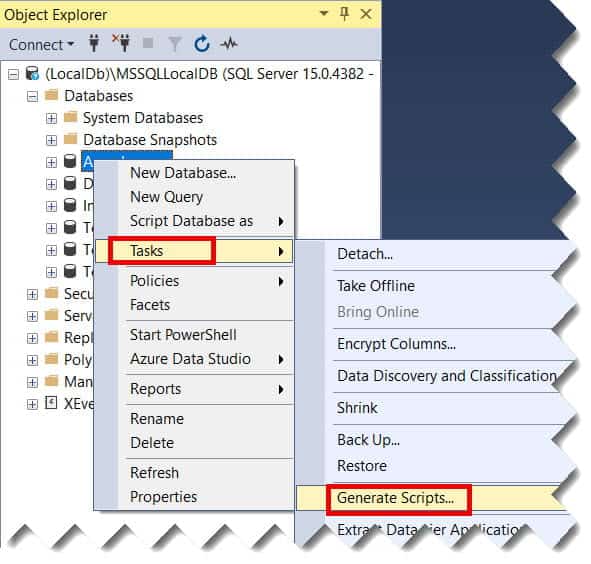
PROD-SQL-EAST-01). - Right-Click Your Database: Navigate to Tasks > Generate Scripts….
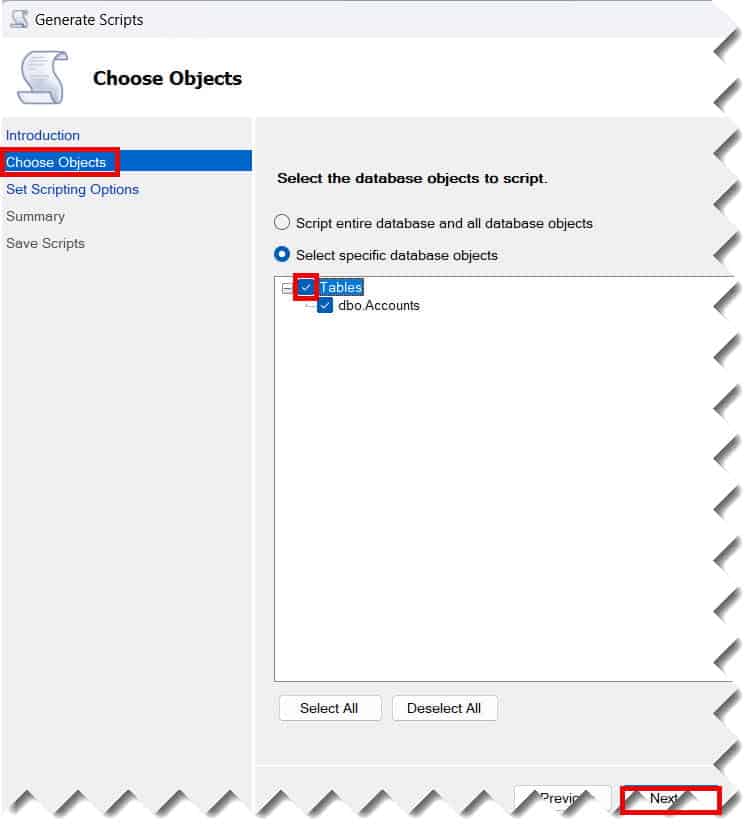
- Choose Objects: Select the specific tables you want to extract data from.
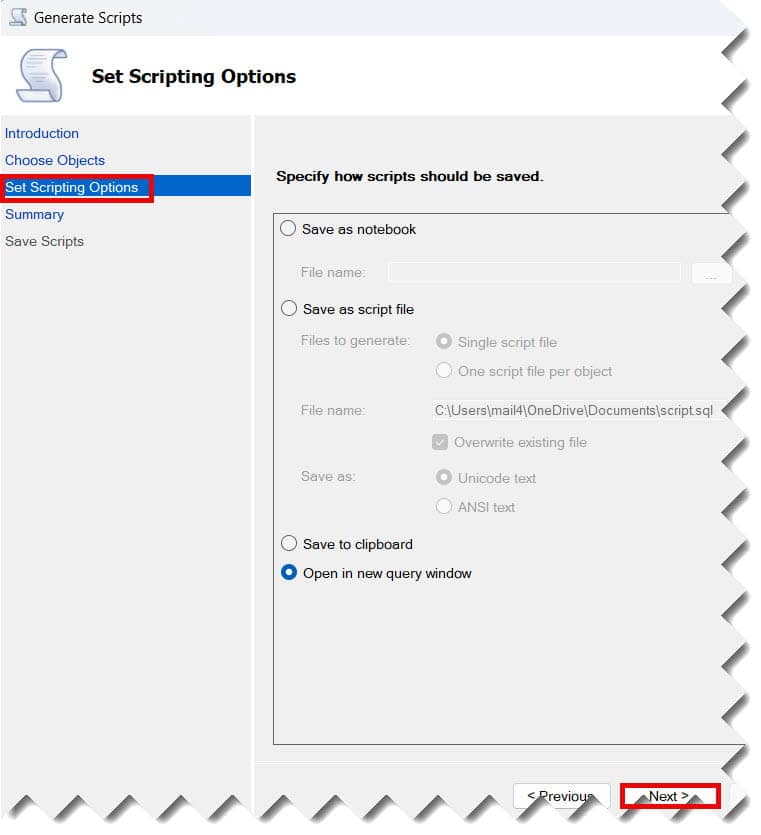
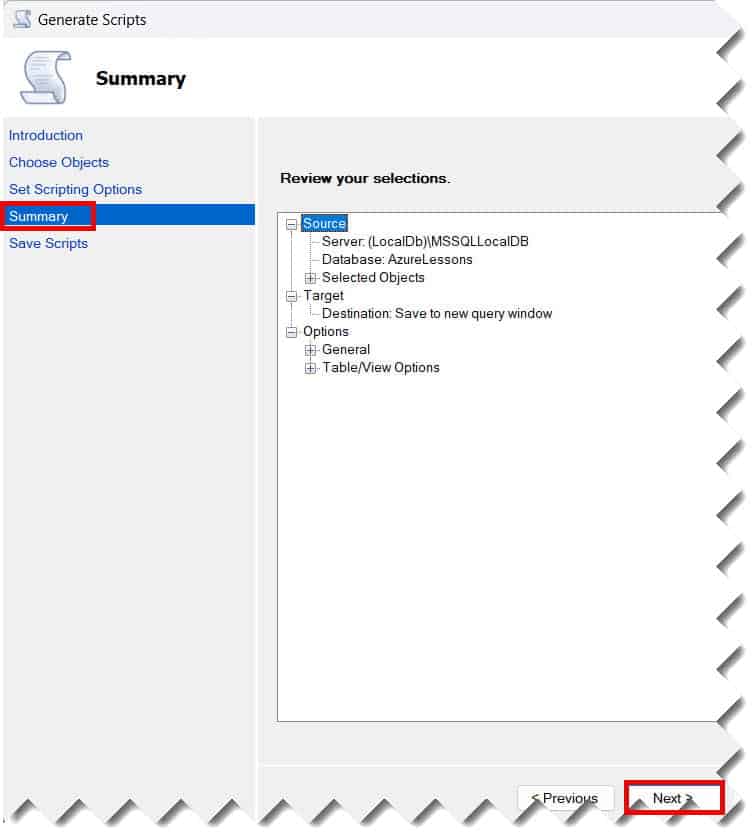
- Set Scripting Options: This is the “secret sauce.” Click the Advanced button.
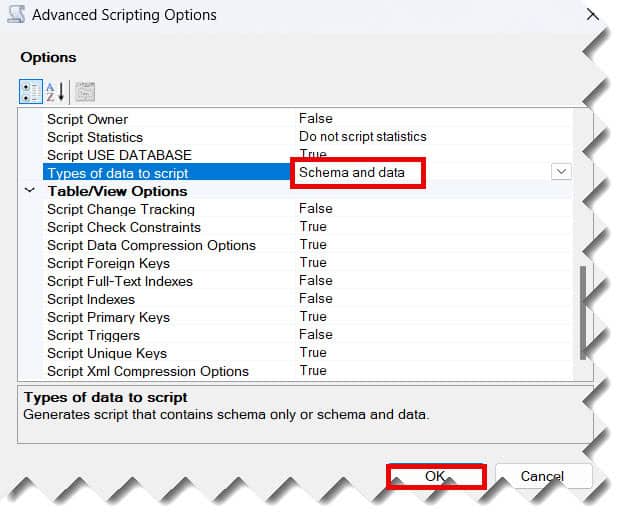
- Types of Data to Script: Scroll down to this option. By default, it is set to “Schema only.” Change this to “Data only” or “Schema and data.”
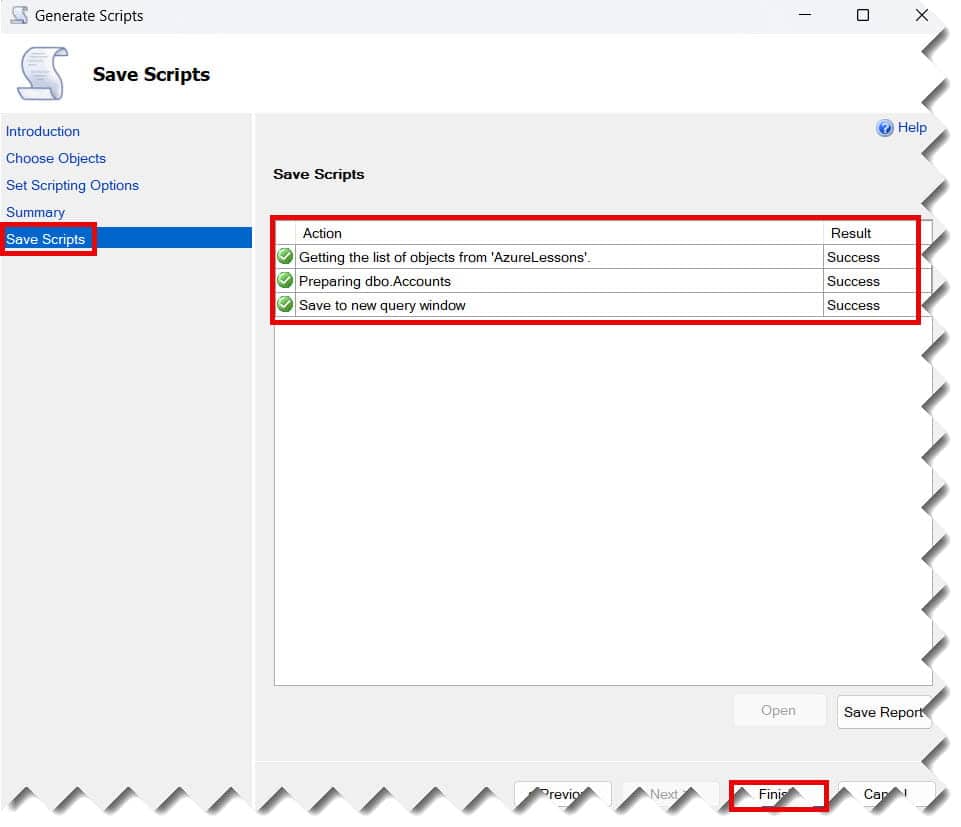
- Output Destination: Choose to save to a new query window or a
.sqlfile on your local drive. Check out the screenshot below for your reference.
When to Use the Wizard
| Feature | Benefit |
| Identity Insert | It automatically handles SET IDENTITY_INSERT ON so your primary keys remain intact. |
| Large Batches | It can handle thousands of rows without crashing the SSMS UI. |
| Complex Types | Properly escapes strings, handles NULL values, and formats DATETIME2 correctly for US regional settings. |
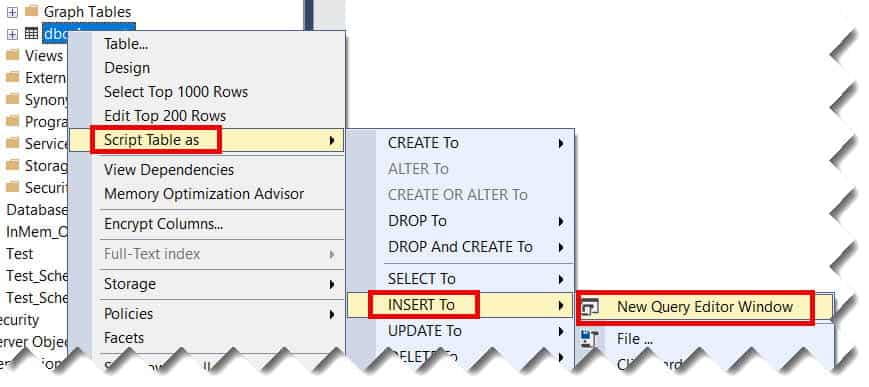
Or, you can also follow the steps below.
Right click on the table name –> Script table as –> Insert to –> New Query editor window. Check out the screenshot below for your reference.
Method 2: The T-SQL Concatenation Trick (The Quick Fix)
Sometimes, you don’t want to run a wizard. You’re in the middle of a troubleshooting session in a Houston data center, and you just need the code now. In these cases, I use a dynamic T-SQL string concatenation.
The Logic Behind the Script
We use the SELECT statement to “build” the string. For a table named Users, the logic looks like this:
SQL
SELECT 'INSERT INTO Users (FirstName, LastName, City) VALUES (''' +
       FirstName + ''', ''' +
       LastName + ''', ''' +
       City + ''');'
FROM Users
WHERE Active = 1;
Critical Considerations for Concatenation
- Single Quote Escaping: In SQL Server, you must use two single quotes (
'') to represent one single quote in a string. This is vital for names like “O’Malley.” - Data Type Conversion: You must wrap non-string types in
CASTorCONVERT. For example, aPricecolumn needs to beCAST(Price AS VARCHAR). - NULL Handling: If a column is NULL, a simple
+operation will turn the entire string NULL. Always useISNULL(Column, 'NULL').
Method 3: Using Power Tools (Azure Data Studio and Beyond)
If you are a modern developer, you might prefer Azure Data Studio. It’s lightweight, cross-platform, and has an excellent extension ecosystem.
- Select Data: Run a standard
SELECT * FROM Table. - Export Options: In the results grid, Azure Data Studio provides an “Export as Insert” option directly.
- Customization: You can highlight only specific rows and generate scripts for just that subset, which is a massive time-saver during unit testing.
Best Practices for Data Integrity
1. The Transaction Safety Net
Never, and I mean never, run a large generated script without a transaction.
- Wrap your code in
BEGIN TRANSACTIONandCOMMIT. - This allows you to
ROLLBACKif you realize you’ve accidentally targeted the wrong environment (like running a “Dev” script on the “Production” server in New York).
2. Handling Identity Columns
Most primary keys in the US corporate world use the IDENTITY property. If you try to insert a specific ID into an identity column, SQL Server will throw an error.
- Standard Practice: Your script should start with
SET IDENTITY_INSERT TableName ON;and end withSET IDENTITY_INSERT TableName OFF;.
3. Batching for Performance
If you are generating 100,000 rows, do not put them in one giant file.
- SQL Server performs better with batches.
- I recommend adding a
GOstatement every 500 to 1,000 rows to clear the buffer and ensure the transaction log doesn’t bloat.
Common Pitfalls to Avoid
Even the most experienced architects in Atlanta or Denver can fall into these traps:
- Collation Mismatches: If your source server is
SQL_Latin1_General_CP1_CI_ASand your target is different, string data might warp. - Truncation: Ensure your
VARCHARvariables in the generation script are large enough (useVARCHAR(MAX)) to hold the entire generated string. - Foreign Key Constraints: If you insert data into a child table before the parent table has its records, the script will fail. Always script your tables in hierarchical order.
Comparing Extraction Methods
| Method | Best For | Technical Effort | Reliability |
| SSMS Wizard | Full table migrations | Low | High |
| T-SQL Concatenation | Ad-hoc, filtered rows | Medium | Medium |
| Stored Procedures | Repeatable, automated tasks | High | High |
| Azure Data Studio | Modern, cross-platform dev | Low | High |
Conclusion:
Generating INSERT statements is a fundamental skill that separates a “coder” from a “Database Professional.” Whether you are using the SSMS Wizard or crafting your own dynamic SQL, the goal remains the same: Accuracy, Repeatability, and Safety.
You may also like the following articles:
- SQL Server Insert Into Select Statement
- How to Insert Data Using Stored Procedure in SQL Server
- SQL Server Rebuild All Indexes On A Table

After working for more than 15 years in the Software field, especially in Microsoft technologies, I have decided to share my expert knowledge of SQL Server. Check out all the SQL Server and related database tutorials I have shared here. Most of the readers are from countries like the United States of America, the United Kingdom, New Zealand, Australia, Canada, etc. I am also a Microsoft MVP. Check out more here.