
In this article, I’m going to walk you through the professional methods I use to track down exactly who updated a table in SQL Server. We will move from the “quick ” checks to the robust, proactive ways.
How To Find Who Updated The Table In SQL Server
The Reality of SQL Server Tracking
By default, SQL Server does not keep a permanent, user-friendly log of every UPDATE statement unless you have specifically configured it to do so. However, the data is usually there—you just have to know where to dig.
The Forensic Hierarchy
Depending on how your server (e.g., DATA-PROD-US-EAST) is configured, you have several places to look:
| Method | Best For | Persistence | Performance Impact |
| Transaction Log | Immediate forensic recovery | Short-term | Low |
| Standard Reports | General schema/data changes | Varies | Minimal |
| SQL Server Audit | Long-term compliance | Permanent | Medium |
| Temporal Tables | Seeing the “Before” and “After” | Permanent | Medium |
Method 1: The Transaction Log (The “CSI” Approach)
When a developer runs an UPDATE without a WHERE clause, the Transaction Log is your first line of defense. Every change to the database is recorded here to ensure ACID compliance.
To read the log, we use an undocumented (but widely known among senior DBAs) function called fn_dblog.
How to Query the Log
- Open a New Query Window: Connect to your instance.
- Execute the Function: You are looking for
LOP_MODIFY_ROW(for updates). - Identify the Transaction ID: Look for the transaction associated with your table’s object ID.
While fn_dblog will show you when the change happened and the hexadecimal representation of the data, it won’t always give you the “Who” (User Name) directly unless the transaction is still active or you cross-reference it with the Begin Time. For a more readable version, enterprise teams often use third-party log readers.
Method 2: Schema Changes History Report
Sometimes, the “update” wasn’t to the data, but to the table structure itself (e.g., someone added a column or changed a data type). SSMS has a built-in “Black Box” called the Default Trace.
Accessing the Report
- Right-click your Database in Object Explorer.
- Select Reports > Standard Reports.
- Choose Schema Changes History.
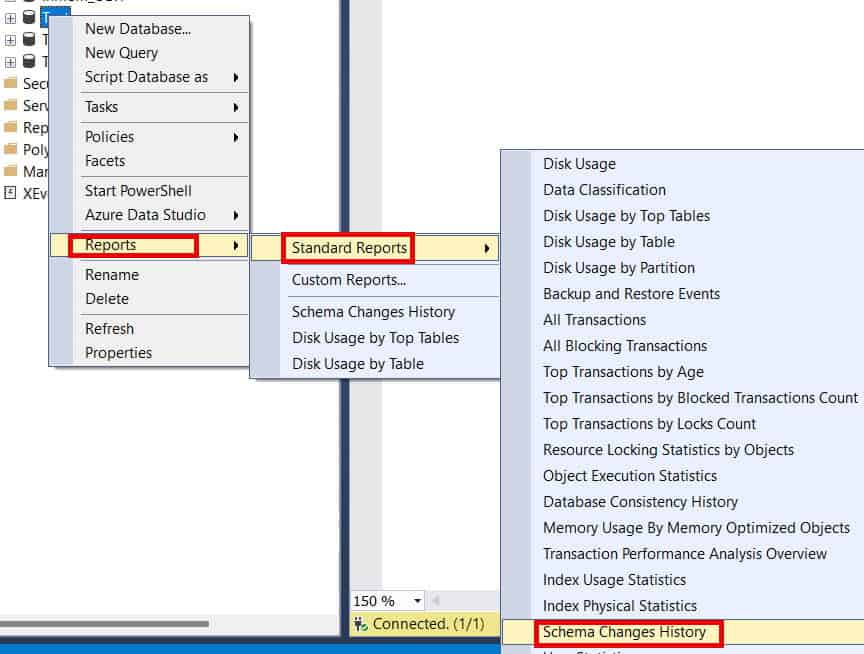
This report is a lifesaver for identifying which login modified the table schema. It pulls data from the background trace files that SQL Server maintains automatically. However, keep in mind that these files “roll over.” If the change happened three weeks ago on a busy server in a Silicon Valley data center, the trace might have already been overwritten.
Method 3: Implementing SQL Server Audit (The Gold Standard)
If you are working in a regulated industry in the USA, you shouldn’t be “hunting” for who updated a table; it should be delivered to you in a report. SQL Server Audit is the most robust way to achieve this.
Setting Up a Database Audit Specification
- Create a Server Audit: This defines where the logs go (File, Application Log, or Security Log).
- Create a Database Audit Specification: This defines what you are watching.
- Select the Action: You want to track
SCHEMA_OBJECT_ACCESS_GROUPor specificallyUPDATEactions on the target table.
Example Configuration:
- Object Name:
Sales.Orders - Principal:
public(to track everyone) - Action:
UPDATE
Once enabled, SQL Server will write a record every time that table is touched, including the Login Name, Application Name, and the Exact SQL Statement used. This is the only way to satisfy a rigorous security audit.
Method 4: Temporal Tables (The “Time Machine”)
Introduced in SQL Server 2016, System-Versioned Temporal Tables are my favorite way to handle data auditing for modern applications. Instead of just knowing who changed it, you see exactly what the data looked like before and after.
How It Works
When you enable system-versioning, SQL Server creates a hidden history table. Every time an UPDATE occurs:
- The current row is moved to the history table.
- The new data is written to the main table.
- The
SysStartTimeandSysEndTimecolumns are updated.
By adding a LastModifiedBy column to your main table and using a DEFAULT constraint like ORIGINAL_LOGIN(), you can easily query the history table to see the full lineage of a record.
Method 5: Using Triggers (The Classic Method)
Before Audit and Temporal Tables existed, we used DML Triggers. While some DBAs find them “heavy,” they remain effective for immediate, custom logging.
Building an Audit Trigger
I recommend creating a dedicated AuditLog table. Your trigger should capture:
TABLE_NAMEPRIMARY_KEY_IDOLD_VALUEandNEW_VALUECHANGED_BY(usingSUSER_SNAME())CHANGED_AT(usingGETDATE())
Pro-Tip: In a high-concurrency environment—like a retail site during a “Black Friday” sale—triggers can add significant latency. Always test the performance impact before deploying a trigger to a production environment in the US.
Troubleshooting: Why Can’t I Find the User?
If you’ve tried the methods above and still can’t find the culprit, you are likely facing one of these three “Ghost User” scenarios:
1. The Service Account Mask
Many US-based web applications use a single “Service Account” to connect to the database. In your logs, you’ll see App_Service_User instead of “John Doe.” To solve this, you must look at the Application Logs (e.g., IIS or .NET logs) and correlate the timestamp from SQL Server with the user session in the app.
2. The Job Agent
If the update happened at exactly 2:00 AM EST, check your SQL Server Agent Jobs. It’s common for an automated maintenance script or an ETL package to be the “who” behind a data change.
3. Ad-hoc Management
If someone logged in via SSMS from a jump box in the Chicago office, their HOST_NAME in the trace or audit logs will be the name of that server. This is why multi-factor authentication and individual logins are mandatory in secure environments.
Comparison of Tracking Methods
| Feature | Audit Logs | Triggers | Temporal Tables | fn_dblog |
| Retroactive? | No | No | No | Yes |
| Shows Old Value? | No | Yes | Yes | Yes (Hex) |
| Performance Hit | Low | High | Medium | None |
| Setup Required? | Yes | Yes | Yes | No |
Conclusion:
Finding out who updated a table after the fact is a time-consuming process. As a professional, your goal should be to move your organization toward a “Transparent Data” model. By implementing SQL Server Audit or Temporal Tables now, you turn a four-hour investigation into a thirty-second query.
You may also like the following articles:
- Generate Insert Statements From Table SQL Server
- How to Recover a Deleted Table in SQL Server Without Backup
- SQL Get Number Of Rows In Table
- Get Primary Key Of Table SQL Server
- SQL Server Update Table From Another Table

After working for more than 15 years in the Software field, especially in Microsoft technologies, I have decided to share my expert knowledge of SQL Server. Check out all the SQL Server and related database tutorials I have shared here. Most of the readers are from countries like the United States of America, the United Kingdom, New Zealand, Australia, Canada, etc. I am also a Microsoft MVP. Check out more here.