
In this article, I am going to walk you through exactly how to combine two (or more) columns in SQL. I will cover the modern functions, the legacy operators, and the dreaded “NULL trap” that ruins so many reports.
How to Combine Two Columns in SQL
Why Is Combining Columns So Complicated?
Before we look at the syntax, it is important to understand that SQL is not a single language; it’s a standard with many “flavors.”
When you ask, “How do I combine columns?”, the answer depends entirely on which database engine you are driving.
- SQL Server loves the plus sign (
+). - Oracle and PostgreSQL prefer the double pipe (
||). - MySQL relies heavily on functions.
If you don’t know your platform, you will spend hours debugging syntax errors. Below, I have broken down the methods by dialect and use case.
Method 1: The Operator Approach (Quick & Dirty)
Using operators is the most “programmer-friendly” way to combine columns.
SQL Server (The Plus Sign)
If you are working in a Microsoft environment (SQL Server or Azure SQL), you use the standard addition operator +.
SQL
SELECT
    FirstName + ' ' + LastName AS FullName
FROM
    Employees;
After executing the query above, I received the expected output, as shown in the screenshot below.

The Catch: In SQL Server, if you try to combine a text string with a number (like OrderNumber + ProductName), it will try to do math, fail, and throw an error. You have to convert the numbers to text first (more on that later).
Method 2: The CONCAT() Function (The Safer Way)
Because operators are inconsistent, database vendors eventually introduced the CONCAT() function. This is generally cleaner and easier to read.
Basic Syntax
Most modern databases (MySQL, PostgreSQL, SQL Server 2012+) support this function. It takes arguments and joins them.
SQL
SELECT
    CONCAT(FirstName, ' ', LastName) AS FullName
FROM
    Employees;
After executing the query above, I received the expected output, as shown in the screenshot below.

Why I Use This:
The biggest advantage of CONCAT() over the + operator in SQL Server is how it handles data types. CONCAT() is smart enough to automatically turn numbers into strings behind the scenes, saving you from writing conversion logic.
Method 3: CONCAT_WS
This is my absolute favorite function, and it is the one I recommend you use if your database supports it (SQL Server 2017+, MySQL, PostgreSQL).
WS stands for “With Separator.”
Imagine you need to combine an address: Street, City, State, and Zip.
Using normal concatenation, you have to manually add the commas every time:
Street + ‘, ‘ + City + ‘, ‘ + State…
With CONCAT_WS, you specify the separator once at the beginning.
SQL
SELECT
    CONCAT_WS(', ', Address, City, State, ZipCode) AS FullAddress
FROM
    Customers;
After executing the query above, I received the expected output, as shown in the screenshot below.

This function is a lifesaver for generating CSV exports or formatted reports directly from the database. It keeps your code clean and readable.
The “NULL” Trap: When Concatenation Fails
This is the section that separates the experts from the beginners.
In SQL, NULL does not mean “empty”; it means “unknown.”
If you add “Unknown” to “John”, the result is “Unknown.”
The Problem
In SQL Server (using the + operator), if any column in your chain is NULL, the entire result becomes NULL.
Scenario:
- FirstName: “John”
- MiddleName: NULL
- LastName: “Smith”
Query:
SQL
SELECT FirstName + ' ' + MiddleName + ' ' + LastNameResult: NULL
Suddenly, John Smith disappears from your report because he doesn’t have a middle name. I have seen this cause massive billing errors in US healthcare systems where patient records vanish due to missing fields.
The Solution 1: ISNULL or COALESCE
You must sanitize your inputs. You tell SQL, “If this column is NULL, use an empty string instead.”
SQL
SELECT
    FirstName + ' ' + ISNULL(MiddleName, '') + ' ' + LastName
FROM
    Employees;
The Solution 2: Just use CONCAT or CONCAT_WS
This is another reason why I prefer functions over operators.
CONCAT()automatically treats NULLs as empty strings.CONCAT_WS()automatically skips NULLs.
If you use CONCAT_WS for the address example above, and the user has no “State” filled in, it won’t leave a dangling comma. It simply stitches the available parts together neatly.
Combining Different Data Types (Strings + Numbers)
A common requirement in US logistics is combining an ID with a Name.
Example: ID: 1045 – Product: Widget
In MySQL or using CONCAT(), this works natively.
In SQL Server using +, this crashes because it tries to add the number 1045 to the text Product.
To fix this, you must CAST the number.
SQL
SELECT
    'ID: ' + CAST(ProductID AS VARCHAR(10)) + ' - Product: ' + ProductName
FROM
    Products;
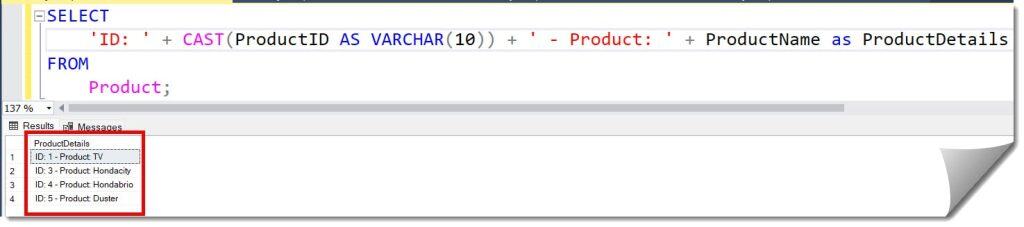
Pro Tip: Always define a length for your VARCHAR (e.g., VARCHAR(10)). While some systems default cleanly, relying on defaults is a bad habit that leads to truncated data.
Advanced Use Case: Adding Line Breaks
Sometimes, you aren’t just combining columns for a report; you are preparing data for a frontend application or a physical mailing label. You might need the columns to appear on separate lines.
You can concatenate “control characters” into your string.
For SQL Server:
The character for a new line is CHAR(13) (Carriage Return) + CHAR(10) (Line Feed).
SQL
SELECT
    FirstName + ' ' + LastName + CHAR(13) + CHAR(10) + Address
AS MailingLabel
FROM
    Customers;
When you copy this result into Notepad or Excel, the address will correctly appear on the line below the name.
Performance Considerations
Generally, string manipulation is cheap. However, if you are doing this in the WHERE clause, you will kill performance.
Avoid This:
SQL
-- This prevents the database from using indexes on FirstName or LastName
WHERE FirstName + ' ' + LastName = 'John Smith'
Do This Instead:
SQL
WHERE FirstName = 'John' AND LastName = 'Smith'When you combine columns, you create a “computed value.” The database cannot use the neatly organized index it built for LastName to find a concatenated string. If you frequently need to search by Full Name, I recommend creating a Computed Column in the table itself and indexing that.
Conclusion:
Combining columns in SQL is one of those foundational skills that seems easy until it isn’t.
If you are working in SQL Server, remember the + operator is strict: it hates NULLs and it hates mixing numbers with text. Use ISNULL and CAST liberally.
If you are on PostgreSQL or Oracle, enjoy the flexibility of the double pipe ||.
Upgrade your habits. Stop using operators and start using CONCAT_WS. It handles NULLs gracefully, it makes your code readable, and it saves you from “comma management” hell.
You may also like the following articles:
- SQL Query to Get Column Names from Table in SQL Server
- Alter table add column at specific position in SQL Server
- SQL Server Create Table With Identity Column

After working for more than 15 years in the Software field, especially in Microsoft technologies, I have decided to share my expert knowledge of SQL Server. Check out all the SQL Server and related database tutorials I have shared here. Most of the readers are from countries like the United States of America, the United Kingdom, New Zealand, Australia, Canada, etc. I am also a Microsoft MVP. Check out more here.