
This tutorial offers a comprehensive analysis of SQL aliases, covering column-level renaming, table-level abstraction, underlying execution paths, and crucial optimization principles.
SQL Aliases
What is an SQL Alias?
At its foundation, an SQL alias is a temporary name assigned to a table or column within the context of a single query execution. It is vital to emphasize that an alias is entirely transient. It does not alter the physical table structures on disk, modify the catalog metadata of the database, or create permanent objects in the schema storage engine.
Instead, it creates a virtual rename within the query engine’s memory buffer, applying exclusively to the output results or internal evaluation scopes of that specific execution cycle.
The Query Execution Pipeline and Alias Visibility
To understand why aliases behave the exact way they do, we must examine the logical processing phases executed by relational database management systems (RDBMS) like Microsoft SQL Server, PostgreSQL, or Oracle.
Consider the sequence in which a database engine evaluates a standard query:
- FROM & JOIN: The engine identifies and registers the target source tables. (Table aliases are declared and become globally visible here.)
- WHERE: Predicate filters isolate relevant records based on specific row criteria.
- GROUP BY: Rows are aggregated into structural buckets.
- HAVING: Filters are applied to the aggregated data sets.
- SELECT Projection: The engine isolates specific expressions, computes calculations, and processes column outputs. (Column aliases are declared and established here.)
- ORDER BY: The final result set is sorted for presentation. (Column aliases become visible for sorting here.)
Because the SELECT phase occurs near the end of this pipeline, a common pitfall is attempting to filter data in the WHERE clause using a column alias created in the SELECT projection. Understanding this processing order is essential for mastering advanced query writing.
Column Aliases: Enhancing Output Precision and Expression Abstraction
Column aliases are used to rename the individual attributes returned in a query projection. This technique proves invaluable when presenting raw fields to business users, renaming vague columns, or giving a clear name to calculated values like mathematical equations or aggregate expressions.
Syntactic Blueprints: Explicit vs. Implicit Declarations
The SQL standard provides two distinct syntactic patterns for implementing a column alias: using the explicit AS keyword, or utilizing an implicit space separation.
SQL
-- Pattern A: The Explicit Blueprint (Highly Recommended)
SELECT standard_identifier AS employee_id FROM human_resources_table;

-- Pattern B: The Implicit Blueprint
SELECT standard_identifier employee_id FROM human_resources_table;
After executing the query above, I obtained the expected output, as shown in the screenshots below.
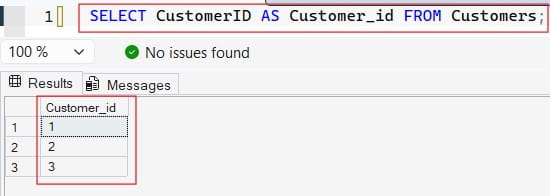
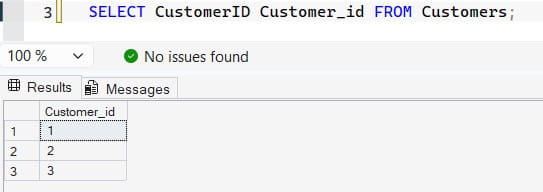
While both patterns return identical results across ANSI-compliant database engines, I strongly advise using the explicit AS keyword in production environments. Omitting the AS keyword can make scripts harder to read, as a missing comma in a long list of attributes can cause the database engine to mistake a real column for an alias, leading to subtle logic errors.
Handling Multi-Word Labels with Identifiers
When an operational reporting dashboard requires column headers with spaces, special characters, or specific capitalization, you must wrap the alias in system-specific string identifiers.
- ANSI SQL Standard / PostgreSQL / Oracle: Double quotation marks (
"Employee ID") - Microsoft SQL Server: Square brackets (
[Employee ID]) or single quotes ('Employee ID') - MySQL: Backticks (
`Employee ID`)
For cross-platform scripts, using standard double quotes or brackets maintains uniform presentation across executive reporting platforms.
Table Aliases: Streamlining Complex Queries and Joint Connections
While column aliases improve the clarity of final reports, table aliases focus on optimization and script organization behind the scenes. A table alias assigns a temporary, shorthand name to a database table within a query, reducing code clutter and cleanly organizing complex operations.
Syntactic Structure for Table Abstraction
Like column aliases, table aliases are declared within the query statement. They are placed immediately following the table name inside the FROM or JOIN clauses:
SQL
SELECT t.tactic_name, o.operator_identifier
FROM strategic_operations_table AS o
JOIN marketing_tactics_table AS t
  ON o.operation_key = t.associated_operation_key;
In this architecture, rather than repeatedly writing long table names across every join, filter, and selection path, the engine accepts short variables like o and t. This significantly reduces script length and improves readability.
Structural Use Cases: When to Deploy Aliases
Using aliases goes far beyond simply cleaning up code. In many advanced query designs, aliases are required to maintain proper logical structure and resolve syntactic conflicts.
1. Disambiguating Overlapping Table Projections
When joining multiple tables that share identical column names (such as an id, created_at, or status field), the database engine will throw an ambiguity exception if you request those fields without specifying their source. Table aliases resolve this by acting as prefixes that explicitly identify the source of each attribute.
2. Formulating Calculated Expressions and Aggregations
When performing arithmetic calculations, text concatenations, or running aggregate functions like SUM(), COUNT(), or AVG(), database engines typically output no column name or a generic label like Expr1001. Using a column alias allows you to give these calculated values clear, meaningful names:
SQL
SELECT COUNT(transaction_id) AS total_processed_transactions FROM ledger_table;
3. Managing Self-Joins
A self-join occurs when a table must be joined to itself to evaluate hierarchical relationships, such as mapping employees to their respective managers within a single corporate staff index. To execute this, the database engine must treat the single physical table as two distinct logical entities. This requires assigning unique table aliases to each instance in the query:
SQL
SELECT e.staff_name AS employee_name, m.staff_name AS manager_name
FROM corporate_staff_table AS e
LEFT JOIN corporate_staff_table AS m
ON e.direct_manager_id = m.staff_id;| Use Case Category | Primary Problem Solved | Key Architectural Benefit |
|---|---|---|
| Ambiguity Resolution | Identical column names across joined tables trigger errors. | Explicitly maps columns to their source tables using short prefixes. |
| Expression Naming | Aggregate functions or calculations return blank/generic labels. | Provides clean, readable headers for downstream applications. |
| Self-Join Isolation | Cannot reference a single physical table multiple times in one path. | Splits a single table into distinct logical entities for hierarchical queries. |
| Subquery Encapsulation | Inline derived datasets lack a root reference. | Required by engines to name a subquery’s output table. |
Best Practices
To ensure your scripts remain highly maintainable and clean as they scale, establish consistent standards for your development teams.
Maintain Predictable and Intuitive Naming Conventions
Avoid using abstract, single-letter aliases like a, b, and c across large queries with multiple joins. While short, they quickly become confusing and make code review difficult. Instead, use clear abbreviations that reflect the table’s actual name:
- For
vendor_invoice_ledger, usevilorinvoice_ledger. - For
customer_demographics_dim, usecdorcust_demo.
Enforce the Use of the Explicit AS Keyword
Consistently using the AS keyword for column projections makes it clear to anyone reviewing the code exactly where column modifications occur. This practice distinguishes your aliases from standard columns or configuration functions, improving code readability.
Avoid Modifying Casing Rules Arbitrarily
If your organization’s business intelligence tools are case-sensitive, match your alias casing with your target reporting requirements. This prevents downstream reporting errors and ensures seamless integration between your database and visualization tools.
Conclusion:
The SQL alias is a fundamental tool for writing clean, efficient, and professional database code. From simplifying multi-table joins to providing clear headers for complex business intelligence reports, mastering column and table abstraction is essential for every data engineer.
By understanding how the database engine processes queries, following consistent naming standards, and avoiding common pathing mistakes, you can write clean, high-performance SQL scripts. This ensures your database solutions remain robust, maintainable, and scalable.
You may also like the following articles:
- SQL Constraints
- How to Write SQL Queries
- SQL Wildcard Characters
- SQL DISTINCT
- SQL WHERE Clause Tutorial
- SQL Query Optimization Tips

After working for more than 15 years in the Software field, especially in Microsoft technologies, I have decided to share my expert knowledge of SQL Server. Check out all the SQL Server and related database tutorials I have shared here. Most of the readers are from countries like the United States of America, the United Kingdom, New Zealand, Australia, Canada, etc. I am also a Microsoft MVP. Check out more here.