
In this article, I will break down how SQL LAST_VALUE works under the hood, explain why its default behavior catches so many developers, and walk you through step-by-step solutions to ensure your analytical queries yield accurate results every single time.
SQL LAST_VALUE
What is the SQL LAST_VALUE Function?
LAST_VALUE is a window (analytic) function that evaluates an ordered set of rows and returns the last value of a specified expression in that window frame.
It is commonly used for:
- Finding a customer’s most recent transaction or status change.
- Fetching the latest stock price or asset valuation within a trading day.
- Comparing an individual row’s metric against the ultimate benchmark or final state of a partition.
Basic Syntax
SQL
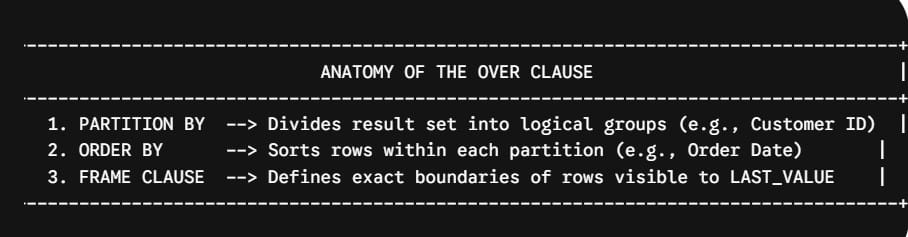
LAST_VALUE(expression) OVER (
    [PARTITION BY partition_column]
    ORDER BY sort_column [ASC | DESC]
    [ROWS|RANGE frame_specification]
)
Why LAST_VALUE Fails
To understand why LAST_VALUE often returns unexpected results, we must examine what happens when you write a basic window query without explicitly defining a frame specification.
The Common Scenario
Imagine you work for an e-commerce platform based in Austin, Texas. You want to query a list of customer orders and include a column displaying the date of the most recent order placed by each customer.
A developer might write:
SQL
-- WRONG OR MISLEADING QUERY (Demonstration of Default Frame Behavior)
SELECT
    customer_id,
    order_id,
    order_date,
    order_amount,
    LAST_VALUE(order_date) OVER (
        PARTITION BY customer_id
        ORDER BY order_date ASC
    ) AS most_recent_order_date
FROM customer_orders;
What You Expect vs. What Actually Happens
- Expectation: The
most_recent_order_datecolumn shows the finalorder_datefor that customer across all rows. - Reality: The
most_recent_order_datecolumn simply duplicates theorder_dateof the current row.
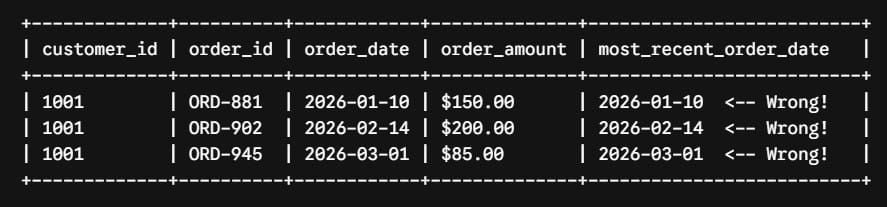
Why Does This Happen?
Whenever you include an ORDER BY clause inside an OVER() specification without defining a frame, ANSI SQL standards apply an implicit default window frame:
SQL
RANGE BETWEEN UNBOUNDED PRECEDING AND CURRENT ROWThis default frame tells the database engine: “Include all rows from the start of the partition up to the current row.”

When evaluating Row 2, the window frame only contains Row 1 and Row 2. Consequently, the “last value” in that restricted frame is Row 2 itself. As the query moves down row by row, the frame expands, making the current row the last row evaluated every single time.
How to Fix LAST_VALUE: Defining the Explicit Window Frame
To force LAST_VALUE to look all the way to the end of the partition, you must override the default frame specification using ROWS BETWEEN.
The Correct Syntax: ROWS BETWEEN UNBOUNDED PRECEDING AND UNBOUNDED FOLLOWING
By explicitly adding ROWS BETWEEN UNBOUNDED PRECEDING AND UNBOUNDED FOLLOWING, you instruct the database engine to extend the frame boundary from the very first row of the partition to the very last row.
SQL
-- CORRECT QUERY
SELECT
    customer_id,
    order_id,
    order_date,
    order_amount,
    LAST_VALUE(order_date) OVER (
        PARTITION BY customer_id
        ORDER BY order_date ASC
        ROWS BETWEEN UNBOUNDED PRECEDING AND UNBOUNDED FOLLOWING
    ) AS most_recent_order_date
FROM customer_orders;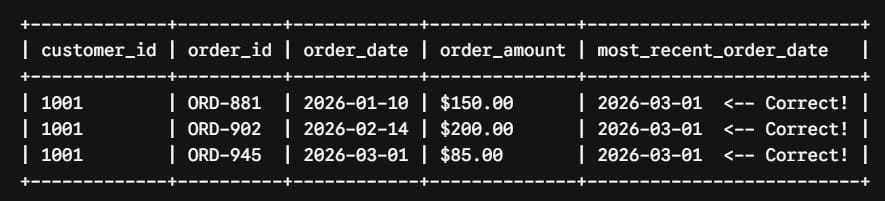
Alternative Solutions: FIRST_VALUE with Reverse Ordering
In data engineering practice, explicitly typing ROWS BETWEEN UNBOUNDED PRECEDING AND UNBOUNDED FOLLOWING every time can feel verbose.
A popular architectural alternative among senior database developers is swapping LAST_VALUE for FIRST_VALUE and inverting the sort order in the ORDER BY clause.
The Inverted FIRST_VALUE Pattern
Because FIRST_VALUE operates relative to UNBOUNDED PRECEDING (the top of the frame), it is not restricted by the CURRENT ROW boundary at the bottom of the default frame.
SQL
SELECT
    customer_id,
    order_id,
    order_date,
    order_amount,
    -- Reversing ASC to DESC allows FIRST_VALUE to capture the newest record cleanly
    FIRST_VALUE(order_date) OVER (
        PARTITION BY customer_id
        ORDER BY order_date DESC
    ) AS most_recent_order_date
FROM customer_orders
ORDER BY customer_id, order_date ASC;
Side-by-Side Method Comparison
| Approach | Window Frame Requirement | Code Complexity | Performance Impact |
LAST_VALUE | Requires ROWS BETWEEN UNBOUNDED PRECEDING AND UNBOUNDED FOLLOWING | Higher (More verbose) | Identical in modern optimizers |
FIRST_VALUE (Inverted DESC) | Default frame works automatically | Lower (Cleaner code) | Identical in modern optimizers |
Handling NULL Values in LAST_VALUE
In real-world data pipelines, columns frequently contain NULL values. How LAST_VALUE handles missing data depends on whether your SQL dialect supports the IGNORE NULLS clause.
Standard Behavior: RESPECT NULLS (Default)
If the final row in a window frame contains a NULL, LAST_VALUE returns NULL.
SQL
-- Returns NULL if the last row's state column is missing
LAST_VALUE(state) OVER (
    PARTITION BY customer_id
    ORDER BY updated_at ASC
    ROWS BETWEEN UNBOUNDED PRECEDING AND UNBOUNDED FOLLOWING
)
Advanced Behavior: IGNORE NULLS
To skip missing records and retrieve the last non-null value within the frame, append IGNORE NULLS after the expression:
SQL
SELECT
    customer_id,
    updated_at,
    phone_number,
    LAST_VALUE(phone_number) IGNORE NULLS OVER (
        PARTITION BY customer_id
        ORDER BY updated_at ASC
        ROWS BETWEEN UNBOUNDED PRECEDING AND UNBOUNDED FOLLOWING
    ) AS latest_known_phone
FROM customer_contact_history;
Summary Checklist for Using LAST_VALUE Safely
Before deploying queries utilizing LAST_VALUE to production pipelines, run through this verification checklist:
- [ ] Did I include an
ORDER BYclause inside theOVER()specification? - [ ] Did I explicitly add
ROWS BETWEEN UNBOUNDED PRECEDING AND UNBOUNDED FOLLOWING? - [ ] Does my target column contain
NULLvalues, and have I accounted for them usingIGNORE NULLSorCOALESCE? - [ ] Have I evaluated whether using
FIRST_VALUE(...) OVER (ORDER BY col DESC)simplifies the code footprint?
By understanding the mechanics of window frames and avoiding the implicit CURRENT ROW default, you can leverage LAST_VALUE with complete confidence across any relational database engine.
You may also like the following articles:

After working for more than 15 years in the Software field, especially in Microsoft technologies, I have decided to share my expert knowledge of SQL Server. Check out all the SQL Server and related database tutorials I have shared here. Most of the readers are from countries like the United States of America, the United Kingdom, New Zealand, Australia, Canada, etc. I am also a Microsoft MVP. Check out more here.