
A marketing analyst once asked me why the “customers without an email” report returned zero rows. The company had 12,000 customers and a visible gap in its email data. The query read WHERE Email = NULL. It ran without errors, returned nothing, and the campaign went out to the wrong list.
That mistake is one of the most common in T-SQL, and it is why learning how to find null values in a table in SQL Server matters. The right operator is only the start. You also need to count NULLs per column, tell them apart from empty strings, find them across an entire table, and decide what to do next. This guide covers each of those tasks with T-SQL, then shows how to speed up NULL searches and run them safely in SQL Server or Azure SQL Database.
What NULL Means in SQL Server
A NULL is a marker for a missing or unknown value. It is not zero, not an empty string, and not a space. Because NULL means “unknown,” SQL Server uses three-valued logic: a comparison can be true, false, or unknown. Any normal comparison with NULL, such as Email = NULL or Email <> 'a@b.com', evaluates to unknown, and a WHERE clause only keeps rows that evaluate to true. That is why the analyst’s query returned nothing.
For a deeper look, see how SQL handles NULL.
Pro Tip: In my experience, most NULL bugs come from treating NULL like a value. I say “unknown” out loud when I read a query, and it makes the wrong operators stand out.
Create a Practice Table
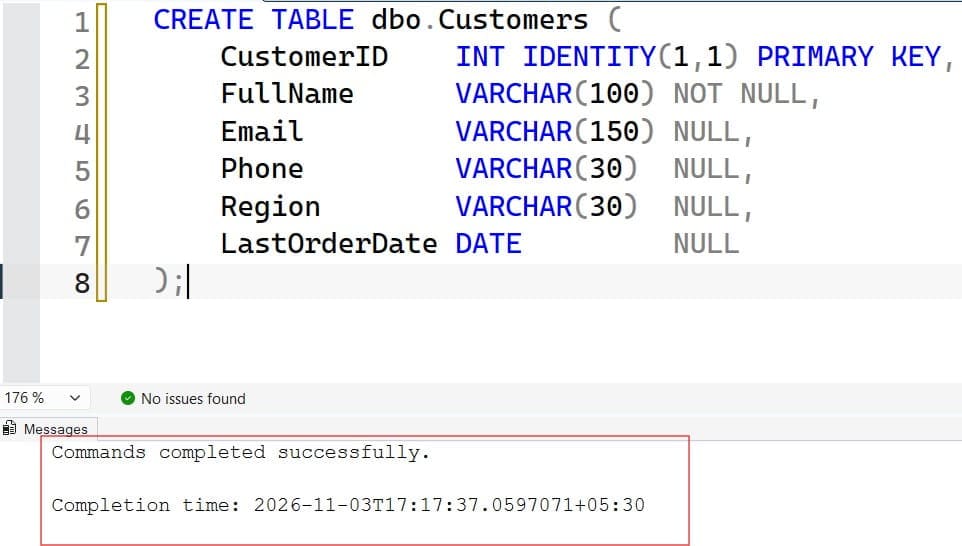
Test on a small table with deliberate edge cases. A schema is the structure of your tables, and sample rows that include NULLs, empty strings, and the text “NULL” will show you every trap.
CREATE TABLE dbo.Customers (
    CustomerID    INT IDENTITY(1,1) PRIMARY KEY,
    FullName      VARCHAR(100) NOT NULL,
    Email         VARCHAR(150) NULL,
    Phone         VARCHAR(30)  NULL,
    Region        VARCHAR(30)  NULL,
    LastOrderDate DATE         NULL
);

INSERT INTO dbo.Customers (FullName, Email, Phone, Region, LastOrderDate)
VALUES
 ('Ava Chen',    'ava@example.com', '555-0101', 'West',  '2026-10-02'),
 ('Ben Ortiz',   NULL,              '555-0102', 'East',  '2026-09-18'),
 ('Cara Singh',  '',                NULL,       'West',  NULL),
 ('Dan Weber',   'NULL',            '555-0104', NULL,    '2026-08-30'),
 ('Eli Brooks',  NULL,              NULL,       NULL,    NULL);
After executing the query above, I got the expected output as shown in the screenshot below.
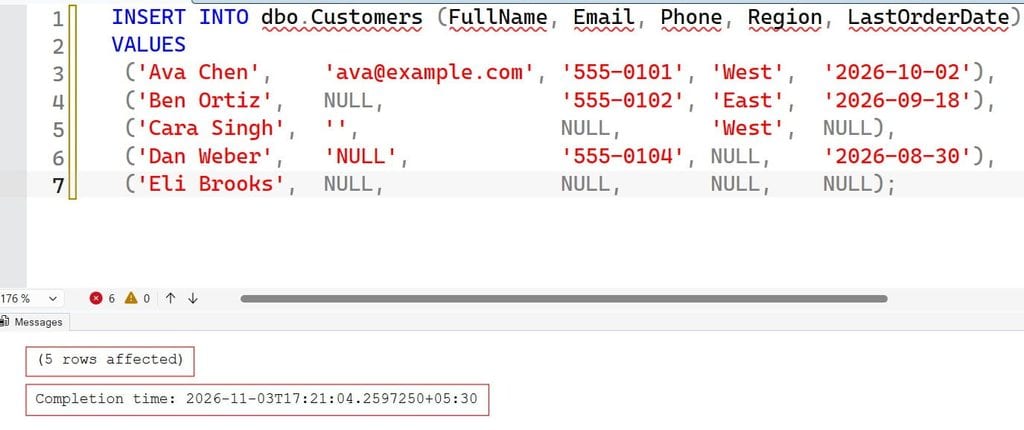
Run this only in a test database, because it inserts rows. Notice that Cara’s email is an empty string, Dan’s email is the five-letter text NULL, and Eli has missing values in four columns. Only Ben’s and Eli’s emails are real NULLs.
How to Find NULL Values in a Table in SQL Server With IS NULL
Use IS NULL to find rows where a column is missing, and IS NOT NULL for rows that have a value. These are the only comparison operators that work with NULL. See also the WHERE clause tutorial.
-- Customers with no email on file
SELECT CustomerID, FullName, Email
FROM dbo.Customers
WHERE Email IS NULL;
After executing the query above, I got the expected output as shown in the screenshot below.
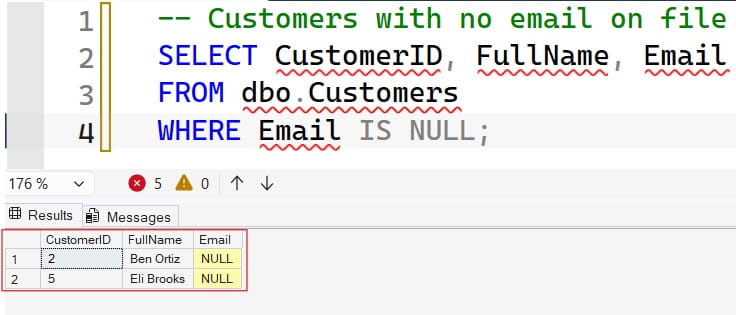
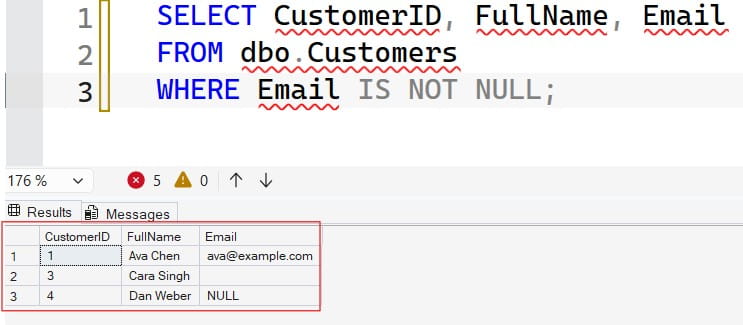
This returns Ben and Eli. It does not return Cara (empty string) or Dan (text “NULL”), which are values, not NULLs. To list customers who do have an email:
SELECT CustomerID, FullName, Email
FROM dbo.Customers
WHERE Email IS NOT NULL;
After executing the query above, I got the expected output as shown in the screenshot below.
You can combine tests. To find customers missing both email and phone:
SELECT CustomerID, FullName
FROM dbo.Customers
WHERE Email IS NULL
  AND Phone IS NULL;
After executing the query above, I got the expected output as shown in the screenshot below.
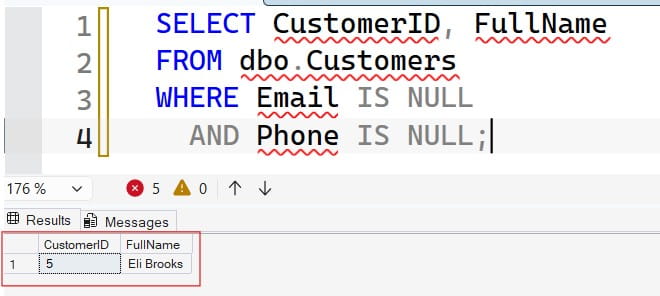
Only Eli matches. Use OR to find rows missing either one.
The Wrong Way: = NULL
-- Returns no rows: comparison with NULL is never true
SELECT * FROM dbo.Customers WHERE Email = NULL;
This runs without error but returns nothing. SQL Server has a legacy setting called ANSI_NULLS that changes this behavior, but turning it off is deprecated and risky because it makes your code behave differently from standard SQL. Always use IS NULL.
Pro Tip: I add a code review rule: any
= NULLor<> NULLis rejected on sight. It has caught real bugs in reports that had been wrong for months.
Find Empty Strings and Fake NULLs Too
Real data is messy. Some systems store missing values as empty strings, spaces, or the text “NULL.” If you only search for real NULLs, you miss those. Check all three:
SELECT CustomerID, FullName, Email
FROM dbo.Customers
WHERE Email IS NULL
   OR LTRIM(RTRIM(Email)) = ''
   OR UPPER(LTRIM(RTRIM(Email))) = 'NULL';
This catches true NULLs, blank or whitespace-only values, and the literal text “NULL.” The function LTRIM(RTRIM(...)) removes spaces on both sides. The query now returns Ben, Cara, Dan, and Eli.
Another approach is NULLIF, which returns NULL when two values are equal. It turns blanks into NULLs for a quick test; see NULLIF vs. COALESCE.
SELECT CustomerID, FullName
FROM dbo.Customers
WHERE NULLIF(LTRIM(RTRIM(Email)), '') IS NULL;
This treats empty and whitespace-only emails as missing. Be aware that wrapping a column in functions stops SQL Server from using a normal index seek on that column, which matters on large tables. We cover that in the performance section.
Count NULLs in One Column or Across a Table
Counting reveals how serious a data quality problem is. COUNT(*) counts all rows, while COUNT(column) counts only non-NULL values. The difference is the NULL count. See the COUNT function.
SELECT
    COUNT(*)                          AS TotalRows,
    COUNT(Email)                      AS EmailsPresent,
    COUNT(*) - COUNT(Email)           AS EmailNulls,
    SUM(CASE WHEN Phone IS NULL THEN 1 ELSE 0 END)  AS PhoneNulls,
    SUM(CASE WHEN Region IS NULL THEN 1 ELSE 0 END) AS RegionNulls
FROM dbo.Customers;
With the sample data, there are 5 rows, 3 emails present (including the empty string and the text), 2 NULL emails, 2 NULL phones, and 2 NULL regions. The SUM(CASE ...) pattern counts rows that meet a condition. For more on CASE, see the CASE statement.
Check Every Nullable Column Automatically
On a table with 40 columns, typing each one is slow and error-prone. Use the system catalog to build the query. The sys.columns view lists each column and whether it allows NULL. To explore a table’s columns manually, see getting column names from a table and describing a table.
DECLARE @sql NVARCHAR(MAX);

SELECT @sql = N'SELECT COUNT(*) AS TotalRows, '
    + STRING_AGG(
        CAST(N'SUM(CASE WHEN ' + QUOTENAME(c.name) + N' IS NULL THEN 1 ELSE 0 END) AS '
             + QUOTENAME(c.name + N'_Nulls') AS NVARCHAR(MAX)),
        N', ')
    + N' FROM dbo.Customers;'
FROM sys.columns AS c
WHERE c.object_id = OBJECT_ID(N'dbo.Customers')
  AND c.is_nullable = 1;

EXEC sys.sp_executesql @sql;
Here is what happens:
sys.columnsreturns one row per column, andis_nullable = 1keeps only columns that can hold NULL. ANOT NULLcolumn can never contain one, so counting it is wasteful.QUOTENAMEwraps names in brackets and escapes special characters, which prevents broken SQL and SQL injection, an attack where untrusted text changes the query.STRING_AGGjoins the generated pieces with commas. It requires SQL Server 2017 or later and is available in Azure SQL Database. TheCASTtoNVARCHAR(MAX)prevents truncation on wide tables.sp_executesqlruns the generated statement. This is dynamic SQL, which builds a statement as text at run time; see dynamic SQL for the risks and benefits.
Replace dbo.Customers with your own table. For a variable table name, validate it against sys.tables first and never concatenate raw user input.
To find which tables contain a column you care about before you scan, see finding a table by column name and checking if a column exists.
Pro Tip: I run this catalog-driven count on every new data source before I trust it. A column that is 90 percent NULL usually means a broken import, not a real business fact.
Handle NULLs in Results and Joins
Finding NULLs is half the job. The other half is stopping them from breaking your logic.
Replace NULLs in output. Use ISNULL, which takes two arguments, or COALESCE, which accepts a list and returns the first non-NULL. See ISNULL and COALESCE.
SELECT FullName,
       COALESCE(Email, '(no email)') AS ContactEmail,
       IIF(Phone IS NULL, 'Missing', 'On file') AS PhoneStatus
FROM dbo.Customers;
COALESCE is standard SQL and works with more than two values. ISNULL is T-SQL specific and takes the data type of the first argument, which can silently truncate a longer replacement. For simple branching, IIF is a short form of CASE; see the IIF function.
Watch out for NOT IN. If a subquery returns even one NULL, NOT IN returns no rows at all, because the comparison with NULL is unknown.
-- Dangerous if the subquery can return NULL
SELECT CustomerID FROM dbo.Customers
WHERE CustomerID NOT IN (SELECT CustomerID FROM dbo.Orders);
Use NOT EXISTS or a left join with IS NULL instead. With a left join, which keeps every row from the left table, unmatched right-side columns come back as NULL; see SQL LEFT JOIN.
SELECT c.CustomerID, c.FullName
FROM dbo.Customers AS c
LEFT JOIN dbo.Orders AS o ON o.CustomerID = c.CustomerID
WHERE o.OrderID IS NULL;
This finds customers with no orders. Test for NULL on the right table’s key column, which is never NULL for a real match. Also remember that two NULLs are not equal in a join condition, so rows with NULL join keys never match.
Aggregates ignore NULLs. AVG, SUM, and COUNT(column) skip them. An average over a column that is half NULL covers only the known values, which may mislead readers.
Pro Tip: I once debugged a revenue report where
NOT INquietly returned an empty list after a single NULL appeared in a lookup table. Since then I default toNOT EXISTS.
Fix the Data: Defaults, Constraints, and Cleanup
Once you know where the NULLs are, decide whether they belong. A constraint is a rule SQL Server enforces on data; see SQL constraints. If a column should always have a value, make it NOT NULL, but clean the data first or the change will fail. Read how to change a column to NOT NULL.
Warning: the update below overwrites data. Back up first, run it in a transaction, and check the row count. See table backup in SQL Server.
-- Preview what will change
SELECT CustomerID, Region
FROM dbo.Customers
WHERE Region IS NULL;

BEGIN TRANSACTION;

UPDATE dbo.Customers
SET Region = 'Unknown'
WHERE Region IS NULL;

SELECT @@ROWCOUNT AS RowsUpdated;

-- COMMIT TRANSACTION;  -- run after you verify the count
-- ROLLBACK TRANSACTION; -- or undo
The preview SELECT uses the same WHERE clause, so you see exactly which rows will change. @@ROWCOUNT shows how many rows the last statement affected. Leaving the transaction open holds locks, so commit or roll back promptly.
Replacing NULL with a made-up value like ‘Unknown’ is a design choice. Sometimes NULL is the honest answer, and a placeholder can distort counts and averages. Decide with the business owner, and document the rule.
For broader design guidance, see SQL database design best practices.
Make NULL Searches Fast
A search for NULLs is only slow if SQL Server must read every row. Two habits help.
Keep the column bare. This query is sargable, meaning SQL Server can use an index seek:
WHERE LastOrderDate IS NULLThis one is not, because the function hides the column from the index:
WHERE ISNULL(LastOrderDate, '1900-01-01') = '1900-01-01'Use a filtered index if you often search for rare NULLs. A filtered index covers only rows that meet a condition, so it stays small. See how to create an index in SQL Server.
CREATE NONCLUSTERED INDEX IX_Customers_NoEmail
ON dbo.Customers (CustomerID)
WHERE Email IS NULL;
This index lists only customers with no email, which suits a recurring “fix missing emails” report. The trade-off is extra storage and a small write cost. If NULLs are common, such as half the table, an index on them rarely helps. Check the actual execution plan first, and keep statistics fresh; see updating statistics on a table.
Pro Tip: In my experience, nobody notices a missing index on a NULL check until the report grows from thousands of rows to millions. I test NULL queries on a table copy sized like production.
NULL Audit Checklist
- Use
IS NULL, never= NULL. Comparisons with NULL are never true. - Look beyond real NULLs. Check for empty strings, spaces, and placeholder text such as “NULL.”
- Count per column. Use
COUNT(*) - COUNT(column)orSUM(CASE ...), and generate queries fromsys.columnsfor wide tables. - Avoid
NOT INwith nullable subqueries. PreferNOT EXISTSor a left join. - Back up before cleanup. Preview, use a transaction, and check
@@ROWCOUNT. - Limit access. Give audit jobs
SELECTthrough an Entra identity over encrypted connections.
Frequently Asked Questions
How do I find NULL values in a SQL Server table?
Use WHERE column_name IS NULL. To find rows that have a value, use IS NOT NULL. Do not use = NULL, because it never returns rows.
How do I count NULL values in a column?
Use COUNT(*) - COUNT(column_name) or SUM(CASE WHEN column_name IS NULL THEN 1 ELSE 0 END). COUNT(column_name) skips NULLs, so the difference is the NULL count.
Why does WHERE column = NULL return no rows?
NULL means unknown, so any normal comparison with it evaluates to unknown, not true. SQL Server only returns rows where the condition is true. Use IS NULL instead.
How do I find all columns that contain NULLs?
Query sys.columns for nullable columns, then build a SUM(CASE WHEN ... IS NULL ...) expression for each with STRING_AGG and run it through sp_executesql. Use QUOTENAME for safety.
What is the difference between NULL and an empty string?
NULL means no value is known, while an empty string is a known value with zero length. They behave differently in comparisons and aggregates, so search for both when cleaning data.
You learned how to find null values in a table in SQL Server with IS NULL, count them per column, catch empty and fake NULLs, and handle them safely in joins and updates. Always preview with a SELECT, back up before changing data, and give audit jobs read-only access through an Entra identity. I hope you found this article helpful.
You May Also Like
- How to find duplicate records in SQL
- SQL normalization explained
- SQL DISTINCT
- SQL Server table naming conventions
- Primary key in SQL Server

After working for more than 15 years in the Software field, especially in Microsoft technologies, I have decided to share my expert knowledge of SQL Server. Check out all the SQL Server and related database tutorials I have shared here. Most of the readers are from countries like the United States of America, the United Kingdom, New Zealand, Australia, Canada, etc. I am also a Microsoft MVP. Check out more here.