
If you are tasked with cleaning up a compromised database, you need to know exactly how to isolate these records without destroying data integrity. In this tutorial, I will walk you through the precise SQL patterns I use to find duplicate records across a variety of relational database engines.
How to Find Duplicate Records in SQL
Understanding What Constitutes a “Duplicate Record”
Before we write a single line of SQL, we must align on what an absolute duplicate actually means from an architectural perspective.
True Row Duplicates
A true row duplicate occurs when every single column value within a row perfectly mirrors another row in the same table. This generally only happens in poorly designed tables that lack a defined Primary Key or a unique constraint. If an entire row is mirrored, finding and purging them requires specialized physical row identifiers.
Business Logic Duplicates
More commonly, you will encounter business logic duplicates. This is a scenario where a table does have a unique Primary Key (such as an auto-incrementing id or a UUID), but specific business-critical columns contain identical data that should natively be unique.
For example, in an enterprise customer database, you might find two rows with completely unique primary keys, but they both share the exact same corporate email address or social security number. From an application standpoint, this is a duplicate record that must be reconciled.
Methodology 1: The Classic GROUP BY and HAVING Clause
The foundational technique for identifying duplicate values relies on aggregating your data. If you understand how to count occurrences of specific column combinations, you can isolate duplicates in seconds. This is the most cross-compatible approach, working flawlessly across PostgreSQL, MySQL, SQL Server, Oracle, and Snowflake.
The Mechanics of the Aggregate Approach
To find duplicates using this method, we select the columns that shouldn’t have duplicate values, count the total rows for each combination, and filter out any group that has a count greater than one.
- The
GROUP BYClause: This groups rows that have the same values in specified columns into summary rows. - The
COUNT()Function: This returns the number of rows that match the grouped criteria. - The
HAVINGClause: Because the standardWHEREclause cannot filter on aggregate functions, we useHAVINGto specify conditions on our groups.
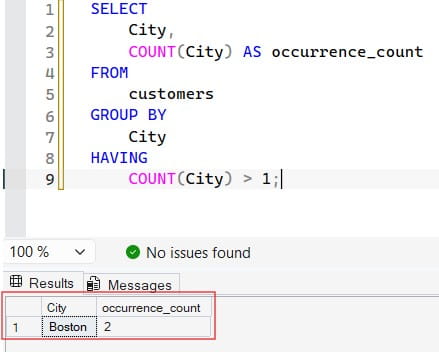
Let’s look at the structure of this query:
SQL
SELECT
    City,
    COUNT(City) AS occurrence_count
FROM
    customers
GROUP BY
    City
HAVING
    COUNT(City) > 1;
After executing the query above, I obtained the expected output shown in the screenshot below.
Finding Multi-Column Duplicates
Frequently, a single column isn’t enough to define a duplicate. For example, in a medical appointment system, it might be perfectly fine for two records to have the same doctor ID, or the same time slot, or the same patient name—but a combination of all three signifies a major data anomaly.
To scale the aggregate approach to multiple columns, you simply extend the fields inside both the SELECT and GROUP BY definitions:
SQL
SELECT
    first_name,
    last_name,
    date_of_birth,
    COUNT(*) AS absolute_duplicates
FROM
    patient_registry
GROUP BY
    first_name,
    last_name,
    date_of_birth
HAVING
    COUNT(*) > 1;
Methodology 2: Isolating Complete Rows via Window Functions
While the GROUP BY method is highly efficient for generating a summary list of duplicate keys, it presents a distinct architectural drawback: it hides the rest of the columns in the row. If your table has fifty columns and you want to view the entire record payload alongside its duplicates, modifying a GROUP BY statement becomes messy and unmanageable.
To solve this, I leverage ANSI-SQL standard Window Functions—specifically ROW_NUMBER(). This approach works elegantly across modern enterprise engines like SQL Server, Oracle, and PostgreSQL.
Demystifying ROW_NUMBER() OVER (PARTITION BY ...)
A window function performs a calculation across a set of table rows that are somehow related to the current row. Unlike a basic aggregate function, a window function does not cause your rows to become grouped into a single output row; the rows retain their individual identities.
PARTITION BY: This logical argument divides your result set into partitions. The function will evaluate independently within each partition bucket.ORDER BY: This determines the sequence in which the row numbers are assigned inside that specific partition bucket.
By partitioning your data by the columns that contain duplicates, you essentially reset a row counter back to 1 for every unique group. The first instance of data gets labeled as 1, the second as 2, and the third as 3. Therefore, any row that receives a row number greater than 1 is fundamentally a duplicate.
Because window functions cannot be directly filtered inside a standard WHERE clause, we wrap the calculation inside a Common Table Expression (CTE) or a Subquery:
SQL
WITH PartitionedRecords AS (
    SELECT
        employee_id,
        first_name,
        last_name,
        department_name,
        salary_amount,
        ROW_NUMBER() OVER (
            PARTITION BY first_name, last_name, date_of_birth
            ORDER BY employee_id ASC
        ) AS internal_row_num
    FROM
        enterprise_roster
)
SELECT
    employee_id,
    first_name,
    last_name,
    department_name,
    salary_amount
FROM
    PartitionedRecords
WHERE
    internal_row_num > 1;
In this architecture, by changing the ORDER BY inside the window function to sort by an internal timestamp or primary key, you can dynamically control which record is categorized as the “original” (Row 1) and which ones are treated as target duplicates.
Methodology 3: Utilizing Self-Joins for Precise Record Pairs
Another powerful weapon in a data engineer’s arsenal is the Self-Join. A self-join is an inner join that treats a single table as if it were two separate tables by invoking aliases. This pattern is exceptionally useful when you want to compare a row directly against its duplicate counterparts to find mismatched data fields or when you are preparing targeted DELETE statements.
The Self-Join Inequality Pattern
When joining a table to itself to look for duplicates, you match the rows based on the columns that contain identical data, but you create an inequality join constraint on the unique identifier column. This prevents a row from matching with itself.
SQL
SELECT
    a.transaction_id AS original_transaction,
    b.transaction_id AS duplicate_transaction,
    a.customer_uuid,
    a.transaction_amount,
    a.processed_timestamp
FROM
    payment_ledger a
INNER JOIN
    payment_ledger b ON a.customer_uuid = b.customer_uuid
    AND a.transaction_amount = b.transaction_amount
    AND a.transaction_id < b.transaction_id;
Notice the critical filter: a.transaction_id < b.transaction_id. If we used a standard inequality operator like <>, the query would return every duplicate pair twice (e.g., Row A matches Row B, and Row B matches Row A). Utilizing the strictly less-than operator ensures you only see the match pair once, keeping your audit output clean.
Real-World Edge Cases: Handling Null Values in Duplicate Audits
When my corporate consulting clients encounter data anomalies, one of the most common oversights involves how their SQL queries treat NULL values. In relational databases, a NULL signifies missing or unknown data. According to standard three-valued SQL logic, a NULL is never equal to another NULL (NULL = NULL evaluates to Unknown, not True).
This creates unexpected behavior depending on the method you select:
- The
GROUP BYBehavior: Interestingly, the SQL standard dictates that for grouping operations,NULLvalues should be treated as identical. If you have ten rows where the email column is completely missing (NULL), aGROUP BYquery will combine all ten into a single group. If yourHAVINGfilter checks for counts greater than one, those missing records will be flagged as duplicates. - The Join Behavior: If you are using a Self-Join to find matching data, the evaluation
a.email_address = b.email_addresswill completely fail for any records containingNULLvalues. As a result, those records will be silently skipped, potentially masking duplicate errors.
To safeguard your self-joins against this blind spot, you must write explicit null-handling logic into your join predicates using functions like COALESCE or standard logical blocks:
SQL
SELECT
    a.vendor_id,
    b.vendor_id,
    a.vendor_tax_id
FROM
    vendor_onboarding a
INNER JOIN
    vendor_onboarding b ON (a.vendor_tax_id = b.vendor_tax_id OR (a.vendor_tax_id IS NULL AND b.vendor_tax_id IS NULL))
    AND a.vendor_id < b.vendor_id;
Summary
Isolating duplicate records is the mandatory first step toward restoring absolute data accuracy inside your enterprise applications. For quick verification metrics, rely on the clean simplicity of GROUP BY and HAVING. When you need a deep look at the complete row contents or are preparing to run automated data purging tasks, transition your pipeline toward window functions like ROW_NUMBER().
You may also like the following articles:
- How to Find Record Inserted Date in SQL Server
- How to Delete Duplicate Records in SQL Server
- SQL Server Get The Latest Record By Date

After working for more than 15 years in the Software field, especially in Microsoft technologies, I have decided to share my expert knowledge of SQL Server. Check out all the SQL Server and related database tutorials I have shared here. Most of the readers are from countries like the United States of America, the United Kingdom, New Zealand, Australia, Canada, etc. I am also a Microsoft MVP. Check out more here.