
This comprehensive technical guide explores how SQL Server views function internally, examines their architectural types, details schema options, reviews DML update mechanics, and outlines critical performance optimization techniques.
SQL Server Views
The Internal Mechanics of SQL Server Views
To utilize views effectively in production, you must first understand how the Microsoft SQL Server relational engine processes them behind the scenes.
When an application queries a standard view, SQL Server executes a multi-step resolution process:
- Syntax Parsing and Object Binding: The parser identifies the view name in the
sys.viewsandsys.objectscatalog metadata and verifies that the calling user has appropriate permissions on the view. - View Expansion (Query Inlining): The query processor retrieves the compiled T-SQL definition from
sys.sql_modules. It replaces the view reference in the outer query with the underlying query expression, integrating filter predicates and projection columns. - Query Optimization: The SQL Server Cost-Based Optimizer analyzes the expanded query tree alongside the underlying base tables, indexes, and statistics to generate an optimal physical execution plan.
- Execution: The storage engine reads the required data pages directly from the physical base tables in the buffer cache or storage subsystem.
Because the relational engine dynamically folds the view definition into the user query, a standard view generally carries zero memory overhead when idle and introduces minimal compilation cost.
Why Use Views in Enterprise Database Architectures?
- Logical Data Independence: Views establish an abstraction layer between physical database structures and application layers. If a database administrator refactors a physical table by splitting it or renaming columns, the view can be modified to maintain the original schema signature, preventing downstream application failures.
- Granular Security and Row/Column Masking: Views enable secure data presentation without granting direct
SELECTpermissions on underlying base tables. Sensitive columns (such as tax identifiers or billing rates) can be excluded from the view projection, while row-level filtering can restrict user access based on organizational boundaries. - Simplification of Complex Relational Logic: Enterprise queries frequently require multi-table
INNERandOUTER JOINoperations, derived tables, and aggregation expressions. Encapsulating this logic inside a view allows software engineers and reporting tools to query the dataset as if it were a single, normalized table. - Centralization of Business Rules: Embedding standardized calculations, state codes, and operational flags into view definitions ensures uniform reporting across multiple analytics platforms, reporting services, and custom applications.
Core Types of SQL Server Views
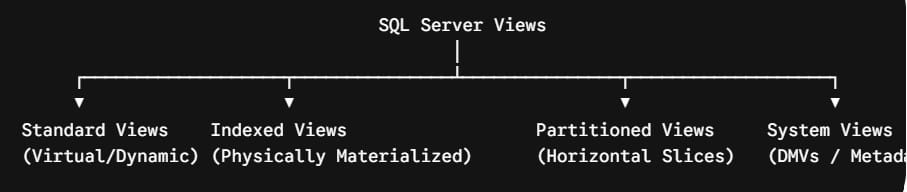
SQL Server provides distinct types of views tailored for specific architectural requirements. Choosing the correct view type is critical for balancing system performance, storage utilization, and query complexity.
1. Standard Views
Standard views are dynamic, non-materialized virtual tables. They store only metadata—the SELECT query definition—in the system catalog. The query runs every time the view is called, ensuring that users always access real-time data from the underlying tables.
2. Indexed Views (Materialized Views)
An indexed view is a view that has been physically materialized on disk by creating a unique clustered index on its result set. When the base tables are modified via INSERT, UPDATE, or DELETE operations, the SQL Server Database Engine automatically updates the data stored in the indexed view. These views accelerate aggregate-heavy and multi-join reporting queries.
3. Partitioned Views
Partitioned views stitch together horizontally split data from multiple tables across one or more databases, presenting the combined data as a single continuous result set using the UNION ALL operator.
- Local Partitioned Views: Combine tables residing on the same SQL Server instance.
- Distributed Partitioned Views: Combine tables across independent SQL Server instances linked via Linked Servers or distributed transactions, allowing horizontal scalability for massive datasets.
4. System Views and Dynamic Management Views (DMVs)
SQL Server exposes internal database engine metadata and runtime diagnostic metrics through system views, such as sys.tables, sys.indexes, and Dynamic Management Views (sys.dm_*). These catalog structures are maintained by the database engine to provide administrators with visibility into system health, query performance, and resource locking.
Comparative Architecture Matrix
The following table contrasts the primary implementation characteristics of the three main user-defined view architectures in SQL Server:
| Architectural Feature | Standard View | Indexed (Materialized) View | Partitioned View |
| Physical Storage | None (Metadata only) | Yes (Clustered & Non-clustered indexes) | None (Reads from base partition tables) |
| Data Latency | Pure real-time | Pure real-time (Synchronous engine sync) | Pure real-time |
| Write Performance Overhead | None | High (Base table DML updates index) | Moderate (Dependent on partition routing) |
| Schema Binding Requirement | Optional | Mandatory (WITH SCHEMABINDING) | Optional (Recommended) |
| Primary Use Case | Abstraction, security, query simplification | Aggregations, static complex joins, data warehousing | Horizontal scaling, archival data partitioning |
| Edition Support | All SQL Server editions | All editions (Auto-match requires Enterprise) | All SQL Server editions |
Creating and Managing Views: Syntax and Schema Options
Creating production-ready SQL Server views requires more than a simple CREATE VIEW statement. T-SQL provides several view definition clauses that control security, integrity, and dependency tracking.
Core Syntax and Declarative Clauses
A standard view is instantiated using the CREATE VIEW statement, with modification and removal handled by ALTER VIEW and DROP VIEW:
SQL
CREATE VIEW Sales.ActiveCustomerInvoices
WITH SCHEMABINDING, ENCRYPTION, VIEW_METADATA
AS
SELECT
    c.CustomerID,
    c.CustomerName,
    i.InvoiceID,
    i.InvoiceDate,
    i.InvoiceTotal
FROM Sales.Customers AS c
INNER JOIN Sales.Invoices AS i
    ON c.CustomerID = i.CustomerID
WHERE i.IsSettled = 0
WITH CHECK OPTION;
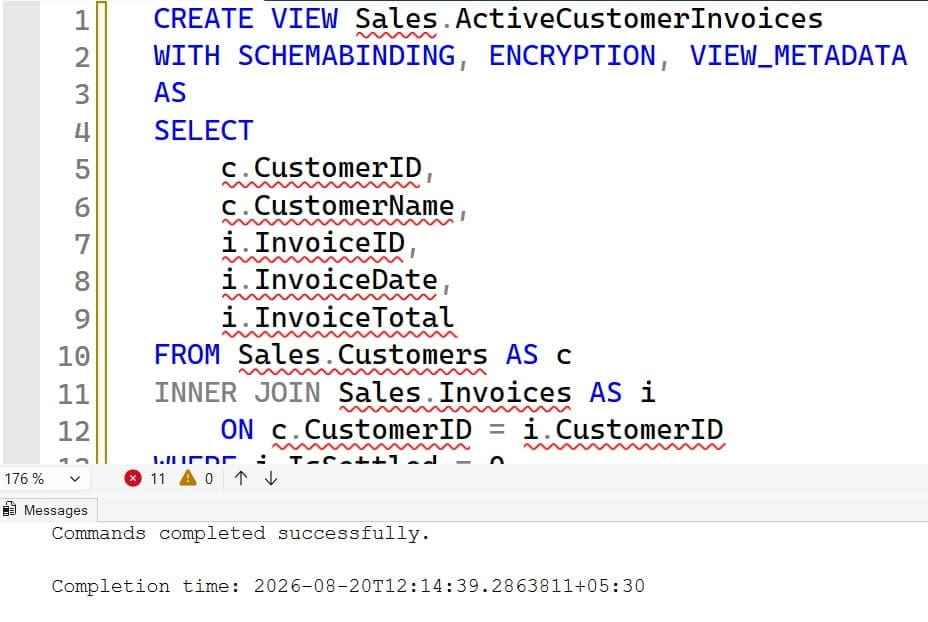
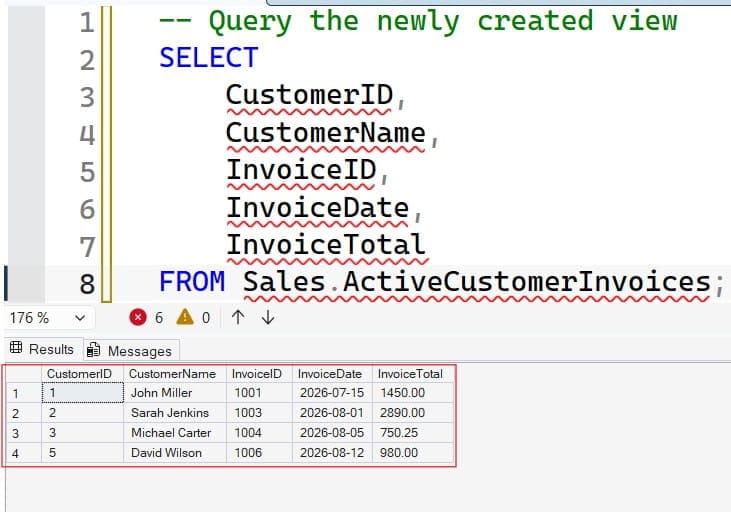
After executing the above query, the view got created successfully as shown in the screenshot below.
Advanced View Clauses Explained
Understanding these optional clauses is essential when designing reliable database solutions:
1. WITH SCHEMABINDING
Schema binding binds the view directly to the underlying physical schema of the referenced tables. When WITH SCHEMABINDING is active:
- Base tables cannot be modified using
ALTER TABLEorDROP TABLEin any way that would break the view definition. - All referenced objects must use two-part naming conventions (
SchemaName.ObjectName). - Base tables and referenced user-defined functions must exist in the same database.
- Crucial Prerequisite: Schema binding is mandatory if you plan to create a clustered index on the view.
2. WITH CHECK OPTION
When a view is used to perform data modifications (INSERT or UPDATE), WITH CHECK OPTION forces all modifications to comply with the filtering criteria defined in the view’s WHERE clause.
For instance, if a view filters for StateCode = 'TX', any INSERT or UPDATE executed through the view that attempts to assign a different state code will be rejected by the database engine. This prevents data from disappearing from the view immediately after an update.
3. WITH ENCRYPTION
The WITH ENCRYPTION clause obfuscates the view definition stored in the sys.sql_modules system catalog. This prevents non-administrative users and external tools from viewing the underlying SQL logic, protecting sensitive business logic and proprietary queries.
4. WITH VIEW_METADATA
This clause specifies that SQL Server will return view-level metadata rather than base-table metadata to the client application when browsing APIs (such as DB-Library, ODBC, or OLE DB) request schema information. This ensures front-end applications treat the view as an independent, primary entity.
Indexed Views: Deep Dive and Engine Requirements
Indexed views are one of the most powerful optimization mechanisms in SQL Server. By creating a unique clustered index on a view, you convert it from a dynamic query into a physically stored, high-performance dataset.
Determinism and Session Set Options
To create an indexed view, all expressions within the SELECT statement must be fully deterministic—meaning they must always return the exact same output for a given set of input values. Functions like GETDATE(), NEWID(), or RAND() cannot be used in indexed views.
Furthermore, indexed views require specific session-level SET options during creation and subsequent DML operations:
QUOTED_IDENTIFIER ONANSI_NULLS ONANSI_PADDING ONANSI_WARNINGS ONARITHABORT ONCONCAT_NULL_YIELDS_NULL ONNUMERIC_ROUNDABORT OFF
Structural Restrictions on Indexed Views
To guarantee that the physical clustered index can be maintained efficiently, SQL Server enforces strict structural rules:
- Must be defined
WITH SCHEMABINDING. - Must not contain
OUTER JOIN,UNION,DISTINCT,TOP, or subqueries. - If
GROUP BYis utilized, theSELECTlist must includeCOUNT_BIG(*). - Aggregations cannot use
AVG(); you must storeSUM()andCOUNT_BIG()separately and compute the average in your application query.
Updatable Views and DML Constraints
A common point of confusion among developers is whether data can be inserted, updated, or deleted through a view. SQL Server does allow direct Data Manipulation Language (DML) operations through views, provided the operations satisfy strict engine constraints:
- Single Base Table Constraint: Any
INSERT,UPDATE, orDELETEstatement executed against a view can modify data in only one underlying base table at a time. Multi-table modifications in a single statement are rejected. - Non-Derivation Rule: Columns targeted for update must map directly to raw base table columns. You cannot update columns that rely on calculated expressions, string concatenations, or aggregate functions.
- Nullable and Default Column Integrity: Any
INSERTstatement executed through a view must supply values for all non-nullable columns in the base table that lack a default constraint, even if those columns are omitted from the view projection.
When an application must perform multi-table writes through a single view interface, the standard solution is to attach an INSTEAD OF Trigger to the view. The trigger intercepts incoming INSERT, UPDATE, or DELETE commands, allowing you to route the write operations across multiple underlying base tables using custom T-SQL transactions.
Performance Considerations and the View-on-View Anti-Pattern
While views provide clear architectural advantages, improper design can introduce severe performance bottlenecks in enterprise SQL Server databases.
1. The “View-on-View” Nesting Anti-Pattern
One of the most frequent performance issues I encounter in production systems is deep view nesting—the practice of building views that query other views, which in turn query additional views.
When SQL Server’s query optimizer attempts to expand nested views that are 4 to 6 layers deep, several issues arise:
- Query Graph Explosion: The expanded query tree becomes massive, consuming significant CPU compilation time.
- Inaccurate Cardinality Estimation: The optimizer struggles to calculate accurate cardinality estimates across layered abstractions, often leading to poor execution plan choices, such as selecting inappropriate physical join operators or generating insufficient memory grants.
- Hidden Join Overhead: Downstream queries often process unnecessary joins and columns embedded deep within the view hierarchy, reading large amounts of unnecessary data from disk.
2. The NOEXPAND Query Hint for Indexed Views
In the Enterprise Edition of SQL Server, the query optimizer automatically searches for matching indexed views and substitutes them into an execution plan—even if the incoming query targets the base tables directly.
In Standard Edition, however, the optimizer does not automatically substitute indexed views. To force SQL Server to use the materialized clustered index rather than re-evaluating the underlying query against the base tables, you must explicitly use the WITH (NOEXPAND) table hint:
SQL
SELECT
    CustomerID,
    TotalRevenue
FROM Sales.IndexedCustomerSummary WITH (NOEXPAND)
WHERE StateCode = 'NY';
Even in Enterprise Edition, I recommend applying WITH (NOEXPAND) in latency-critical workloads, as it bypasses the optimizer’s view-matching phase and guarantees that SQL Server reads the pre-computed clustered index pages directly.
Enterprise View Security: Ownership Chaining
Views are a cornerstone of secure database multi-tenancy because of Ownership Chaining.
When a user queries a view that references a base table, and both the view and the table share the same owner (such as the default dbo schema owner), SQL Server evaluates permissions only on the view. It skips permission checks on the underlying base tables.
This security model allows you to revoke all direct SELECT, INSERT, UPDATE, and DELETE permissions on physical tables from application accounts, routing all data access through managed views that enforce column projection limits and row filters.
Best Practices Checklist for Database Administrators
To maintain a secure, high-performance SQL Server environment, use this operational checklist when building and managing views:
- Enforce Two-Part Naming: Always declare object references using two-part notation (
SchemaName.ObjectName) to support schema binding and avoid ambiguous resolution overhead. - Avoid
SELECT *in View Definitions: Explicitly declare every column in the projection list. UsingSELECT *can lead to metadata synchronization errors when the underlying table schema changes, and it prevents the use ofWITH SCHEMABINDING. - Apply
WITH SCHEMABINDINGto Core Architectural Views: Use schema binding on foundational views to prevent unexpected table alterations from breaking production services. - Keep View Nesting Under Two Levels: Limit view hierarchies to a depth of two to ensure predictable query execution plans and accurate cardinality estimates.
- Monitor Indexed View Maintenance Overhead: Before creating an indexed view, evaluate the write-to-read ratio of the base tables. Highly volatile tables with frequent
INSERTandUPDATEtraffic may suffer write-throughput penalties if they support multiple indexed views. - Use
WITH CHECK OPTIONon Updatable Views: Prevent data corruption by verifying that all modifications performed through views conform to the view’s filtering rules. - Refresh View Metadata After Base Table Modifications: If a view is not schema-bound and an underlying table is updated, run
sp_refreshviewto synchronize the view’s internal metadata with the new physical schema.
Summary
SQL Server views are an essential tool for building robust, secure, and scalable database architectures. By abstracting raw relational tables into clean virtual datasets, views protect data integrity, simplify complex application queries, and establish clear security boundaries.
Understanding the differences between dynamic standard views, physically materialized indexed views, and partitioned views allows you to balance query performance with storage and write-maintenance costs across your database environment.
You may also like the following articles:

After working for more than 15 years in the Software field, especially in Microsoft technologies, I have decided to share my expert knowledge of SQL Server. Check out all the SQL Server and related database tutorials I have shared here. Most of the readers are from countries like the United States of America, the United Kingdom, New Zealand, Australia, Canada, etc. I am also a Microsoft MVP. Check out more here.