
This comprehensive guide covers how SQL indexes work under the hood, how clustered and nonclustered structures operate, how to design composite indexes, and how to maintain them across large enterprise environments.
SQL Indexes
What Is a SQL Index?
At its simplest, a SQL index is an auxiliary on-disk data structure that the database engine uses to locate and retrieve rows significantly faster than scanning the entire table.
Think of an index like the index at the back of a comprehensive technical reference book. If you want to find every reference to “Connection Pooling,” you do not read the entire 900-page book front to back. You turn to the back, look up the term alphabetically, find the exact page numbers, and jump straight to those pages.
In SQL engines like Microsoft SQL Server, PostgreSQL, and MySQL, an index performs this exact operation on database storage pages.
SQL
-- Basic syntax for creating an index
CREATE INDEX idx_customers_lastname
ON dbo.Customers (LastName);
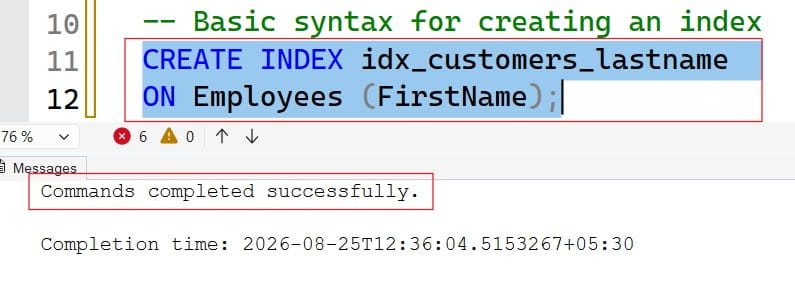
After executing the above query, I got the expected output and the index got created successfully as shown in the screenshot below.
Check out SQL Indexes Best Practices
The Cost of Missing Indexes: Full Table Scans vs. Index Seeks
When a table lacks an index on a filtered column, the database engine must execute a Full Table Scan (or Table Scan / Clustered Index Scan). It loads every single page of data into memory buffer pools and evaluates the predicate row by row.
When an index exists, the engine performs an Index Seek. It traverses a tree structure directly to the qualifying rows with minimal disk input/output (I/O) operations.
| Metric | Full Table Scan (Scan) | Index Seek |
| I/O Complexity | $O(N)$ — Linear scaling | $O(\log N)$ — Logarithmic scaling |
| Storage Impact | Evaluates every data page | Reads only relevant branch and leaf pages |
| Execution Cost | Increases proportionally with table growth | Remains nearly constant as tables grow |
| Memory Buffer Usage | High memory turnover / churn | Low memory consumption |
How SQL Indexes Work Under the Hood: B-Trees Explained
Most relational database indexes are implemented using a B-Tree (Balanced Tree) data structure. Understanding the physical layout of a B-Tree is crucial for writing queries that effectively leverage the index.
A B-Tree index maintains a hierarchical tree structure with three distinct tiers:
- Root Node: The single entry point at the top of the tree. It contains pointers and key ranges that guide searches to the next level down.
- Intermediate Nodes: Branch levels between the root and leaves. These nodes contain sorted key ranges that direct the database engine to the exact child page holding the requested data.
- Leaf Nodes: The bottom layer of the tree. In a nonclustered index, the leaf nodes contain the indexed key values along with a row locator (a pointer) to the actual physical row. In a clustered index, the leaf nodes are the actual data pages.
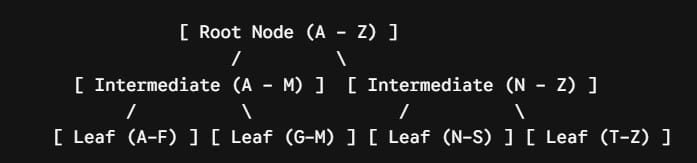
Because B-Trees are self-balancing, every leaf node sits at the exact same depth from the root. Whether querying a record that starts with “Adams” or “Zimmerman,” the database engine traverses the exact same number of pages (typically 3 to 5 levels deep, even for tables containing tens of millions of rows).
Primary Types of SQL Indexes
Relational database systems primarily organize data using two structural models: Clustered Indexes and Nonclustered Indexes.
1. Clustered Indexes
A clustered index defines the physical storage order of the data within a table. Because physical rows can only be sorted on disk in one order, a table can have only one clustered index.
- When you create a clustered index on a column, the leaf level of the B-Tree contains the actual data rows of the table.
- In engines like Microsoft SQL Server, creating a
PRIMARY KEYconstraint automatically builds a unique clustered index by default unless configured otherwise. - A table without a clustered index is stored as an unordered structure known as a Heap.
SQL
-- Creating an explicit Clustered Index
CREATE CLUSTERED INDEX cdx_employees_employeeid
ON dbo.Employees (EmployeeID);
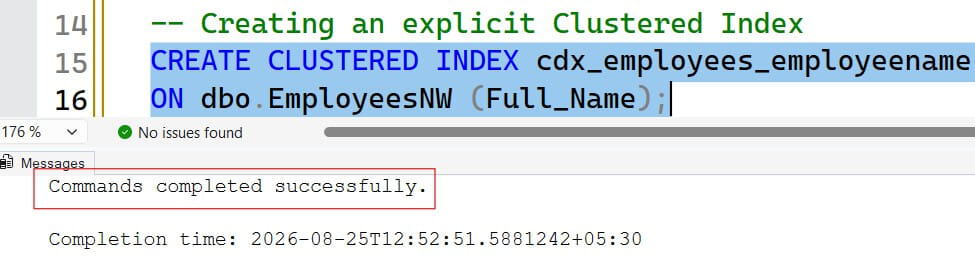
After executing the above query, I got the expected output and the Clustered index got created successfully as shown in the screenshot below.
2. Nonclustered Indexes
A nonclustered index is a structure completely separate from the actual data rows. It contains the indexed column values sorted in order, paired with a row locator that tells the database engine where the base row lives.
- If the base table is a clustered table, the row locator is the Clustered Index Key.
- If the base table is a heap, the row locator is a physical Row Identifier (RID) pointing to file, page, and slot numbers.
- You can define multiple nonclustered indexes on a single table (typically up to 999 depending on the database engine, though production systems rarely need more than 5 to 10 per table).
SQL
-- Creating a standard Nonclustered Index
CREATE NONCLUSTERED INDEX idx_orders_orderdate
ON dbo.Orders (OrderDate);
Clustered vs. Nonclustered Indexes: Structural Comparison
| Characteristic | Clustered Index | Nonclustered Index |
| Max per Table | 1 | Multiple (typically dozens to hundreds supported) |
| Physical Storage | Dictates physical sorting of table data | Separate structure; independent of physical layout |
| Leaf Node Content | Actual base table data pages | Index keys + Row Locator pointer |
| Best Used For | Primary keys, ranges, sequential IDs | Filter predicates, foreign keys, secondary lookups |
| Storage Overhead | Minimal (it is the table itself) | Additional disk storage required |
Specialized Index Types and Modern Patterns
Beyond standard single-column indexes, modern database engines offer specialized index patterns designed to solve specific query bottlenecks.
1. Composite Indexes (Multi-Column Indexes)
A composite index is an index built on two or more columns. The database engine sorts the data first by the primary column, then by the secondary column, and so on.
SQL
CREATE NONCLUSTERED INDEX idx_customers_state_city
ON dbo.Customers (State, City);
The “Leftmost Prefix” Rule
When designing composite indexes, column ordering is critical. The database engine can only use an index if the query filters include the leftmost leading column in the index definition.
Given the index on (State, City):
WHERE State = 'Texas' AND City = 'Austin'$\rightarrow$ Uses the Index (Full Seek)WHERE State = 'Texas'$\rightarrow$ Uses the Index (Prefix Seek)WHERE City = 'Austin'$\rightarrow$ Cannot Use the Index (Must scan because data is not sorted by City first)
2. Covering Indexes and the INCLUDE Clause
When a query requests columns that are not part of a nonclustered index, the engine must perform an index seek and then make an expensive jump to the base table to fetch the remaining columns. This secondary lookup is known as a Key Lookup or Bookmark Lookup.
To eliminate Key Lookups, you can design a Covering Index using the INCLUDE clause. Included columns are appended directly to the leaf nodes of the B-Tree without contributing to the sorting hierarchy of the intermediate nodes.
SQL
CREATE NONCLUSTERED INDEX idx_employees_department
ON dbo.Employees (DepartmentID)
INCLUDE (FirstName, LastName, Salary);
With this index in place, a query selecting FirstName, LastName, and Salary filtered by DepartmentID resolves entirely within the index leaf pages, generating zero base table lookups.
3. Filtered / Partial Indexes
A filtered index (or partial index in PostgreSQL) indexes only a subset of rows meeting a defined predicate. This drastically reduces index size, maintenance overhead, and page count.
SQL
-- Indexing only active records to save space and speed up queries
CREATE NONCLUSTERED INDEX idx_orders_unprocessed
ON dbo.Orders (OrderStatus, OrderDate)
WHERE OrderStatus IN ('Pending', 'Processing');
Filtered indexes are well suited for:
- Columns with heavily skewed data distributions (e.g., millions of
Archivedrecords vs. thousands ofActiverecords). - Sparse columns where the vast majority of values are
NULL.
4. Unique Indexes
A unique index guarantees that no two rows in the indexed column contain identical values. While it behaves like a standard index for search optimizations, it doubles as an integrity constraint.
SQL
CREATE UNIQUE NONCLUSTERED INDEX udx_users_email
ON dbo.Users (EmailAddress);
Best Practices for Designing High-Performance SQL Indexes
Over-indexing can degrade write performance just as severely as under-indexing degrades read performance. Follow these core design principles:
Choose Narrow, Static, and Sequential Clustered Keys
Because every nonclustered index stores a copy of the clustered index key as its row locator, wide clustered keys inflate the storage footprint of every other index on the table.
- Narrow: Use standard integer or
BIGINTtypes over wide character strings. - Sequential: Monotonically increasing values (such as
IDENTITYorBIGINT GENERATED ALWAYS AS IDENTITY) append new records cleanly to the end of data pages, preventing costly page splits. - Static: Avoid clustered keys on values that update frequently.
Index Foreign Keys Systematically
Relational engines do not automatically index foreign key columns when you declare a foreign key constraint. Manually indexing foreign keys improves the performance of JOIN operations and reduces blocking during cascading operations or parent-record deletions.
Place High-Selectivity Columns First in Composite Indexes
Selectivity measures how unique values are across a column. A column with high selectivity (such as SSN or TransactionID) narrows down the result set much faster than a column with low selectivity (such as Gender or StatusFlag).
$$\text{Selectivity} = \frac{\text{Number of Distinct Values}}{\text{Total Number of Rows}}$$
In composite indexes, place the highest selectivity columns at the leading position unless your primary query access patterns dictate otherwise.
Strategic Summary
Designing an optimal indexing layer requires balancing fast read paths with acceptable write latency. Every new index introduces write amplification, as every INSERT, UPDATE, and DELETE must modify the base table along with all associated index trees.
You may also like the following articles:

After working for more than 15 years in the Software field, especially in Microsoft technologies, I have decided to share my expert knowledge of SQL Server. Check out all the SQL Server and related database tutorials I have shared here. Most of the readers are from countries like the United States of America, the United Kingdom, New Zealand, Australia, Canada, etc. I am also a Microsoft MVP. Check out more here.