
In this tutorial, I will guide you through the core architecture of NULL, how it behaves across mathematical and logical operations, how it impacts aggregate functions and joins, and how to safely handle it across your SQL queries and schema designs.
SQL NULL
What Is SQL NULL?
In the ANSI SQL standard, NULL is a special marker used to indicate that a data value does not exist in the database.
It is crucial to understand what NULL is not:
NULLis not an empty string (''). An empty string is known text with a character length of zero.NULLis not a numeric zero (0). Zero is a known integer with a defined arithmetic value.NULLis not a booleanFALSE.FALSEis a known truth value.NULLis not equal to anotherNULL. Because two missing values are unknown, the database cannot verify that they are identical.
Three-Valued Logic (3VL): True, False, and Unknown
Standard classical logic operates on a binary model: a predicate is either TRUE or FALSE.
Because NULL represents an unknown quantity, SQL implements Three-Valued Logic (3VL). In 3VL, the result of a comparison can be TRUE, FALSE, or UNKNOWN.
When an expression evaluates to UNKNOWN, a standard WHERE clause treats it as non-matching. SQL filter predicates require an expression to evaluate explicitly to TRUE to return a row.
Truth Tables in Three-Valued Logic
To master SQL query execution, you must understand how logical operators (AND, OR, NOT) evaluate UNKNOWN states.
The AND Truth Table
The AND operator returns TRUE only if both operands are TRUE. If either operand is UNKNOWN and the other is TRUE or UNKNOWN, the result is UNKNOWN.
| Operand A | Operand B | Result (A AND B) |
TRUE | TRUE | TRUE |
TRUE | FALSE | FALSE |
TRUE | UNKNOWN | UNKNOWN |
FALSE | UNKNOWN | FALSE |
UNKNOWN | UNKNOWN | UNKNOWN |
The OR Truth Table
The OR operator returns TRUE if at least one operand is TRUE, regardless of whether the other operand is UNKNOWN.
| Operand A | Operand B | Result (A OR B) |
TRUE | UNKNOWN | TRUE |
FALSE | FALSE | FALSE |
FALSE | UNKNOWN | UNKNOWN |
UNKNOWN | UNKNOWN | UNKNOWN |
The NOT Operator
Negating an UNKNOWN value still yields UNKNOWN:
NOT (TRUE)=FALSENOT (FALSE)=TRUENOT (UNKNOWN)=UNKNOWN
Comparing Values with NULL: IS NULL vs. = NULL
The single most common mistake in SQL query writing is using equality operators (= or !=) to test for NULL.
Why = NULL Always Fails
Consider this query:
SQL
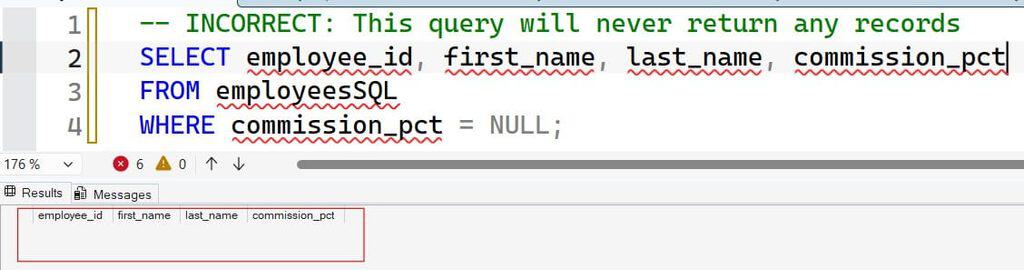
-- INCORRECT: This query will never return any records
SELECT employee_id, first_name, last_name, commission_pct
FROM employees
WHERE commission_pct = NULL;
When the SQL engine evaluates commission_pct = NULL, it asks: “Is an unknown commission equal to an unknown value?” The answer is UNKNOWN. Because WHERE UNKNOWN does not satisfy the filter, zero rows are returned, even if thousands of rows have NULL in that column. Check out the below screenshot for your reference.
The same logic applies to inequality checks: commission_pct != NULL also evaluates to UNKNOWN.
The Correct Approach: IS NULL and IS NOT NULL
SQL provides dedicated comparison predicates designed specifically to test for missing data:
SQL
-- CORRECT: Returns all records where commission_pct is missing
SELECT employee_id, first_name, last_name, commission_pct
FROM employees
WHERE commission_pct IS NULL;

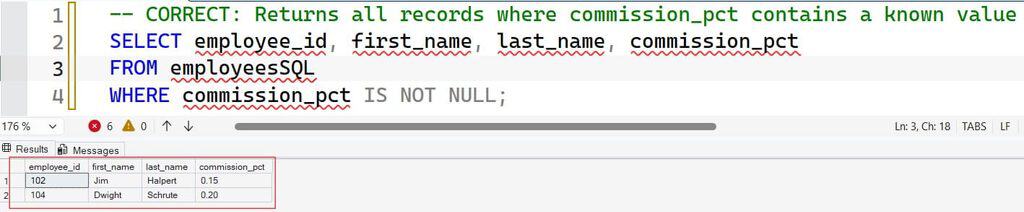
-- CORRECT: Returns all records where commission_pct contains a known value
SELECT employee_id, first_name, last_name, commission_pct
FROM employees
WHERE commission_pct IS NOT NULL;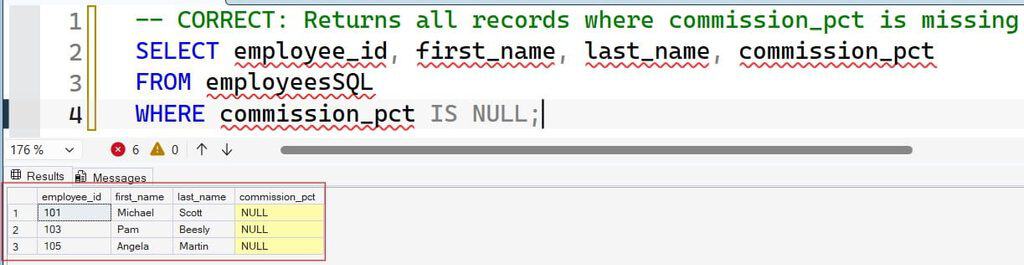
NULL in Arithmetic Operations and String Concatenation
Whenever NULL enters a mathematical expression or standard string concatenation, the missing data typically propagates throughout the entire expression.
Arithmetic Propagation
Any arithmetic operation (+, -, *, /, %) involving a NULL operand results in NULL:
SQL
SELECT
    100 + NULL AS addition_result,       -- Output: NULL
    500 * NULL AS multiplication_result, -- Output: NULL
    NULL / 10  AS division_result;       -- Output: NULL
If an employee’s base salary is $85,000 and their bonus column contains NULL, running base_salary + bonus evaluates to NULL, completely wiping out the base salary calculation unless explicitly handled.
String Concatenation Behavior
In the ANSI SQL standard and engines like PostgreSQL, SQLite, and Oracle, concatenating a string with NULL yields NULL:
SQL
-- Standard SQL concatenation
SELECT first_name || ' ' || middle_name || ' ' || last_name AS full_name
FROM clients;
If middle_name is NULL, the entire full_name column evaluates to NULL.
(Note: Microsoft SQL Server behavior depends on the CONCAT_NULL_YIELDS_NULL setting, but standard practice across all modern engines is to treat NULL concatenation defensively).
SQL Functions for Handling NULL
To prevent calculations and string operations from evaluating to NULL, SQL provides built-in functions to substitute default fallback values.
1. COALESCE(): The ANSI Standard Universal Handler
The COALESCE() function evaluates arguments in sequential order and returns the first non-NULL expression. If all arguments are NULL, it returns NULL.
SQL
SELECT
    customer_id,
    first_name,
    last_name,
    COALESCE(phone_number, mobile_number, emergency_contact, 'No Phone Provided') AS primary_contact
FROM customers;
COALESCE() is ANSI SQL standard and runs identically across PostgreSQL, MySQL, SQL Server, Oracle, and SQLite.
2. NULLIF(): Preventing Division by Zero
The NULLIF(expr1, expr2) function compares two expressions:
- If
expr1 = expr2, it returnsNULL. - If
expr1 != expr2, it returnsexpr1.
The most powerful application of NULLIF() is guarding against runtime division by zero errors:
SQL
-- Prevents a divide-by-zero fatal error by turning 0 into NULL
SELECT
    product_name,
    total_revenue / NULLIF(units_sold, 0) AS average_price_per_unit
FROM product_sales;
When units_sold is 0, NULLIF(units_sold, 0) returns NULL. Dividing total_revenue by NULL safely yields NULL rather than crashing your analytics pipeline.
3. Engine-Specific Fallback Functions
While I always recommend using the standard COALESCE() function for portability, you will frequently encounter database-specific alternatives in legacy codebases:
| Function | Database Engine | Behavior |
COALESCE(val, default) | All Engines (ANSI Standard) | Returns first non-NULL value in list |
IFNULL(val, default) | MySQL, SQLite | Returns default if val is NULL |
ISNULL(val, default) | Microsoft SQL Server | Returns default if val is NULL |
NVL(val, default) | Oracle | Returns default if val is NULL |
NVL2(val, expr1, expr2) | Oracle, PostgreSQL | Returns expr1 if val is NOT NULL; expr2 if NULL |
How NULL Behaves in Aggregate Functions
Aggregate functions (COUNT, SUM, AVG, MIN, MAX) treat NULL values in very specific ways that directly impact report calculations.
Table: sales_incentives
┌───────────────┬─────────────────┐
│ employee_id   │ incentive_bonus │
├───────────────┼─────────────────┤
│ 101           │ 1000.00         │
│ 102           │ 2000.00         │
│ 103           │ NULL            │
│ 104           │ 3000.00         │
└───────────────┴─────────────────┘
The Difference Between COUNT(*) and COUNT(column)
COUNT(*): Counts every physical row returned by the query, including rows containingNULLvalues.COUNT(column_name): Counts only the rows where the specified column is NOT NULL.
SQL
-- Using the sample table above:
SELECT
    COUNT(*) AS total_rows,                  -- Returns: 4
    COUNT(incentive_bonus) AS bonus_count    -- Returns: 3 (ignores row 103)
FROM sales_incentives;
Distortions in AVG() Calculations
All mathematical aggregates (SUM, AVG, MIN, MAX) automatically ignore NULL values. In statistical calculations, this can produce unexpected mathematical results:
SQL
-- Computes (1000 + 2000 + 3000) / 3 = 2000.00
SELECT AVG(incentive_bonus) AS avg_bonus_ignoring_null
FROM sales_incentives;

-- Computes (1000 + 2000 + 0 + 3000) / 4 = 1500.00
SELECT AVG(COALESCE(incentive_bonus, 0)) AS avg_bonus_including_all_staff
FROM sales_incentives;
If your business rule requires missing bonuses to count as zero, relying on default AVG() behavior will artificially inflate your metric by dividing by 3 instead of 4.
NULL Behavior in GROUP BY, ORDER BY, and DISTINCT
While NULL = NULL is UNKNOWN in boolean filters, SQL engines treat NULL values as equivalent grouping keys and distinct entities for set operations.
1. GROUP BY
When grouping by a column containing multiple NULL records, SQL consolidates all NULL values into a single aggregate group:
SQL
SELECT department_id, COUNT(*) AS headcount
FROM employees
GROUP BY department_id;
All employees with no assigned department are grouped together under one NULL header.
2. DISTINCT
The DISTINCT keyword treats multiple NULL rows as duplicates and returns a single NULL entry:
SQL
SELECT DISTINCT region_code
FROM warehouse_locations;
3. ORDER BY Sorting Rules
Because NULL is not a numerical quantity, database engines have differing conventions on whether NULL sorts as the highest or lowest value.
| Database Engine | Default ORDER BY ASC Position | Default ORDER BY DESC Position |
| PostgreSQL | Placed LAST | Placed FIRST |
| Oracle | Placed LAST | Placed FIRST |
| MySQL | Placed FIRST | Placed LAST |
| SQL Server | Placed FIRST | Placed LAST |
| SQLite | Placed FIRST | Placed LAST |
To guarantee consistent cross-platform sorting behavior regardless of the database engine, use the ANSI standard NULLS FIRST or NULLS LAST syntax:
SQL
-- Explicitly force missing values to the bottom regardless of sort direction
SELECT account_id, balance
FROM corporate_accounts
ORDER BY balance DESC NULLS LAST;
The Dangerous Trap: NOT IN with Subqueries Containing NULL
One of the most destructive pitfalls in SQL query design occurs when combining the NOT IN predicate with a dataset or subquery containing a NULL value.
The Problem Explained
Consider these two simple tables:
SQL
-- parent_departments (department_id: 10, 20, 30, 40)
-- inactive_departments (department_id: 30, NULL)

SELECT department_name
FROM parent_departments
WHERE department_id NOT IN (SELECT department_id FROM inactive_departments);
You might expect this query to return departments 10, 20, and 40. Instead, it returns zero rows.
Why This Happens
SQL expands NOT IN (30, NULL) into sequential comparisons joined by AND:
SQL
WHERE (department_id != 30) AND (department_id != NULL)For every row evaluated:
department_id != 30evaluates toTRUEorFALSE.department_id != NULLalways evaluates toUNKNOWN.TRUE AND UNKNOWNevaluates toUNKNOWN.
Because the predicate never evaluates to TRUE, the entire query returns an empty result set.
The Solution: Use NOT EXISTS
Always write negative membership checks using NOT EXISTS, which relies on boolean existence rather than set equality:
SQL
-- SAFE & ROBUST: Unaffected by NULL values in the target table
SELECT p.department_name
FROM parent_departments p
WHERE NOT EXISTS (
    SELECT 1
    FROM inactive_departments i
    WHERE i.department_id = p.department_id
);
Database Design: NOT NULL Constraints vs. Default Values
Handling NULL in queries adds overhead and complexity. Proper schema architecture minimizes unnecessary NULL columns from the start.
SQL
CREATE TABLE financial_accounts (
    account_id INT GENERATED ALWAYS AS IDENTITY PRIMARY KEY,
    account_number VARCHAR(32) NOT NULL,
    account_balance NUMERIC(15, 2) NOT NULL DEFAULT 0.00,
    is_active BOOLEAN NOT NULL DEFAULT TRUE,
    created_at TIMESTAMPTZ NOT NULL DEFAULT CURRENT_TIMESTAMP,
    closure_date TIMESTAMPTZ NULL -- Legitimate use: Account may still be open
);
When to Use NOT NULL with Defaults
- Status Flags: Use
BOOLEAN NOT NULL DEFAULT FALSErather than a nullable column with 3 states (TRUE,FALSE,NULL). - Numeric Quantities: Use numeric columns defaulted to
0or0.00if a missing balance truly represents zero money. - Date Created / Timestamps: Always apply
NOT NULL DEFAULT CURRENT_TIMESTAMP.
When NULL Is Appropriate
- Future or Unknown Events: An
order_shipped_dateortermination_datemust remainNULLuntil the event actually occurs. Using fake “sentinel values” (like'1900-01-01'or'9999-12-31') creates technical debt and corrupts data validation. - Optional Attributes: An optional
suite_numberin a mailing address table.
Best Practices Checklist for SQL NULL Handling
Keep this architectural checklist in mind when writing queries and designing relational schemas:
- [ ] Never Use
= NULLor!= NULL: Always useIS NULLorIS NOT NULLfor filtering missing values. - [ ] Guard Subqueries with
NOT EXISTS: AvoidNOT INagainst columns or subqueries that might containNULLvalues. - [ ] Standardize on
COALESCE(): UseCOALESCE()for fallback handling to ensure queries remain portable across database engines. - [ ] Be Explicit in Aggregations: Determine whether
AVG()should calculate over all rows (usingCOALESCE(col, 0)) or only existing values. - [ ] Specify Sorting Order Explicitly: Use
NULLS FIRSTorNULLS LASTinORDER BYclauses to eliminate engine-specific sort variations. - [ ] Prevent Division by Zero with
NULLIF(): UseNULLIF(denominator, 0)to gracefully returnNULLinstead of generating fatal runtime division errors. - [ ] Enforce
NOT NULLat the Schema Layer: If a column should never be missing, enforce aNOT NULLconstraint at table creation rather than relying on application-layer validation.
You may also like the following articles:

After working for more than 15 years in the Software field, especially in Microsoft technologies, I have decided to share my expert knowledge of SQL Server. Check out all the SQL Server and related database tutorials I have shared here. Most of the readers are from countries like the United States of America, the United Kingdom, New Zealand, Australia, Canada, etc. I am also a Microsoft MVP. Check out more here.