
The main difference in SQL Server CHARINDEX vs PATINDEX is straightforward: CHARINDEX finds a literal substring, while PATINDEX finds a wildcard pattern. Both return a starting position, but only CHARINDEX accepts a starting search location.
You’ll learn how to choose the right function, extract values safely, handle NULLs and collations, and keep string searches from becoming a production bottleneck.
SQL Server CHARINDEX vs PATINDEX: Key Differences
Use CHARINDEX when you know the text or delimiter you need. Use PATINDEX when you need to locate a character class or a flexible pattern.
| Feature | CHARINDEX | PATINDEX |
|---|---|---|
| Search type | Literal substring | Wildcard pattern |
| Example | Find @ in an address | Find the first digit |
| Optional starting position | Yes | No |
| Position numbering | Starts at 1 | Starts at 1 |
| No match | Returns 0 | Returns 0 |
| Case sensitivity | Controlled by collation | Controlled by collation |
| Search argument limit | 8,000 characters | 8,000 characters |
The 8,000-character limit applies to the search text or pattern, not automatically to the entire searched value. Both functions support searching large string values, with return types depending on the searched data type.
These functions are available in SQL Server, Azure SQL Database, and Azure SQL Managed Instance. Neither requires moving an existing database to a different hosting model.
A position is useful when another expression needs to extract or inspect text. If the requirement is simply “does this value start with this prefix,” LIKE may express the requirement more clearly.
Pro Tip: I choose the function by writing the requirement in plain English first. “Find this exact text” points to CHARINDEX; “find a character matching this rule” points to PATINDEX.
Find Literal Text With CHARINDEX
The syntax places the search text first and the value being searched second:
SELECT CHARINDEX('INV-', 'Payment received for INV-2048')
    AS InvoicePosition;
The result is 22. CHARINDEX locates the first character of INV-, counting from 1. Checkout the screenshot below for your reference.

Reversing the arguments is a common mistake. Searching for the entire payment message inside INV- returns no match.
Search from a specific position
The optional third argument helps locate repeated delimiters:
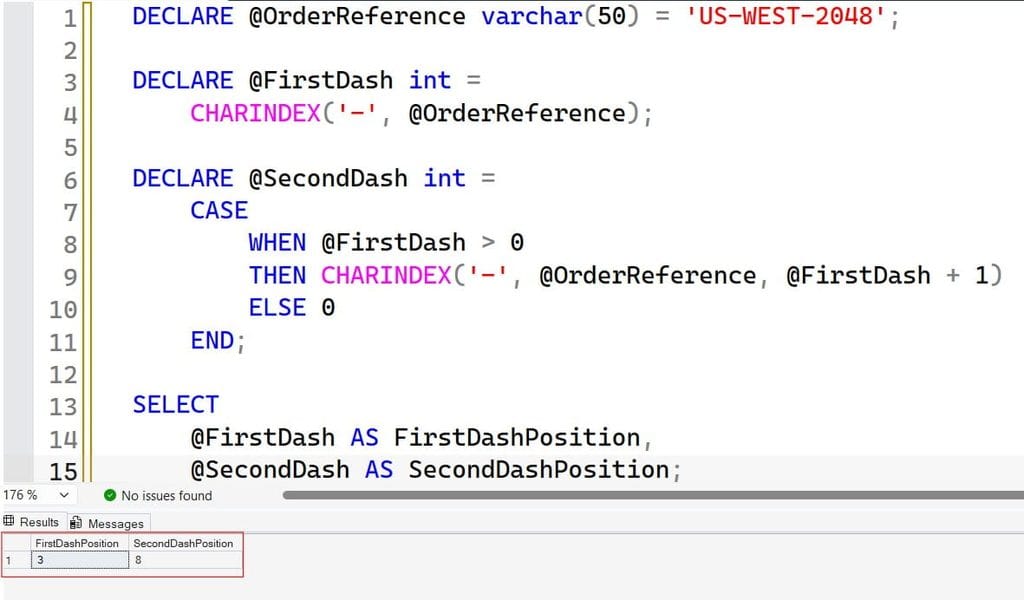
DECLARE @OrderReference varchar(50) = 'US-WEST-2048';

DECLARE @FirstDash int =
    CHARINDEX('-', @OrderReference);

DECLARE @SecondDash int =
    CASE
        WHEN @FirstDash > 0
        THEN CHARINDEX('-', @OrderReference, @FirstDash + 1)
        ELSE 0
    END;

SELECT
    @FirstDash AS FirstDashPosition,
    @SecondDash AS SecondDashPosition;
The results are 3 and 8. The second search begins after the first dash, but its result remains a position within the original string. I got the expected output as shown in the screenshot below.
The guard matters: if the first dash is missing, blindly adding 1 to its result starts another search at position 1. That can hide malformed input.
A missing, zero, or negative starting location makes CHARINDEX search from the beginning. It does not search backward.
Wildcards remain literal
SELECT
    CHARINDEX('_', 'SKU_A100') AS UnderscorePosition,
    CHARINDEX('%', 'Discount 10%') AS PercentPosition;
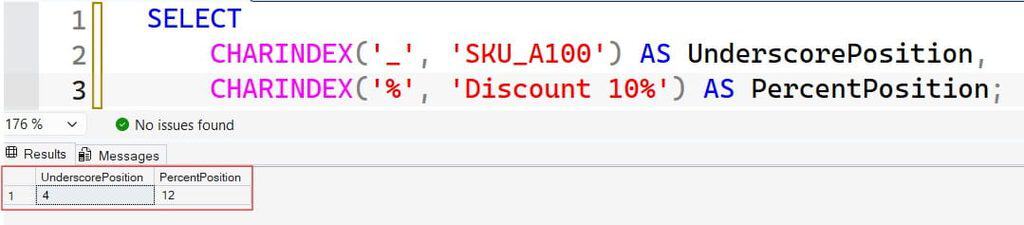
The results are 4 and 12. No wildcard escaping is needed because CHARINDEX treats these characters literally. I got the expected output as shown in the screenshot below.
For additional delimiter examples, see this CHARINDEX function guide.
Pro Tip: I use CHARINDEX for fixed separators such as
@,|, and-. Literal searching makes the code easier to review and avoids accidental wildcard behavior.
Find Patterns With PATINDEX
PATINDEX uses wildcard syntax similar to LIKE, but returns a position instead of a true-or-false match condition. It is not a regular-expression engine.
Common pattern elements include:
| Pattern | Meaning |
|---|---|
% | Zero or more characters |
_ | Exactly one character |
[0-9] | One character in the specified range |
[ABC] | One character from the listed set |
[^0-9] | One character outside the specified range |
For an anywhere-in-the-string search, surround the meaningful pattern with %:
SELECT
    PATINDEX('%[0-9]%', 'Order AB123 shipped')
        AS FirstDigitPosition,
    PATINDEX('%[^0-9]%', '123A45')
        AS FirstNonDigitPosition;
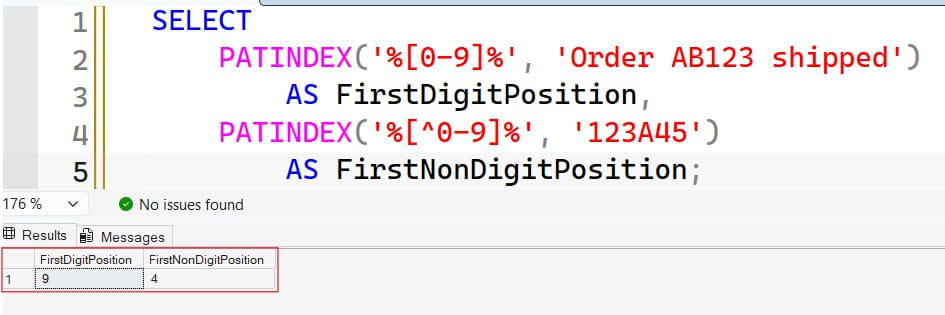
The results are 9 and 4. The second expression is useful when a supplier sends supposedly numeric identifiers containing letters.
Ranges and comparisons can depend on collation. For strict machine-readable rules, define the intended character set and test it under an appropriate collation.
Locate a flexible substring
SELECT PATINDEX('%en_ure%', 'Please ensure the door is locked!')
    AS PatternPosition;
The result is 8. The underscore matches one character between en and ure.
Patterns do not always need surrounding percent signs. For example, PATINDEX('INV%', 'INV-2048') returns 1, while the same pattern does not match Paid INV-2048, because it requires the value to begin with INV.
Learn more about these operators in the SQL wildcard character guide.
Search for literal wildcard characters
SELECT
    PATINDEX('%[_]%', 'SKU_A100') AS UnderscorePosition,
    PATINDEX('%[%]%', 'Discount 10%') AS PercentPosition,
    PATINDEX('%[[]%', 'Item[Blue]') AS BracketPosition;
Bracket expressions make _, %, and [ literal in these examples. Without that treatment, the first two characters would retain their wildcard meanings.
Pro Tip: I test wildcard patterns against both expected matches and near misses. A pattern that finds the right row can still be wrong if it also accepts dozens of invalid values.
SQL Server CHARINDEX vs PATINDEX for Data Validation
Consider an order-processing API receiving account codes from several vendors. The business rule permits only uppercase ASCII letters, digits, and hyphens.
A set-based query checks all sample rows together rather than using a row-by-row loop:
DECLARE @IncomingAccounts TABLE
(
    AccountId int,
    AccountCode varchar(30) NULL
);

INSERT INTO @IncomingAccounts (AccountId, AccountCode)
VALUES
    (1, 'AC-2048'),
    (2, 'AC_2048'),
    (3, ''),
    (4, NULL),
    (5, 'ac-2048');

SELECT
    AccountId,
    AccountCode,
    CASE
        WHEN AccountCode IS NULL THEN 'Missing'
        WHEN DATALENGTH(AccountCode) = 0 THEN 'Empty'
        WHEN PATINDEX(
            '%[^A-Z0-9-]%',
            COALESCE(AccountCode, '')
                COLLATE Latin1_General_100_BIN2
        ) > 0 THEN 'Invalid characters'
        ELSE 'Valid'
    END AS ValidationStatus
FROM @IncomingAccounts;
The first code is valid. The underscore and lowercase letters are invalid; empty and missing values receive separate statuses.
COLLATE applies comparison rules to an expression. The binary collation makes the intended ASCII ranges explicit rather than relying on a database’s linguistic sorting behavior.
COALESCE supplies a non-NULL search expression to PATINDEX. The separate NULL branch still preserves the difference between “missing” and “contains no invalid characters.”
This example checks allowed characters, not the complete account-code format. It still accepts values such as ---. Add separate rules for structure, length, or required prefixes.
For permanent enforcement, consider a CHECK constraint—a rule evaluated when data changes. Pair it with NOT NULL where values are mandatory, and test existing records before deployment. See these SQL constraint fundamentals.
Pro Tip: I return separate validation reasons instead of one “bad data” flag. Support teams can fix a missing value much faster when it is not mixed with character-format errors.
Extract Values Without Invalid-Length Errors
String searching often feeds LEFT or SUBSTRING. The danger appears when no delimiter exists.
An expression such as LEFT(EmailAddress, CHARINDEX('@', EmailAddress) - 1) can produce a negative length when CHARINDEX returns zero.
Use a guarded expression:
DECLARE @EmailAddress nvarchar(200) = N'alex@example.test';

DECLARE @AtPosition int =
    CHARINDEX(N'@', @EmailAddress);

SELECT
    CASE
        WHEN @AtPosition > 1
        THEN LEFT(
            @EmailAddress,
            CASE
                WHEN @AtPosition > 1 THEN @AtPosition - 1
                ELSE 0
            END
        )
        ELSE NULL
    END AS LocalPart;
The result is alex. The inner length expression remains nonnegative, while the outer condition returns NULL for missing delimiters or an empty local part.
This is extraction, not complete email validation. It does not establish that the domain exists or that the address meets every email-format rule.
Simulate a starting location for PATINDEX
PATINDEX has no third parameter. Search a substring, then translate the result back into the original position:
DECLARE @AuditText nvarchar(200) = N'ID=12; CODE=AB7';
DECLARE @StartPosition int = 8;

DECLARE @RelativePosition int =
    PATINDEX(
        N'%[0-9]%',
        SUBSTRING(@AuditText, @StartPosition, 200)
    );

SELECT
    CASE
        WHEN @RelativePosition > 0
        THEN @StartPosition + @RelativePosition - 1
        ELSE 0
    END AS OriginalPosition;
The result is 14, the location of 7 in the original text. The conditional preserves zero when no match exists.
For extraction options, review the SUBSTRING function tutorial. If the real requirement is splitting many delimited values, consider a dedicated splitting approach instead of nesting repeated searches.
Pro Tip: I test extraction with no delimiter, a leading delimiter, repeated delimiters, and NULL. Happy-path examples rarely expose the invalid-length failures that interrupt imports.
Handle NULLs, Collations, and Unicode Deliberately
CHARINDEX returns NULL when either input is NULL. Current Microsoft documentation distinguishes PATINDEX: a NULL pattern returns NULL, while a NULL searched expression is documented as an error. Older documentation describes different NULL behavior, so avoid depending on implicit handling across versions.
For portable defensive code, pass an explicitly normalized expression:
DECLARE @CustomerNote nvarchar(200) = NULL;

SELECT PATINDEX(
    N'%[0-9]%',
    COALESCE(@CustomerNote, N'')
) AS DigitPosition;
This returns 0. Use this only when treating missing text as empty fits the business rule; otherwise, preserve a separate missing-value status.
Case sensitivity is also explicit, not a built-in difference between the functions:
SELECT
    CHARINDEX(
        'sql',
        'SQL Server' COLLATE Latin1_General_100_CI_AS
    ) AS CaseInsensitivePosition,
    CHARINDEX(
        'sql',
        'SQL Server' COLLATE Latin1_General_100_CS_AS
    ) AS CaseSensitivePosition;
The results are 1 and 0. CI means case-insensitive; CS means case-sensitive. Both functions follow the applicable collation.
Use Unicode literals such as N'客户' when searching nvarchar data. Under supplementary-character-aware collations, both functions count UTF-16 surrogate pairs as one character. Positions are not byte offsets, so do not combine them blindly with byte measurements.
Pro Tip: I include collation and NULL cases in automated tests. Otherwise, moving the same code into a differently configured database can change results without changing the query text.
Performance, Cost, and Safe Production Testing
Neither function is universally faster. The amount of text examined, row count, filters, data types, and execution plan usually matter more than choosing one function name.
A condition such as CHARINDEX('refund', OrderNote) > 0 generally cannot seek directly into an ordinary index on OrderNote. A seek navigates to a selective index range; an anywhere-substring search commonly needs a scan.
Replacing it with PATINDEX('%refund%', OrderNote) > 0 does not solve that access-path problem.
For SQL Server performance tuning:
- Restrict searches by indexed business attributes such as tenant, order date, or processing status.
- Use
LIKE 'INV-%'for prefix searches when appropriate; suitable indexes and data types can enable a range seek. - Store frequently queried reference numbers in dedicated columns instead of repeatedly parsing notes.
- Evaluate full-text search for word-based document searches, not as a drop-in replacement for arbitrary substring matching.
Inspect actual execution plans and logical reads, which measure data pages accessed through the buffer cache. Query Store retains query plans and runtime history for before-and-after comparison. These SQL query optimization tips provide a broader tuning workflow.
On Azure SQL Database, repeated scans can consume purchased CPU and I/O capacity. Tune the search and schema before increasing compute.
Run profiling with a non-administrator account and only required SELECT permissions. Keep application and administrator identities separate. Prefer Microsoft Entra authentication and managed identities where supported; protect unavoidable credentials in Azure Key Vault rather than source code or shared files.
Require encrypted connections with certificate validation. Verify the current session’s encryption through approved connection diagnostics or the permitted connection DMV, rather than assuming encryption from a successful login.
Parameterize application input instead of building dynamic SQL. Parameterization prevents input from becoming SQL syntax, but it does not remove wildcard meaning from a PATINDEX pattern.
Pro Tip: I benchmark on production-sized test data before approving a search change. Ten sample rows cannot reveal the scan costs that appear on a busy order-history table.
Frequently Asked Questions
Is PATINDEX a regular-expression function?
No. It supports SQL wildcard patterns such as %, _, and bracket expressions, not regular-expression quantifiers or capture groups. Use it for simple positional pattern matching.
Can CHARINDEX find the second occurrence?
Yes. Find the first occurrence, then start another search after it. Guard the first result so a missing match does not accidentally restart the search.
Why does PATINDEX return zero?
Zero means the supplied pattern did not match. Check surrounding % characters, collation, literal wildcard escaping, and whether the data contains the characters you expect.
Which is faster, CHARINDEX or PATINDEX?
There is no universal winner. Choose correct semantics first, then measure the actual execution plan and workload; scanning millions of rows can outweigh any small scalar-function difference.
Can I use these functions in Azure SQL Database?
Yes. Both are supported in Azure SQL Database and Azure SQL Managed Instance. Still test collation, NULL handling, and performance in the target database rather than assuming every environment is configured identically.
You May Also Like
- Explore PATINDEX examples in SQL Server
- Split a SQL Server string into rows
- Understand SQL NULL values
- Apply SQL Server indexing best practices
- Review SQL Server database permissions
CHARINDEX locates literal substrings and supports a starting location, while PATINDEX locates wildcard patterns. Choose the correct matching rules, guard extraction boundaries, and measure search costs before deploying against large tables. I hope you found this article helpful.

After working for more than 15 years in the Software field, especially in Microsoft technologies, I have decided to share my expert knowledge of SQL Server. Check out all the SQL Server and related database tutorials I have shared here. Most of the readers are from countries like the United States of America, the United Kingdom, New Zealand, Australia, Canada, etc. I am also a Microsoft MVP. Check out more here.