
An order-processing report says 25 items fit into two cartons that each hold 12. The query runs without errors, but the warehouse needs three cartons. Integer division removed the remainder before the rounding function could see it.
SQL Server CEILING returns the smallest whole-number value greater than or equal to its input. It helps calculate cartons, result pages, billing increments, and capacity requirements—but only when the expression feeding it preserves the information you need.
You’ll learn how to use CEILING, handle negative values and data types, and test rounding rules without modifying production data.
How SQL Server CEILING Works
CEILING is a built-in mathematical function in T-SQL, Microsoft’s SQL dialect. It is available in SQL Server, Azure SQL Database, and Azure SQL Managed Instance. Its syntax accepts one numeric expression:
CEILING(numeric_expression)A numeric expression can be a number, column, variable, or calculation.
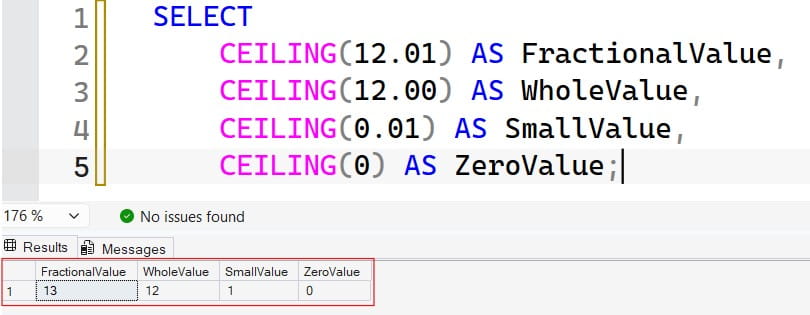
SELECT
    CEILING(12.01) AS FractionalValue,
    CEILING(12.00) AS WholeValue,
    CEILING(0.01) AS SmallValue,
    CEILING(0) AS ZeroValue;
The numerical results are 13, 12, 1, and 0. A value already at a whole-number boundary stays unchanged.
After running the query above, I got the expected output shown in the screenshot below.
“Rounds up” means toward positive infinity, not necessarily away from zero. This distinction becomes important with negative adjustments and credits.
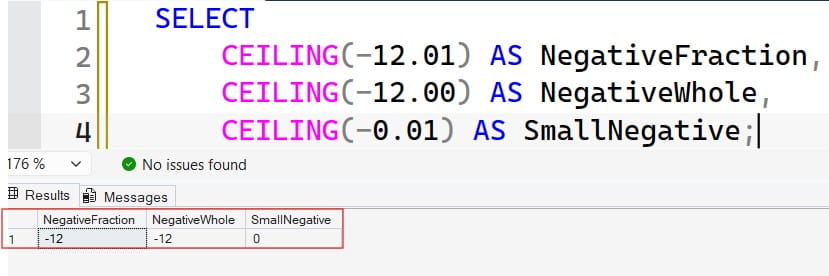
SELECT
    CEILING(-12.01) AS NegativeFraction,
    CEILING(-12.00) AS NegativeWhole,
    CEILING(-0.01) AS SmallNegative;
The results are -12, -12, and 0. Negative twelve is greater than negative twelve point zero one, so it satisfies the ceiling rule.
After running the query above, I got the expected output shown in the screenshot below.
CEILING returns a whole-number value, but that does not mean its SQL data type is always int.
Pro Tip: I would describe the rule as “the next whole value toward positive infinity” in specifications. That wording avoids confusion when negative amounts enter the system.
Compare SQL Server CEILING, FLOOR, and ROUND
These functions answer different questions:
| Input | CEILING | FLOOR | ROUND with length 0 |
|---|---|---|---|
| 12.2 | 13 | 12 | 12 |
| 12.8 | 13 | 12 | 13 |
| -12.2 | -12 | -13 | -12 |
| -12.8 | -12 | -13 | -13 |
CEILING chooses the smallest whole value at or above the input. FLOOR chooses the largest whole value at or below it. ROUND selects a value at a specified precision and uses commercial rounding, with halfway values rounded away from zero.
SELECT
    CEILING(12.2) AS RoundedUp,
    FLOOR(12.2) AS RoundedDown,
    ROUND(12.2, 0) AS RoundedNearest,
    ROUND(12.8, 0, 1) AS Truncated;
The last expression returns 12.0. A nonzero third argument makes ROUND truncate rather than round.
Use CEILING when a partial unit requires another complete unit. Use ROUND when the requirement is nearest-value rounding. Use FLOOR when the requirement is a lower boundary.
For additional comparisons, see SQL Server FLOOR examples.
Pro Tip: I would test positive and negative examples before choosing a rounding function. A rule that looks correct for sales charges can behave differently for refunds.
Avoid Integer Division Before Applying CEILING
The most common CEILING mistake happens before the function executes.
SELECT CEILING(25 / 12) AS IncorrectCartons;Both operands are integers. SQL Server evaluates 25 / 12 as 2, discarding the fractional portion. CEILING then receives 2 and correctly returns 2. The original remainder is already gone. See the screenshot below for reference.

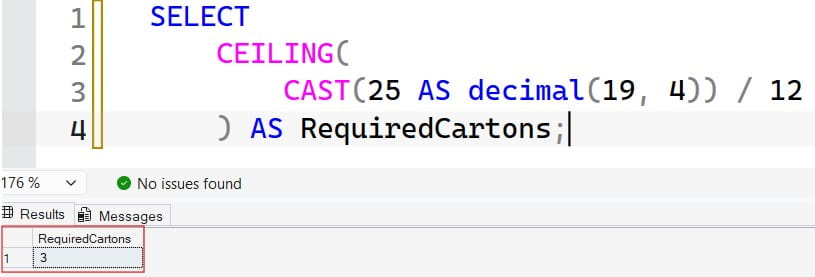
Convert an operand before division:
SELECT
    CEILING(
        CAST(25 AS decimal(19, 4)) / 12
    ) AS RequiredCartons;
This returns 3. See the screenshot below for reference.
Casting after division does not solve the problem:
SELECT
    CEILING(
        CAST(25 / 12 AS decimal(19, 4))
    ) AS StillIncorrect;
The expression still returns 2.
Precision is the total number of digits a decimal type supports. Scale is the number of digits after the decimal point. Choose both deliberately, especially when intermediate calculations involve large quantities or very small fractions. SQL Server limits decimal precision to 38 digits and applies specific rules to arithmetic results.
Review CAST examples in SQL Server when designing numeric expressions.
For extremely large integer counts, decimal division can itself round away a tiny remainder. An integer quotient-and-remainder approach may be preferable when exact grouping matters across the full supported range.
Pro Tip: I would inspect each operand’s data type before troubleshooting CEILING itself. The function cannot restore fractional information lost earlier in the expression.
Calculate Cartons With Safe Input Handling
Suppose an order line contains a quantity and a carton capacity. The business rule requires one additional carton whenever items remain.
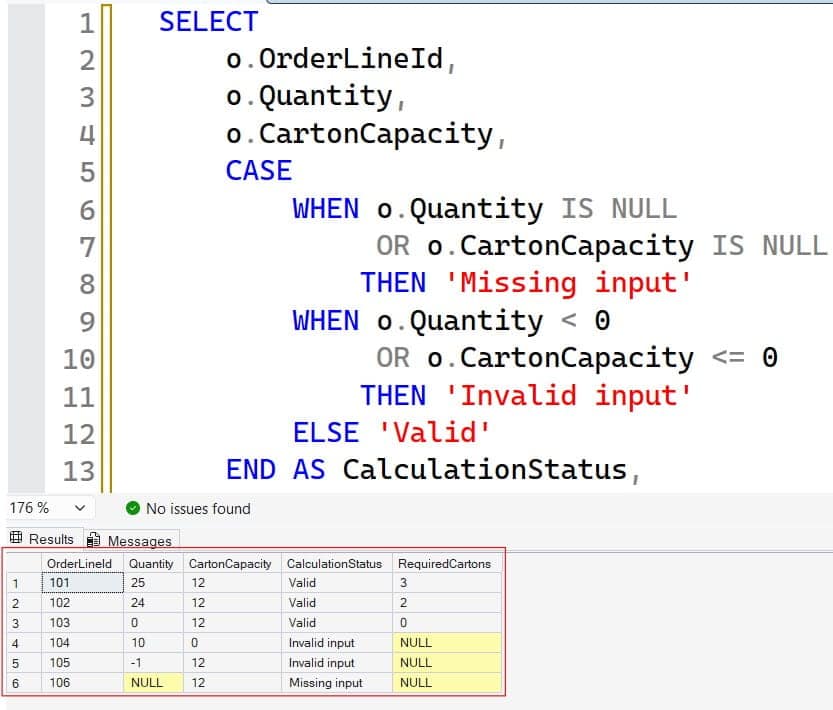
The following query uses inline sample rows. It does not create or change permanent tables.
SELECT
    o.OrderLineId,
    o.Quantity,
    o.CartonCapacity,
    CASE
        WHEN o.Quantity IS NULL
             OR o.CartonCapacity IS NULL
            THEN 'Missing input'
        WHEN o.Quantity < 0
             OR o.CartonCapacity <= 0
            THEN 'Invalid input'
        ELSE 'Valid'
    END AS CalculationStatus,
    CASE
        WHEN o.Quantity >= 0
             AND o.CartonCapacity > 0
        THEN CEILING(
            CAST(o.Quantity AS decimal(19, 4))
            / NULLIF(o.CartonCapacity, 0)
        )
    END AS RequiredCartons
FROM
(
    VALUES
        (101, 25, 12),
        (102, 24, 12),
        (103, 0, 12),
        (104, 10, 0),
        (105, -1, 12),
        (106, NULL, 12)
) AS o(OrderLineId, Quantity, CartonCapacity);
The valid rows produce 3, 2, and 0 cartons. Invalid or missing inputs produce NULL, accompanied by an explanatory status.Check out the screenshot below for your reference.
NULLIF converts a zero denominator to NULL. CASE expresses the broader business validation: a capacity must be positive, and an order quantity cannot be negative.
For persistent order tables, enforce stable rules with SQL Server constraints. For example, capacity should usually be NOT NULL with a CHECK constraint requiring a positive value. A CHECK condition alone does not necessarily reject NULL.
Keep return merchandise separate if negative quantities represent legitimate returns. Do not force two different workflows into one undocumented rounding rule.
Pro Tip: I would return a calculation status alongside NULL during validation. Otherwise, a dashboard can silently treat invalid source data as an ordinary missing result.
Calculate Result Pages and Batch Counts
CEILING is useful when an application displays a fixed number of records per page.
DECLARE @TotalRows bigint = 101;
DECLARE @PageSize int = 25;

SELECT
    CEILING(
        CAST(@TotalRows AS decimal(28, 6))
        / NULLIF(@PageSize, 0)
    ) AS TotalPages;
This returns 5.
Validate that total rows are nonnegative and page size is positive before running the calculation. NULLIF prevents a zero division, but it does not make a negative page size meaningful.
Use exact integer arithmetic for large counts
For nonnegative integer totals and a positive page size, quotient-and-remainder arithmetic avoids decimal precision concerns:
DECLARE @TotalRows bigint = 101;
DECLARE @PageSize bigint = 25;

IF @TotalRows IS NULL
   OR @TotalRows < 0
   OR @PageSize IS NULL
   OR @PageSize <= 0
BEGIN
    THROW 50001,
        'Total rows must be nonnegative; page size must be positive.',
        1;
END;

SELECT
    (@TotalRows / @PageSize)
    + CASE
        WHEN @TotalRows % @PageSize = 0 THEN 0
        ELSE 1
      END AS TotalPages;
The % operator returns the remainder. This produces the same ceiling-of-division result under the stated input rules.
Avoid casually using (total + size - 1) / size: the addition can overflow near the data type’s upper limit.
Also distinguish page counting from efficient pagination. Calculating five pages does not establish a stable row order or make a large OFFSET query inexpensive.
Pro Tip: I would define whether an empty result has zero pages or one empty display page. That is an application decision, not something CEILING should decide accidentally.
Round Billing Values to an Increment
CEILING accepts one argument; it has no decimal-places parameter. To round toward positive infinity at a particular increment, divide by the increment, apply CEILING, and multiply back.
For fifteen-minute billing:
DECLARE @Minutes decimal(12, 2) = 31.00;
DECLARE @Increment decimal(12, 2) = 15.00;

SELECT
    CAST(
        CEILING(@Minutes / NULLIF(@Increment, 0))
        * @Increment
        AS decimal(12, 2)
    ) AS BillableMinutes;
The result is 45.00.
Thirty minutes stays at thirty. Any positive amount beyond thirty requires another increment.
Round upward to cents
sqlDECLARE @Amount decimal(12, 4) = 19.2301;

SELECT
    CAST(
        CEILING(@Amount * 100.0) / 100.0
        AS decimal(12, 2)
    ) AS AmountRoundedUp;
This returns 19.24.
For a negative amount of -19.2301, the same expression returns -19.23, not -19.24. If a contract requires rounding negative values away from zero, that is a different rule.
Use decimal inputs for contractual calculations. Float and real are approximate numeric types; small representation differences around boundaries can produce an unexpected extra increment.
Also decide whether rounding applies per line item or after aggregation. Rounding two separate amounts upward can produce a different total from rounding their sum once.
Pro Tip: I would document the increment, sign rule, and rounding stage together. Those three decisions determine the invoice, not just the selected SQL function.
Inspect Return Types and Prevent Overflow
CEILING’s return type depends on its input. Integer inputs return integer-family results, while float inputs return float. Money inputs return money. Decimal behavior should be checked against the target engine and its documented behavior.
Inspect the metadata directly:
DECLARE @Value decimal(12, 4) = 19.2301;

SELECT
    CEILING(@Value) AS RoundedValue,
    SQL_VARIANT_PROPERTY(
        CEILING(@Value), 'BaseType'
    ) AS ResultType,
    SQL_VARIANT_PROPERTY(
        CEILING(@Value), 'Precision'
    ) AS ResultPrecision,
    SQL_VARIANT_PROPERTY(
        CEILING(@Value), 'Scale'
    ) AS ResultScale;
This reports the actual result metadata from your database rather than relying on how a query grid displays the value.
An explicit final CAST gives an API or report a defined output type, but it can overflow if the value exceeds that type’s range:
SELECT
    TRY_CONVERT(
        int,
        CEILING(
            CAST(2147483647.1 AS decimal(20, 1))
        )
    ) AS IntResult;
The ceiling is 2147483648, which exceeds the maximum int value. TRY_CONVERT therefore returns NULL.
Do not silently accept that NULL in a billing or inventory process. Record or reject the out-of-range value.
See TRY_CONVERT examples for controlled conversion handling.
Pro Tip: I would test the maximum supported input and the resulting output type together. A valid intermediate calculation can still fail when assigned to a narrower column.
Frequently Asked Questions
What does CEILING do in SQL Server?
It returns the smallest whole-number value greater than or equal to its input. For example, CEILING(7.01) returns 8, while CEILING(7.00) returns 7.
Why does CEILING return 2 instead of 3?
Integer division may have removed the fractional portion before CEILING ran. Convert an operand before division, such as CEILING(CAST(25 AS decimal(19,4)) / 12).
How does CEILING handle negative numbers?
It moves toward positive infinity. Therefore, CEILING(-7.8) returns -7, not -8. Use a different expression if the business rule requires rounding away from zero.
Can CEILING round to two decimal places?
Not directly; it accepts only one argument. Scale the value, apply CEILING, and scale it back, while checking precision and the required negative-number behavior.
Does CEILING always return an int?
No. The result type depends on the input type, and a whole-number value can still have a decimal, money, or float representation. Inspect metadata and cast explicitly when consumers require a particular type.
You May Also Like
- How SQL NULL values affect calculations
- Using CASE expressions for business rules
- SQL Server query optimization tips
- Calculating totals with SUM
- SQL database design best practices
SQL Server CEILING helps calculate whole-unit requirements, page counts, and upward billing increments. Preserve the necessary precision, define negative-value behavior, and test boundaries before deploying the calculation. I hope you found this article helpful.

After working for more than 15 years in the Software field, especially in Microsoft technologies, I have decided to share my expert knowledge of SQL Server. Check out all the SQL Server and related database tutorials I have shared here. Most of the readers are from countries like the United States of America, the United Kingdom, New Zealand, Australia, Canada, etc. I am also a Microsoft MVP. Check out more here.