
SQL Server LEN vs DATALENGTH comes down to what you measure. LEN counts characters but excludes trailing spaces. DATALENGTH counts the bytes representing an expression, including trailing spaces in string values. Unicode encoding and fixed-length data types make that distinction especially important.
You’ll learn how to choose the right function, validate incoming data, investigate padding, and avoid expensive length checks on large tables.
SQL Server LEN vs DATALENGTH: The Core Difference
Use LEN when the requirement concerns character length, excluding trailing ordinary spaces. Use DATALENGTH when the requirement concerns the byte representation of a value. Neither function measures a column’s declared maximum capacity.
| Behavior | LEN | DATALENGTH |
|---|---|---|
| Measures | Characters | Bytes |
| Trailing ordinary spaces | Excluded | Included |
| Leading and internal spaces | Counted | Included in byte count |
| Unicode strings | Character count depends on collation rules | Bytes depend on encoding |
| NULL input | Returns NULL | Returns NULL |
| Common purpose | Business validation | Byte limits and data profiling |
Both functions work in SQL Server, Azure SQL Database, and Azure SQL Managed Instance. Moving a database to a managed Azure service does not make character length equal byte length.
Their syntax is simple:
SELECT
    LEN('Order-1001') AS CharacterCount,
    DATALENGTH('Order-1001') AS ByteCount;
After executing the query above, I got the expected output as shown in the screenshot below.
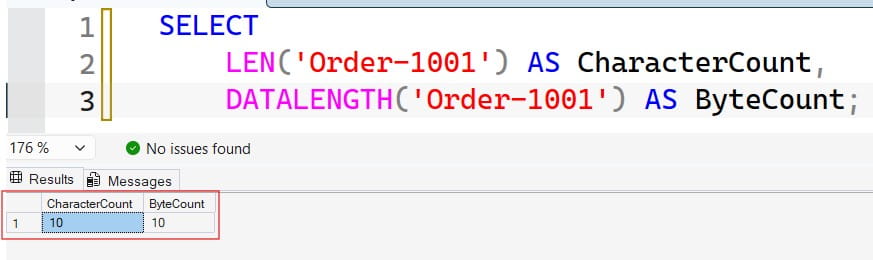
Both results are 10 because the example uses ASCII characters in a varchar literal. That agreement is convenient, but it is not a rule you should build into an international application.
For most non-max inputs, these functions return int. For supported large-value types such as varchar(max) and nvarchar(max), they return bigint.
Pro Tip: I label diagnostic columns
CharacterCountandByteCount, not simplyLength. Clear units prevent the wrong result from becoming an application rule.
SQL Server LEN vs DATALENGTH With Trailing Spaces
Trailing spaces are ordinary space characters at the end of a string. They commonly arrive through CSV imports, older desktop applications, and fixed-width integrations.
Run this read-only example:
DECLARE @CustomerCode varchar(20) = 'ABC   ';

SELECT
    '[' + @CustomerCode + ']' AS VisibleValue,
    LEN(@CustomerCode) AS CharacterCount,
    DATALENGTH(@CustomerCode) AS ByteCount;
The results are: See the screenshot below for reference.
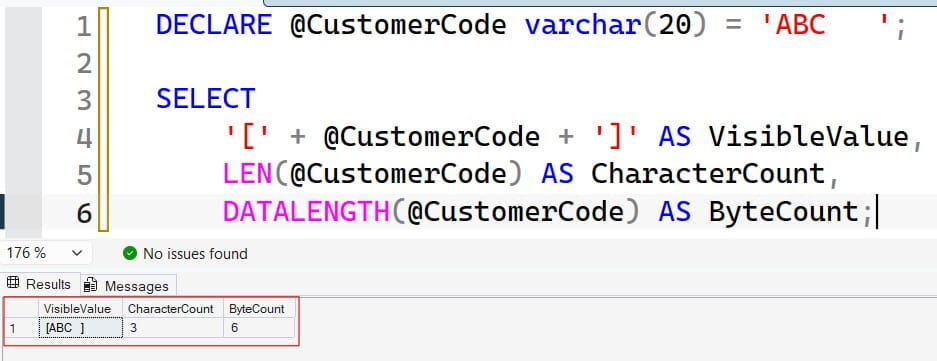
The brackets expose the spaces in the result grid. LEN excludes the three trailing spaces, while DATALENGTH includes their bytes.
Leading and internal spaces behave differently:
SELECT
    LEN('  A B  ') AS CharacterCount,
    DATALENGTH('  A B  ') AS ByteCount;
After executing the query above, I got the expected output as shown in the screenshot below.
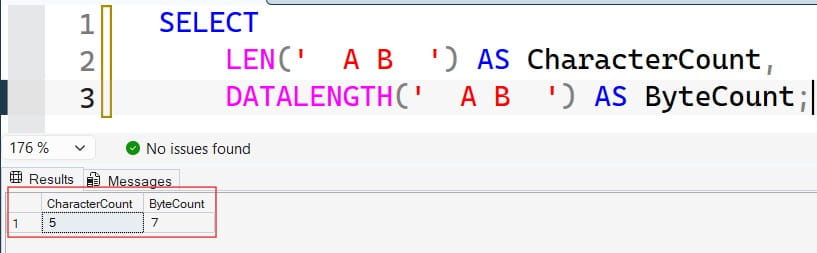
The results are 5 and 7. The leading spaces and the space between A and B count toward LEN; only the final two ordinary spaces are excluded.
Do not interpret this as “LEN removes all whitespace.” Tabs, line breaks, and other Unicode whitespace require separate rules.
Count characters while preserving trailing spaces
Appending a non-space marker makes the original trailing spaces internal:
DECLARE @CustomerCode varchar(20) = 'ABC   ';

SELECT
    LEN(CAST(@CustomerCode AS varchar(max)) + '#') - 1
        AS CharacterCountIncludingTrailingSpaces;
The result is 6. Casting to varchar(max) prevents ordinary bounded-string concatenation from truncating the appended marker. See the screenshot below for reference.
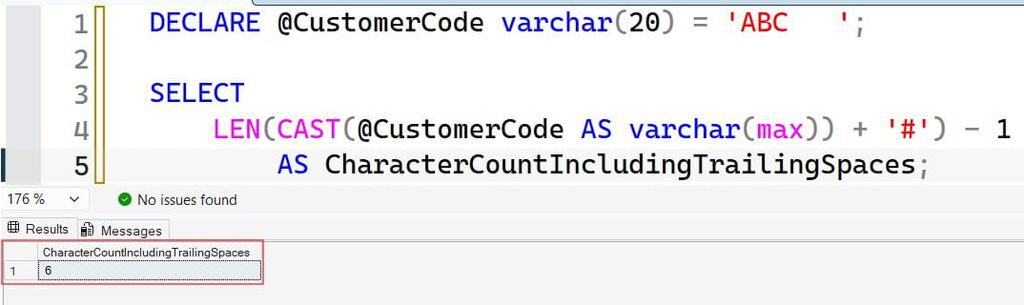
For nvarchar, use nvarchar(max) and N'#'. This technique preserves SQL Server’s character-counting behavior; it does not turn the result into a count of visual symbols.
If spaces should be removed instead, define that cleanup explicitly. This SQL Server TRIM guide explains trimming options.
Pro Tip: I display suspicious strings inside brackets before proposing cleanup. Invisible padding is much easier to explain when the team can actually see it.
Understand CHAR, VARCHAR, NCHAR, and NVARCHAR
Data types determine how SQL Server represents values. Choosing the wrong type can create padding, lose characters, or make validation misleading.
char and nchar are fixed-length string types. varchar and nvarchar are variable-length types.
DECLARE @FixedCode char(10) = 'ABC';
DECLARE @VariableCode varchar(10) = 'ABC';
DECLARE @UnicodeCode nvarchar(10) = N'ABC';

SELECT
    LEN(@FixedCode) AS FixedCharacters,
    DATALENGTH(@FixedCode) AS FixedBytes,
    LEN(@VariableCode) AS VariableCharacters,
    DATALENGTH(@VariableCode) AS VariableBytes,
    LEN(@UnicodeCode) AS UnicodeCharacters,
    DATALENGTH(@UnicodeCode) AS UnicodeBytes;
Expected results:
| Measurement | Result |
|---|---|
| FixedCharacters | 3 |
| FixedBytes | 10 |
| VariableCharacters | 3 |
| VariableBytes | 3 |
| UnicodeCharacters | 3 |
| UnicodeBytes | 6 |
char(10) pads the value to its fixed width. varchar(10) does not add that padding. The three basic Latin characters in nvarchar use six bytes.
The declaration size also matters:
varchar(50)permits up to 50 bytes, not necessarily 50 characters.nvarchar(50)permits 50 byte-pairs, or 100 bytes of string payload.- Some Unicode characters require more than one byte-pair in
nvarchar.
For customer names, variable-length storage usually fits the changing input better than fixed-width padding. Fixed-width codes can justify char, but only when the domain actually requires a fixed width.
Also specify lengths explicitly. A declaration such as DECLARE @Code varchar defaults to length 1, which can lose data before any later check runs.
Pro Tip: I check the parameter and variable declarations before blaming the table. An undersized intermediate variable can destroy the evidence before the INSERT statement executes.
Unicode, UTF-8, and Collation Change the Results
Unicode represents characters across languages. An encoding determines how those characters become bytes. A collation controls comparison and sorting rules and can also affect encoding and character handling.
NVARCHAR is not always two bytes per character
Many commonly used characters occupy two bytes in nvarchar. Supplementary characters use a UTF-16 surrogate pair: two code units occupying four bytes.
Under a supplementary-character-aware, or SC, collation, LEN counts a surrogate pair as one character.
DECLARE @SupplementaryCharacter nvarchar(2) =
    CONVERT(nvarchar(2), 0x3DD800DE);

SELECT
    LEN(
        @SupplementaryCharacter
        COLLATE Latin1_General_100_CI_AS_SC
    ) AS CharacterCount,
    DATALENGTH(@SupplementaryCharacter) AS ByteCount;
The results are 1 and 4. The hexadecimal input creates a supplementary Unicode character without depending on an editor preserving its visible symbol.
Therefore, DATALENGTH(value) / 2 measures UTF-16 code units for an nvarchar value, not universally characters.
Even SC-aware LEN is not a complete count of user-perceived symbols. A displayed character can consist of multiple Unicode code points, such as a letter plus a combining accent. Apply user-interface limits in the application using the appropriate text-processing rules.
UTF-8 makes VARCHAR variable-width
SQL Server 2019 and later support UTF-8 collations for char and varchar. With UTF-8, one character can require multiple bytes.
Run this example on a platform supporting the named collation:
DECLARE @Utf8Example TABLE
(
    CustomerName varchar(20)
        COLLATE Latin1_General_100_CI_AS_SC_UTF8
);

INSERT INTO @Utf8Example (CustomerName)
VALUES (N'café');

SELECT
    CustomerName,
    LEN(CustomerName) AS CharacterCount,
    DATALENGTH(CustomerName) AS ByteCount
FROM @Utf8Example;
The results are 4 characters and 5 bytes. The Unicode literal preserves the accented character before conversion into the UTF-8 column.
This is why a 50-character application limit does not guarantee that text fits in varchar(50). Review Unicode function behavior when troubleshooting multilingual values.
Pro Tip: I include accented names, Asian-language text, and supplementary characters in migration tests. ASCII-only test data hides the encoding problems most likely to affect real customers.
Build Validation Around the Actual Business Rule
An e-commerce system might have two requirements:
- Product codes must contain between 1 and 30 meaningful characters.
- A downstream UTF-8 export permits at most 40 bytes per code.
Those are different rules. One function cannot safely stand in for the other.
Handle NULL and empty strings deliberately
SELECT
    LEN(CAST(NULL AS varchar(20))) AS NullCharacterCount,
    DATALENGTH(CAST(NULL AS varchar(20))) AS NullByteCount,
    LEN('') AS EmptyCharacterCount,
    DATALENGTH('') AS EmptyByteCount,
    LEN('   ') AS SpacesCharacterCount,
    DATALENGTH('   ') AS SpacesByteCount;
The NULL expressions return NULL; empty strings return 0 for both functions. Three ordinary spaces produce 0 from LEN and 3 from DATALENGTH.
NULL means missing or unknown, not an empty string. This distinction matters because a CHECK constraint accepts an unknown result, so a length check alone does not reject NULL.
Enforce the requirement in a constraint
A constraint is a database rule enforced during data changes. The following table-variable example demonstrates validation without creating a permanent application table:
DECLARE @ProductCodeValidation TABLE
(
    ProductCode nvarchar(100) NOT NULL,
    CHECK (LEN(ProductCode) BETWEEN 1 AND 30)
);

INSERT INTO @ProductCodeValidation (ProductCode)
VALUES (N'SKU-1001');

SELECT ProductCode
FROM @ProductCodeValidation;
NOT NULL rejects missing values. The length constraint rejects empty strings and strings containing only ordinary spaces.
However, N'SKU-1001 ' still passes. Decide whether to preserve, reject, or normalize trailing spaces rather than letting LEN make that decision accidentally. Review these SQL constraint fundamentals before applying permanent rules.
Validate before converting into a narrower variable or column. Once text has been truncated, measuring the shortened value cannot reveal its original length. For related failures, see this string or binary data truncation troubleshooting guide.
Pro Tip: I document character limits and byte limits separately in interface contracts. “Maximum length 30” is incomplete unless everyone agrees on the unit and encoding.
Profile Data Without Confusing Payload With Database Size
Before changing a column definition, measure real values. A maximum declared width says little about typical customer input.
DECLARE @CustomerSample TABLE
(
    CustomerName nvarchar(200)
);

INSERT INTO @CustomerSample (CustomerName)
VALUES (N'Anne'), (N'María'), (N'Li  '), (NULL);

SELECT
    COUNT_BIG(*) AS TotalRows,
    MAX(LEN(CustomerName)) AS MaximumCharacters,
    MAX(DATALENGTH(CustomerName)) AS MaximumBytes,
    SUM(CAST(DATALENGTH(CustomerName) AS bigint))
        AS TotalPayloadBytes,
    AVG(CAST(DATALENGTH(CustomerName) AS decimal(19,2)))
        AS AveragePayloadBytes
FROM @CustomerSample;
This set-based query measures the sample without processing rows in a loop. The explicit bigint conversion protects a large aggregate from an int overflow.
MAX, SUM, and AVG ignore NULL inputs. The average therefore describes non-NULL names, while COUNT_BIG(*) includes every row.
Do not treat TotalPayloadBytes as table size. It excludes row metadata, page overhead, indexes, free space, transaction logs, and other allocation details. Compression can also change physical storage without making DATALENGTH a compressed-page measurement.
Use a database table-size query for allocation analysis.
On Azure SQL Database, better sizing decisions can reduce unnecessary storage growth. But selecting a smaller column does not automatically shrink existing files or lower provisioned compute charges.
Pro Tip: I pair length profiling with allocation measurements. Payload tells me about the data; allocation tells me what the database has actually reserved and used.
Frequently Asked Questions
Why does LEN return fewer characters than expected?
LEN excludes trailing ordinary spaces. Collation rules also affect supplementary-character counting, so check the expression’s data type and collation before assuming the result is wrong.
Does DATALENGTH include trailing spaces?
Yes, when those spaces exist in the string expression being measured. It also reflects fixed-width padding, which explains why a short value in char(10) can produce ten bytes.
Can I divide DATALENGTH by two for NVARCHAR?
That gives the number of UTF-16 code units, not always the number of characters. Supplementary characters occupy two code units but count as one character under an SC-aware collation.
Which function should I use to prevent truncation?
Match the destination’s capacity and encoding. Use byte measurements for a byte-limited destination, but measure the converted destination representation when encodings differ; validate before narrowing the value.
Does DATALENGTH show disk space used by a row?
No. It measures the byte representation of the expression, not the complete row, index allocation, compressed page footprint, or database file size. Use storage-allocation measurements for capacity planning.
You May Also Like
- SQL Server CHARINDEX vs PATINDEX
- Count characters in a SQL Server string
- Understand SQL NULL values
- Use CAST for explicit SQL Server conversions
- Apply SQL Server indexing best practices
- Review database design best practices
LEN measures characters without trailing ordinary spaces, while DATALENGTH measures the bytes representing a value. Match validation to the actual data type, encoding, and business requirement, then test boundary cases before deployment. I hope you found this article helpful.

After working for more than 15 years in the Software field, especially in Microsoft technologies, I have decided to share my expert knowledge of SQL Server. Check out all the SQL Server and related database tutorials I have shared here. Most of the readers are from countries like the United States of America, the United Kingdom, New Zealand, Australia, Canada, etc. I am also a Microsoft MVP. Check out more here.