
In this article, I will take you through the SQL Server FLOOR function from an architectural and development perspective: its formal mathematical definition, underlying data type preservation rules, negative number behaviors, performance implications, and practical schema design patterns.
SQL Server FLOOR
What is the SQL Server FLOOR Function?
The FLOOR function in Microsoft SQL Server is a built-in mathematical scalar function that takes a single numeric expression as an input and returns the largest integer less than or equal to that specified expression.
Visualizing the Number Line:
   <---|-------|-------|-------|-------|-------|--->
      -3      -2      -1       0       1       2

 positive input:  1.85  ======>  moves left toward -infinity  ======>  1
 negative input: -1.15  ======>  moves left toward -infinity  ======> -2
In pure mathematical notation, this is known as the greatest integer function:
$$\lfloor x \rfloor = \max \{ m \in \mathbb{Z} \mid m \le x \}$$
The essential concept to grasp is directional movement: FLOOR always rounds downward along the Cartesian number line toward negative infinity ($-\infty$).
Core T-SQL Syntax
The syntax for FLOOR is direct and minimal:
FLOOR(numeric_expression)The numeric_expression argument can be any valid literal, column expression, variable, or subquery resolving to an exact numeric or approximate numeric data type category (with the explicit exception of the BIT data type).
Return Types and Data Type Preservation Rules
A common misconception among database developers is that FLOOR() always returns an INT or BIGINT.
This is false.
SQL Server preserves the input data type family. If you pass a DECIMAL(10, 2) into FLOOR(), the engine evaluates the mathematical floor, but the return data type remains DECIMAL(10, 2)—it merely forces the fractional precision after the decimal separator to zeroes.
Inspecting Type Preservation in T-SQL
To verify how SQL Server surfaces the output metadata, execute the following script using the sys.dm_exec_describe_first_result_set dynamic management function:
-- Auditing the metadata return type of the FLOOR function
SELECT
    column_ordinal,
    name,
    system_type_name
FROM sys.dm_exec_describe_first_result_set(
    N'SELECT
          FLOOR(CAST(142.85 AS DECIMAL(18, 4))) AS DecimalFloor,
          FLOOR(CAST(142.85 AS FLOAT))          AS FloatFloor,
          FLOOR(CAST(142.85 AS MONEY))          AS MoneyFloor;',
    NULL,
    0
);
Script Execution Results
| column_ordinal | name | system_type_name |
| 1 | DecimalFloor | decimal(18,4) |
| 2 | FloatFloor | float |
| 3 | MoneyFloor | money |
After executing the above query, I got the expected output as shown in the screenshot below.
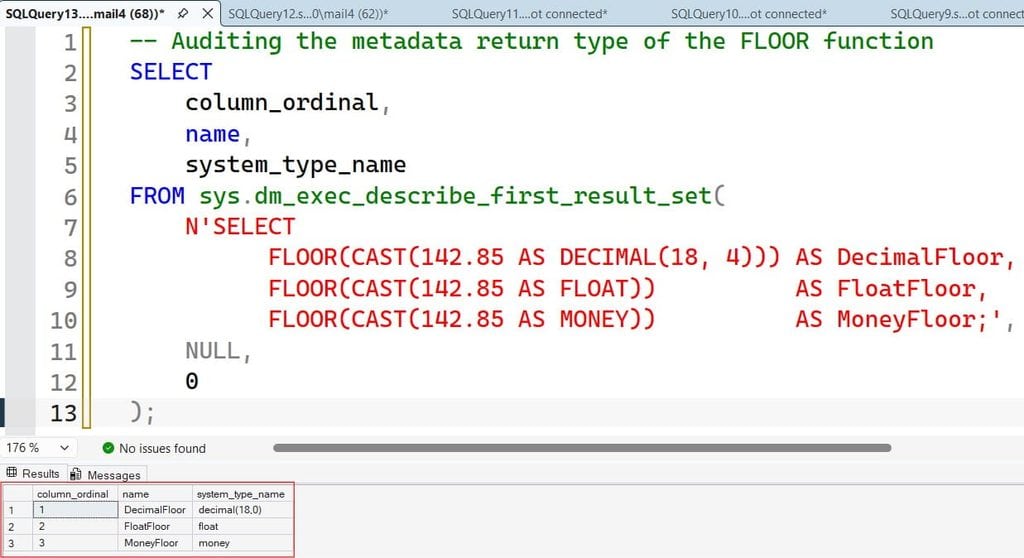
Notice that the return type for DecimalFloor retains four decimal places (decimal(18,4)). The value returned is 142.0000, not an untyped integer 142.
If your application client or API contract requires a strict integer without trailing zeroes, you must explicitly wrap the output inside a conversion function:
DECLARE @InputMetric DECIMAL(10, 2) = 879.65;

-- Explicitly casting to an integer to strip scale
SELECT CAST(FLOOR(@InputMetric) AS INT) AS CleanInteger;
Positive vs. Negative Numbers: The Cartesian Trap
The most common bug related to FLOOR occurs when handling negative numerical values.
When developers think of “rounding down,” they frequently conflate the concept with truncation (stripping the fractional tail). While FLOOR and truncation produce identical outputs for positive numbers, their outputs diverge when processing negative values.
Positive Comparison:
Input:  18.75  --> FLOOR:  18
Input:  18.75  --> TRUNCATE: 18 (Values match)

Negative Comparison:
Input: -18.75  --> FLOOR: -19 (Moves down toward -infinity)
Input: -18.75  --> TRUNCATE: -18 (Moves toward zero)
Comparative T-SQL Demonstration
Run this batch script to observe how FLOOR processes numbers on either side of zero:
DECLARE @PosValue DECIMAL(8, 2) = 45.85;
DECLARE @NegValue DECIMAL(8, 2) = -45.85;

SELECT
    @PosValue AS [Original_Positive],
    FLOOR(@PosValue) AS [FLOOR_Positive],
    @NegValue AS [Original_Negative],
    FLOOR(@NegValue) AS [FLOOR_Negative];
Output:
After executing the above query, I got the expected output as shown in the screenshot below.
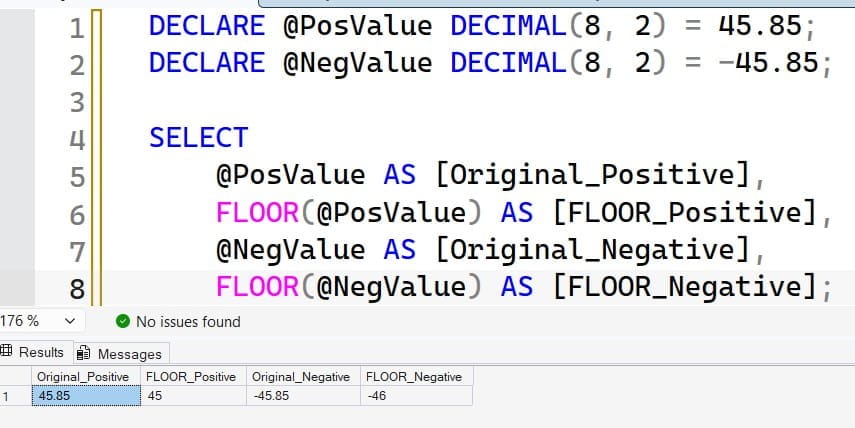
Because $-46$ is smaller than $-45.85$, FLOOR(-45.85) evaluates to -46.00. If your business requirements dictate that negative metrics round toward zero (e.g., -45.85 becomes -45), do not use FLOOR. Instead, use integer casting or the ROUND() function with a truncation flag.
Practical T-SQL Patterns Using FLOOR
Beyond basic scalar math, FLOOR serves as a core building block for common database manipulation patterns.
Pattern 1: Truncating a Number to a Specific Decimal Precision
While FLOOR natively reduces numbers to whole integers, you can truncate a number to a fixed decimal scale (such as two decimal places) without rounding up by scaling the number by powers of ten:
DECLARE @RawRate DECIMAL(18, 6) = 145.879234;

-- Target: Truncate strictly to 2 decimal places (145.87) without rounding to 145.88
SELECT
    FLOOR(@RawRate * 100.0) / 100.0 AS TruncatedTwoPlaces;
- Multiply by $10^N$ (where $N$ is the desired number of decimal places).
- Apply
FLOOR()to discard the remaining fractional tail. - Divide by $10^N$ using a decimal divisor (
100.0, not the integer100) to prevent implicit integer division truncation.
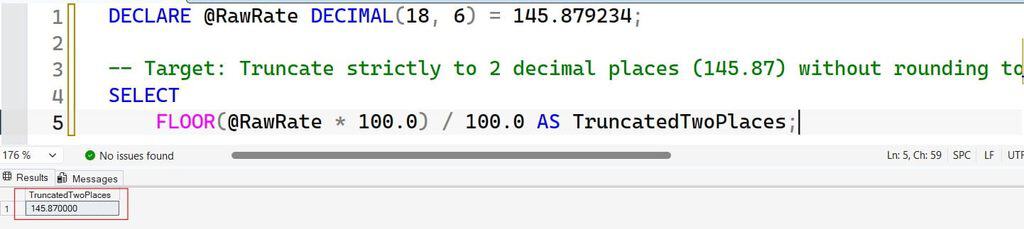
After executing the above query, I got the expected output as shown in the screenshot below.
Pattern 2: Dynamic Numeric Bucketing and Histogram Grouping
When constructing analytical reports or data distribution histograms, you often need to categorize numerical values into fixed buckets (e.g., intervals of 10, 50, or 100):
-- Schema Target: Sales.Invoices (Subtotal Column)
-- Categorizing invoice balances into $50.00 analytical tiers

DECLARE @BucketInterval INT = 50;

SELECT
    FLOOR(Subtotal / @BucketInterval) * @BucketInterval AS BucketFloor,
    (FLOOR(Subtotal / @BucketInterval) * @BucketInterval) + (@BucketInterval - 0.01) AS BucketCeiling,
    COUNT(InvoiceID) AS InvoiceCount,
    SUM(Subtotal)    AS TotalBucketVolume
FROM Sales.Invoices
GROUP BY
    FLOOR(Subtotal / @BucketInterval) * @BucketInterval
ORDER BY
    BucketFloor ASC;
This pattern dynamically buckets values into groups such as $0.00 - $49.99, $50.00 - $99.99, and $100.00 - $149.99 in a single aggregation step without requiring complex CASE statements.
Pattern 3: Legacy Stripping of the Time Component from DATETIME
In legacy versions of SQL Server (prior to the introduction of the clean DATE type in SQL Server 2008), database administrators stripped time elements from legacy DATETIME storage using FLOOR.
Under the hood, SQL Server stores DATETIME values as two 4-byte integers: the first integer stores the number of days since January 1, 1900, while the second stores the fractional time of day.
-- Legacy technique: Stripping time by flooring the internal float representation
DECLARE @HistoricalTimestamp DATETIME = '2026-09-07 14:45:32.890';

SELECT
    @HistoricalTimestamp AS FullTimestamp,
    CAST(FLOOR(CAST(@HistoricalTimestamp AS FLOAT)) AS DATETIME) AS DateOnlyFloored;
Modern Standard Note: While this is a common sight in legacy enterprise stored procedures, modern SQL Server development should always use
CAST(@HistoricalTimestamp AS DATE)for readability and optimizer accuracy.
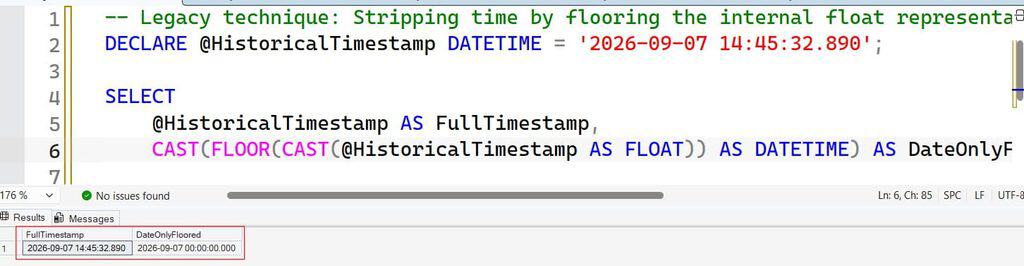
After executing the above query, I got the expected output as shown in the screenshot below.
Performance, SARGability, and Index Optimization
As a database architect, the primary issue I encounter with scalar mathematical functions like FLOOR is their misplacement inside query search predicates (WHERE and JOIN clauses).
Applying a function to an indexed column invalidates the index’s B-tree search capabilities, turning what should be a microsecond Index Seek into an expensive Index Scan.
Un-SARGable Query Execution (Anti-Pattern):
SELECT AccountID, Balance
FROM Banking.Accounts
WHERE FLOOR(Balance) = 500;
[Engine must evaluate FLOOR() on every single row in the index -> Index Scan]

SARGable Query Execution (Best Practice):
SELECT AccountID, Balance
FROM Banking.Accounts
WHERE Balance >= 500.00 AND Balance < 501.00;
[Engine performs a direct, high-efficiency Index Seek on the B-tree leaf nodes]
Preserving SARGability with Range Predicates
When filtering data based on a floored value, re-engineer your predicate into a half-open boundary interval ([Start, End)):
-- Instead of: WHERE FLOOR(MetricValue) = @TargetInteger
-- Rewrite to:
WHERE MetricValue >= @TargetInteger
  AND MetricValue <  (@TargetInteger + 1);
This allows the SQL Server Query Optimizer to evaluate the boundary conditions as constant literals, navigating directly to the matching leaf nodes of an existing nonclustered index.
The Persisted Computed Column Alternative
If queries frequently filter or group by the floored representation of a column, do not compute the function dynamically on every user search. Build a persisted computed column and index it:
-- Step 1: Add a persisted computed column encapsulating the mathematical floor
ALTER TABLE Sales.CustomerTransactions
ADD FlooredAmount AS FLOOR(TransactionAmount) PERSISTED;

-- Step 2: Index the computed column
CREATE NONCLUSTERED INDEX IX_CustomerTransactions_FlooredAmount
ON Sales.CustomerTransactions (FlooredAmount)
INCLUDE (CustomerID, TransactionDate);

-- Step 3: Queries hitting this column will now execute an Index Seek directly
SELECT CustomerID, TransactionDate, FlooredAmount
FROM Sales.CustomerTransactions
WHERE FlooredAmount = 250.00;
By persisting the computed column, the CPU cost of calculating the floor is paid once during INSERT or UPDATE operations rather than on every analytical read.
Edge Cases and T-SQL Practices
When deploying mathematical operations into enterprise production environments, build defensive guardrails against these known edge cases:
- Approximate Data Types (
FLOATandREAL): Due to binary floating-point representation limits under IEEE 754 standards, approximate datatypes can yield unexpected flooring results. A value stored asFLOATthat displays as5.0in SQL Server Management Studio (SSMS) might internally be represented as4.9999999999999991. In that scenario,FLOOR()returns4, not5. Always use exact numerics (DECIMALorNUMERIC) for financial calculations. - Arithmetic Overflow on Explicit Conversion: If you floor a large
DECIMAL(38, 0)and subsequently attempt to convert the result into a standardINT, the engine will throw an arithmetic overflow error (Msg 232, Level 16) if the number exceeds $2,147,483,647$. Always cast into a sufficiently sized target data type (such asBIGINT). NULLPropagation: Like most standard scalar mathematical functions in T-SQL,FLOORconforms to ANSI SQL standard null-propagation rules:SQLSELECT FLOOR(NULL); -- Evaluates to NULL without throwing an exceptionIf your business logic requires fallback handling for missing values, wrap your input insideISNULL()orCOALESCE():SQLSELECT FLOOR(COALESCE(DiscretionaryBonus, 0.00)) FROM Payroll.Salaries;
Technical Summary
The SQL Server FLOOR function is a predictable, high-performance mathematical scalar function when its operational boundaries are respected:
- Directional Rounding:
FLOORalways moves downward toward negative infinity ($-\infty$), setting it apart from symmetric rounding and zero-truncation operations. - Type Preservation: The output data type matches the input data type family; it does not automatically transform inputs into generic integers.
- Negative Divergence: Negative numbers round to the next lower integer (e.g.,
-2.1evaluates to-3.0). - SARGability Protection: Never apply
FLOOR()directly to indexed columns inside aWHEREclause; replace function calls with half-open range queries or persisted computed columns to protect index seek operations.
Understanding these mechanics ensures your T-SQL calculations remain precise, performant, and reliable across enterprise database environments.
You may also like the following articles:

After working for more than 15 years in the Software field, especially in Microsoft technologies, I have decided to share my expert knowledge of SQL Server. Check out all the SQL Server and related database tutorials I have shared here. Most of the readers are from countries like the United States of America, the United Kingdom, New Zealand, Australia, Canada, etc. I am also a Microsoft MVP. Check out more here.