
A product manager once asked me for a list of users who had logged in five days in a row, so the team could send them a loyalty reward. An analyst had already tried. The query joined the login table to itself five times, took several minutes on a table with a few million rows, and still missed users who logged in twice on the same day. The rewards email went out a week late.
That request is a classic problem: how to find consecutive dates in SQL. The good news is that SQL Server has a clean, fast pattern for it, and it needs no loops and no stack of self joins. This guide builds that pattern step by step with T-SQL, then shows how to find streak lengths, longest and current streaks, and missing dates, and how to index the table.
Build a Practice Table
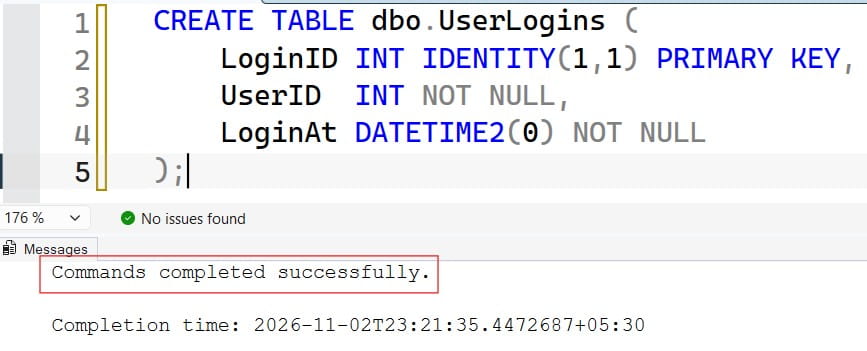
A schema is the structure of your tables. Use a simple login log, the kind found in SaaS apps and audit trails.
CREATE TABLE dbo.UserLogins (
    LoginID INT IDENTITY(1,1) PRIMARY KEY,
    UserID  INT NOT NULL,
    LoginAt DATETIME2(0) NOT NULL
);

INSERT INTO dbo.UserLogins (UserID, LoginAt)
VALUES
 (1, '2026-10-01 09:10'), (1, '2026-10-02 08:05'), (1, '2026-10-02 17:45'),
 (1, '2026-10-03 10:30'), (1, '2026-10-05 11:00'), (1, '2026-10-06 12:15'),
 (1, '2026-10-09 07:50'),
 (2, '2026-10-01 14:00'), (2, '2026-10-03 13:20'), (2, '2026-10-04 09:40'),
 (2, '2026-10-05 16:10'), (2, '2026-10-06 08:30'), (2, '2026-10-07 10:05');
After running the query above, I got the expected output shown in the screenshot below.
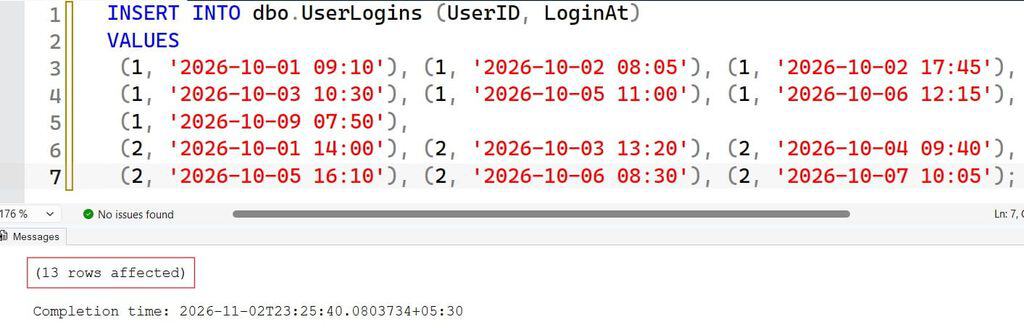
Run this only in a test database. User 1 has two logins on October 2, which is a deliberate trap. Expected streaks are:
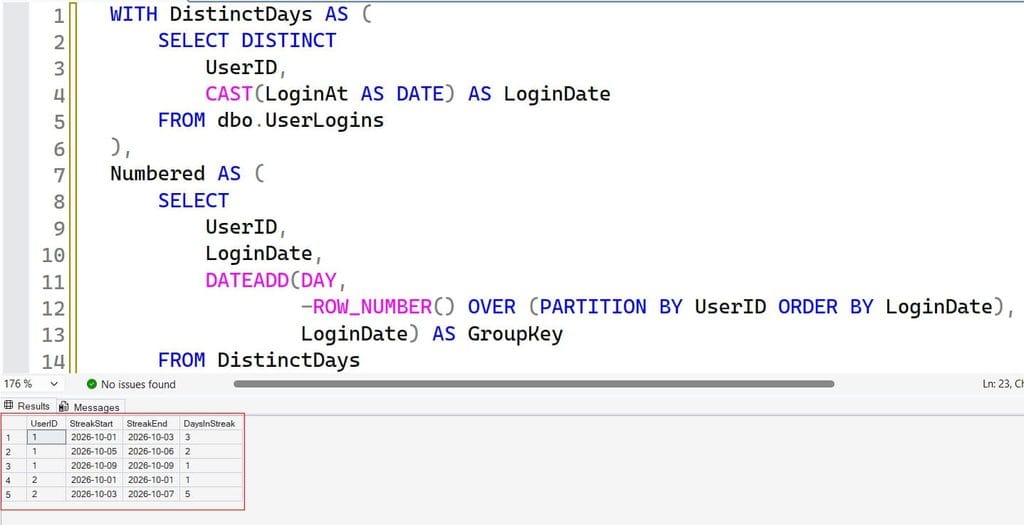
| User | Streak | Days |
|---|---|---|
| 1 | Oct 1 to Oct 3 | 3 |
| 1 | Oct 5 to Oct 6 | 2 |
| 1 | Oct 9 | 1 |
| 2 | Oct 1 | 1 |
| 2 | Oct 3 to Oct 7 | 5 |
The LoginAt column stores a date and time. Consecutive-date logic works on dates, so you must remove the time part first. See SQL Server date data types and converting datetime to date.
Pro Tip: In my experience, every streak bug I have fixed involved a date the developer never tested: two events on the same day, a gap over a weekend, or a time component hiding in the column. I put all three in my test data before writing any query.
The Core Pattern: Date Minus Row Number
This technique is part of what DBAs call gaps and islands: an island is an unbroken run of values, and a gap is a break between islands. The trick is simple. If dates are consecutive and you subtract an increasing row number from each date, every date in the same streak produces the same result.
| Date | Row number | Date minus row number |
|---|---|---|
| Oct 1 | 1 | Sep 30 |
| Oct 2 | 2 | Sep 30 |
| Oct 3 | 3 | Sep 30 |
| Oct 5 | 4 | Oct 1 |
| Oct 6 | 5 | Oct 1 |
Oct 1 to Oct 3 all land on Sep 30, so they form one group. The jump to Oct 5 produces a new value, which starts a new group. That result becomes your grouping key.
WITH DistinctDays AS (
    SELECT DISTINCT
        UserID,
        CAST(LoginAt AS DATE) AS LoginDate
    FROM dbo.UserLogins
),
Numbered AS (
    SELECT
        UserID,
        LoginDate,
        DATEADD(DAY,
                -ROW_NUMBER() OVER (PARTITION BY UserID ORDER BY LoginDate),
                LoginDate) AS GroupKey
    FROM DistinctDays
)
SELECT
    UserID,
    MIN(LoginDate) AS StreakStart,
    MAX(LoginDate) AS StreakEnd,
    COUNT(*)       AS DaysInStreak
FROM Numbered
GROUP BY UserID, GroupKey
ORDER BY UserID, StreakStart;
Here is what each part does:
DISTINCTwithCAST(... AS DATE)keeps one row per user per day. Without it, user 1’s two logins on October 2 would break the pattern, because the row number would advance twice for one date. See DISTINCT.ROW_NUMBER() OVER (PARTITION BY ...)numbers each user’s dates from 1 upward.PARTITION BYrestarts the numbering for each user; read ROW_NUMBER, PARTITION BY, and the OVER clause.DATEADD(DAY, -n, date)subtracts the row number from the date. See DATEADD.GROUP BY UserID, GroupKeycollapses each island into one row, with its start, end, and length.
After running the query above, I got the expected output shown in the screenshot below.
A CTE (common table expression) is a named, temporary result that the next query can use. If you wonder when to use one instead of a temp table, see CTE vs. temp table.
The result matches the table above. This pattern reads the data once, sorts it once per user, and scales much better than repeated self joins.
Pro Tip: I always run the
NumberedCTE by itself first and look at theGroupKeycolumn. If the keys in one visible streak are not identical, the date cleanup is wrong, and every later step will be wrong too.
How to Find Users With a Minimum Streak
The original request was “five days in a row.” Add HAVING to filter the grouped islands. Read about HAVING vs. WHERE if you need a refresher.
WITH DistinctDays AS (
    SELECT DISTINCT UserID, CAST(LoginAt AS DATE) AS LoginDate
    FROM dbo.UserLogins
),
Numbered AS (
    SELECT UserID, LoginDate,
           DATEADD(DAY,
                   -ROW_NUMBER() OVER (PARTITION BY UserID ORDER BY LoginDate),
                   LoginDate) AS GroupKey
    FROM DistinctDays
)
SELECT UserID, MIN(LoginDate) AS StreakStart, MAX(LoginDate) AS StreakEnd,
       COUNT(*) AS DaysInStreak
FROM Numbered
GROUP BY UserID, GroupKey
HAVING COUNT(*) >= 5;
After running the query above, I got the expected output shown in the screenshot below.
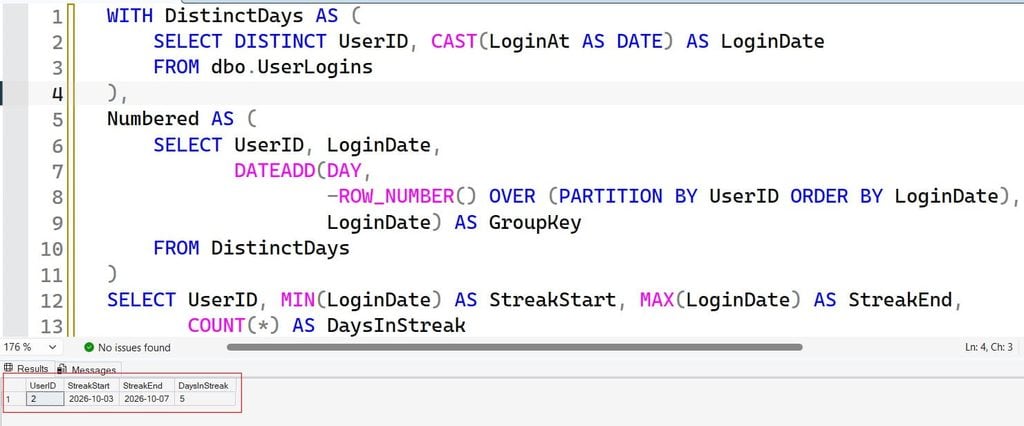
With the sample data, only user 2 qualifies, with a five-day streak from October 3 to October 7. Change the number in HAVING for any threshold. A user can appear more than once if they had several qualifying streaks, so use SELECT DISTINCT UserID if the business only wants a list of users.
Find Each User’s Longest Streak
To keep only the best streak per user, rank the islands:
WITH DistinctDays AS (
    SELECT DISTINCT UserID, CAST(LoginAt AS DATE) AS LoginDate
    FROM dbo.UserLogins
),
Numbered AS (
    SELECT UserID, LoginDate,
           DATEADD(DAY,
                   -ROW_NUMBER() OVER (PARTITION BY UserID ORDER BY LoginDate),
                   LoginDate) AS GroupKey
    FROM DistinctDays
),
Streaks AS (
    SELECT UserID, MIN(LoginDate) AS StreakStart, MAX(LoginDate) AS StreakEnd,
           COUNT(*) AS DaysInStreak
    FROM Numbered
    GROUP BY UserID, GroupKey
),
Ranked AS (
    SELECT *,
           ROW_NUMBER() OVER (PARTITION BY UserID
                              ORDER BY DaysInStreak DESC, StreakEnd DESC) AS rn
    FROM Streaks
)
SELECT UserID, StreakStart, StreakEnd, DaysInStreak
FROM Ranked
WHERE rn = 1;
After running the query above, I got the expected output shown in the screenshot below.
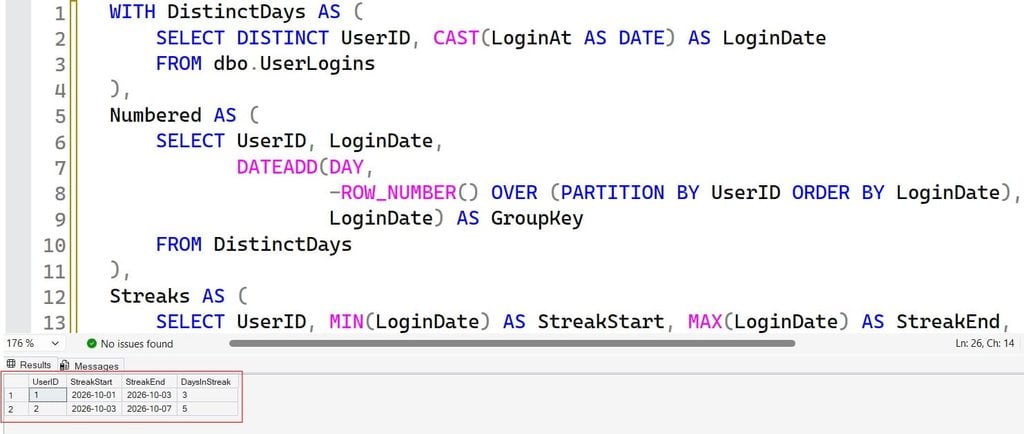
The tie-breaker StreakEnd DESC makes the result stable when two streaks have the same length: the most recent one wins. User 1 returns Oct 1 to Oct 3, and user 2 returns Oct 3 to Oct 7.
Pro Tip: In my experience, stakeholders change the rule from “5 in a row” to “longest streak” to “current streak” in the same meeting. I build the
StreaksCTE once and reuse it for all three questions.
Find the Current Streak
A “current streak” is one that includes today, or yesterday if today’s activity has not happened yet. Use a variable for the as-of date so you can test repeatably. For more on working with today’s date, see getting the days between a date and today.
DECLARE @AsOf DATE = '2026-10-09';  -- use CAST(GETDATE() AS DATE) in production

WITH DistinctDays AS (
    SELECT DISTINCT UserID, CAST(LoginAt AS DATE) AS LoginDate
    FROM dbo.UserLogins
),
Numbered AS (
    SELECT UserID, LoginDate,
           DATEADD(DAY,
                   -ROW_NUMBER() OVER (PARTITION BY UserID ORDER BY LoginDate),
                   LoginDate) AS GroupKey
    FROM DistinctDays
)
SELECT UserID, MIN(LoginDate) AS StreakStart, MAX(LoginDate) AS StreakEnd,
       COUNT(*) AS DaysInStreak
FROM Numbered
GROUP BY UserID, GroupKey
HAVING MAX(LoginDate) >= DATEADD(DAY, -1, @AsOf);
After running the query above, I got the expected output shown in the screenshot below.
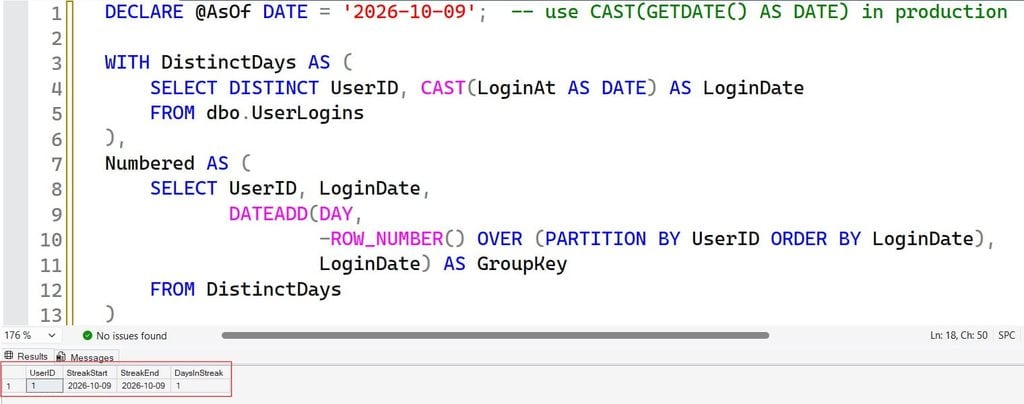
This keeps streaks that ended today or yesterday. With the sample data and an as-of date of October 9, user 1’s one-day streak qualifies. Passing the date as a parameter also makes the logic easy to unit test. Time zones matter here: if your users are in several zones, decide whether “a day” is based on UTC or on the user’s local time, and store the rule in the query.
An Alternative: LAG to Flag Streak Breaks
The row-number trick is compact but a little abstract. The LAG approach is easier to explain to teammates. LAG reads a value from the previous row. See window functions in SQL Server.
WITH DistinctDays AS (
    SELECT DISTINCT UserID, CAST(LoginAt AS DATE) AS LoginDate
    FROM dbo.UserLogins
),
Flagged AS (
    SELECT UserID, LoginDate,
           CASE WHEN DATEDIFF(DAY,
                     LAG(LoginDate) OVER (PARTITION BY UserID ORDER BY LoginDate),
                     LoginDate) = 1
                THEN 0 ELSE 1 END AS IsNewStreak
    FROM DistinctDays
),
Grouped AS (
    SELECT UserID, LoginDate,
           SUM(IsNewStreak) OVER (PARTITION BY UserID ORDER BY LoginDate
                                  ROWS UNBOUNDED PRECEDING) AS StreakID
    FROM Flagged
)
SELECT UserID, StreakID,
       MIN(LoginDate) AS StreakStart,
       MAX(LoginDate) AS StreakEnd,
       COUNT(*) AS DaysInStreak
FROM Grouped
GROUP BY UserID, StreakID
ORDER BY UserID, StreakStart;
After running the query above, I got the expected output shown in the screenshot below.
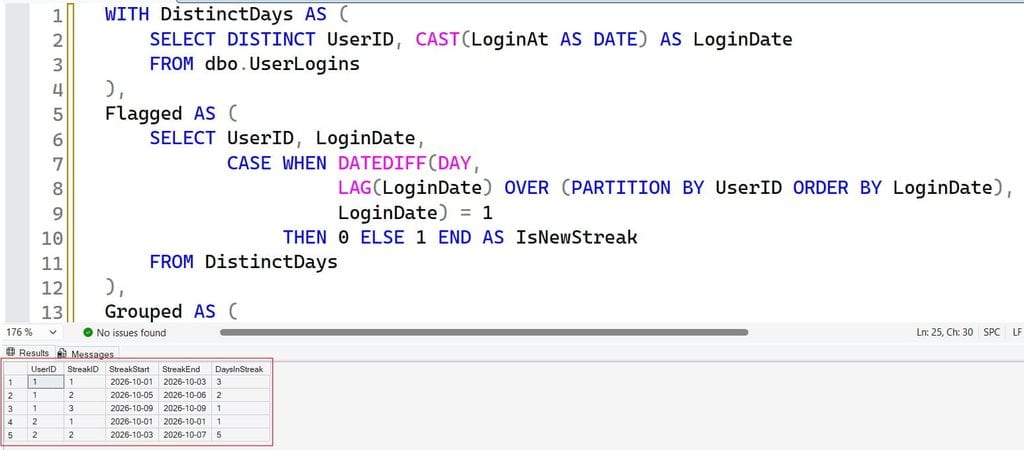
The logic reads like a sentence. If the gap from the previous date is exactly one day, this row continues the streak, so the flag is 0. Otherwise it starts a new streak, so the flag is 1. For the first row, LAG returns NULL, DATEDIFF returns NULL, the comparison is not true, and the flag becomes 1, which is correct. A running SUM of the flags then gives each streak an ID. See DATEDIFF for how it counts boundaries.
Both approaches give the same answer. The row-number version needs one window function; the LAG version needs two, but each step is easier to debug. Pick the one your team can maintain.
Pro Tip: I use the
LAGversion when I am teaching or handing the query to someone new, and the date-minus-row-number version when I want the shortest code. Whichever you choose, add a comment explaining why it works.
Find Missing Dates (Gaps)
The opposite question is just as common: when did a user skip days? Use LEAD, which reads the next row’s value.
WITH DistinctDays AS (
    SELECT DISTINCT UserID, CAST(LoginAt AS DATE) AS LoginDate
    FROM dbo.UserLogins
),
WithNext AS (
    SELECT UserID, LoginDate,
           LEAD(LoginDate) OVER (PARTITION BY UserID ORDER BY LoginDate) AS NextDate
    FROM DistinctDays
)
SELECT UserID,
       DATEADD(DAY, 1, LoginDate)  AS GapStart,
       DATEADD(DAY, -1, NextDate)  AS GapEnd,
       DATEDIFF(DAY, LoginDate, NextDate) - 1 AS MissingDays
FROM WithNext
WHERE DATEDIFF(DAY, LoginDate, NextDate) > 1
ORDER BY UserID, GapStart;
After running the query above, I got the expected output shown in the screenshot below.
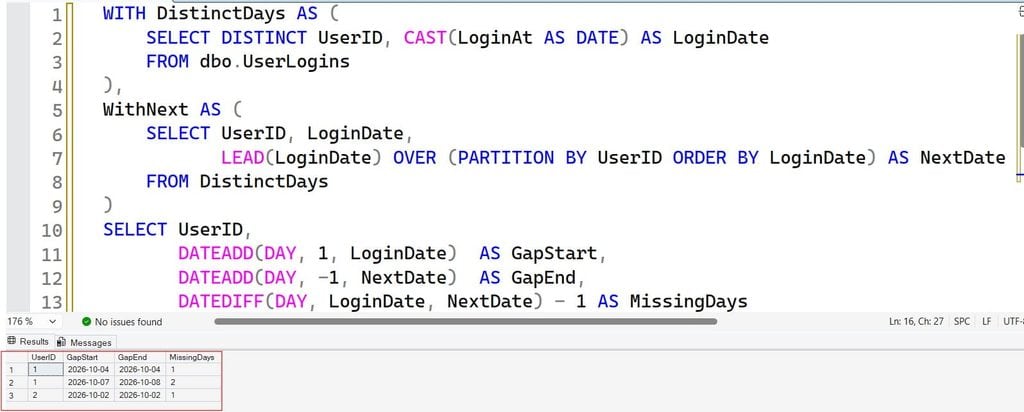
For user 1, this returns Oct 4 (1 day) and Oct 7 to Oct 8 (2 days). The final row for each user has no next date, so DATEDIFF is NULL and the row is filtered out, which is the behavior you want. These gap reports help with churn detection, missing sensor readings, and compliance checks.
Why Self Joins Are the Wrong Tool
You may see answers like this:
SELECT a.UserID, a.LoginDate
FROM DistinctDays a
JOIN DistinctDays b ON b.UserID = a.UserID AND b.LoginDate = DATEADD(DAY, 1, a.LoginDate)
JOIN DistinctDays c ON c.UserID = a.UserID AND c.LoginDate = DATEADD(DAY, 2, a.LoginDate);
It finds three-day streaks, but it has serious problems. You need one extra join per day of the streak, so a seven-day rule needs seven joins. It returns overlapping rows for longer streaks, so a ten-day streak is reported several times. And performance falls as the table grows. See joins in SQL Server for when self joins are the right tool. For streaks of any length, the window approach is almost always better.
Loops are also a poor fit. A row-by-row WHILE loop processes one date at a time, which is slow and hard to read; set-based T-SQL does the same job in one pass.
Make It Fast: Indexing and Date Types
A clustered index defines how rows are physically stored, and a nonclustered index is a separate sorted structure that speeds up lookups. The streak query partitions by user and sorts by date. An index that already has that order lets SQL Server skip an expensive sort. See how to create an index in SQL Server.
Because the query casts LoginAt to a date, you can store the date part in a persisted computed column, a column calculated from others and stored physically so it can be indexed.
ALTER TABLE dbo.UserLogins
ADD LoginDate AS CAST(LoginAt AS DATE) PERSISTED;

CREATE NONCLUSTERED INDEX IX_UserLogins_User_LoginDate
ON dbo.UserLogins (UserID, LoginDate);
Test this on a non-production copy first. Adding a persisted column to a large table can take time and locks. The index supports PARTITION BY UserID ORDER BY LoginDate and lets SQL Server read each user’s dates in order. The trade-off is extra storage and slightly slower inserts, because every new login updates the index.
Other tuning tips:
- Filter by a date range first. If you only need the last 90 days, add a range such as
LoginAt >= @Start AND LoginAt < @Endso the engine reads less. See filtering by date and SQL query optimization tips. - Pre-aggregate large logs. For hundreds of millions of rows, keep a small daily table with one row per user per day, updated by a nightly job, and run streak queries against that.
- Check the actual execution plan for Sort operators and scans. In Azure SQL Database, use Query Store to compare run time before and after the index.Pro Tip: In my experience, a daily summary table beats any clever index once the log gets huge. It turns “scan every login ever” into “read one row per user per day.”
Frequently Asked Questions
How do I find consecutive dates in SQL Server?
Remove duplicate days, number each user’s dates with ROW_NUMBER(), and subtract that number from the date. Dates in the same streak give the same result, so you can group by it. Then use MIN, MAX, and COUNT to get the start, end, and length.
How do I find users who logged in three days in a row?
Use the grouping pattern and add HAVING COUNT(*) >= 3. Apply DISTINCT UserID if you only need a list of users instead of each streak.
What is the difference between ROW_NUMBER and LAG for streaks?
ROW_NUMBER with date subtraction creates the group key in one step and is shorter. LAG compares each date to the previous one, flags breaks, and builds groups with a running sum; it is longer but easier to read and debug.
How do I find missing dates between rows?
Use LEAD to get each row’s next date, then keep rows where DATEDIFF(DAY, LoginDate, NextDate) > 1. The gap runs from one day after the current date to one day before the next date.
Why does my streak query miscount when users log in twice a day?
Duplicate rows advance ROW_NUMBER without advancing the date, which breaks the pattern. Select DISTINCT UserID, CAST(LoginAt AS DATE) first so each day counts once.
You learned how to find consecutive dates in SQL Server by cleaning dates, numbering rows, grouping streaks, and using LAG and LEAD for flags and gaps. Always reduce your data to one row per entity per day before applying streak logic, and give report users read-only access to a view instead of the raw log. I hope you found this article helpful.
You May Also Like
- How to find the maximum date in SQL Server
- How to find the minimum date in SQL Server
- How to add days to a date in SQL Server
- How to get the weekday from a date in SQL Server
- How to get the latest record by date in SQL Server
- How to Find NULL Values in a Table in SQL Server

After working for more than 15 years in the Software field, especially in Microsoft technologies, I have decided to share my expert knowledge of SQL Server. Check out all the SQL Server and related database tutorials I have shared here. Most of the readers are from countries like the United States of America, the United Kingdom, New Zealand, Australia, Canada, etc. I am also a Microsoft MVP. Check out more here.