
A support lead once asked me why her “high priority” ticket report showed refunds as low priority. The developer had written a long chain of IF logic in the application, and every time the rules changed, the app and the report disagreed. We moved the rule into one T-SQL expression, and the two numbers matched on the first run.
That expression was CASE WHEN, and learning how to use CASE WHEN in SQL Server is one of the best investments a developer or analyst can make. It adds if/then logic directly inside a query, so labels, buckets, custom sorting, and conditional totals all come from the database in one pass. This guide covers both forms of CASE, the common patterns, the NULL and data-type traps, performance, and safe use in production on SQL Server or Azure SQL Database.
What CASE Does and the Two Forms
CASE is an expression, not a statement. That means it returns a value and can be used anywhere a value is allowed: in SELECT, WHERE, ORDER BY, GROUP BY, aggregates, and UPDATE. SQL Server evaluates the conditions from top to bottom and returns the result for the first one that is true.
There are two forms.
Simple CASE compares one expression to a list of values:
CASE Status
    WHEN 'Shipped' THEN 'Done'
    WHEN 'Pending' THEN 'Open'
    ELSE 'Other'
END
Searched CASE tests full conditions, so it handles ranges, AND/OR, and NULL checks:
CASE
    WHEN Amount < 100 THEN 'Small'
    WHEN Amount < 500 THEN 'Medium'
    ELSE 'Large'
END
Use simple CASE for exact matches and searched CASE for everything else. If you leave out ELSE and no condition matches, the result is NULL. Always add an ELSE unless NULL is truly what you want.
Pro Tip: In my experience, I default to the searched form even for exact matches. It costs nothing, and it avoids a rewrite when someone asks for a range or a NULL check later.
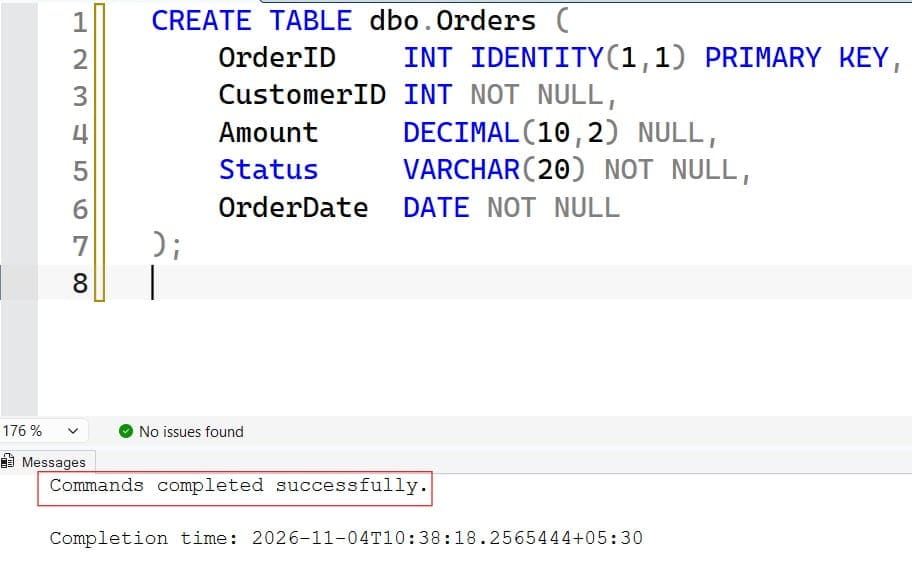
Create a Practice Table
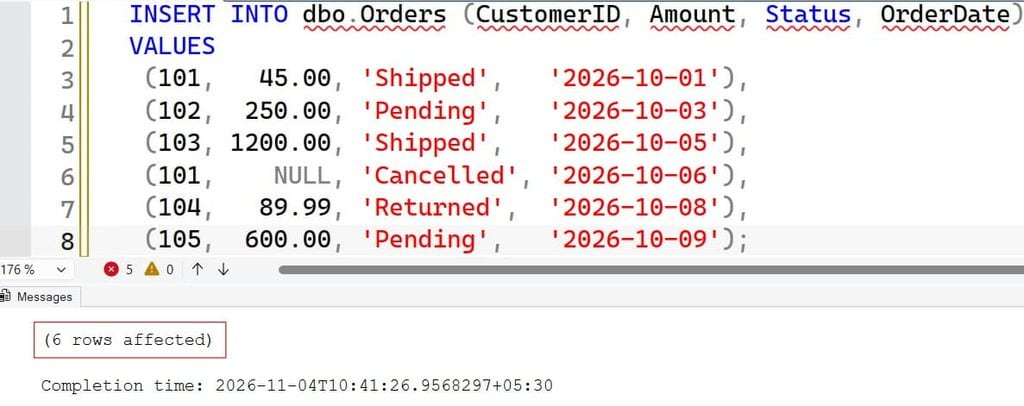
A schema is the structure of your tables. Use a small orders table with edge cases: a NULL amount, mixed statuses, and values on both sides of each band.
CREATE TABLE dbo.Orders (
    OrderID    INT IDENTITY(1,1) PRIMARY KEY,
    CustomerID INT NOT NULL,
    Amount     DECIMAL(10,2) NULL,
    Status     VARCHAR(20) NOT NULL,
    OrderDate  DATE NOT NULL
);

INSERT INTO dbo.Orders (CustomerID, Amount, Status, OrderDate)
VALUES
 (101,   45.00, 'Shipped',   '2026-10-01'),
 (102,  250.00, 'Pending',   '2026-10-03'),
 (103, 1200.00, 'Shipped',   '2026-10-05'),
 (101,    NULL, 'Cancelled', '2026-10-06'),
 (104,   89.99, 'Returned',  '2026-10-08'),
 (105,  600.00, 'Pending',   '2026-10-09');
Run this only in a test database, because it inserts rows. Order 4 has a NULL amount on purpose.
After executing the query above, I got the expected output as shown in the screenshot below.
How to Use CASE WHEN in SQL Server SELECT Queries
The most common use is creating a label column. This query puts each order in a size band:
SELECT
    OrderID,
    Amount,
    CASE
        WHEN Amount IS NULL THEN 'No amount'
        WHEN Amount < 100   THEN 'Small'
        WHEN Amount < 500   THEN 'Medium'
        ELSE 'Large'
    END AS OrderSize
FROM dbo.Orders;
After executing the query above, I got the expected output as shown in the screenshot below.
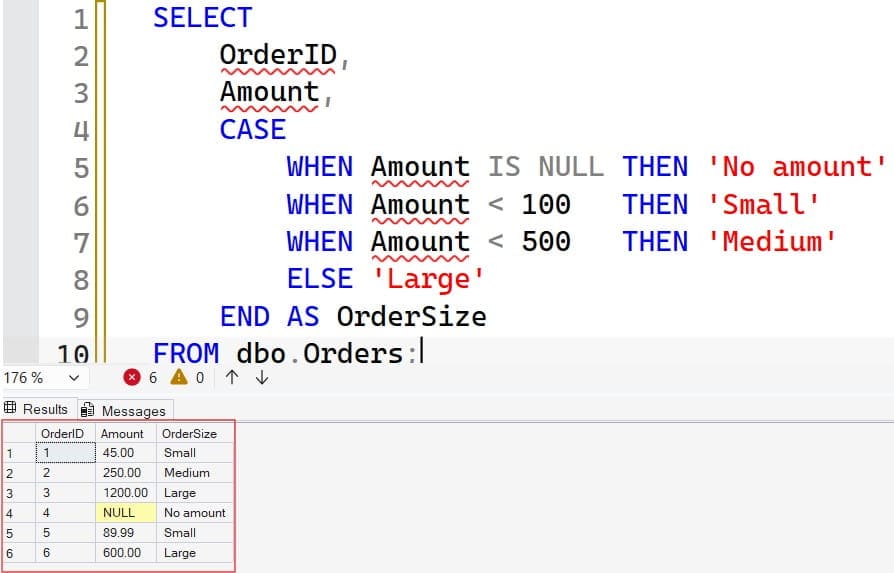
The results are Small, Medium, Large, No amount, Small, and Large for orders 1 to 6. Notice three details:
- Order matters. SQL Server returns the first true branch. Because
Amount < 100comes beforeAmount < 500, an order of 45 is Small, even though it is also below 500. If you reverse them, everything below 500 becomes Medium. - The NULL check comes first. A NULL amount makes both
Amount < 100andAmount < 500unknown, not true, so it would fall through toELSEand be labeled Large. That is a silent bug. For more on this behavior, see how SQL handles NULL. - Aliases name the result.
AS OrderSizegives the new column a readable name.
You can also translate codes with a simple CASE:
SELECT OrderID,
       CASE Status
           WHEN 'Shipped'   THEN 'Complete'
           WHEN 'Pending'   THEN 'In progress'
           WHEN 'Cancelled' THEN 'Closed'
           WHEN 'Returned'  THEN 'Closed'
           ELSE 'Unknown'
       END AS StatusGroup
FROM dbo.Orders;
After executing the query above, I got the expected output as shown in the screenshot below.
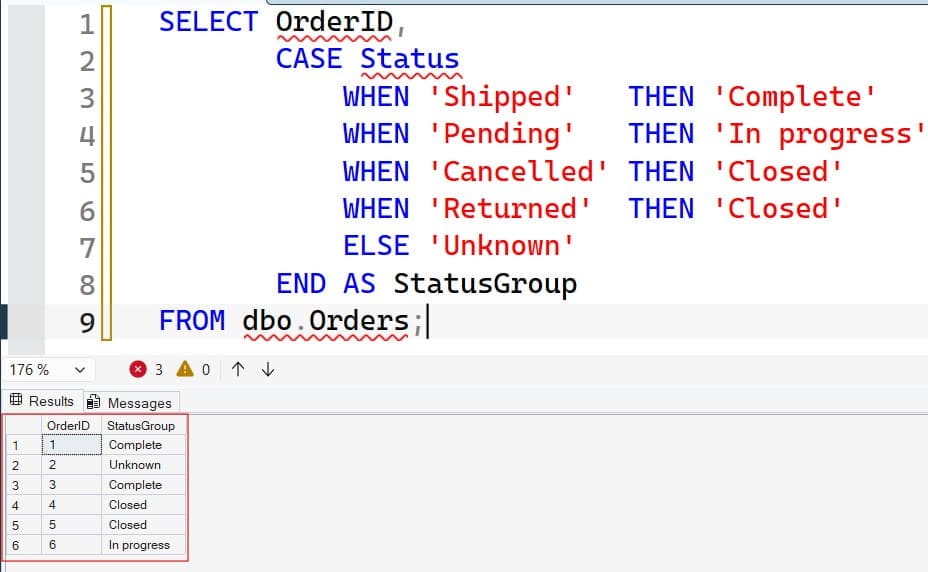
Keeping this mapping in one query, or better in a view, prevents the “app and report disagree” problem. See SQL Server views.
Pro Tip: I write the NULL branch first in every searched
CASE. It takes one line and removes a whole class of “why is this row in the wrong bucket” bugs.
The NULL Trap: = NULL Never Matches
This is the number one mistake. Inside CASE, WHEN Amount = NULL is never true, because comparing with NULL gives unknown.
-- Wrong: never matches
CASE WHEN Amount = NULL THEN 'No amount' ELSE 'Has amount' END

-- Right
CASE WHEN Amount IS NULL THEN 'No amount' ELSE 'Has amount' END
The same trap exists in simple CASE. CASE Amount WHEN NULL THEN ... also never matches, because the simple form uses equality. Use the searched form with IS NULL.
For shorter NULL handling, COALESCE and ISNULL often replace a whole CASE; see COALESCE and ISNULL. For choosing between them, read NULLIF vs. COALESCE.
Use CASE in ORDER BY for Custom Sorting
Alphabetical order is rarely the business order. CASE in ORDER BY lets you define your own ranking:
SELECT OrderID, Status, OrderDate
FROM dbo.Orders
ORDER BY
    CASE Status
        WHEN 'Pending'   THEN 1
        WHEN 'Shipped'   THEN 2
        WHEN 'Returned'  THEN 3
        WHEN 'Cancelled' THEN 4
        ELSE 5
    END,
    OrderDate DESC;
After executing the query above, I got the expected output as shown in the screenshot below.
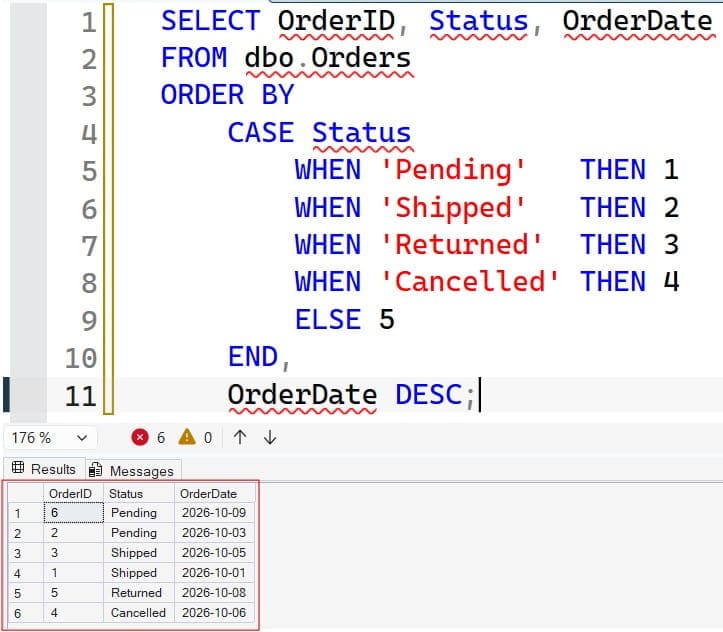
The CASE maps each status to a number, and SQL Server sorts by that number first. Pending orders appear at the top, then Shipped, Returned, and Cancelled, with the newest order first inside each group. See ORDER BY in SQL Server for the basics.
A second use is putting NULLs last. SQL Server sorts NULLs first in ascending order, so this flips that:
sqlORDER BY CASE WHEN Amount IS NULL THEN 1 ELSE 0 END, Amount;The first sort key is 0 for rows with an amount and 1 for NULL rows, so NULLs fall to the end.
Conditional Aggregation: Pivot-Style Reports
You can place CASE inside an aggregate function to count or sum only certain rows. This is called conditional aggregation, and it replaces many separate queries with one. See the SUM function and GROUP BY.
SELECT
    COUNT(*) AS TotalOrders,
    SUM(CASE WHEN Status = 'Shipped'   THEN 1 ELSE 0 END) AS ShippedCount,
    SUM(CASE WHEN Status = 'Pending'   THEN 1 ELSE 0 END) AS PendingCount,
    SUM(CASE WHEN Status = 'Shipped'   THEN Amount ELSE 0 END) AS ShippedRevenue,
    SUM(CASE WHEN Status = 'Pending'   THEN Amount ELSE 0 END) AS PendingRevenue
FROM dbo.Orders;
After executing the query above, I got the expected output as shown in the screenshot below.
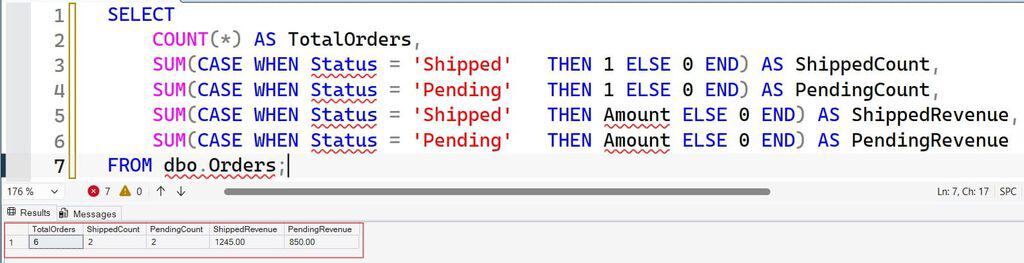
With the sample data, this returns 6 total orders, 2 shipped, 2 pending, 1,245.00 in shipped revenue, and 850.00 in pending revenue. Each CASE returns 1 or the amount when the row qualifies and 0 otherwise, and SUM adds the results.
Use SUM(CASE ... THEN 1 ELSE 0 END), not COUNT(CASE ... THEN 1 ELSE 0 END). COUNT counts every non-NULL value, so 0 is counted too. If you want COUNT, omit the ELSE so non-matching rows become NULL. For more on COUNT, see the COUNT function.
For a full pivot with dynamic columns, SQL Server also has a PIVOT operator; see pivoting rows to columns. Conditional aggregation is often easier to read and works with any version.
Pro Tip: I use conditional aggregation for dashboards because one query returns every tile. Ten small queries each scan the table; one
CASE-based query scans it once.
Use CASE in UPDATE Statements
CASE lets one UPDATE apply different values to different rows.
Warning: UPDATE overwrites data. Take a backup, preview with a SELECT, and use a transaction. See table backup in SQL Server.
-- Preview first
SELECT OrderID, Status,
       CASE WHEN Status = 'Pending' AND OrderDate < '2026-10-05'
            THEN 'Delayed' ELSE Status END AS NewStatus
FROM dbo.Orders;

BEGIN TRANSACTION;

UPDATE dbo.Orders
SET Status = CASE
                 WHEN Status = 'Pending' AND OrderDate < '2026-10-05' THEN 'Delayed'
                 ELSE Status
             END
WHERE Status = 'Pending';

SELECT @@ROWCOUNT AS RowsUpdated;

-- COMMIT TRANSACTION;   -- after verifying the count
-- ROLLBACK TRANSACTION; -- to undo
After executing the query above, I got the expected output as shown in the screenshot below.
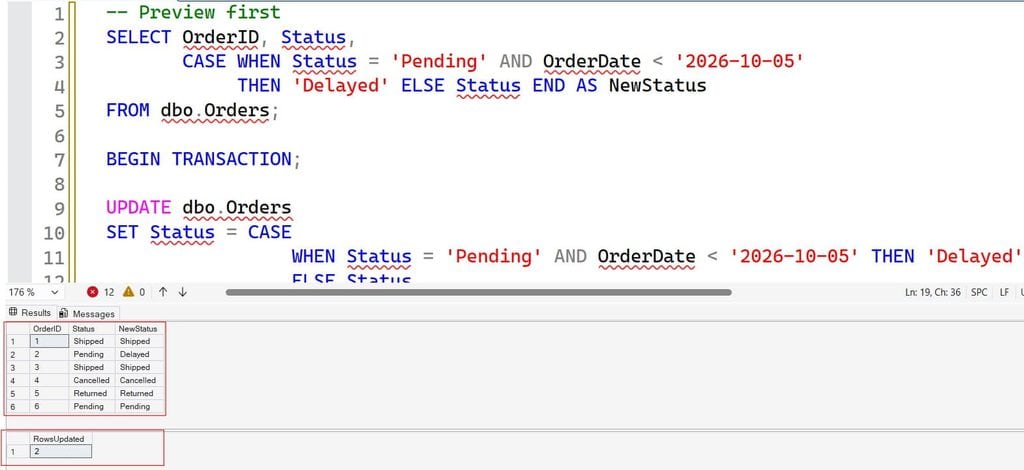
The preview shows exactly what will change. The WHERE Status = 'Pending' limits the rows the update touches, and ELSE Status keeps the original value for rows that do not match. Without the WHERE, SQL Server would rewrite every row, including unchanged ones, which wastes log space and takes more locks.
Check @@ROWCOUNT before you commit, and keep the transaction short to avoid blocking other sessions. When the new values come from another table, see updating a table from another table.
Pitfalls: Data Types, Evaluation Order, and Division
Return types must be compatible. Every THEN and ELSE result in one CASE must resolve to a single data type, chosen by SQL Server’s data type precedence, the ranking that decides which type wins when types are mixed. If one branch returns a number and another returns text, SQL Server tries to convert the text to a number and fails:
-- Fails when the ELSE branch is reached: 'Unknown' cannot become an INT
SELECT CASE WHEN Amount > 100 THEN 1 ELSE 'Unknown' END FROM dbo.Orders;
Make the types match, for example by casting the number to text. See the CAST function and the related error converting varchar to numeric.
Guard division, but know the limits. CASE is the standard way to avoid divide-by-zero:
SELECT CASE WHEN Amount = 0 OR Amount IS NULL THEN NULL
            ELSE 100.0 / Amount END AS Ratio
FROM dbo.Orders;
SQL Server generally evaluates CASE branches in order, but the documentation warns that it does not guarantee evaluation order in every case, especially when aggregates appear inside the expression. For simple division, NULLIF is shorter and safer: 100.0 / NULLIF(Amount, 0).
Nesting has a limit. SQL Server allows CASE expressions to nest up to 10 levels. If you need that many, move the rules into a lookup table and join to it. A mapping table is easier to change than code; see joins in SQL Server.
Know the alternatives. IIF is shorthand for a two-branch CASE; see the IIF function. CHOOSE picks from a list by position; see the CHOOSE function. Use CASE when you have more than two outcomes or need the clearest logic.
Pro Tip: I once reviewed a
CASEwith twelve nested levels that nobody on the team dared touch. We replaced it with a six-row lookup table, and the next rule change took two minutes.
Use CASE in WHERE and Keep Queries Fast
You can place CASE in a WHERE clause, but you usually should not. Compare these two queries:
-- Hard for the optimizer: the column is hidden inside an expression
SELECT OrderID FROM dbo.Orders
WHERE CASE WHEN Status = 'Shipped' THEN 1 ELSE 0 END = 1;

-- Better: a plain, index-friendly condition
SELECT OrderID FROM dbo.Orders
WHERE Status = 'Shipped';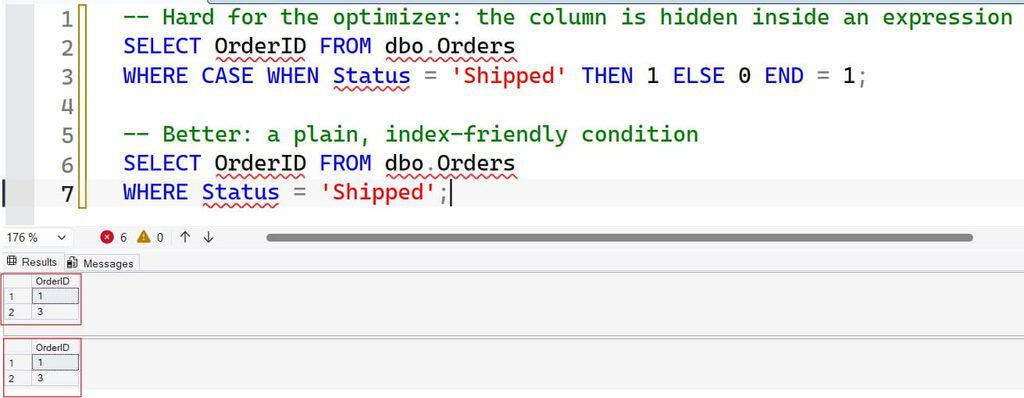
A condition is sargable when SQL Server can use an index seek to find matching rows. Wrapping a column in a CASE or function usually makes it non-sargable, which forces a scan. Use ordinary AND/OR conditions in WHERE; see the WHERE condition. Reserve CASE for the SELECT list, ORDER BY, and aggregates.
When you do filter on a computed bucket often, an index on the base column helps, and a computed column can store the label. Create indexes only after checking the actual execution plan; see how to create an index in SQL Server and SQL query optimization tips. Every index slows writes and takes storage.
In Azure SQL Database, use Query Store, which records query run times and plans, to confirm that a rewrite helped.
Pro Tip: In my experience,
CASEitself is rarely the performance problem. The slow part is almost always putting it inWHEREor joining on its result against a big table.
Secure and Test CASE-Based Reports
Reports that bucket customers or flag risk are business logic, so treat them like code.
- Put shared rules in a view or stored procedure so every report uses the same definition.
- Use a least-privilege reporting user. Grant
SELECTon the view only. See how to grant SELECT. - Use Microsoft Entra ID authentication and managed identities instead of SQL passwords in scripts.
- Require encrypted connections. Verify with
SELECT encrypt_option FROM sys.dm_exec_connections WHERE session_id = @@SPID;. - Test boundaries. Include values at each band edge, plus NULLs, in your test data.
CREATE USER [orders-report] FROM EXTERNAL PROVIDER;
GRANT SELECT ON OBJECT::dbo.vw_OrderSize TO [orders-report];
FROM EXTERNAL PROVIDER creates a contained database user mapped to an Entra identity, so no password is stored. The grant allows reading one view. If a bad UPDATE ... CASE ever damages data, Azure SQL Database supports point-in-time restore into a new database, so you can compare and copy back correct values. Confirm your retention window in advance.
CASE WHEN Quality Checklist
- Order your branches. The first true condition wins, so put narrow rules before broad ones.
- Handle NULL explicitly. Use
IS NULL, never= NULL, and put that branch first. - Always add
ELSE. A missingELSEquietly returns NULL. - Match result types. Every branch must convert to one compatible data type.
- Keep
CASEout ofWHERE. Use plain conditions to preserve index seeks. - Preview before updating. Run the
SELECT, use a transaction, and check@@ROWCOUNT.
Frequently Asked Questions
What is CASE WHEN in SQL Server?
CASE WHEN is a conditional expression that returns different values based on conditions. It evaluates WHEN tests in order and returns the result of the first true one, or the ELSE value if none match. You can use it in SELECT, ORDER BY, GROUP BY, aggregates, and UPDATE.
What is the difference between simple and searched CASE?
Simple CASE compares one expression to a list of values for equality. Searched CASE evaluates full Boolean conditions, so it handles ranges, AND/OR, and IS NULL. Searched CASE is more flexible and is the safer default.
How do I handle NULL in CASE WHEN?
Use WHEN column IS NULL, not = NULL, and place it first so NULL rows do not fall into ELSE. For simple replacements, COALESCE or ISNULL may be shorter.
Can I use CASE WHEN in a WHERE clause?
Yes, but it often prevents index seeks and slows queries. Prefer ordinary conditions with AND and OR in WHERE, and use CASE in the select list, ORDER BY, or aggregates.
How many conditions can a CASE statement have?
There is no small fixed limit on the number of WHEN branches, but CASE expressions can nest only up to 10 levels. If you need dozens of rules, move them into a lookup table and join to it.
You learned how to use CASE WHEN in SQL Server for labels, custom sorting, conditional totals, and updates, and how to avoid NULL, data type, and performance traps. Put the NULL branch first, always include ELSE, and preview every UPDATE with a SELECT and a transaction before you commit. I hope you found this article helpful.
You May Also Like
- SQL SELECT query examples
- SQL Server TOP clause
- SQL wildcard characters
- How to use IF ELSE in a SQL Server stored procedure
- SQL cheat sheet

After working for more than 15 years in the Software field, especially in Microsoft technologies, I have decided to share my expert knowledge of SQL Server. Check out all the SQL Server and related database tutorials I have shared here. Most of the readers are from countries like the United States of America, the United Kingdom, New Zealand, Australia, Canada, etc. I am also a Microsoft MVP. Check out more here.