
In this article, I will walk you through everything you need to know about SQL scalar functions: how they operate, the built-in functions every developer must know, how to build custom User-Defined Scalar Functions (UDFs).
SQL Scalar Functions
What is a SQL Scalar Function?
A scalar function in SQL is a function that accepts one or more input parameters (or a single column value from a row) and returns a single scalar value.
Unlike aggregate functions (such as SUM, AVG, or COUNT) which process an entire dataset or group of rows to return a single summarized result, a scalar function evaluates each row individually.
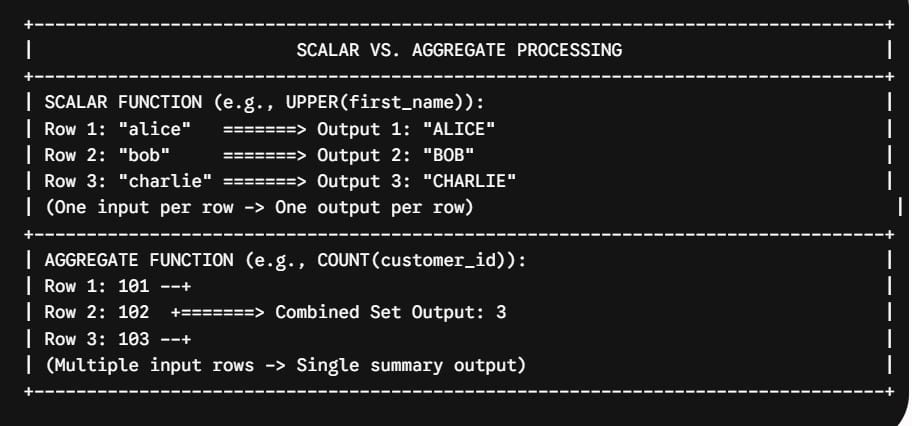
Comparing Function Types in SQL
To build scalable database solutions, you must understand where scalar functions fit within the broader SQL function taxonomy:
| Function Type | Input | Output | Primary Use Case | Examples |
| Scalar Functions | Single row values | Single scalar value | Data scrubbing, string manipulation, math, type casting | UPPER(), ROUND(), CAST(), GETDATE() |
| Aggregate Functions | Multi-row column sets | Single summary value | Group reporting, KPI metrics, totals | SUM(), AVG(), COUNT(), MAX() |
| Table-Valued Functions (TVFs) | Parameters/Tables | A tabular result set (virtual table) | Parameterized views, complex joins, multi-row sets | Inline TVFs, Multi-Statement TVFs |
| Window Functions | Frame of rows | Single value per row | Running totals, moving averages, row ranking | ROW_NUMBER(), RANK(), LEAD(), LAG() |
Core Categories of Built-In SQL Scalar Functions
Every major relational database engine—whether Microsoft SQL Server, PostgreSQL, MySQL, or Oracle—provides a rich library of built-in scalar functions. Let’s break down the four most essential categories used in enterprise data pipelines.
1. String Manipulation Scalar Functions
String formatting is a daily requirement when ingesting raw data from web forms, third-party APIs, or legacy flat files.
UPPER(str)/LOWER(str): Standardizes text casing for case-insensitive comparisons.LEN(str)/LENGTH(str): Returns the character count of a string.SUBSTRING(str, start, length): Extracts a specific segment from a text block.TRIM(str)/LTRIM()/RTRIM(): Removes leading and trailing whitespace.CONCAT(str1, str2, ...): Safely joins multiple text strings together, handlingNULLvalues gracefully.
SQL
-- Example: Cleaning customer contact inputs
SELECT
    customer_id,
    CONCAT(UPPER(last_name), ', ', UPPER(first_name)) AS formatted_full_name,
    LOWER(TRIM(email_address)) AS clean_email,
    SUBSTRING(zip_code, 1, 5) AS standard_5digit_zip
FROM US_Customer_Leads;
2. Numeric and Mathematical Scalar Functions
Numeric scalar functions allow you to perform precision calculations, rounding, and financial adjustments directly within your SELECT statements.
ROUND(numeric_expression, length): Rounds a value to a specified decimal precision.ABS(numeric_expression): Returns the absolute positive value of a number.CEILING(numeric_expression): Rounds up to the nearest integer.FLOOR(numeric_expression): Rounds down to the nearest integer.POWER(numeric_expression, power): Raises a number to a specified exponent.
SQL
-- Example: Financial rounding for payroll tax calculations
SELECT
    employee_id,
    gross_salary_usd,
    ROUND(gross_salary_usd * 0.062, 2) AS social_security_tax,
    CEILING(gross_salary_usd * 0.0145) AS medicare_tax_rounded_up
FROM US_Payroll_Records;
3. Date and Time Scalar Functions
Date arithmetic is notoriously tricky due to leap years, time zones, and daylight saving shifts. Built-in scalar date functions simplify complex temporal math.
GETDATE()/CURRENT_TIMESTAMP: Returns the current system date and time.DATEDIFF(datepart, startdate, enddate): Calculates the elapsed time between two dates in days, months, or years.DATEADD(datepart, number, date): Adds or subtracts a specific time interval from a date.EXTRACT(part FROM date)/DATEPART(part, date): Pulls out specific date components (e.g., Year, Month, Day, Quarter).
SQL
-- Example: Calculating customer account age and renewal dates
SELECT
    account_id,
    signup_date,
    DATEDIFF(day, signup_date, GETDATE()) AS account_age_in_days,
    DATEADD(year, 1, signup_date) AS annual_renewal_date
FROM Enterprise_Subscriptions;
4. Data Type Conversion & Logical Scalar Functions
Data type mismatches will halt a pipeline in its tracks. Conversion functions ensure safe casting, while conditional scalar functions handle missing data cleanly.
CAST(expression AS target_type): Standard ANSI SQL type conversion.CONVERT(target_type, expression, style): T-SQL specific conversion function supporting explicit date/time style formatting.COALESCE(val1, val2, ...): Evaluates arguments in order and returns the first non-null value.NULLIF(val1, val2): ReturnsNULLifval1equalsval2, commonly used to prevent division-by-zero errors.
SQL
-- Example: Safe metric calculation with COALESCE and NULLIF
SELECT
    campaign_id,
    total_ad_spend_usd,
    total_conversions,
    -- Prevent division-by-zero by converting 0 conversions to NULL
    total_ad_spend_usd / NULLIF(total_conversions, 0) AS cost_per_conversion,
    -- Replace NULL result with 0.00 fallback
    COALESCE(total_ad_spend_usd / NULLIF(total_conversions, 0), 0.00) AS final_cpc
FROM Marketing_Campaign_Stats;
How to Build Custom User-Defined Scalar Functions (UDFs)
While database engines ship with hundreds of built-in scalar functions, enterprise business logic often requires custom, reusable calculations. This is where User-Defined Scalar Functions (UDFs) come into play.
Syntax & Creation Script (T-SQL Example)
SQL
CREATE FUNCTION dbo.ufn_CalculateCASalesTax (
    @PreTaxAmount DECIMAL(18,2),
    @DistrictTaxRate DECIMAL(5,4)
)
RETURNS DECIMAL(18,2)
WITH SCHEMABINDING -- Best practice: binds function to underlying object schemas
AS
BEGIN
    DECLARE @StateTaxRate DECIMAL(5,4) = 0.0725; -- California baseline 7.25%
    DECLARE @TotalTaxAmount DECIMAL(18,2);

    -- Handle NULL inputs gracefully
    IF @PreTaxAmount IS NULL OR @PreTaxAmount <= 0
        RETURN 0.00;

    -- Calculate combined state + district sales tax
    SET @TotalTaxAmount = @PreTaxAmount * (@StateTaxRate + COALESCE(@DistrictTaxRate, 0.0000));

    -- Return rounded currency result
    RETURN ROUND(@TotalTaxAmount, 2);
END;
GO
Executing the Custom Scalar UDF
Once compiled, you can invoke the scalar UDF anywhere a standard column expression is permitted:
SQL
SELECT
    order_id,
    customer_name,
    order_subtotal_usd,
    dbo.ufn_CalculateCASalesTax(order_subtotal_usd, 0.0200) AS local_sales_tax,
    order_subtotal_usd + dbo.ufn_CalculateCASalesTax(order_subtotal_usd, 0.0200) AS final_order_total
FROM Online_Orders
WHERE order_state = 'CA';
Best Practices
To ensure your database applications remain clean, maintainable, and high-performing, follow these rules of thumb when working with SQL scalar functions:
- Prefer Built-In Functions Over Custom Code: Always utilize built-in scalar functions (
COALESCE,NULLIF,CONCAT,DATEDIFF) before attempting to write custom logic. Built-in scalar functions are compiled in native C++ and optimized directly inside the engine kernel. - Keep Scalar Functions Out of Filter Predicates: Avoid wrapping indexed table columns inside scalar functions inside
WHEREorJOINclauses (e.g.,WHERE YEAR(order_date) = 2026). Doing so breaks SARGability (Search Argument Ability), preventing the engine from using index seeks and forcing expensive full table scans.- Bad:
WHERE UPPER(last_name) = 'SMITH' - Good:
WHERE last_name = 'Smith'(assuming case-insensitive collation) or use an indexed computed column.
- Bad:
- Always Include
WITH SCHEMABINDING: When creating UDFs, specifyWITH SCHEMABINDING. This prevents changes to underlying dependent tables and provides crucial metadata hints to the query optimizer. - Benchmark at Enterprise Scale: Never test scalar function performance against small dev datasets with 100 rows. Always benchmark UDFs against production-scale datasets (1,000,000+ rows) while monitoring CPU time, logical reads, and execution plan parallelism.
Summary Checklist for Using SQL Scalar Functions
Before deploying SQL scripts containing scalar functions into production, complete this operational review checklist:
- [ ] Identified whether built-in scalar functions can replace custom procedural code.
- [ ] Verified that scalar functions are not wrapping indexed columns inside
WHEREorONpredicates. - [ ] Evaluated custom scalar UDFs against row volume to check for RBAR execution bottlenecks.
- [ ] Converted performance-critical scalar UDFs to Inline Table-Valued Functions (iTVFs) using
CROSS APPLY. - [ ] Ensured
NULLhandling is explicitly accounted for usingCOALESCEorNULLIF. - [ ] Verified query execution plans confirm proper index usage and parallel thread distribution.
By understanding both the functional utility and the performance characteristics of SQL scalar functions, you can design clean, maintainable, and blistering-fast data architectures.
You may also like the following articles:
- How to Execute Function in SQL Server with Parameters
- SQL COUNT DISTINCT
- SQL LAST_VALUE
- SQL OVER Clause
- SQL Subquery vs JOIN

After working for more than 15 years in the Software field, especially in Microsoft technologies, I have decided to share my expert knowledge of SQL Server. Check out all the SQL Server and related database tutorials I have shared here. Most of the readers are from countries like the United States of America, the United Kingdom, New Zealand, Australia, Canada, etc. I am also a Microsoft MVP. Check out more here.