
In this article, I will show you how to master the SQL JOIN with a WHERE clause to write high-performance, authoritative queries.
SQL Join Example With Where Clause
The Fundamentals: Connecting Tables and Filtering Results
At its core, a JOIN combined with a WHERE clause allows you to retrieve data from two or more tables while applying specific filtering criteria to the final result set.
Think of it this way: the JOIN logic (using the ON clause) defines how the tables are related, while the WHERE clause defines which rows from that combined set should be displayed.
The Standard Syntax
I always follow this standard structure:
SQL
SELECT
    t1.ColumnName,
    t2.ColumnName
FROM Table1 AS t1
INNER JOIN Table2 AS t2
    ON t1.CommonKey = t2.CommonKey
WHERE t1.FilterColumn = 'SpecificValue';
1. The INNER JOIN with WHERE Clause
The most common scenario involves an INNER JOIN. This returns only the records that have matching values in both tables. When you add a WHERE clause, you are further narrowing down that “shared” set of data.
Imagine you are managing a logistics system for a company. You have an Orders table and a Customers table. You only want to see orders placed by customers located in “Miami”.
Example
SQL
SELECT
    o.OrderID,
    o.Amount,
    c.Name
FROM Orders AS o
INNER JOIN Customers AS c
    ON o.CustomerID = c.CustomerID
WHERE c.City = 'Miami';
After executing the query above, I received the expected output, as shown in the screenshot below.
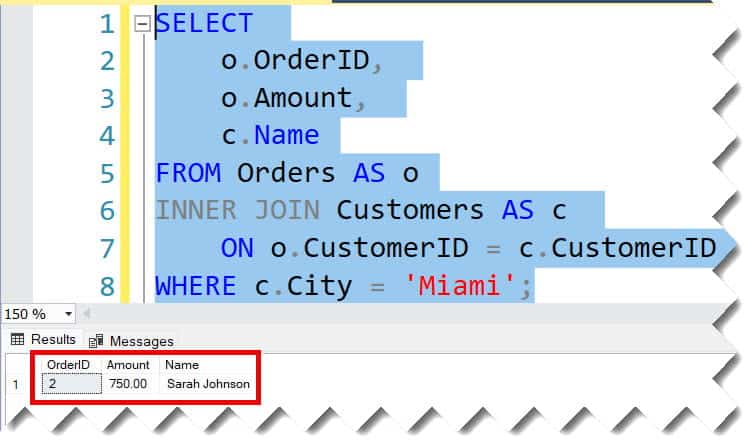
Why this works:
- The JOIN: Links orders to specific customers.
- The WHERE: Discards every order in the database unless the associated customer resides in the Big Apple.
2. Filtering with LEFT JOIN: The “Anti-Join” Trap
Things get more sophisticated when using a LEFT JOIN. A LEFT JOIN returns all rows from the left table and the matched rows from the right table. If there is no match, the right side results are NULL.
The Common Pitfall
A common mistake I see among junior developers is placing a filter in the WHERE clause that accidentally turns their LEFT JOIN into an INNER JOIN.
- Scenario: You want a list of all customers and their orders, but you only want to see orders from the year 2026.
- The Mistake: Placing
WHERE o.OrderYear = 2026. BecauseNULL(for customers with no orders) is not equal to 2026; those customers are filtered out entirely!
The Pro Fix: Filter in the ON Clause vs. WHERE
| Filter Location | Result for LEFT JOIN |
| Inside the ON Clause | Keeps all “Left” rows; right-side data is NULL if the filter fails. |
| Inside the WHERE Clause | Discards “Left” rows entirely if the filter fails (Behaves like an INNER JOIN). |
3. Advanced Filtering: Using Multiple Conditions
Using AND/OR in the WHERE Clause
SQL
SELECT
    e.EmployeeName,
    d.DepartmentName,
    e.Salary
FROM Employees AS e
JOIN Departments AS d
    ON e.DeptID = d.DeptID
WHERE d.Region = 'West'
    AND e.Salary > 90000;
This query identifies high-earning individuals specifically in the West Coast divisions, excluding anyone in East Coast hubs like Philadelphia or DC.
4. Working with Dates and Ranges
Businesses often run reports based on specific fiscal quarters or timeframes. Using BETWEEN or comparison operators in the WHERE clause is essential.
SQL
SELECT
    p.ProductName,
    s.SaleDate
FROM Products AS p
JOIN Sales AS s
    ON p.ProductID = s.ProductID
WHERE s.SaleDate BETWEEN '2026-01-01' AND '2026-03-31';
This provides a clear snapshot of Q1 performance for your sales team.
5. Handling NULLs in Joined Filters
Data is rarely perfect. When joining tables, you may encounter missing values. To handle this with authority, use IS NULL or IS NOT NULL in your WHERE clause.
Example: Finding “Stray” Records
If you want to find customers who have never placed an order (often called an “Anti-Join”):
SQL
SELECT c.CustomerName
FROM Customers AS c
LEFT JOIN Orders AS o
    ON c.CustomerID = o.CustomerID
WHERE o.OrderID IS NULL;
Summary of SQL Join and Where Logic
| Feature | Description |
| JOIN Type | Defines which records are combined based on relationships. |
| ON Clause | The “link” between the two tables (usually Primary/Foreign keys). |
| WHERE Clause | The “gatekeeper” that filters the final result set after joining. |
| Performance | Filters in WHERE are generally processed after the join is logically formed. |
Conclusion
The SQL JOIN with a WHERE clause is a foundational tool for any database professional. By understanding the distinction between the ON clause (the relationship) and the WHERE clause (the filter), you can write queries that are not only accurate but also optimized for speed.
You may also like the following articles:
- SQL Select Query Examples
- How To Find Who Updated The Table In SQL Server
- SQL Server Update Table From Another Table

After working for more than 15 years in the Software field, especially in Microsoft technologies, I have decided to share my expert knowledge of SQL Server. Check out all the SQL Server and related database tutorials I have shared here. Most of the readers are from countries like the United States of America, the United Kingdom, New Zealand, Australia, Canada, etc. I am also a Microsoft MVP. Check out more here.