
Understanding primary key creation is fundamental to building robust, scalable databases. Today, I’ll share my comprehensive guide on creating tables with primary keys in SQL Server.
SQL Server Create Table With Primary Key
Understanding Primary Keys in SQL Server
Before diving into the technical implementation, let me establish why primary keys are the cornerstone of effective database design. A primary key is a column or combination of columns that uniquely identifies each row in a table.
Key Characteristics of Primary Keys
| Characteristic | Description | Impact |
|---|---|---|
| Uniqueness | No duplicate values allowed | Ensures data integrity |
| Non-null | Cannot contain NULL values | Maintains referential integrity |
| Immutable | Should not change once assigned | Preserves relationships |
| Minimal | Uses fewest columns necessary | Optimizes performance |
Why Primary Keys Matter in Database Design
Below are the critical importance of primary keys:
- Data Integrity: Prevents duplicate records and maintains consistency
- Performance Optimization: Enables efficient indexing and query execution
- Relationship Management: Facilitates foreign key relationships between tables
- Replication Support: Essential for SQL Server replication scenarios
- Backup and Recovery: Improves transaction log management
Method 1: Creating Tables with Primary Keys During Table Creation
The most efficient approach I recommend to my clients is defining primary keys during the initial table creation. This method ensures optimal performance from the start and follows database design best practices.
Single Column Primary Key Syntax
CREATE TABLE Employees (
    EmployeeID INT IDENTITY(1,1) PRIMARY KEY,
    FirstName VARCHAR(50) NOT NULL,
    LastName VARCHAR(50) NOT NULL,
    Email VARCHAR(100) UNIQUE,
    HireDate DATE NOT NULL,
    Salary DECIMAL(10,2)
);
After executing the above query, the table has been created successfully, as shown in the screenshot below.

Named Primary Key Constraint
Based on my experience with enterprise database standards, It is always recommended to use named constraints for better maintainability:
CREATE TABLE CustomersN (
    CustomerID INT IDENTITY(1,1),
    CompanyName VARCHAR(100) NOT NULL,
    ContactName VARCHAR(50),
    City VARCHAR(50),
    State VARCHAR(2),
    ZipCode VARCHAR(10),
    CONSTRAINT PK_Customers_CustomerID PRIMARY KEY (CustomerID)
);
After executing the above query, the table has been created successfully, as shown in the screenshot below.

Composite Primary Key Implementation
For complex business scenarios I’ve encountered in multi-national corporations, composite primary keys are sometimes necessary:
CREATE TABLE OrderDetailsN (
    OrderID INT NOT NULL,
    ProductID INT NOT NULL,
    Quantity INT NOT NULL,
    UnitPrice DECIMAL(10,2) NOT NULL,
    CONSTRAINT PK_OrderDetails_OrderID_ProductID PRIMARY KEY (OrderID, ProductID)
);
After executing the above query, the table has been created successfully, as shown in the screenshot below.

Method 2: Adding Primary Keys to Existing Tables
I’ve frequently needed to add primary keys to existing tables. This scenario requires careful planning and execution.
Step-by-Step Process for Existing Tables
Step 1: Analyze Existing Data
Before adding a primary key to an existing table, I always perform data analysis:
-- Check for duplicate values
SELECT EmployeeID, COUNT(*) as DuplicateCount
FROM [EmployeeNew]
GROUP BY EmployeeID
HAVING COUNT(*) > 1;

-- Check for NULL values
SELECT COUNT(*) as NullCount
FROM EmployeesLegacy
WHERE EmployeeID IS NULL;
After executing the above query, I got the expected output as shown in the screenshot below.


Step 2: Clean Data if Necessary
-- Remove duplicates (if business logic permits)
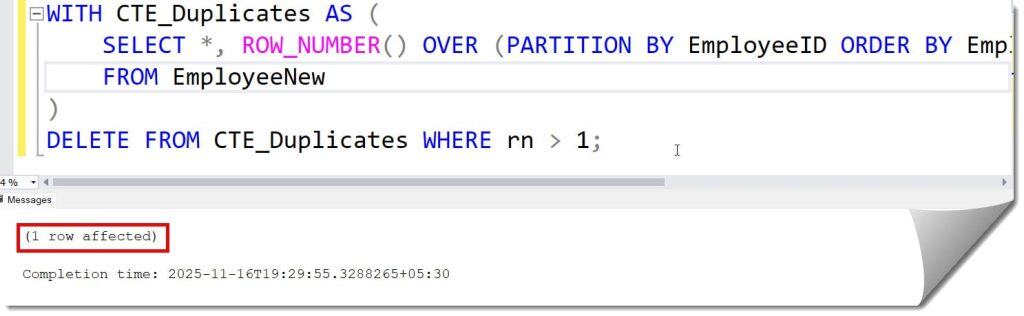
WITH CTE_Duplicates AS (
    SELECT *, ROW_NUMBER() OVER (PARTITION BY EmployeeID ORDER BY EmployeeID) as rn
    FROM EmployeeNew
)
DELETE FROM CTE_Duplicates WHERE rn > 1;
After executing the above query, I got the expected output as shown in the screenshot below.
-- Handle NULL values
UPDATE EmployeeNew
SET EmployeeID = NEXT VALUE FOR EmployeeSequence
WHERE EmployeeID IS NULL;
Step 3: Add Primary Key Constraint
ALTER TABLE EmployeesLegacy
ADD CONSTRAINT PK_EmployeesLegacy_EmployeeID PRIMARY KEY (EmployeeID);
After executing the above query, I got the expected output as shown in the screenshot below.

Different Primary Key Data Types and Best Practices
Choosing the right data type for primary keys significantly impacts performance and scalability.
Primary Key Data Type Comparison
| Data Type | Advantages | Disadvantages | Best Use Case |
|---|---|---|---|
| INT IDENTITY | Fast, compact, sequential | Limited range, not globally unique | Small to medium tables |
| BIGINT IDENTITY | Large range, fast | More storage space | High-volume applications |
| UNIQUEIDENTIFIER | Globally unique, merge-friendly | Larger size, random order | Distributed systems |
| VARCHAR/CHAR | Business meaningful | Variable performance, larger indexes | Natural keys when appropriate |
IDENTITY Column Implementation
For most business applications I’ve designed, IDENTITY columns provide optimal performance:
CREATE TABLE Products (
    ProductID INT IDENTITY(1,1) PRIMARY KEY,
    ProductName VARCHAR(100) NOT NULL,
    CategoryID INT,
    UnitPrice DECIMAL(10,2),
    UnitsInStock INT DEFAULT 0
);
UNIQUEIDENTIFIER Primary Keys
For distributed systems and cloud applications, I often recommend UNIQUEIDENTIFIER:
CREATE TABLE Documents (
    DocumentID UNIQUEIDENTIFIER DEFAULT NEWID() PRIMARY KEY,
    Title VARCHAR(255) NOT NULL,
    Content TEXT,
    CreatedDate DATETIME2 DEFAULT GETDATE(),
    CreatedBy VARCHAR(50)
);
Advanced Primary Key Scenarios
Clustered vs Non-Clustered Primary Keys
One of the most important decisions I help clients make involves clustering strategy:
Clustered Primary Key (Default)
CREATE TABLE SalesN (
    SaleID INT IDENTITY(1,1),
    CustomerID INT NOT NULL,
    SaleDate DATETIME2 NOT NULL,
    Amount DECIMAL(10,2) NOT NULL,
    CONSTRAINT PK_Sales_SaleID PRIMARY KEY CLUSTERED (SaleID)
);
After executing the above query, I got the expected output as shown in the screenshot below.

Non-Clustered Primary Key
CREATE TABLE Inventory (
    SKU VARCHAR(20),
    ProductName VARCHAR(100) NOT NULL,
    Quantity INT NOT NULL,
    LastUpdated DATETIME2 DEFAULT GETDATE(),
    CONSTRAINT PK_Inventory_SKU PRIMARY KEY NONCLUSTERED (SKU)
);

-- Separate clustered index on frequently queried column
CREATE CLUSTERED INDEX IX_Inventory_LastUpdated ON Inventory (LastUpdated);
After executing the above query, I got the expected output as shown in the screenshot below.


Common Primary Key Design Patterns
Based on my experience with enterprise applications across various industries:
Pattern 1: Surrogate Keys with Business Data
CREATE TABLE Accounts (
    AccountID BIGINT IDENTITY(1,1) PRIMARY KEY,
    AccountNumber VARCHAR(20) UNIQUE NOT NULL,
    AccountHolderName VARCHAR(100) NOT NULL,
    Balance DECIMAL(15,2) DEFAULT 0,
    OpenDate DATE NOT NULL,
    Status VARCHAR(10) DEFAULT 'Active'
);

Pattern 2: Natural Composite Keys
CREATE TABLE TimeSheetEntries (
    EmployeeID INT NOT NULL,
    WorkDate DATE NOT NULL,
    ProjectCode VARCHAR(10) NOT NULL,
    HoursWorked DECIMAL(4,2) NOT NULL,
    Description TEXT,
    CONSTRAINT PK_TimeSheet_Emp_Date_Project PRIMARY KEY (EmployeeID, WorkDate, ProjectCode)
);

Performance Considerations and Optimization
Index Management with Primary Keys
From my performance tuning experience with high-traffic databases:
- Primary keys automatically create a unique clustered index
- Consider non-clustered primary keys for non-sequential data
- Monitor fragmentation on clustered primary key indexes
- Plan for index maintenance during off-peak hours
Best Practices for Primary Key Selection
Do’s:
- Use surrogate keys for most business tables
- Keep primary keys as narrow as possible
- Use consistent naming conventions across the database
- Document business rules for primary key generation
Don’ts:
- Avoid using business data that might change
- Don’t use wide composite keys unnecessarily
- Avoid NULL-able columns in composite primary keys
- Don’t ignore the performance impact of UNIQUEIDENTIFIER keys
Modifying and Dropping Primary Keys
Dropping Primary Key Constraints
-- Drop primary key constraint
ALTER TABLE Employees
DROP CONSTRAINT PK_Employees_EmployeeID;
Modifying Primary Key Columns
Changing primary keys requires careful planning:
-- Step 1: Drop existing primary key
ALTER TABLE Products DROP CONSTRAINT PK_Products_ProductID;

-- Step 2: Modify column definition
ALTER TABLE Products ALTER COLUMN ProductID BIGINT NOT NULL;

-- Step 3: Recreate primary key
ALTER TABLE Products ADD CONSTRAINT PK_Products_ProductID PRIMARY KEY (ProductID);
Conclusion
Creating tables with primary keys in SQL Server is a fundamental skill that forms the backbone of effective database design. Proper primary key implementation directly impacts application performance, data integrity, and long-term maintainability.
You may also like the following articles:
- Get Primary Key Of Table SQL Server
- SQL Server Add Primary Key To Existing Table
- Rename Table In SQL Server
- Create Table If Not Exists SQL Server
- How to Create a Table in SQL Server Management Studio Using Query?
- How To Drop Temp Table If Exists In SQL Server

After working for more than 15 years in the Software field, especially in Microsoft technologies, I have decided to share my expert knowledge of SQL Server. Check out all the SQL Server and related database tutorials I have shared here. Most of the readers are from countries like the United States of America, the United Kingdom, New Zealand, Australia, Canada, etc. I am also a Microsoft MVP. Check out more here.