
Knowing how to comment in SQL Server Management Studio (SSMS) is not just a basic syntax skill; it is a professional courtesy. In this deep-dive tutorial, I will walk you through commenting in SSMS, from the basic characters to the strategic philosophy of when and where to leave your mark.
How To Comment In SSMS
1. The Syntax: Two Ways
In T-SQL, the language of SQL Server, we have two primary methods for adding comments.
Single-Line Comments: The Double-Dash (--)
The most common way to comment out a quick thought or a single line of code is using the double-dash.
- How it works: Anything to the right of the
--on that specific line is ignored by the SQL Server compiler. - Best for: Labeling variables, explaining a specific join, or temporarily “turning off” a line of code during debugging.
Check out the screenshot below for your reference.

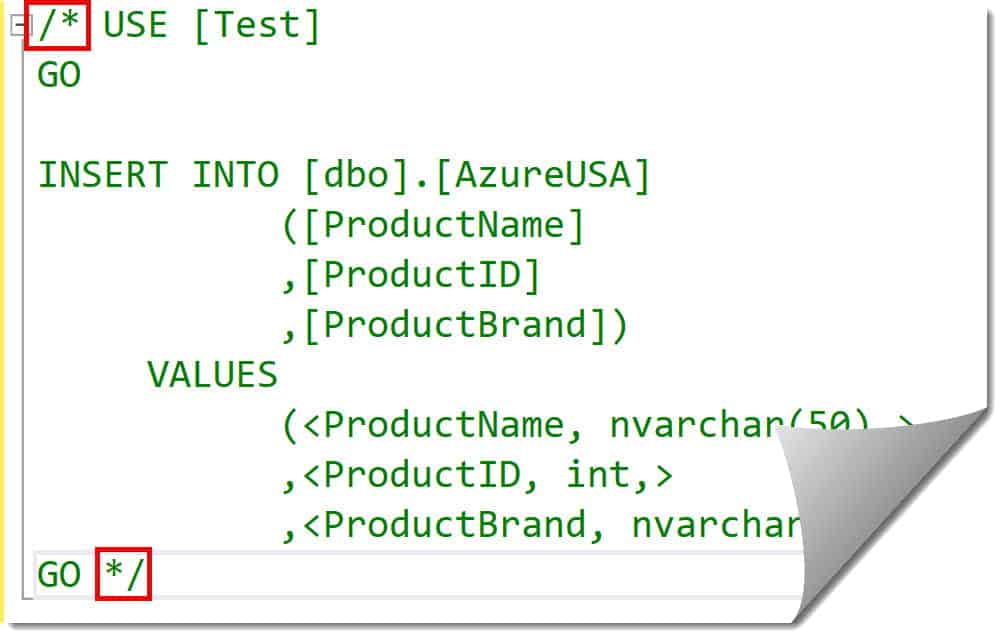
Multi-Line (Block) Comments: The Slash-Star (/* ... */)
When you need to tell a story or document a complex logic block, single lines won’t cut it. We use the C-style block comments.
- How it works: Everything between the opening
/*and the closing*/is treated as a comment, even if it spans fifty lines. - Best for: Header documentation, explaining business logic, and “commenting out” large sections of code during testing.
Check out the screenshot below for your reference.
2. SSMS Power Shortcuts
I don’t manually type dashes if I’m commenting out a 200-line stored procedure. I use the built-in SSMS shortcuts that every developer should know.
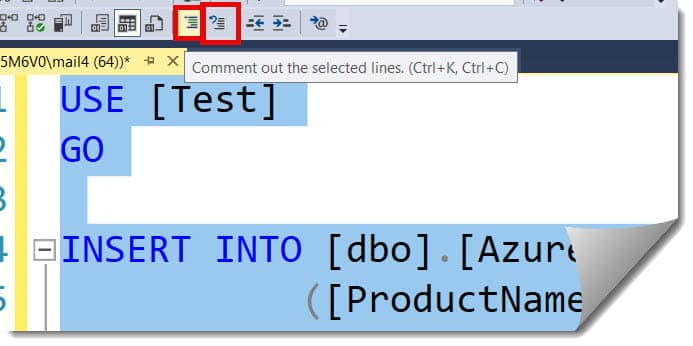
The Toolbar Method
If you look at the top SQL Editor toolbar in SSMS, you will see two icons:
- Comment out the selected lines: A small blue icon with lines and a green arrow.
- Uncomment the selected lines: The same icon with a blue “back” arrow.
Check out the screenshot below for your reference.
The Keyboard Ninja Method (Recommended)
If you want to look like a seasoned pro during a screen-share session with your lead architect, use these keyboard combinations:
| Action | Shortcut (Windows) |
| Comment Selection | Ctrl + K, Ctrl + C |
| Uncomment Selection | Ctrl + K, Ctrl + U |
Pro Tip from the Field: I always remind my junior devs that
K+Cstands for “Keep Commenting” andK+Ustands for “Keep Un-commenting.” It makes it much easier to remember during high-pressure production fixes.
3. The Professional Header
In a collaborative environment, every script should have a standard header. I recommend that every dev team adopt a standard header template like the one below:
SQL
/*******************************************************************************
Author:       Raj (Senior Data Engineer)
Created:      2026-03-30
Project:      Q1 Financial Reporting - Atlanta Branch
Description:  This script calculates the aggregate quarterly revenue
              adjusted for tax variances across the Southeast region.

Change Log:
-------------------------------------------------------------------------------
Date          Author          Description
2026-04-15    Raj     Optimized the JOIN on the Sales table for speed.
2026-05-10    Smith       Added filter for 'Discontinued' product lines.
*******************************************************************************/
Why This Matters
- Accountability: You know exactly who to call if the logic seems flawed.
- Version History: Even if you use Git or Azure DevOps, having a quick-glance changelog inside the script saves precious minutes.
- Context: Explaining the “Project” helps future developers understand the business “Why” behind the technical “How.”
4. Strategic Commenting:
There is such a thing as “over-commenting.” If your code says SELECT Name --Selecting the name column, you are wasting space. The code already tells me what you are doing. Your comments should tell me why.
Explaining “Magic Numbers”
If I see a WHERE StatusID = 4 in a script, I have no idea what “4” means. A pro always comments this:
WHERE StatusID = 4 -- 4 denotes 'Pending Approval' per the 2026 Policy Manual
Documenting Complex Joins
If you are performing a LEFT JOIN on a subquery that looks like a bowl of spaghetti, add a comment above it explaining the grain of the data being returned.
The “TODO” Tag
During development, I often use the TODO: keyword in my comments.
-- TODO: Optimize this cursor into a set-based operation before the July release.- Benefit: In SSMS, you can actually use the Task List window (View > Task List) to see all your TODO comments across the script in one organized pane.
5. Commenting Etiquette for Teams
Here are the “Golden Rules” for commenting:
- Keep it Professional: Never use comments to vent about a client or a difficult project manager. Comments are permanent parts of the corporate record.
- Update the Comments with the Code: There is nothing more dangerous than a comment that says “Subtracts 10%” while the code beneath it has been updated to subtract 15%. If you change the logic, change the label.
- Remove “Dead Code”: Don’t leave 500 lines of commented-out code in a production script just because you “might need it later.” Use a version control system like Git for that. Commented-out code in production creates visual noise and confusion.
6. Visual Organization with Comments
I often use comments to create “Regions” or “Sections” within a long script. This acts as a table of contents for the file.
Section Dividers
When a script exceeds 500 lines, I use visual dividers to separate the variable declarations, the temp table creations, and the final data merge.
-- =============================================-- SECTION 1: VARIABLE INITIALIZATION-- =============================================
This makes the scroll bar much easier to navigate and helps other developers find the “meat” of the procedure quickly.
7. Comparative Table: Commenting Techniques
| Technique | Visibility | Use Case | Maintenance Level |
Inline (--) | High | Quick notes, logic labels. | Low |
| Header Block | High | Metadata, Author, History. | High (Must be updated). |
| Section Dividers | Medium | Visual structure of long files. | Minimal |
| TODO Tags | Low (Internal) | Development reminders. | Moderate (Must be cleared). |
Conclusion:
In the database world, your code is your legacy. By mastering the art of commenting in SSMS, you transition from being a “coder” to a “solution architect.”
Comments are the bridge between the rigid logic of the SQL engine and the creative mind of the developer.
You may also like the following articles:

After working for more than 15 years in the Software field, especially in Microsoft technologies, I have decided to share my expert knowledge of SQL Server. Check out all the SQL Server and related database tutorials I have shared here. Most of the readers are from countries like the United States of America, the United Kingdom, New Zealand, Australia, Canada, etc. I am also a Microsoft MVP. Check out more here.