
In this article, I will walk you through the professional landscape of SQL SELECT queries, providing you with an authoritative toolkit of examples to master your data retrieval.
SQL Select Query Examples
The Anatomy of a SELECT Statement
Before we dive into the examples, we must understand the core logic. A SELECT query isn’t just a command; it’s a request for a specific subset of reality.
The Basic Syntax
The fundamental structure of every query we will discuss follows this hierarchy:
- SELECT: Which columns do you want?
- FROM: Which table holds the data?
- WHERE: What are the filters?
- ORDER BY: How should the results be sorted?
1. Basic Retrieval
Selecting All Columns
While common in development, I always caution my teams against using SELECT * in production code. It’s inefficient and can break applications if the schema changes.
SQL
-- Selecting all columns from a customer table
SELECT * FROM dbo.Customers;
After executing the above query, I got the expected output as shown in the screenshot below.

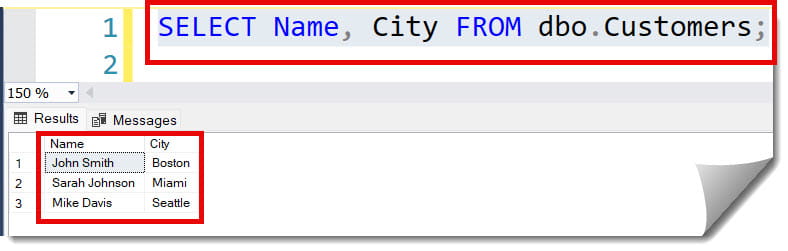
Selecting Specific Columns
Efficiency is key. If you only need names and emails for a marketing campaign in Chicago, only ask for those.
SQL
SELECT Name, City FROM dbo.Customers;After executing the above query, I got the expected output as shown in the screenshot below.
2. Filtering Data with the WHERE Clause
Using Comparison Operators
SQL
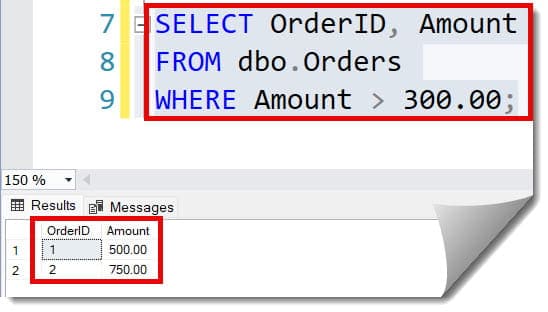
-- Finding high-value orders
SELECT OrderID, Amount
FROM dbo.Orders
WHERE Amount > 300.00;
After executing the above query, I got the expected output as shown in the screenshot below.
Filtering with Multiple Conditions
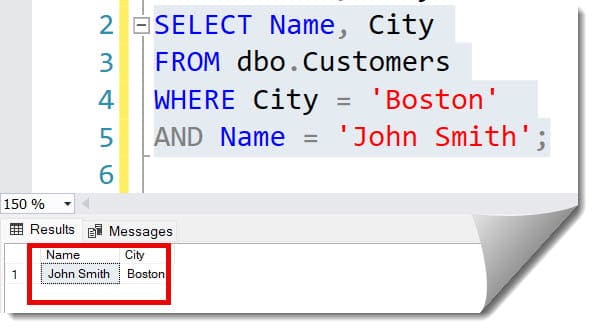
We use AND and OR to refine our search. Imagine searching for employees in San Francisco who work in the Engineering department:
SQL
SELECT Name, City
FROM dbo.Customers
WHERE City = 'Boston'
AND Name = 'John Smith';
After executing the above query, I got the expected output as shown in the screenshot below.
Using the IN Operator
The IN operator is a cleaner way to handle multiple OR conditions.
SQL
-- Finding customers in specific tech hubs
SELECT CustomerName, State
FROM dbo.Customers
WHERE State IN ('CA', 'TX', 'WA', 'NY');
3. Advanced Pattern Matching with LIKE
Sometimes, you don’t know the exact value. Perhaps you are a customer support rep in Phoenix trying to find a client whose name starts with “Mc.”
- % (Percent): Represents zero, one, or multiple characters.
- _ (Underscore): Represents a single character.
SQL
-- Finding all customers with names starting with 'john'
SELECT Name, City
FROM dbo.Customers
WHERE Name LIKE 'john%';

-- Finding emails that end in .gov
SELECT Email
FROM dbo.Staff
WHERE Email LIKE '%.gov';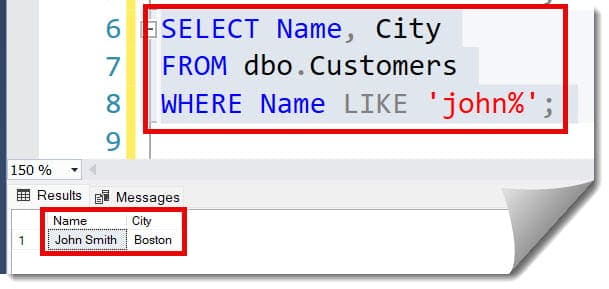
4. Sorting and Limiting Results
Presentation matters. When reporting to a board of directors in Washington D.C., you need your data organized.
Sorting with ORDER BY
SQL
-- Sorting products from most expensive to cheapest
SELECT ProductName, Price
FROM dbo.Products
ORDER BY Price DESC;
Limiting Results (TOP / LIMIT)
In SQL Server (common in US corporate environments), we use TOP. In MySQL or PostgreSQL (common in startups), we use LIMIT.
SQL
-- Getting the top 5 highest earners
SELECT TOP 5 EmployeeName, Salary
FROM dbo.Payroll
ORDER BY Salary DESC;
5. Aggregate Functions and Data Summarization
As an authority in data, you’ll often be asked for “the big picture.” Aggregates turn thousands of rows into a single, powerful number.
| Function | Purpose | Example Use Case |
| COUNT() | Counts the number of rows. | Total users in California. |
| SUM() | Adds up numeric values. | Total revenue for Q3. |
| AVG() | Calculates the mean. | Average home price in Denver. |
| MIN() / MAX() | Finds the extremes. | Highest and lowest sales figures. |
SQL
-- Calculating total sales from the Dallas branch
SELECT SUM(OrderTotal) AS TotalRevenue
FROM dbo.Sales
WHERE BranchCity = 'Dallas';
6. The Power of GROUP BY and HAVING
Aggregates become truly transformative when combined with GROUP BY. This allows you to categorize your summaries.
Grouping Data
If you need to see the number of customers per state across the USA:
SQL
SELECT State, COUNT(CustomerID) AS CustomerCount
FROM dbo.Customers
GROUP BY State;
Filtering Groups with HAVING
The WHERE clause filters rows before they are grouped. The HAVING clause filters the results after the grouping.
SQL
-- Finding states with more than 500 customers
SELECT State, COUNT(CustomerID) AS Total
FROM dbo.Customers
GROUP BY State
HAVING COUNT(CustomerID) > 500;
7. Joins: Connecting the Dots
In a normalized database, data is split across tables. A pro knows exactly how to stitch it back together.
INNER JOIN
The most common join. It returns records that have matching values in both tables.
SQL
-- Joining Orders with Customers to see who bought what
SELECT o.OrderID, c.FirstName, c.LastName, o.OrderDate
FROM dbo.Orders o
INNER JOIN dbo.Customers c ON o.CustomerID = c.CustomerID;
LEFT JOIN (LEFT OUTER JOIN)
This is critical when you want to see all records from the left table, even if there’s no match in the right table.
SQL
-- Finding all employees and their assigned projects (including those with no project)
SELECT e.EmployeeName, p.ProjectName
FROM dbo.Employees e
LEFT JOIN dbo.Projects p ON e.ProjectID = p.ProjectID;
8. Working with Dates
In the United States, date formats can be a point of contention. However, in SQL, we treat them with strict logic.
SQL
-- Finding orders placed in the last 30 days
SELECT OrderID, OrderDate
FROM dbo.Orders
WHERE OrderDate >= DATEADD(day, -30, GETDATE());

-- Extracting the year from a transaction
SELECT TransactionID, YEAR(TransactionDate) AS SalesYear
FROM dbo.Finance;
9. Subqueries and Common Table Expressions (CTEs)
When a single query isn’t enough, we nest them. As a consultant, I prefer CTEs for readability—they make your code look clean and professional.
Example of a CTE
Imagine you need to find employees whose salary is above the company average:
SQL
WITH AverageSalary AS (
    SELECT AVG(Salary) AS AvgSal
    FROM dbo.Employees
)
SELECT EmployeeName, Salary
FROM dbo.Employees, AverageSalary
WHERE Salary > AvgSal;
10. Handling NULL Values
In the real world, data is often missing. A junior dev ignores NULLs; a senior dev plans for them.
- IS NULL: Checks for missing data.
- COALESCE(): Provides a default value if data is missing.
SQL
-- Finding leads without a phone number
SELECT LeadName
FROM dbo.Leads
WHERE PhoneNumber IS NULL;

-- Replacing NULL emails with a placeholder
SELECT CustomerName, COALESCE(Email, 'No Email Provided') AS ContactEmail
FROM dbo.Customers;
Best Practices for SQL Querying
- Use Aliases: Table aliases (like
Customers AS c) make long joins readable. - Format for Humans: Use indentations and new lines. SQL doesn’t care, but your colleagues in Philadelphia will.
- Be Skeptical of SELECT *: Always specify columns to protect performance and security.
- Comment Your Logic: Use
--for quick notes. Explain the “why” behind complex filters.
Conclusion
The SELECT query is the heartbeat of data analysis. By mastering these examples—from basic retrieval to complex CTEs—you are not just “running code”; you are extracting the truth from a vast database.
You may also like the following articles:

After working for more than 15 years in the Software field, especially in Microsoft technologies, I have decided to share my expert knowledge of SQL Server. Check out all the SQL Server and related database tutorials I have shared here. Most of the readers are from countries like the United States of America, the United Kingdom, New Zealand, Australia, Canada, etc. I am also a Microsoft MVP. Check out more here.