
The definitive tool for completely removing a table from your database catalog is the DROP TABLE command. In this comprehensive guide, I will take you inside the mechanics of the DROP TABLE command, analyze how it impacts database internals, contrast dialect-specific options, and provide a disciplined workflow to safeguard your enterprise data.
SQL DROP TABLE
Under the Hood: What Happens During a DROP TABLE?
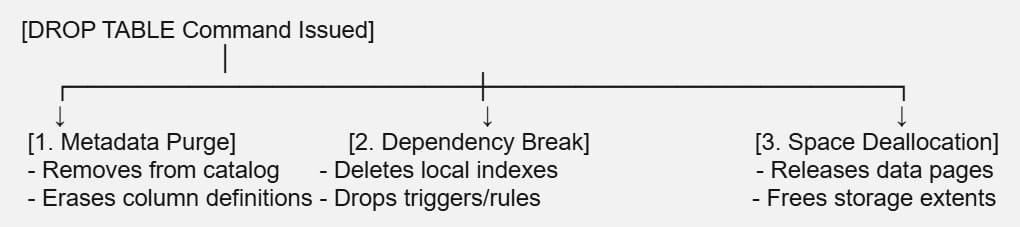
When you execute a DROP TABLE statement, the database engine carries out a sequence of internal tasks to remove the object from storage and metadata catalogs.
The Metadata System Purge
Every database maintains a system catalog (such as sys.objects and sys.columns in SQL Server, or pg_class in PostgreSQL). This catalog tracks the physical and logical definitions of your tables. When you drop a table, the engine completely deletes its tracking records from these system metadata views, meaning the database no longer recognizes the table name.
Dependent Object Destruction
Dropping a table triggers a cascade of internal deletions for objects tightly bound to its local structure. The database engine automatically removes:
- All local indexes (clustered and non-clustered).
- All table-level constraints (Primary Keys, Unique constraints, and Check constraints).
- All triggers and rules bound directly to the table.
Note: Objects outside the table, such as Stored Procedures, Views, or User-Defined Functions that reference the dropped table, are not automatically deleted. Instead, they are marked as Invalid or broken in the catalog, requiring manual updates or separate drop commands.
Physical Storage Reclamation
At the file-system level, the database deallocates the data pages and extents that were reserved for the table’s data heap and index trees. This space is released back to the database filespace allocation pool, making it immediately available for new data writes.
Core Syntax and the Power of Idempotency
The fundamental syntax for dropping a table is straightforward, but running a raw drop command in an automated deployment script can introduce operational risks.
SQL
-- Standard ANSI SQL Syntax
DROP TABLE schema_name.table_name;
The “Table Does Not Exist” Error
If your automated migration script attempts to execute a standard DROP TABLE command on a table that has already been removed or was never created, the database engine will halt execution and throw an error. In production deployment pipelines, a single failed command can stall an entire release framework.
Resolving Errors with DROP TABLE IF EXISTS
To ensure your scripts are idempotent (meaning they can run multiple times safely without throwing unexpected exceptions), leverage the IF EXISTS clause. This feature checks the system catalog first; if the table is found, it is dropped, and if it isn’t, the engine skips the command with a warning instead of failing.
SQL
-- Modern Idempotent Syntax (SQL Server 2016+, PostgreSQL, MySQL)
DROP TABLE IF EXISTS dbo.legacy_customers;
Resolving Foreign Key and Dependency Blockers
The most common operational roadblock encountered during a table drop is a Foreign Key constraint violation error.
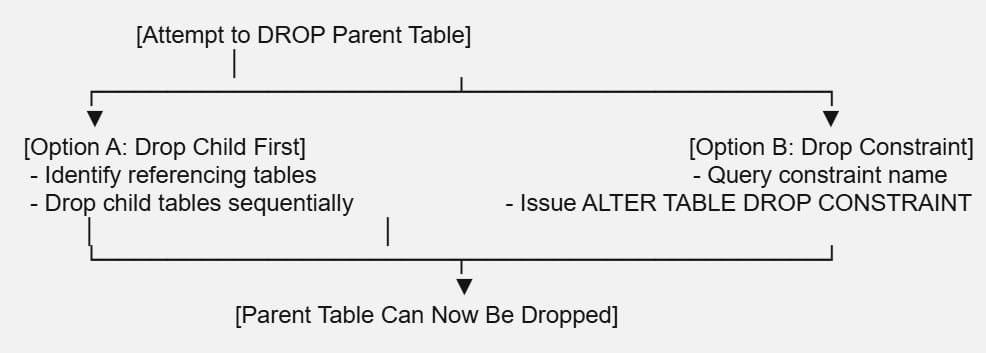
Database systems protect relational data integrity. If a “Parent” table contains a Primary Key that is actively referenced by a Foreign Key column inside a “Child” table, the database will block any attempt to drop the parent table.
Approach 1: The Chronological Drop Sequence (Universal)
The cleanest way to resolve this conflict without breaking structural links between other active assets is to drop your tables in reverse dependency order. Always remove the referencing child tables before dropping the referenced parent tables.
SQL
-- Step 1: Drop the child table holding the foreign key reference
DROP TABLE IF EXISTS dbo.order_items;

-- Step 2: Drop the intermediate parent table
DROP TABLE IF EXISTS dbo.orders;

-- Step 3: Drop the master parent table safely
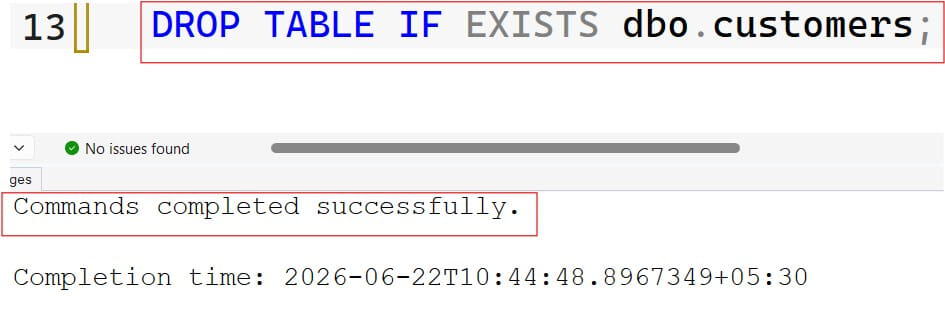
DROP TABLE IF EXISTS dbo.customers;
After executing the query above, I got the expected output shown in the screenshot below.
Step-by-Step Tutorial: Implementing a Secure Production Drop Sequence
When removing an obsolete table from a production environment, follow this disciplined troubleshooting and execution sequence to eliminate the risk of accidental data loss:
1. Audit the Database Catalog for Active Structural Dependencies:
Before running your drop commands, identify any active constraints or dependent views that reference your target table. In SQL Server, query the sys.foreign_keys catalog view to pinpoint exactly which child tables hold referencing keys.
2. Generate an Out-of-Band Physical Backup of the Target Assets:
Never rely on memory when destroying a schema object. Export a physical backup copy of the table’s schema and contents to an isolated file or backup storage account using utilities like pg_dump or bcp before executing the drop.
3. Wrap the Drop Command Inside an Explicit Transaction Block:
Open an administrative query window. Wrap your idempotent drop statement inside an explicit transaction block to allow you to review schema health indicators before committing the structural change permanently to disk.
SQL
-- Step 3: Demonstration of the Isolated Transaction Block
BEGIN TRANSACTION;

    -- Drop the table conditionally
    DROP TABLE IF EXISTS sales.legacy_transactions;

-- Validate application connection status here before committing
COMMIT TRANSACTION;
Summary
Executing a DROP TABLE command is an irreversible operation that requires careful coordination. By leveraging IF EXISTS syntax for clean deployments, auditing referencing foreign keys beforehand, and isolating your DDL commands inside transaction blocks, you can safely update your schemas and keep your database clean.
You may also like the following articles:
- How To Drop Temp Table If Exists In SQL Server
- Drop All Constraints On A Table SQL Server
- How To Delete Data From Table In SQL

After working for more than 15 years in the Software field, especially in Microsoft technologies, I have decided to share my expert knowledge of SQL Server. Check out all the SQL Server and related database tutorials I have shared here. Most of the readers are from countries like the United States of America, the United Kingdom, New Zealand, Australia, Canada, etc. I am also a Microsoft MVP. Check out more here.