
In this article, I will discuss SQL Server Architecture. We will dissect the communication layer, analyze the relational and storage engines, explore the internal operating system layer (SQLOS), and track exactly how data flows through the system during a read versus a write transaction.
SQL Server Architecture
Architectural Overview: The Four-Layer
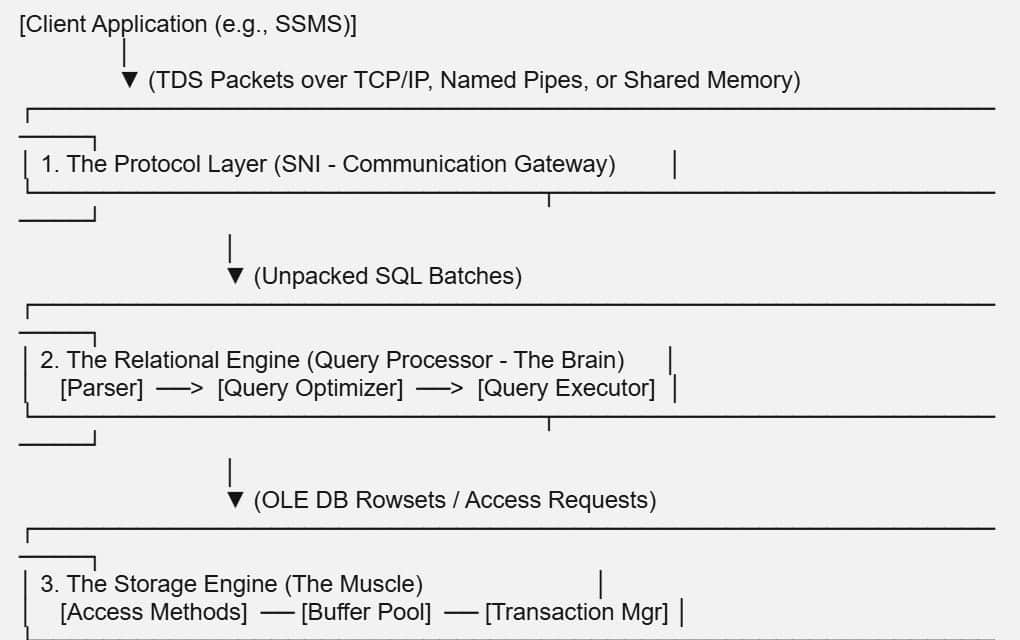
Microsoft SQL Server does not operate as a monolithic executable. Instead, it delegates separate operational tasks to four distinct, highly specialized layers.
Layer 1: The Protocol Layer & SQL Server Network Interface (SNI)
The lifecycle of any database query starts when an external application initiates a request. The Protocol Layer serves as the communication gateway, managing client connections via the SQL Server Network Interface (SNI).
Tabular Data Stream (TDS) Protocol
All communication between a client application and the SQL Server Database Engine is packaged into Tabular Data Stream (TDS) packets. TDS is a proprietary, application-level messaging protocol that encapsulates your T-SQL queries, parameters, and returned tabular data arrays into standardized network structures.
Supported Network Protocols
The SNI layer automatically unpacks incoming TDS payloads using one of three primary network transport protocols:
- Shared Memory: The fastest, lowest-overhead protocol available. It is used exclusively when the client application (like SQL Server Management Studio) and the SQL Server service run on the same physical machine, completely bypassing the network card stack.
- TCP/IP: The standard default for enterprise architecture. It handles remote network connections across routers and switches, binding your instances to dedicated network ports (typically port 1433).
- Named Pipes: Primarily utilized in local area networks (LANs) for direct, point-to-point communication. It is highly effective in legacy corporate environments but carries higher latency overhead than pure TCP/IP paths over wide area networks.
The Relational Engine (The Query Processor)
Once the SNI layer unpacks the incoming SQL command, it passes the raw text execution string straight to the Relational Engine, often referred to as the Query Processor. This layer acts as the brain of SQL Server, determining exactly what your query wants and planning the most efficient way to fetch it.
The Command Parser (CMD Parser)
The Parser is the first component to touch your SQL code. It has two strict responsibilities:
- Syntactic Check: Verifies that your T-SQL text follows correct grammatical syntax rules. If you misspell
SELECTasSELEKT, the parser stops processing and throws an error. - Semantic Check & Binding: Verifies that the objects you are querying actually exist in the database catalogs (tables, columns, views) and that your user account has permissions to access them.
Once these validations pass, the parser normalizes the code and outputs an internal tree structure called a Query Tree.
The Query Optimizer: The Cost-Based Engine
The Query Optimizer is easily the most complex and fascinating component of the entire engine. SQL Server uses a cost-based optimizer, meaning it generates multiple potential execution paths and estimates the hardware resources (CPU and I/O) required to run each path.
Because checking every single mathematical permutation for a complex multi-table join would take longer than running the query itself, the Optimizer does not look for the absolute best plan. Instead, it aims for a good enough plan with a low optimization cost. It leverages data column Statistics (histograms that track data density and distribution) to estimate how many rows will pass through each operator, selecting the final blueprint and registering it as an official Execution Plan.
The Query Executor
The Execution Plan is passed directly to the Query Executor. This component does not physically read data blocks off your hard drive. Instead, it acts as a manager, stepping through the plan’s visual operators (like Index Seeks or Hash Match Joins) and making structural calls to the Storage Engine to pull the necessary rows.
Layer 3: The Storage Engine (The Muscle)
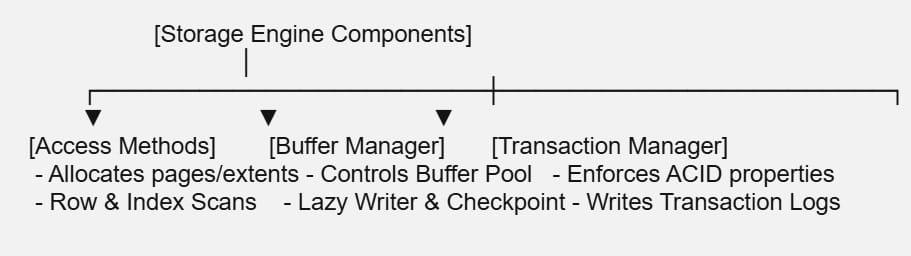
If the Relational Engine acts as the architect, the Storage Engine is the construction crew. It is responsible for organizing data blocks, maintaining transaction logs, managing physical disk access, and enforcing concurrency rules.
Access Methods
The Access Methods layer translates the logical data requests from the Query Executor into physical block assignments. It sets up the execution logic to scan rows, seek down index tree structures, and allocate physical space when data pages expand.
The Buffer Manager & The Buffer Pool
Reading data files directly from a physical NVMe SSD or SAN storage array introduces massive microsecond latency compared to processing data in RAM. To maximize performance, SQL Server allocates a massive section of system memory to the Buffer Pool, which acts as an in-memory cache for 8 KB data pages.
- Clean Pages: Data pages loaded into RAM that match the exact data state on the physical disk.
- Dirty Pages: Data pages that have been modified in memory by an
UPDATEorINSERTquery but have not yet been written back to the disk.
The Transaction Manager
The Transaction Manager maintains database reliability under heavy transactional stress. It ensures your queries conform to strict ACID standards through two primary sub-components:
- The Lock Manager: Allocates and releases structural database locks (Shared, Exclusive, Intent-Shared) to isolate concurrent user modifications and prevent unaligned data anomalies.
- Write-Ahead Logging (WAL): To ensure data durability, SQL Server guarantees that a dirty page modified in memory can never be overwritten on disk until the corresponding log record outlining the change is safely flushed to the non-volatile transaction log file (
.ldf).
Layer 4: The SQLOS (SQL Server Operating System)
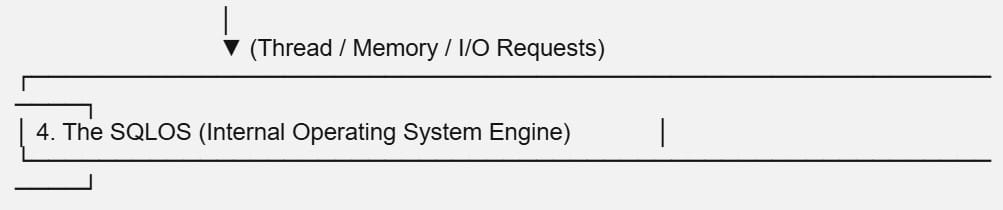
Tucked beneath the relational and storage layers sits a highly specialized, low-level abstraction layer called the SQL Server Operating System (SQLOS).
SQL Server is incredibly greedy with hardware resources. Rather than relying on generic Windows or Linux kernel schedulers—which are optimized to juggle hundreds of unrelated background apps—SQL Server uses SQLOS to take total control over its own hardware allocations.
Co-operative Thread Scheduling
SQLOS implements non-preemptive, cooperative scheduling. Instead of the OS kernel forcefully cutting off thread tasks mid-cycle, SQLOS sets up dedicated schedulers mapped directly to your physical CPU cores. Threads running inside SQL Server willingly yield control of the CPU when they hit a resource blocker (like waiting for a page read off a disk), allowing another database task to step onto the core instantly with near-zero context switching overhead.
Memory Broker and Memory Management
SQLOS dynamically manages the entire internal memory footprint. It monitors memory consumption across the Plan Cache, the Buffer Pool, and workspace sort buffers. If the underlying host operating system reports external memory pressure, SQLOS negotiates with its internal memory brokers to shrink caches and release ram allocations safely without crashing active queries.
Real-Time Execution Walkthrough: Read vs. Write Paths
To synthesize this theoretical architecture into practical tuning knowledge, let’s trace exactly how SQL Server moves data through its internal components during a simple data retrieval command versus a data modification command.
The Lifecycle of a SELECT Query (Read Path)
When you submit a data retrieval request, the transaction pipeline operates as follows:
1. The Request Travels Through the Protocol Gateway into the Parser:
The client application wraps your query text into a TDS packet and transmits it over TCP/IP. The SNI layer captures the network packet, unpacks the text string, and hands it to the CMD Parser to validate syntax and compile the foundational query tree layout.
2. The Query Processor Checks the Plan Cache Before Optimizing:
The Relational Engine hashes your query string and checks the Plan Cache memory pool to see if an identical plan already exists. If it finds a match (a Cache Hit), it skips optimization entirely; if it misses, the Optimizer evaluates statistics, builds a fresh execution plan, and stores it in memory.
3. The Executor Calls Access Methods to Fetch Pages via the Buffer Pool:
The Query Executor processes the plan operators and asks the Storage Engine’s Access Methods to fetch the target rows. The Buffer Manager checks the Buffer Pool in RAM; if the required 8 KB data pages are cached, they are read instantly, but if they are missing, it commands a physical I/O read to load the pages from disk into memory before returning rows back up the protocol layer.
The Lifecycle of an UPDATE Query (Write Path)
When you submit a data modification request, the engine shifts to a high-speed transactional reliability mode to prevent data loss:
- Step 1: Optimization and Locking: The query passes through parsing and optimization exactly like a read request. Once the plan is ready, the Lock Manager places exclusive locks on the target data rows or pages to block other queries from modifying the same data mid-stream.
- Step 2: Modifying Memory (The Dirty Page): If the target data page sits inside the Buffer Pool RAM cache, the engine modifies the row data inside memory instantly. This page is now officially flagged as a Dirty Page.
- Step 3: Flushing the Transaction Log (WAL): Before a success confirmation is returned to your client app, the Transaction Manager writes the exact logical modification steps to the physical Transaction Log file (
.ldf) on disk. Because the log file records writes sequentially, this disk I/O happens in single-digit milliseconds. - Step 4: Hardening Disk State (The Checkpoint Process): The modified data page is not immediately written back to the primary database file (
.mdf). Instead, it stays in memory as a dirty page. Every few minutes, a proactive background system process called the Checkpoint wakes up. It scans the Buffer Pool, finds all dirty pages hardened by the log file, and flushes those data pages in an organized bulk write straight onto your primary disk storage drives.
Summary
Mastering the internal architecture of Microsoft SQL Server completely changes how you build and scale your data platforms. By understanding how the Protocol Layer isolates connection traffic, how the Relational Engine optimizes query trees using statistics, how the Storage Engine uses the Buffer Pool to protect slow physical disk paths, and how SQLOS manages hardware threads with surgical precision.
You may also like the following articles:

After working for more than 15 years in the Software field, especially in Microsoft technologies, I have decided to share my expert knowledge of SQL Server. Check out all the SQL Server and related database tutorials I have shared here. Most of the readers are from countries like the United States of America, the United Kingdom, New Zealand, Australia, Canada, etc. I am also a Microsoft MVP. Check out more here.