
The primary tool for combining rows from two or more tables based on a related logical column between them is the SQL INNER JOIN.In this comprehensive, step-by-step tutorial, I will take you inside the inner mechanics of the INNER JOIN framework, break down relational execution sets, and contrast logical syntax structures.
SQL INNER JOIN Tutorial
What is an INNER JOIN?
To write efficient database code, you must first understand the mathematical intersection that occurs when tables combine. An INNER JOIN creates a new result set by combining column values of two tables (let’s call them Table A and Table B) based upon a strict join predicate (the matching criteria).
The defining characteristic of an INNER JOIN is its strict exclusivity: It returns only the rows where there is a perfect match found in both tables. * If a row in Table A matches a row in Table B based on the join criteria, those rows are concatenated and returned in your output grid.
- If a row exists in Table A but has no corresponding matching record in Table B, that row is completely excluded from the result set.
- Conversely, any unmatched records inside Table B are discarded as well.
Structural Deep Dive: The ANSI-SQL Syntax
Historically, database developers wrote joins using old-style implicit syntax inside the WHERE clause. Modern enterprise standards mandate the use of explicit ANSI-SQL standard join syntax, which separates your relational matching logic from your filtering logic.
The Explicit ANSI-SQL Framework (The Universal Standard)
The modern blueprint isolates the join mechanics completely into the FROM block using the INNER JOIN and ON keywords:
SQL
SELECT
    t1.column_a,
    t2.column_b
FROM
    schema_name.table_a AS t1
INNER JOIN
    schema_name.table_b AS t2
    ON t1.shared_key_id = t2.shared_key_id;
Breaking Down the Components:
- The
FROMTable (Left Side): This is your anchor table (table_a). The engine sets this up as the primary baseline for the evaluation loop. - The
INNER JOINTable (Right Side): This is the secondary table (table_b) you are bringing into the processing space to pair with your anchor data. - The
ASTable Alias: Short, descriptive abbreviations (liket1andt2) are critical. They keep your code scannable and explicitly tell the parser exactly which table should supply each selected column, preventing “ambiguous column name” errors. - The
ONPredicate: This is the relational bridge. It defines the exact logical condition that must evaluate toTRUEfor a row pairing to be permitted into the final output. Typically, this maps a Foreign Key in your child table straight back to the Primary Key of your parent table.
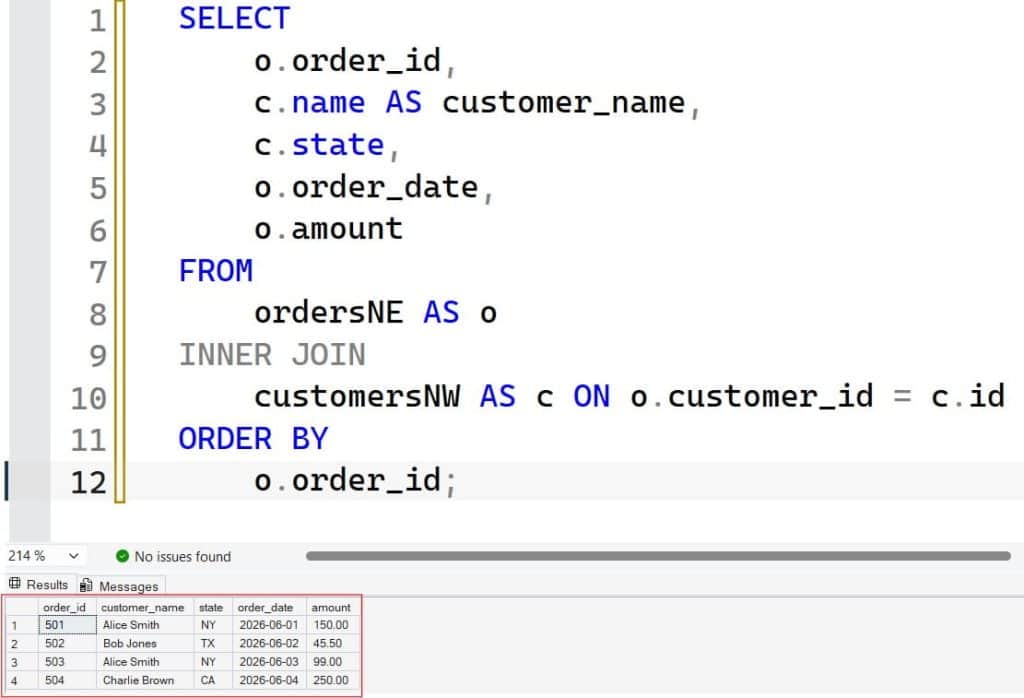
Example
SELECT
    o.order_id,
    c.name AS customer_name,
    c.state,
    o.order_date,
    o.amount
FROM
    ordersNE AS o
INNER JOIN
    customersNW AS c ON o.customer_id = c.id
ORDER BY
    o.order_id;
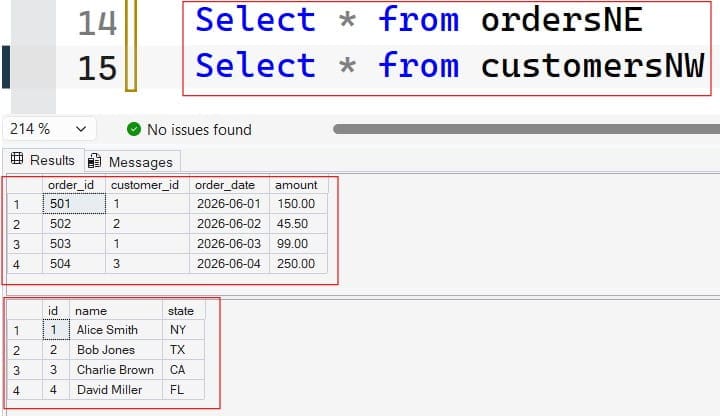
After executing the query above, I obtained the expected output shown in the screenshot below.
Comparative Framework: Choosing the Right Relational Operator
| Join Operation Type | Set-Theoretic Result Behavior | Handling of Unmatched Left Rows | Handling of Unmatched Right Rows | Primary Performance Profile |
INNER JOIN | Strict intersection of both datasets. | Completely Excluded. | Completely Excluded. | Highly efficient; gives the optimizer maximum indexing flexibility. |
LEFT OUTER JOIN | Returns all left rows, plus matching right rows. | Retained (Unmatched columns fill with NULL). | Completely Excluded. | Requires scanning or probing the entire left table framework. |
RIGHT OUTER JOIN | Returns all right rows, plus matching left rows. | Completely Excluded. | Retained (Unmatched columns fill with NULL). | Mirror image of a Left Join; rarely used in clean, top-down architectures. |
FULL OUTER JOIN | Complete Cartesian union of both datasets. | Retained (Fills with NULL). | Retained (Fills with NULL). | High overhead; requires extensive sorting and merge processing. |
Multi-Table Orchestration: Joining Beyond Two Tables
In complex corporate schemas, the information you need is rarely isolated to just two tables. You might need to trace an asset across three, four, or five relational layers to pull a complete data profile.
The database engine processes multi-table joins sequentially, top-down, treating the output of the first join as a virtual composite table before applying the next join evaluation layer.
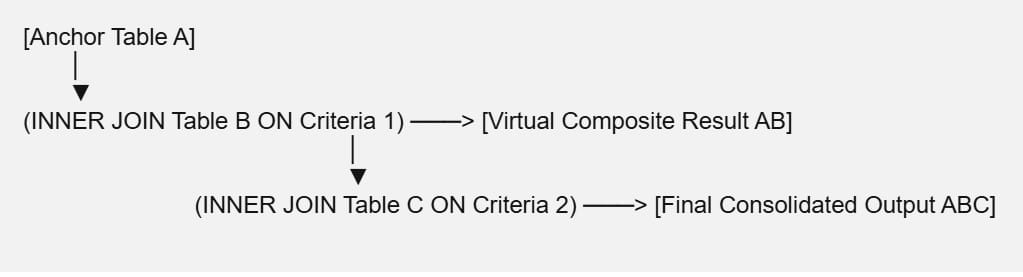
When building these multi-layered query structures, maintaining clear table aliasing and distinct join criteria blocks is essential for long-term code maintenance:
SQL
SELECT
    ord.order_id,
    cust.customer_name,
    emp.sales_rep_name,
    prod.product_name
FROM
    sales.orders AS ord
INNER JOIN
    sales.customers AS cust ON ord.customer_id = cust.customer_id
INNER JOIN
    hr.employees AS emp ON cust.assigned_rep_id = emp.employee_id
INNER JOIN
    production.products AS prod ON ord.product_id = prod.product_id;
Identifying and Eliminating Common Join Roadblocks
Even senior developers can run into performance issues or data anomalies when writing complex join logic. Understanding how the underlying query engine processes these commands will help you spot and fix these issues quickly.
- The Many-to-Many Fan-Out (Accidental Row Explosion): If your join predicate targets columns that contain duplicate, non-unique values in both tables, the database engine will map every matching instance to every other matching instance. This creates a Cartesian explosion that can balloon a expected 100-row output into millions of duplicate rows, draining server memory. Always verify that at least one side of your
ONclause points to a unique, primary key constraint. - Mismatched Data Type Coercion: If you attempt to join a child column configured as a
VARCHARstring datatype straight to a parent primary key configured as anINTinteger, the database engine will be forced to perform an implicit data type conversion on every single row comparison loop. This completely breaks the engine’s ability to use your data indexes efficiently, turning a lightning-fast search into a slow, full-table scan. - Filtering Inside the
ONClause vs. theWHEREClause: While placing a filter condition (likeAND t1.status = 'Active') inside yourONclause is technically valid in anINNER JOIN, it violates clean code practices. Keep yourONclause dedicated strictly to establishing the relational structural relationship between the tables, and use theWHEREclause exclusively to handle your data filters.
Under the Hood: How the Database Engine Executes Joins
The Relational Engine’s Query Optimizer translates your logical INNER JOIN text into a physical execution plan using one of three underlying join algorithms, depending on the size of your datasets and your data indexing strategy:
- Nested Loop Join: The simplest execution path. The engine takes a row from the outer table (left) and scans or searches down the inner table (right) looking for a match, repeating this loop for every row. This algorithm is incredibly fast if the inner table has a highly optimized, clustered index.
- Merge Join: The most performant algorithm available. If both datasets are already physically sorted on the join column (due to matching index layouts), the engine reads both tables simultaneously, pairing rows in a single pass without resorting or caching data.
- Hash Match Join: The fallback choice for large, unindexed big-data pools. The engine scans the smaller table, builds a temporary hash table framework in server memory, and then reads the larger table, hashing its keys to locate matches. While powerful, this approach requires significant memory and tempDB storage resources.
Summary
Mastering the SQL INNER JOIN is a foundational milestone in your data engineering journey. By consistently prioritizing explicit ANSI standard syntax over legacy implicit formats, mapping your keys accurately to prevent row duplication issues, and ensuring matching datatypes across your join columns to maintain index integrity.
You may also like the following articles:
- SQL LEFT JOIN
- SQL INNER JOIN vs LEFT JOIN
- What Are The Different Types Of Joins In SQL
- SQL JOIN vs UNION
- SQL Join Example With Where Clause

After working for more than 15 years in the Software field, especially in Microsoft technologies, I have decided to share my expert knowledge of SQL Server. Check out all the SQL Server and related database tutorials I have shared here. Most of the readers are from countries like the United States of America, the United Kingdom, New Zealand, Australia, Canada, etc. I am also a Microsoft MVP. Check out more here.