
In this comprehensive article, I will look under the hood of both join types, SQL INNER JOIN vs LEFT JOIN, compare their relational execution behaviors side-by-side, analyze how the query optimizer processes them, and lay out a definitive selection framework for your data architecture.
SQL INNER JOIN vs LEFT JOIN
Mathematical Foundations: Venn Diagrams and Set Exclusivity
To write database queries with authority, you must first visualize the mathematical intersection that occurs when two tables are linked. The primary difference between an INNER JOIN and a LEFT JOIN comes down to exclusivity vs. inclusivity.
The Mechanics of an INNER JOIN (Strict Intersection)
An INNER JOIN is an exclusive operation. It focuses entirely on the intersection of the two datasets. When you join Table A (the left table) to Table B (the right table) using an INNER JOIN, the query engine evaluates the join criteria and returns only the rows that have a perfect match in both tables.
If a row inside the left table cannot find a corresponding matching key in the right table, that row is completely dropped from the final output grid.
The Mechanics of a LEFT JOIN (Left-Side Inclusivity)
A LEFT JOIN is an inclusive operation that prioritizes the structural integrity of your primary dataset. When you execute a LEFT JOIN, the database engine guarantees that every single row from the left table is retained in the final output, regardless of whether a matching record exists on the right side.
If a match is found in the right table, the engine concatenates the matching right-side columns to the row. If no match exists, the engine still returns the left-side row, but it dynamically injects an empty NULL placeholder value into every column originating from the right table.
Structural Syntax Deep Dive: Coding the Relational Bridge
Modern enterprise development standards mandate using explicit ANSI-SQL standard join syntax, which cleanly separates your relational matching logic from your filtering parameters.
Coding an INNER JOIN
The explicit INNER JOIN framework connects your tables using an absolute relational match requirement inside the ON clause:
SQL
SELECT
    emp.employee_id,
    emp.full_name,
    dept.department_name
FROM
    dbo.employeesNW AS emp
INNER JOIN
    dbo.departments AS dept ON emp.department_id = dept.department_id;
After executing the above query, I got the expected output
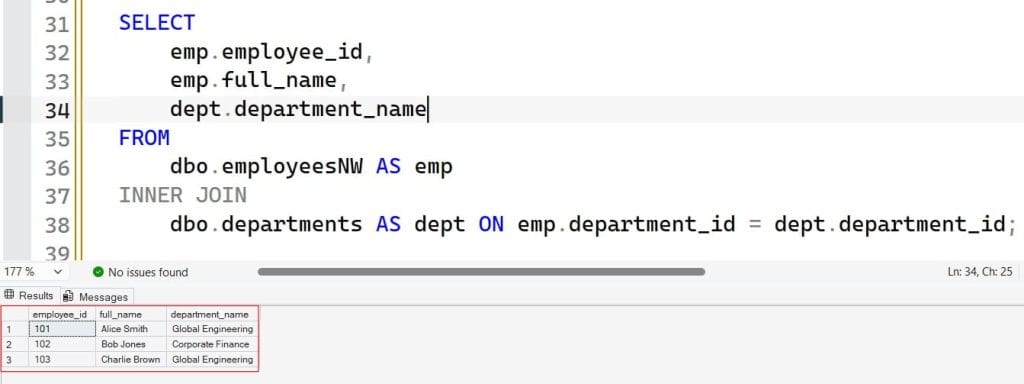
Architectural Impact: If your organization employs a remote contractor who hasn’t been assigned to a specific department code yet (meaning their department_id is blank or unmapped), an INNER JOIN will completely drop that employee from the query output.
Coding a LEFT JOIN
The LEFT JOIN syntax uses an identical structural layout, but it instructs the query engine to preserve the left anchor table entirely:
SQL
SELECT
    emp.employee_id,
    emp.full_name,
    dept.department_name
FROM
    hr.employees AS emp
LEFT JOIN
    hr.departments AS dept ON emp.department_id = dept.department_id;
After executing the above query, I got the expected output
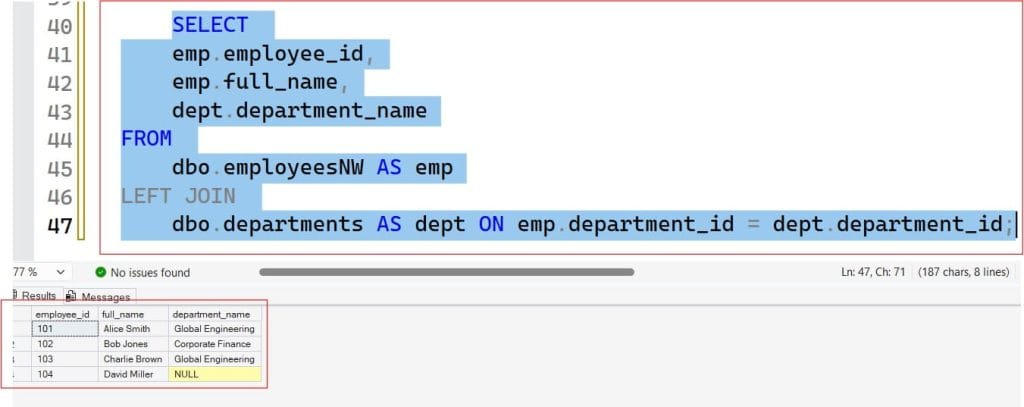
Architectural Impact: Running this query ensures that every single worker in the employees table appears in the report. For the contractor without a department assignment, their name is safely preserved, and the department_name column simply displays a NULL marker.
Side-by-Side Comparison Matrix
To help your development and data engineering teams choose the right operator during query design reviews, look over this comprehensive technical comparison:
| Technical Evaluation Dimension | INNER JOIN Operation | LEFT JOIN (LEFT OUTER JOIN) |
| Set Theory Classification | Exclusive Mathematical Intersection ($\cap$). | Inclusive Left-Hand Selection ($\subset$ or $\cup$). |
| Unmatched Left Rows Handling | Completely discarded from the output grid. | Preserved intact across the output layer. |
| Unmatched Right Rows Handling | Discarded from the final dataset. | Discarded from the final dataset. |
| Right-Side Column Behavior | Always populated with matching data values. | Populated with NULL indicators when unmatched. |
| Resulting Row Count | Can be less than or equal to the left table count. | Always greater than or equal to the left table count. |
| Optimizer Execution Freedom | High; the engine can freely swap table ordering. | Restrained; the engine must evaluate the left table first. |
| Primary Use Case Focus | Fetching deeply coupled relational transactions. | Auditing, orphan hunting, and preserving master data loops. |
Query Optimizer Internals: Behind-the-Scenes Execution Plans
The difference between these operators isn’t limited to the layout of your final data grid; it also alters how the database engine’s Query Optimizer physically reads your data blocks off the disk.
Table Reordering Flexibility in INNER JOINs
When you write an INNER JOIN, the relational relationship is completely symmetrical. Joining Table A to Table B yields the exact same logical result as joining Table B to Table A.
Because the order doesn’t matter, the Query Optimizer has total freedom to reorder the tables behind the scenes. If Table B contains only 5 rows and Table A contains 5 million rows, the optimizer will automatically swap the tables in the physical execution plan, reading the tiny table first to probe into the large table using a fast Nested Loop or Merge Join operator.
Rigid Processing Constraints in LEFT JOINs
A LEFT JOIN forces the query engine into a strict processing sequence. Because you have explicitly stated that every row from the left table must be preserved, the optimizer cannot easily swap the table evaluation order.
The engine is forced to read the left table as the driving outer loop framework. If your left table is a massive, unindexed transaction log, the engine must scan it entirely before probing the right table, which can lead to intensive resource usage and long execution delays if your indexing strategy is unaligned.
Identifying Performance Traps and Data Anomalies
Even experienced data engineers can encounter unexpected performance issues or data anomalies when combining complex join commands.
The Predicate Placement Trap (Accidental Inner Join conversion): A frequent mistake when using a LEFT JOIN is placing a filtering condition targeting the right table inside your global WHERE clause.
For example:SQL-- WARNING: This logically converts your LEFT JOIN back into a strict INNER JOIN! SELECT emp.full_name, dept.department_name FROM hr.employees AS emp LEFT JOIN hr.departments AS dept ON emp.department_id = dept.department_id WHERE dept.status = 'Active'; Because the WHERE clause evaluates after the join occurs, checking if dept.status = 'Active' completely discards any rows where department_name is NULL.
To fix this and preserve your left-side rows, move that condition straight into your join predicate using the AND keyword:SQL-- CORRECT: Preserves the inclusive LEFT JOIN logic cleanly LEFT JOIN hr.departments AS dept ON emp.department_id = dept.department_id AND dept.status = 'Active';
The Many-to-Many Row Explosion: If the join keys inside your ON clause contain non-unique, duplicate entries in both tables, the database engine will map every matching record to every other matching instance. This creates an unintended Cartesian fan-out that can cause a expected 1,000-row output to balloon into millions of duplicate rows, draining server memory. Always verify your data relationships before deployment.
Practical Use Case: Orphan Hunting and Exception Reporting
While an INNER JOIN is ideal for standard relational data pulling, a LEFT JOIN serves as an excellent diagnostic tool for identifying missing or disconnected data across your environment.
If you need to generate an exception report to hunt down orphaned data records—such as locating customers who have never placed an order, or spotting old server profiles that have no active users mapped to them—you can implement an anti-join pattern.
By executing a LEFT JOIN and filtering the results down to rows where the right-side primary key is explicitly NULL, you can pinpoint your orphaned assets instantly:
SQL
-- Hunting for customers who have never generated an active order transaction
SELECT
    cust.customer_id,
    cust.company_name
FROM
    sales.customers AS cust
LEFT JOIN
    sales.orders AS ord ON cust.customer_id = ord.customer_id
WHERE
    ord.order_id IS NULL; -- Filters out any customers who match an active order
Summary
Mastering the structural choices of relational query writing completely transforms how you build and scale your data platforms.
- Choose an
INNER JOINWhen you need to fetch tightly coupled data profiles where matching records are strictly required in both directions, allowing your query engine maximum freedom to optimize execution and table ordering paths. - Choose a
LEFT JOINWhen you need to preserve your primary master dataset completely, run diagnostic exception reports, or safely manage optional data mappings where right-side entries might be missing.
You may also like the following articles:
- SQL LEFT JOIN vs RIGHT JOIN
- What Are The Different Types Of Joins In SQL
- SQL JOIN vs UNION
- What Are The Different Types Of Joins In SQL

After working for more than 15 years in the Software field, especially in Microsoft technologies, I have decided to share my expert knowledge of SQL Server. Check out all the SQL Server and related database tutorials I have shared here. Most of the readers are from countries like the United States of America, the United Kingdom, New Zealand, Australia, Canada, etc. I am also a Microsoft MVP. Check out more here.