
The single most common stumbling block? Understanding the practical and structural differences between a LEFT JOIN and a RIGHT JOIN.
In this comprehensive article, I am going to demystify SQL outer joins i.e SQL LEFT JOIN vs RIGHT JOIN completely. We will break down the underlying mechanics of both operations, look at how the SQL engine processes them, analyze performance considerations, and establish a definitive conclusion so you always know exactly which join to use.
SQL LEFT JOIN vs RIGHT JOIN
The Core Concept: What is an Outer Join?
Before we pit LEFT JOIN against RIGHT JOIN, we need to understand the broader category they belong to: Outer Joins.
In standard relational database management systems (RDBMS)—whether you are using SQL Server, PostgreSQL, MySQL, or Oracle—a join is used to combine rows from two or more tables based on a related column between them.
- An
INNER JOINstrictly returns rows where there is a perfect match in both tables. If a row in the first table doesn’t have a corresponding match in the second table, it is completely omitted from the final result set. - An
OUTER JOIN(which includes bothLEFTandRIGHTvarieties) behaves differently. It preserves unmatched rows from one table while pulling matching records from the other. Where no match exists, the database engine automatically fills the missing values withNULL.
Understanding this preservation of unmatched data is the secret to mastering relational data analysis.
The Structural Breakdown: Table Order Matters
The fundamental difference between a LEFT JOIN and a RIGHT JOIN comes down to one thing: the physical order of the tables in your written SQL statement. When you write a query, the table listed immediately after the FROM clause is designated as the Left Table (also known as the primary or driving table). The table listed immediately after the JOIN keyword is designated as the Right Table (the secondary table).
What is a LEFT JOIN?
A LEFT JOIN (or LEFT OUTER JOIN) instructs the database engine to return all records from the left table, regardless of whether a match exists on the right.
If a row in the left table finds a match in the right table based on the join condition, those columns are merged. If that row finds absolutely no match in the right table, it is still included in your final result set, but every single column coming from the right table will contain a NULL value.
What is a RIGHT JOIN?
Conversely, a RIGHT JOIN (or RIGHT OUTER JOIN) reverses this exact operational logic. It instructs the engine to return all records from the right table, along with any matching records from the left table.
If a row in the right table has no matching record in the left table, the row is preserved in the final output, and the columns belonging to the left table are populated with NULL values.
Side-by-Side Comparison Matrix
| Operational Category | LEFT JOIN | RIGHT JOIN |
| Primary Focus | Preserves 100% of rows from the Left table. | Preserves 100% of rows from the Right table. |
| Placement in Code | Evaluates the table specified before the join keyword. | Evaluates the table specified after the join keyword. |
| Handling of Unmatched Data | Populates columns of the right table with NULL. | Populates columns of the left table with NULL. |
| Industry Usage Frequency | Extremely high (~95% of analytical queries). | Very low (rarely used in clean modern syntax). |
| Readability Profile | Matches Western left-to-right reading patterns. | Can disrupt logical flow in complex multi-table queries. |
| Equivalency Status | Can be converted to a RIGHT JOIN by swapping table order. | Can be converted to a LEFT JOIN by swapping table order. |
The Logical Equivalence: They are Two Sides of the Same Coin
Here is a foundational truth that surprises many junior data analysts: Any query written using a LEFT JOIN can be rewritten as a RIGHT JOIN simply by reversing the order of the tables in your code. They are functionally identical under the hood when configured correctly.
Consider these two conceptual structural models:
Model A (Using LEFT JOIN):
SQL
SELECT *
FROM Table_A
LEFT JOIN Table_B
ON Table_A.Key = Table_B.Key;
In Model A, Table_A is on the left, so every single row from Table_A is guaranteed to appear in the output.
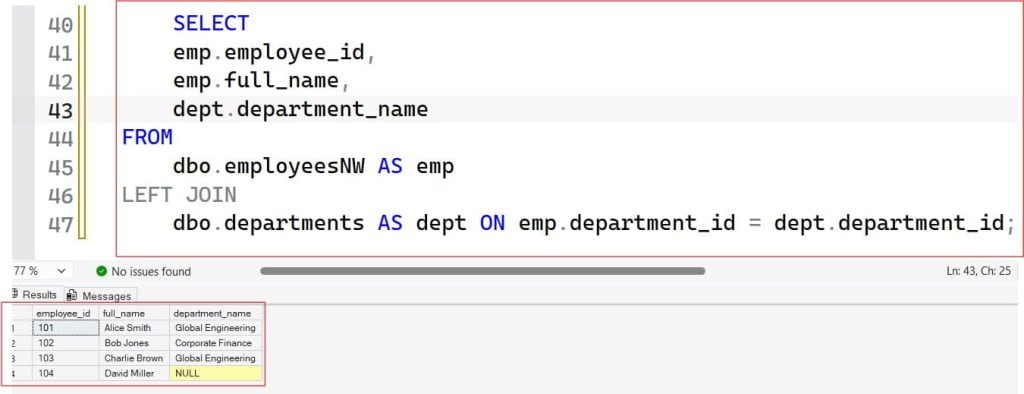
Example
    SELECT
    emp.employee_id,
    emp.full_name,
    dept.department_name
FROM
    dbo.employeesNW AS emp
LEFT JOIN
    dbo.departments AS dept ON emp.department_id = dept.department_id;
After executing the above query, I got the expected output as shown in the screenshot below.
Model B (Using RIGHT JOIN):
SQL
SELECT *
FROM Table_B
RIGHT JOIN Table_A
ON Table_B.Key = Table_A.Key;
In Model B, we swapped the order of the tables in the FROM and JOIN clauses. Because Table_A is now positioned as the right-hand table, using a RIGHT JOIN achieves the exact same logical result as Model A. The row counts, data pairings, and NULL assignments will be identical.
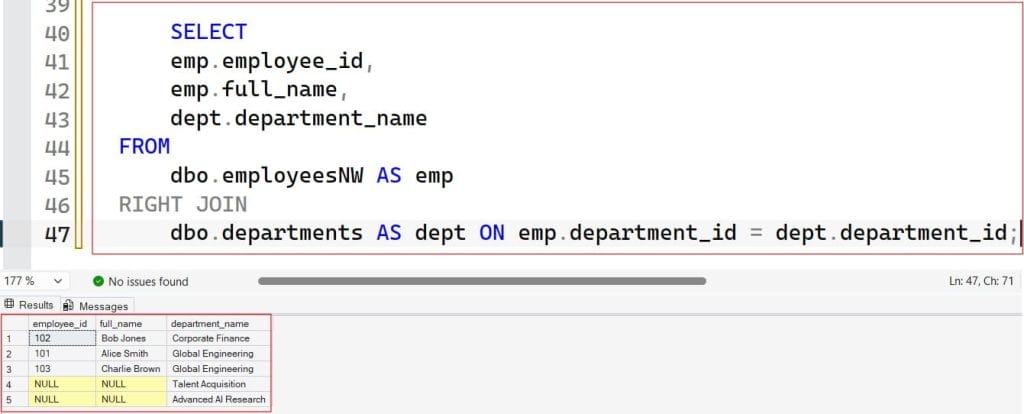
Example
    SELECT
    emp.employee_id,
    emp.full_name,
    dept.department_name
FROM
    dbo.employeesNW AS emp
RIGHT JOIN
    dbo.departments AS dept ON emp.department_id = dept.department_id;
After executing the above query, I got the expected output as shown in the screenshot below.
Why the Industry Standard Strongly Favors LEFT JOIN
If LEFT JOIN and RIGHT JOIN are functionally interchangeable by swapping table names, why do almost all enterprise analytics teams, database administrators, and automated SQL formatters in the United States overwhelmingly enforce the use of LEFT JOIN?
The answer comes down to human psychology, code readability, and maintainability.
1. Left-to-Right Reading Patterns
In the Western world, we read text from left to right. When scanning a SQL script, our brains naturally expect a linear flow.
When you use a LEFT JOIN, your query says: “Start with this primary table over here on the left, and then pull in supplementary data from these other tables if it happens to exist.” This creates a clean mental hierarchy.
A RIGHT JOIN forces the reader to reverse their cognitive process. It essentially says: “Look at this new table on the right, but remember we are prioritizing it over the primary table we just read a line ago.” ### 2. Multi-Table Join Complexity
The readability issue escalates dramatically when your queries scale past a simple two-table join. Imagine a complex analytics view that aggregates data across five distinct tables.
If you mix LEFT JOIN and RIGHT JOIN operations within a single multi-table query, deciphering which tables are driving the dataset becomes an absolute nightmare. It creates an optimization maze where it is incredibly easy to accidentally introduce data inflation or filter out rows unintentionally. Stick to a consistent chain of LEFT JOIN statements to ensure your queries remain scannable and easy to debug for anyone reviewing your code.
Handling Multi-Table Complexity and Filters
When working with outer joins, there are two advanced concepts that frequently cause bugs in production environments: the placement of filtering conditions and the compounding behavior of multiple joins.
The WHERE Clause Trap
A common architectural error occurs when a developer implements a LEFT JOIN to preserve all records from the primary table, but then accidentally converts it back into an INNER JOIN by adding a filter to the WHERE clause.
If you filter a column belonging to the right-hand table inside your WHERE clause (e.g., WHERE RightTable.Status = 'Active'), the database evaluates the join first, populating unmatched rows with NULL. Then, the WHERE clause filters out any row where the status is not ‘Active’. Because NULL is not equal to ‘Active’, all your preserved unmatched rows are instantly wiped out of the final result.
To preserve unmatched rows while applying a filter to the secondary table, that filtering condition must live directly inside the ON clause of the join, rather than the global WHERE clause.
Compounding Joins
When chaining multiple outer joins together, remember that the output of your first join becomes the “left table” for the next join in the sequence. If you execute a LEFT JOIN between Table 1 and Table 2, and then follow it up with a standard INNER JOIN to Table 3 on a column originating from Table 2, you will inadvertently drop any rows where Table 2 was NULL.
To maintain the integrity of your primary dataset throughout a long query pipeline, you must generally continue using LEFT JOIN operations for all subsequent tables down the stream.
When to Use Which
- Default to
LEFT JOIN: MakeLEFT JOINyour organization’s standard operational mandate for all outer join scenarios. It keeps code uniform, clean, and immediately understandable for downstream data consumers. - Use
RIGHT JOINExclusively for Minimal-Impact Refactoring: The only time aRIGHT JOINis practically justified in an enterprise setting is when you are modifying an incredibly large, deeply nested legacy query, and you need to pull in all records from a brand-new table without rewriting or restructuring the existing upstream table hierarchy. - Avoid Mixing Joins: Never combine
LEFT JOINandRIGHT JOINsyntax within the same query block. If you inherit a script that mixes them, take the time to refactor the code into a unified sequence ofLEFT JOINstatements to safeguard your data’s long-term maintainability.
You may also like the following articles:
- SQL JOIN vs EXISTS
- SQL INNER JOIN Tutorial
- SQL INNER JOIN vs LEFT JOIN
- What Are The Different Types Of Joins In SQL

After working for more than 15 years in the Software field, especially in Microsoft technologies, I have decided to share my expert knowledge of SQL Server. Check out all the SQL Server and related database tutorials I have shared here. Most of the readers are from countries like the United States of America, the United Kingdom, New Zealand, Australia, Canada, etc. I am also a Microsoft MVP. Check out more here.