
In this comprehensive guide, I will break down the fundamental differences, performance implications, execution mechanics, and architectural best practices for deciding when to use subqueries versus JOINs.
SQL Subquery vs JOIN
Understanding the Fundamentals
What is a SQL Subquery?
A subquery (also known as a nested query or inner query) is a SELECT statement embedded inside a primary SELECT, INSERT, UPDATE, or DELETE SQL statement. Subqueries pass their result set directly to the outer query, acting as a dynamic filter, value lookup, or temporary inline dataset.
Subqueries generally fall into two categories:
- Non-Correlated Subquery: Executes independently of the outer query. The database engine runs the inner query first, returns the intermediate result set, and then evaluates the outer query.
- Correlated Subquery: References columns from the outer query context. The database engine must evaluate the inner query repeatedly—conceptually once for every candidate row evaluated by the outer query—unless the query optimizer can rewrite it internally into a join construct.
What is a SQL JOIN?
A JOIN is a relational operation that combines columns from one or more tables into a single result set based on a common key or logical relationship.
Unlike subqueries, which nest logic vertically, JOINs align datasets horizontally. Modern database engines—such as SQL Server, PostgreSQL, MySQL, and Oracle—are heavily optimized to process JOINs using relational algebra techniques like Hash Matches, Merge Joins, and Nested Loops.
Structural Syntax Comparison
To understand how subqueries and JOINs differ in practice, consider how both constructs solve common relational problems.
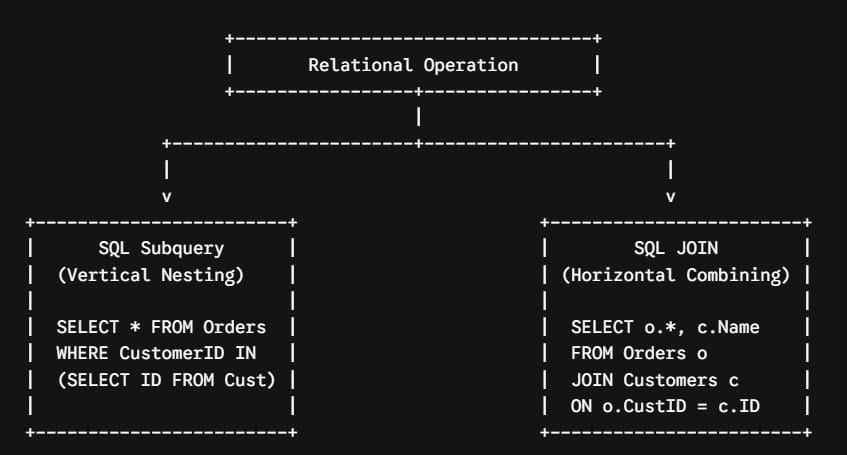
1. Data Filtering via Subquery vs INNER JOIN
Suppose you need to select orders placed by customers who reside in a specific state.
Using a non-correlated subquery:
SQL
SELECT OrderID, OrderDate, TotalAmount
FROM Orders
WHERE CustomerID IN (
    SELECT CustomerID
    FROM Customers
    WHERE State = 'TX'
);
Achieving the exact same business logic using an INNER JOIN:
SQL
SELECT o.OrderID, o.OrderDate, o.TotalAmount
FROM Orders o
INNER JOIN Customers c ON o.CustomerID = c.CustomerID
WHERE c.State = 'TX';
2. Finding Non-Matching Records: NOT IN vs LEFT JOIN / EXCEPT
Suppose you need to find customers who have never placed an order.
Using a correlated NOT EXISTS subquery:
SQL
SELECT CustomerID, CustomerName
FROM Customers c
WHERE NOT EXISTS (
    SELECT 1
    FROM Orders o
    WHERE o.CustomerID = c.CustomerID
);
Achieving this using a LEFT JOIN combined with a NULL filter (an anti-join):
SQL
SELECT c.CustomerID, c.CustomerName
FROM Customers c
LEFT JOIN Orders o ON c.CustomerID = o.CustomerID
WHERE o.OrderID IS NULL;
Core Operational Differences: Subquery vs JOIN
When deciding between these two relational constructs, consider these key structural differences:
| Feature / Dimension | SQL Subquery | SQL JOIN |
| Primary Purpose | Filtering, computing aggregate scalars, or dynamic inline lookups. | Combining columns from multiple tables into a unified record set. |
| Result Set Output | Can only display columns from the primary (outer) query table(s). | Can return and display columns from all joined tables simultaneously. |
| Readability | High for isolated logic (e.g., scalar aggregates like WHERE Price > AVG(Price)). | High for multi-table relationships and complex relational sets. |
| Execution Plan Complexity | Risk of sub-optimal plans if correlated subqueries aren’t unnested by the query optimizer. | Leverages native relational algorithms (Hash, Merge, Nested Loop Joins). |
| Memory Allocation | May materialize temporary tables in memory (TempDB / disk spill). | Optimized for memory pipeline streaming across indexed keys. |
Query Engine Execution Mechanics: How the Database Processes Your Query
Understanding how modern Cost-Based Optimizers (CBOs) evaluate subqueries and JOINs is essential for performance engineering.
1. Subquery Unnesting and Flattening
Older database engines evaluated subqueries strictly procedurally. A correlated subquery meant the engine literally iterated row-by-row through the outer query table, executing the inner query repeatedly.
Modern database engines employ Subquery Unnesting (also called query flattening). During the compilation phase, the query optimizer analyzes the subquery to see if it can logically rewrite the statement into an equivalent JOIN or SEMI-JOIN.
If the optimizer can successfully flatten the subquery, the performance between a subquery and a JOIN will be identical because both produce the exact same execution plan.
2. When Subqueries Fail to Unnest
However, the optimizer cannot always unnest a subquery. Common scenarios where subqueries remain isolated include:
- Complex Aggregations Inside Correlated Subqueries: Subqueries involving multiple nested aggregate functions (
SUM,AVG) combined with outer reference criteria. - Nondeterministic Functions: Subqueries evaluating functions like
NEWID(),RAND(), or custom scalar User-Defined Functions (UDFs). - The
NOT INAnti-Pattern with Nullable Columns: If a subquery evaluated inside aWHERE column NOT IN (SELECT...)returns a singleNULLvalue, the entire predicate evaluates toUNKNOWN, returning zero rows. To guard against this, query engines often fall back to slower, row-by-row validation plans.
Performance Deep Dive: Benchmarking Real-World Scenarios
While modern optimizers handle simple queries well, complex enterprise datasets uncover significant performance variations between subqueries and JOINs.
Scenario 1: Aggregating Large Datasets
When computing aggregate thresholds across large datasets—such as identifying customers whose total spend exceeds the enterprise average—a subquery is often cleaner for scalar values, but a JOIN with a derived table outperforms for group-level math.
Rule of Thumb: Use a subquery when evaluating a single scalar baseline value (e.g.,
WHERE salary > (SELECT AVG(salary) FROM employees)). Use a joined derived table when comparing row values against multi-group aggregated buckets.
Scenario 2: Anti-Pattern Traps (NOT IN vs NOT EXISTS / LEFT JOIN)
Consider querying a table of 10 million telemetry events to find unregistered device IDs.
WHERE DeviceID NOT IN (SELECT DeviceID FROM RegisteredDevices)- Performance Impact: Severe risk. If
RegisteredDevices.DeviceIDcontains nullable values, the optimizer may convert this into a costly Nested Loop operator that scans the target set millions of times.
- Performance Impact: Severe risk. If
WHERE NOT EXISTS (SELECT 1 FROM RegisteredDevices r WHERE r.DeviceID = d.DeviceID)- Performance Impact: Excellent.
NOT EXISTSshort-circuits as soon as a single matching record is found, allowing the optimizer to utilize index seeks efficiently.
- Performance Impact: Excellent.
LEFT JOIN RegisteredDevices r ON d.DeviceID = r.DeviceID WHERE r.DeviceID IS NULL- Performance Impact: Excellent. The optimizer builds an explicit anti-semi-join, utilizing Hash or Merge operators across large datasets.
Architectural Decision Framework: When to Use Which
To help your team standardize query patterns, use this decision framework during architectural design and code reviews.
Choose a SQL JOIN when:
- You need to retrieve and display attributes from multiple related tables in your final
SELECTprojection. - You are working with normalized schemas where relational foreign keys are indexed properly.
- You are aggregating data across multiple related tables using
GROUP BY. - You are performing multi-table transformations inside data pipelines, data warehouses, or ETL procedures.
Choose a SQL Subquery when:
- You need to filter rows based on a single calculated aggregate value (e.g., comparing individual line items to an overall average).
- You want to isolate complex lookup logic inside a reusable sub-component without polluting the top-level
FROMclause. - You are using correlated existence checks via
EXISTSorNOT EXISTSfor readable logic that short-circuits early. - You are writing quick data-patching scripts (
UPDATEorDELETEstatements) where nesting a target condition is clearer than writing multi-table join syntax.
Summary & Key Takeaways
Both subqueries and JOINs are indispensable tools. While modern database optimizers frequently compile simple subqueries into equivalent join plans, structural differences become paramount when scaling to high-volume enterprise production environments.
Key Takeaways
- Use JOINs for set-based horizontal expansion when your application needs columns from multiple tables.
- Use Subqueries for scalar criteria and isolated filtering when evaluating comparative thresholds like averages, maximums, or standalone sub-computations.
- Prefer
EXISTSoverINfor correlated conditional checks to take advantage of short-circuit evaluation. - Rely on Execution Plans, not syntactic assumptions, to guide performance tuning decisions on enterprise datasets.
You may also like the following articles:

After working for more than 15 years in the Software field, especially in Microsoft technologies, I have decided to share my expert knowledge of SQL Server. Check out all the SQL Server and related database tutorials I have shared here. Most of the readers are from countries like the United States of America, the United Kingdom, New Zealand, Australia, Canada, etc. I am also a Microsoft MVP. Check out more here.