
If you have ever asked yourself, “What is SQL used for?” or wondered why virtually every major enterprise relies on it, you are in the right place. In this article, I will draw on my years of hands-on experience managing relational databases to explain what SQL is, why it powers the modern digital economy, how key industries use it daily.
What Is SQL Used For
What Is SQL? (And Why Does It Matter?)
SQL (pronounced “Sequel” or spoken as individual letters S-Q-L) stands for Structured Query Language. Originally developed by IBM researchers back in the 1970s, SQL has become the globally recognized standard language for communicating with relational databases.
To understand SQL, think of a database as an extremely large, highly secure digital filing cabinet. Instead of paper files, this cabinet stores structured data organized into clean tables consisting of rows and columns.
While traditional spreadsheets like Microsoft Excel are great for small datasets, they quickly slow down or crash when handling millions of records. SQL was created specifically to solve this problem—allowing users to store, filter, modify, and analyze massive amounts of relational data in milliseconds.
What Is SQL Used For? Core Functions and Real-World Applications
At its core, SQL is used to manage Relational Database Management Systems (RDBMS). Whether you are streaming a movie, checking your bank balance, or shopping online, SQL is working quietly behind the scenes.
Here is a breakdown of the primary functions SQL performs across modern software systems:
1. Data Retrieval and Querying
The most common use of SQL is extracting specific data from large datasets. Rather than opening thousands of rows manually, you write a SQL query to ask the database for precise information.
- Example: A retail brand in New York retrieving all customer purchases made during Black Friday that exceeded $200.
2. Data Insertion and Record Updating
Whenever a new user creates an account or updates their profile picture, SQL statements write that information into the database.
- Example: Updating a shipping address in an e-commerce platform after a user moves from Austin, Texas to Seattle, Washington.
3. Database Schema Creation and Structuring
Engineers use SQL to design the structural blueprint (schema) of a database. This involves defining table structures, assigning data types (numbers, dates, text), and setting rules to maintain data accuracy.
4. User Access Control and Security
Data security is paramount for enterprise organizations. SQL provides built-in authorization tools that enable administrators to grant or revoke specific access rights to users.
- Example: Allowing a marketing team member to read product analytics while restricting access to sensitive customer credit card details.
How American Industries Rely on SQL Everyday
| Industry | Primary Use Case | Key SQL Benefit |
| E-Commerce & Retail | Tracking inventory, order histories, and payment statuses. | High concurrency handling during peak shopping seasons. |
| Financial Services | Managing transaction logs, ledger balances, and credit checks. | Strict transactional integrity and audit compliance. |
| Healthcare | Storing patient records, prescription tracking, and appointment schedules. | Maintaining HIPAA data structure standards and fast access. |
| Tech & SaaS | Authentication, user preference storage, and platform analytics. | Seamless integration with application backend logic. |
E-Commerce & Retail
Major national platforms like Amazon or Target rely on SQL databases to store product catalogs, manage shopping carts, and track inventory across regional fulfillment centers. Every time an order is placed, SQL queries execute to decrement stock counts and generate receipt records.
Finance and Wall Street Banking
Financial institutions in financial hubs like Manhattan, New York use SQL databases because of their support for ACID properties (Atomicity, Consistency, Isolation, Durability). When money moves from account A to account B, SQL ensures that the entire transaction completes successfully or rolls back completely if a network drop occurs, eliminating phantom balance errors.
Digital Marketing & Customer Relationship Management (CRM)
Marketing teams leverage SQL to segment user demographics, analyze advertising campaign returns, and track customer retention rates. By joining customer purchase records with web traffic logs, analysts can target high-value audience segments with personalized promotions.
Understanding the 4 Essential Sub-Languages of SQL
To understand how SQL functions, it helps to categorize its commands into functional building blocks. Over the years, I have found that breaking SQL down into these four core sub-languages makes learning much less intimidating for beginners.
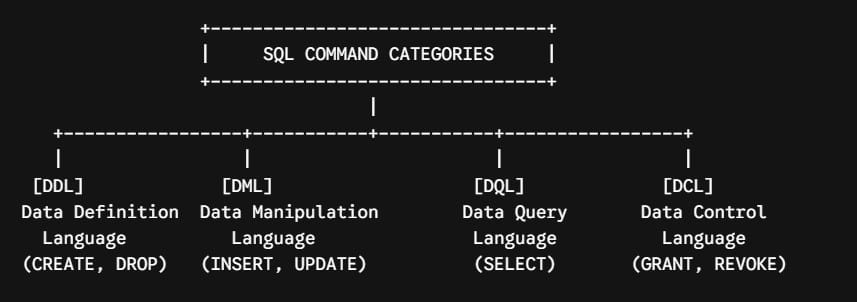
1. Data Query Language (DQL)
DQL focuses entirely on searching and retrieving data from your tables. It is the most widely used component of SQL, especially for data analysts and business intelligence specialists.
- Key Command:
SELECT
2. Data Manipulation Language (DML)
DML commands allow you to modify the actual records stored inside database tables.
- Key Commands:
INSERT(add new records),UPDATE(modify existing records),DELETE(remove records).
3. Data Definition Language (DDL)
DDL defines the architectural structure of the database itself. You use DDL to create entirely new databases, build tables, or alter existing structures.
- Key Commands:
CREATE,ALTER,DROP,TRUNCATE.
4. Data Control Language (DCL)
DCL handles administrative privileges, system permissions, and overall database security.
- Key Commands:
GRANT(give access privileges) andREVOKE(take away access privileges).
The Most Popular SQL Relational Database Systems (RDBMS)
While standard SQL syntax remains consistent across tools, different tech companies have developed specialized database management engines over the decades. Here are the industry standards you will encounter in job postings throughout the tech sector:
- PostgreSQL: An enterprise-grade, open-source relational database known for robust features, extensibility, and strict standards compliance. It is hugely popular among modern tech startups in places like San Francisco and Boston.
- MySQL: Supported by Oracle, MySQL is one of the most widely deployed open-source databases in the world, powering millions of web applications, including platforms like WordPress and Facebook.
- Microsoft SQL Server: A favorite among enterprise corporations across North America, seamlessly integrating with Microsoft’s enterprise infrastructure and Azure cloud services.
- Oracle Database: Designed for high-performance enterprise needs, heavily utilized by Fortune 500 companies, financial markets, and government entities requiring maximum uptime and security.
Who Uses SQL? (Popular Career Paths)
One of the questions I hear most frequently from college students and career switchers is: “Do I really need to learn SQL if I’m not a software developer?”
The short answer is yes. SQL skills are no longer restricted to computer scientists. Here are some key tech and business roles where SQL is a required skill:
- Data Analysts: They write daily SQL queries to pull metrics, build performance dashboards, and help business leaders make data-driven decisions.
- Data Engineers: They construct automated pipelines to move high-volume data safely from source applications into central enterprise data warehouses.
- Backend Software Developers: They write database connection logic in languages like Python, Java, or C# to save user profiles, process payments, and render application content.
- Business Intelligence (BI) Developers: They connect SQL databases directly to analytics visualization platforms like Tableau or Power BI to report enterprise KPIs.
- Product Managers: They write custom analytical queries to evaluate user engagement, feature adoption rates, and customer retention trends.
How to Start Learning SQL: Practical Roadmap
If you are ready to add SQL to your resume, here is a practical roadmap based on how I successfully trained my own junior team members:
- Master Basic Syntax First: Learn how to write simple queries using
SELECT,FROM,WHERE, andORDER BY. - Learn Data Aggregations: Practice summarizing data using aggregate functions like
COUNT(),SUM(),AVG(), and grouping results withGROUP BY. - Understand Relational Joins: Learn how to combine related tables using
INNER JOIN,LEFT JOIN, andRIGHT JOINbased on primary and foreign key relationships. - Practice on Real-World Datasets: Download free public datasets from sources like Google BigQuery or Kaggle, install PostgreSQL or SQLite on your machine, and start running real queries.
Final Thoughts
So, what is SQL used for? Simply put, SQL is the universal bridge connecting human curiosity with computer data storage. It allows us to transform raw, disconnected rows of numbers into meaningful business insights, reliable application experiences, and game-changing innovations.
You may also like the following articles:
- SQL Database Design Best Practices
- SQL Server Developer Edition Limitations
- SQL Constraints
- SQL Join Basics
- SQL Subquery

After working for more than 15 years in the Software field, especially in Microsoft technologies, I have decided to share my expert knowledge of SQL Server. Check out all the SQL Server and related database tutorials I have shared here. Most of the readers are from countries like the United States of America, the United Kingdom, New Zealand, Australia, Canada, etc. I am also a Microsoft MVP. Check out more here.