
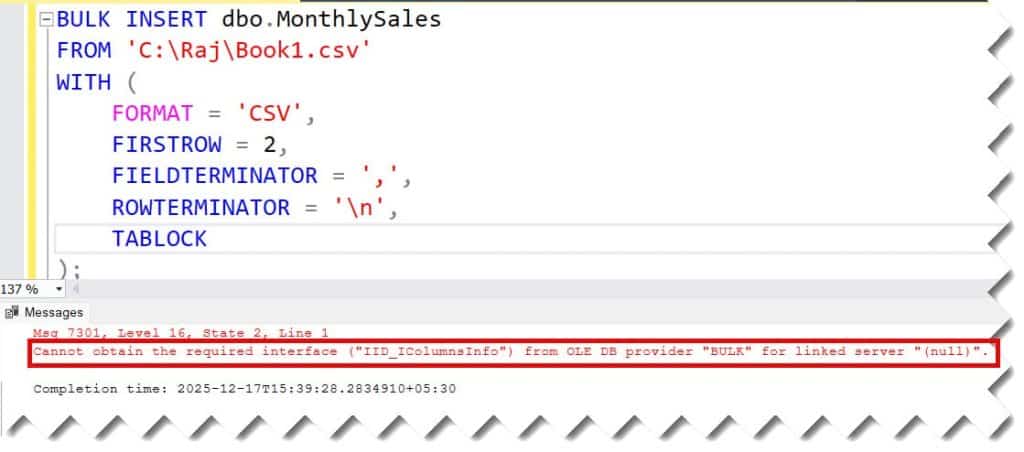
Recently, I was working on the script to import our sales data into one of my existing tables from a CSV file. Immediately after executing the script I got the error “Cannot obtain the required interface (“IID_IColumnsInfo”) from OLE DB provider “BULK” for linked server “(null)”.”
Cannot Obtain The Required Interface
I was trying to execute the script below.
BULK INSERT dbo.MonthlySales
FROM 'C:\Raj\Book1.csv'
WITH (
    FORMAT = 'CSV',
    FIRSTROW = 2,
    FIELDTERMINATOR = ',',
    ROWTERMINATOR = '\n',
   TABLOCK
);
After running the script above, I got this error, as shown in the screenshot below.
The Cause:
SQL Server is trying to map the columns, but the math doesn’t add up.
- Extra Columns: Your CSV has 6 columns, but your table only has 5.
- Line Endings: This is the most common culprit. Your CSV might use Windows line endings (
\r\n), but the script specifies Unix style (\n), or vice versa. SQL Server reads the entire file as one single row, gets confused, and throws this interface error.
Solution
- Check Line Endings: Open your CSV in a text editor (like Notepad++) and turn on “Show All Characters”. If you see
CRLF, change your script toROWTERMINATOR = '0x0a'orROWTERMINATOR = '\r\n'. - Match Columns: Ensure the table has the exact same number of columns as the CSV.
- Test with a Format File: If the data is messy, you might need to generate a format file (XML) to tell SQL Server exactly how to read it.
For me, I updated my SQL script as below.
BULK INSERT dbo.MonthlySales
FROM 'C:\Raj\Test3.csv'
WITH (
    FORMAT = 'CSV',
    --FIRSTROW = 2,
    FIELDTERMINATOR = ',',
    ROWTERMINATOR = '\r\n',
    --ROWTERMINATOR = '0x0a',
    --TABLOCK
);
After executing the above query, the command executed successfully and the records from the CSV file inserted to the table successfully.


Conclusion
This is how you can fix the Cannot Obtain The Required Interface error in SQL Server.
You may also like the following articles:

After working for more than 15 years in the Software field, especially in Microsoft technologies, I have decided to share my expert knowledge of SQL Server. Check out all the SQL Server and related database tutorials I have shared here. Most of the readers are from countries like the United States of America, the United Kingdom, New Zealand, Australia, Canada, etc. I am also a Microsoft MVP. Check out more here.