
One of the most critical skills in SQL Server is the ability to audit object-level permissions. In this guide, I will walk you through the professional methods I use to identify and audit these permissions using T-SQL, system views, and built-in functions.
How to Check Object Level Permissions in SQL Server
Understanding the SQL Server Permission Hierarchy
- Server Level: Logins and server roles (e.g.,
sysadmin). - Database Level: Users and database roles (e.g.,
db_datareader). - Schema Level: Permissions granted on an entire schema (e.g.,
Sales). - Object Level: Specific permissions on a single table, view, or procedure.
When you check for permissions on an object (like a table named Employees), you aren’t just looking for explicit grants on that table. You are looking for effective permissions—the result of direct grants, role memberships, and schema-level overrides.
Using sys.fn_my_permissions for Quick Audits
When I need to know what I can do (or what the current security context allows), my first stop is the sys.fn_my_permissions function. This is a built-in table-valued function that returns the effective permissions of the caller.
Checking Permissions on a Specific Table
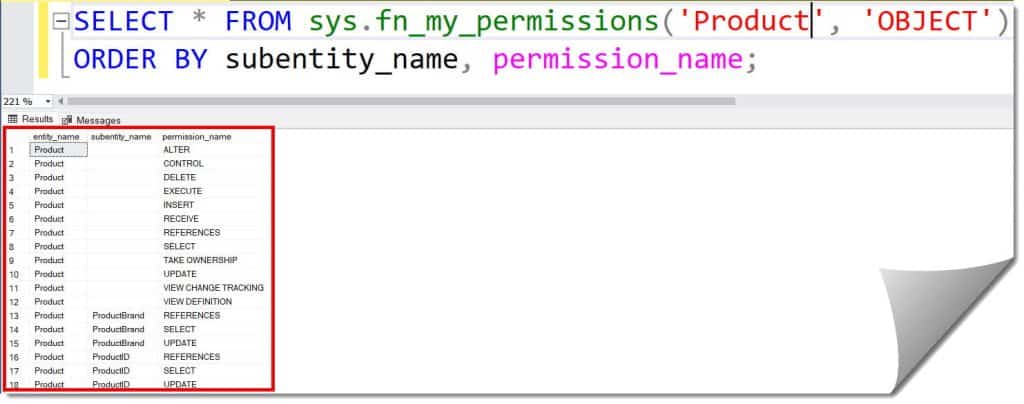
If I’m logged in as Admin and I want to see my rights on the Product table, I run:
SQL
SELECT * FROM sys.fn_my_permissions('Product', 'OBJECT')
ORDER BY subentity_name, permission_name;
After executing the query above, I received the expected output, as shown in the screenshot below.
Why I Use This:
- Simplicity: It provides a clean list of actions (SELECT, INSERT, UPDATE, etc.).
- Granularity: If there are column-level permissions, they appear in the
subentity_namecolumn. - Accuracy: It accounts for all inherited roles.
Auditing Other Users with EXECUTE AS
Usually, a developer like “Raj from Marketing” says he can’t access a specific report. To troubleshoot this, I “impersonate” his security context using EXECUTE AS.
The Impersonation Workflow
- Switch Context: Use
EXECUTE AS USER = 'Raj_Marketing'. - Run the Check: Use the
fn_my_permissionsfunction. - Revert: Always run
REVERTto return to your original high-privilege context.
SQL
EXECUTE AS USER = 'Raj_Marketing';
SELECT * FROM sys.fn_my_permissions('Reports.QuarterlySales', 'OBJECT');
REVERT;
Expert Note: This requires the
IMPERSONATEpermission. If you are adb_ownerorsysadmin, you likely have this by default.
Querying System Catalog Views for a Global View
Functions are great for one-off checks, but if you need to generate a report for a compliance audit in a law firm, you need a broader view. For this, I query the System Catalog Views.
The most important views for object permissions are:
sys.database_permissions: Stores the actual grant/deny entries.sys.objects: To link those permissions to specific tables/views.sys.database_principals: To identify the user or role receiving the permission.
Professional Script to List All Object Permissions
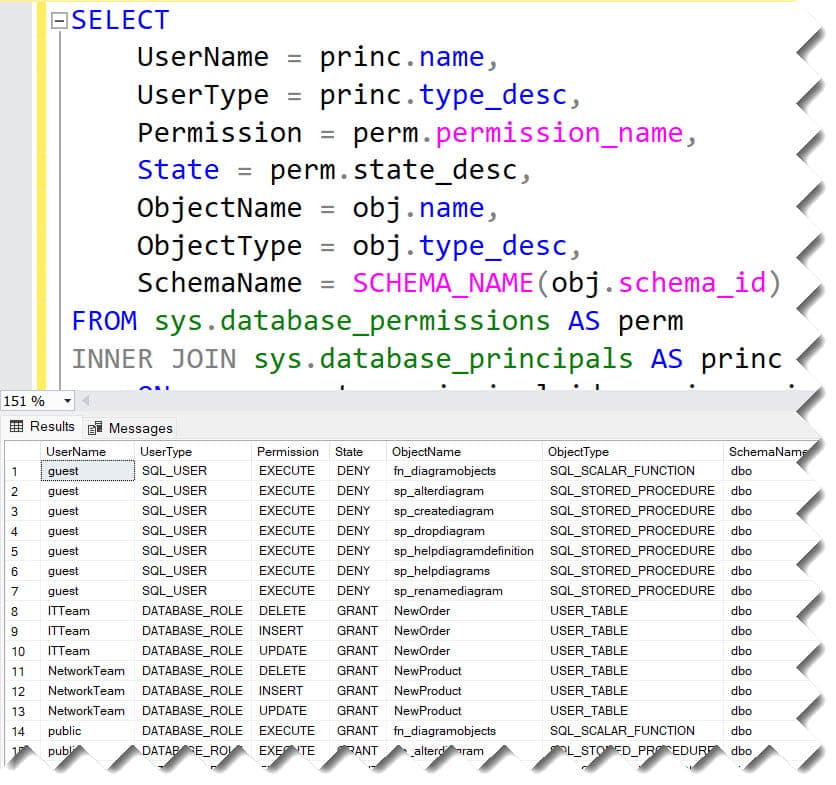
I use the following query to get a human-readable list of all explicit object-level grants in the current database:
SQL
SELECT
    UserName = princ.name,
    UserType = princ.type_desc,
    Permission = perm.permission_name,
    State = perm.state_desc,
    ObjectName = obj.name,
    ObjectType = obj.type_desc,
    SchemaName = SCHEMA_NAME(obj.schema_id)
FROM sys.database_permissions AS perm
INNER JOIN sys.database_principals AS princ
    ON perm.grantee_principal_id = princ.principal_id
INNER JOIN sys.objects AS obj
    ON perm.major_id = obj.object_id
WHERE perm.class = 1 -- Class 1 is 'Object'
ORDER BY UserName, ObjectName;
After executing the query above, I received the expected output, as shown in the screenshot below.
Identifying Permissions via Database Roles
Many permissions in SQL Server aren’t granted to users directly; they are inherited through Database Roles. If Raj is a member of the db_datareader role, he can read every table, even if there is no explicit “GRANT” entry for her name.
Checking Role Membership
To see which roles a specific user belongs to, I use this query:
SQL
SELECT
    RoleName = roleprinc.name,
    MemberName = memprinc.name
FROM sys.database_role_members AS rm
JOIN sys.database_principals AS roleprinc
    ON rm.role_principal_id = roleprinc.principal_id
JOIN sys.database_principals AS memprinc
    ON rm.member_principal_id = memprinc.principal_id
WHERE memprinc.name = 'Raj_Marketing';
Using sp_table_privileges for Fast Results
If you prefer a built-in stored procedure, SQL Server provides sp_table_privileges. This is particularly useful when you need to check permissions across multiple tables using wildcards.
Example Usage:
To see all privileges on any table starting with “Sales” in the current database:
SQL
EXEC sp_table_privileges @table_name = 'Sales%';After executing the query above, I received the expected output, as shown in the screenshot below.

Result Columns Explained:
| Column | Description |
| GRANTOR | The user who issued the grant (often dbo). |
| GRANTEE | The user or role that received the permission. |
| PRIVILEGE | The type of action allowed (SELECT, INSERT, etc.). |
| IS_GRANTABLE | Whether the GRANTEE can pass this permission to others. |
The Checklist for a Comprehensive Permission Audit
I follow this structured checklist to ensure nothing is missed:
- [ ] Check for Explicit Denies: A
DENYat the user level always overrides aGRANTat the role level. - [ ] Audit Schema Ownership: If a user owns a schema, they effectively have full control over all objects within it.
- [ ] Verify Guest User Access: Ensure the
guestuser doesn’t have unintended permissions on sensitive objects. - [ ] Examine the ‘public’ Role: Every user is a member of the
publicrole. Any permission granted topublicis granted to everyone. - [ ] Review Cross-Database Ownership Chaining: If enabled, this can allow users to bypass object-level checks if the same owner exists across databases.
Summary and Key Takeaways
Checking object-level permissions in SQL Server is a multi-layered process. While fn_my_permissions is the fastest way for individual checks, querying sys.database_permissions is essential for broad reporting.
- For Yourself: Use
SELECT * FROM sys.fn_my_permissions('ObjectName', 'OBJECT'). - For Others: Use
EXECUTE AS USER+fn_my_permissions. - For Audits: Use joins between
sys.database_permissions,sys.objects, andsys.database_principals.
By knowing these T-SQL techniques, you can provide the visibility needed to keep your SQL Server environment secure and compliant.
You may also like the following articles:
- SQL Server Grant Select On Table
- How To Check Database Role Permissions In Sql Server
- SQL Server Permissions

After working for more than 15 years in the Software field, especially in Microsoft technologies, I have decided to share my expert knowledge of SQL Server. Check out all the SQL Server and related database tutorials I have shared here. Most of the readers are from countries like the United States of America, the United Kingdom, New Zealand, Australia, Canada, etc. I am also a Microsoft MVP. Check out more here.