
In this article, I’ll walk you through everything you need to know about the SQL OVER clause—from its core syntax and mechanics to advanced framing techniques and practical analytical patterns.
SQL OVER Clause
What is the SQL OVER Clause?
The OVER clause defines a window or set of rows within a query result set for a function to operate on. Functions that use the OVER clause are known as Window Functions (or Analytic Functions).
Unlike standard aggregate functions (SUM(), AVG(), COUNT()) used with a standard GROUP BY clause, a window function does not collapse individual rows into a single summary row. Instead, every individual row retains its identity in the output while displaying the computed aggregate alongside it.
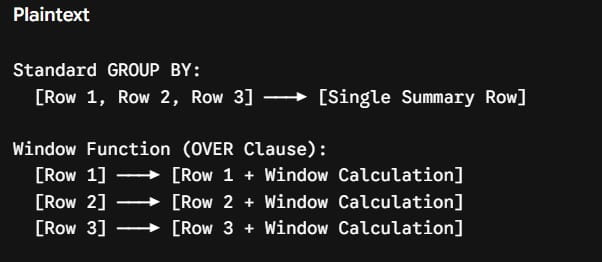
Why the OVER Clause is Essential for Modern Data Teams
- Dramatically Simpler Queries: Eliminates the need for multiple self-joins and temporary tables.
- Superior Performance: Database query engines optimize window functions far better than complex nested subqueries.
- Advanced Analytics Built-In: Makes running totals, moving averages, row ranking, and period-over-period comparisons straightforward to express.
The Syntax Anatomy of the OVER Clause
To write effective window functions, you must understand the four primary components that make up the OVER clause structure:
SQL
FUNCTION_NAME(expression) OVER (
    [PARTITION BY partition_column]
    [ORDER BY sort_column]
    [ROWS|RANGE frame_specification]
)
Let’s break down each component in detail.
1. PARTITION BY
The PARTITION BY clause divides the result set into distinct partitions or groups of rows. The function is applied independently to each partition, and the calculation resets when crossing partition boundaries.
- Analogy: Think of
PARTITION BYas a localGROUP BYapplied specifically to that function’s output window without altering the overall query rows. - Optionality: If omitted, the entire result set is treated as a single partition.
2. ORDER BY
The ORDER BY clause inside the OVER specification defines the logical order of rows within each partition.
- Critical Distinction: The
ORDER BYinside theOVERclause controls the processing sequence for the window function calculation. It does not guarantee the final sorting order of the query’s final result set (you still need an outerORDER BYat the very end of your query for that).
3. ROWS or RANGE (Window Framing)
The frame specification further limits the set of rows within the partition used for the calculation, relative to the current row.
ROWS: Operates on physical row counts (e.g., “the 2 rows preceding and 2 rows following”).RANGE: Operates on logical values based on theORDER BYcolumn (e.g., “all rows within a date range”).
GROUP BY vs. OVER Clause: Key Differences
One of the most common points of confusion for developers SQL is knowing when to use GROUP BY versus the OVER clause.
| Feature / Aspect | GROUP BY Clause | OVER Clause (Window Functions) |
| Row Preservation | Collapses multiple input rows into a single aggregate row per group. | Retains all original input rows in the query output. |
| Data Granularity | Loses detail on individual records. | Combines granular record-level data with aggregated metrics. |
| Filtering Context | Filtered using the HAVING clause after aggregation. | Filtered using CTEs or subqueries (window functions cannot go in WHERE). |
| Use Cases | Summary reporting, executive dashboards, pivot-style rollups. | Running totals, ranking, comparative analysis, moving averages. |
Core Functions Used with the OVER Clause
Step-by-Step Tutorial: How to Use the OVER Clause
To demonstrate how the OVER clause works in real-world scenarios, let’s step through four common analytics workflows.
Scenario 1: Computing a Group Average Alongside Detail Rows
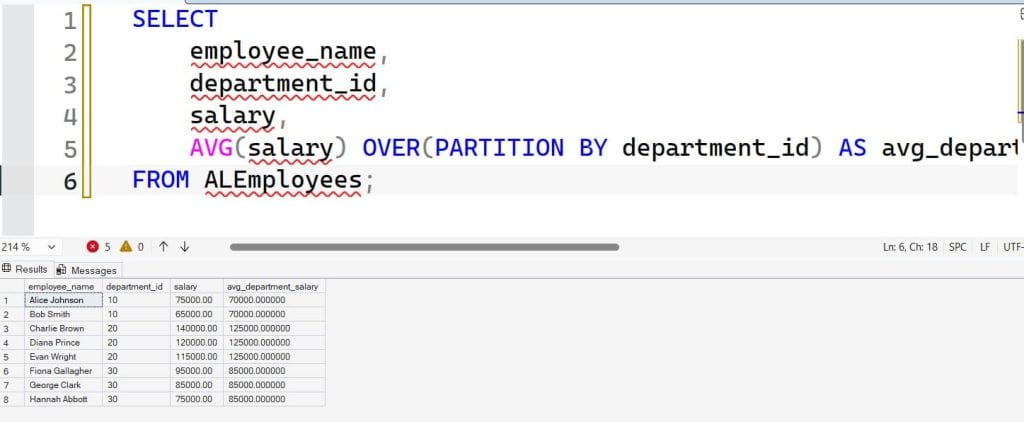
Suppose we need to display every employee’s name, department, salary, and their department’s average salary side-by-side to identify pay disparities.
Without the OVER Clause (Old Way):
SQL
SELECT
    e.employee_name,
    e.department_id,
    e.salary,
    d.avg_salary
FROM employees e
INNER JOIN (
    SELECT department_id, AVG(salary) AS avg_salary
    FROM employees
    GROUP BY department_id
) d ON e.department_id = d.department_id;
With the OVER Clause (Clean Way):
SQL
SELECT
    employee_name,
    department_id,
    salary,
    AVG(salary) OVER(PARTITION BY department_id) AS avg_department_salary
FROM employees;
Notice how much cleaner the second query is. We avoided a subquery and an explicit join altogether. After executing the above query, I got the expected output as shown in the screenshot below.
Scenario 2: Calculating Running Totals
Calculating cumulative totals (such as year-to-date revenue or running user signups) requires combining both PARTITION BY and ORDER BY.
SQL
SELECT
    account_id,
    transaction_date,
    amount,
    SUM(amount) OVER(
        PARTITION BY account_id
        ORDER BY transaction_date
    ) AS running_balance
FROM bank_transactions;
How this works:
PARTITION BY account_idsplits transactions by individual account holder.ORDER BY transaction_datesorts the transactions chronologically within each account.SUM(amount)accumulates values row by row, adding each transaction to the preceding total.
Scenario 3: Ranking Rows with ROW_NUMBER, RANK, and DENSE_RANK
Ranking items—such as identifying top-performing sales representatives per region—is one of the primary use cases for the OVER clause.
SQL provides three distinct ranking functions, and understanding their behavior during ties is vital:
SQL
SELECT
    sales_rep_name,
    region,
    total_sales,
    ROW_NUMBER() OVER(PARTITION BY region ORDER BY total_sales DESC) AS row_num,
    RANK()       OVER(PARTITION BY region ORDER BY total_sales DESC) AS rank_num,
    DENSE_RANK() OVER(PARTITION BY region ORDER BY total_sales DESC) AS dense_rank_num
FROM sales_performance;
Scenario 4: Accessing Prior and Next Rows with LAG and LEAD
Value functions like LAG() and LEAD() allow you to look backward or forward in a result set without writing self-joins. This is especially useful for calculating month-over-month growth metrics.
SQL
SELECT
    sales_month,
    monthly_revenue,
    LAG(monthly_revenue, 1) OVER(ORDER BY sales_month) AS prior_month_revenue,
    monthly_revenue - LAG(monthly_revenue, 1) OVER(ORDER BY sales_month) AS month_over_month_change
FROM monthly_sales_summary;
Example: Computing a 7-Day Moving Average
To smooth out daily volatility in web traffic or sales figures, engineers often use a centered 7-day moving average (3 days before, current day, and 3 days after):
SQL
SELECT
    log_date,
    daily_visitors,
    AVG(daily_visitors) OVER(
        ORDER BY log_date
        ROWS BETWEEN 3 PRECEDING AND 3 FOLLOWING
    ) AS moving_avg_7day
FROM website_traffic_logs;
Advanced Technique: Named Windows for Clean SQL
When a query contains multiple window functions that share the exact same partition and ordering criteria, repeating the full OVER (...) definition makes your code bloated and difficult to maintain.
To solve this, modern SQL standards support the WINDOW clause.
Repetitive Approach:
SQL
SELECT
    employee_name,
    department_id,
    salary,
    SUM(salary) OVER(PARTITION BY department_id ORDER BY hire_date) AS running_dept_salary,
    AVG(salary) OVER(PARTITION BY department_id ORDER BY hire_date) AS running_dept_avg,
    COUNT(*)    OVER(PARTITION BY department_id ORDER BY hire_date) AS running_dept_count
FROM enterprise_payroll;
Refactored Approach Using a Named Window:
SQL
SELECT
    employee_name,
    department_id,
    salary,
    SUM(salary) OVER dept_window AS running_dept_salary,
    AVG(salary) OVER dept_window AS running_dept_avg,
    COUNT(*)    OVER dept_window AS running_dept_count
FROM enterprise_payroll
WINDOW dept_window AS (
    PARTITION BY department_id
    ORDER BY hire_date
);
Using named windows significantly improves readability and reduces the risk of copy-paste errors when modifying complex queries.
Performance Considerations and Optimization Strategies
While the OVER clause is powerful, executing window functions across multi-million or multi-billion row tables can consume significant CPU and RAM if not properly optimized.
1. Indexing for Window Functions
Database engines sort data to process PARTITION BY and ORDER BY specifications. To avoid expensive sorting operations in memory or on disk, create composite indexes matching your window clause:
SQL
-- Optimal Index Structure: (Partition Columns, Order Columns) INCLUDE (Value Columns)
CREATE INDEX idx_orders_analytics
ON customer_orders (customer_id, order_date)
INCLUDE (order_amount);
2. Beware of Large Window Frames Using RANGE
By default, specifying ORDER BY implies RANGE BETWEEN UNBOUNDED PRECEDING AND CURRENT ROW. In engines like PostgreSQL or SQL Server, RANGE requires evaluating logical boundaries, which can be significantly slower than physical ROWS frames.
3. Filter Early with CTEs
Remember that window functions are evaluated after the WHERE, GROUP BY, and HAVING clauses in SQL processing order. You cannot place a window function directly inside a WHERE clause:
SQL
-- INVALID SQL:
SELECT employee_name, salary
FROM employees
WHERE ROW_NUMBER() OVER(ORDER BY salary DESC) <= 5;
Instead, wrap the window function inside a Common Table Expression (CTE) or subquery:
SQL
-- VALID SQL:
WITH RankedEmployees AS (
    SELECT
        employee_name,
        salary,
        ROW_NUMBER() OVER(ORDER BY salary DESC) AS salary_rank
    FROM employees
)
SELECT employee_name, salary
FROM RankedEmployees
WHERE salary_rank <= 5;
Key Takeaways
The SQL OVER clause unlocks the full power of analytic database processing directly within standard queries.
- No Row Loss: Computed values attach to original rows without collapsing them like
GROUP BY. - Three Pillar Construction: Built using optional
PARTITION BY,ORDER BY, and frame specifications (ROWS/RANGE). - Versatile Tooling: Essential for ranking (
ROW_NUMBER), running totals (SUM), offset comparisons (LAG/LEAD), and moving averages. - Optimization Ready: Supported by covering indexes and clean refactoring options like the
WINDOWclause.
You may also like the following articles:
- SQL Subquery vs JOIN
- SQL DELETE vs DROP
- SQL Database Design Best Practices
- SQL Constraints
- SQL LAST_VALUE

After working for more than 15 years in the Software field, especially in Microsoft technologies, I have decided to share my expert knowledge of SQL Server. Check out all the SQL Server and related database tutorials I have shared here. Most of the readers are from countries like the United States of America, the United Kingdom, New Zealand, Australia, Canada, etc. I am also a Microsoft MVP. Check out more here.