
A finance analyst once sent me a screenshot of a payroll report with a cheerful note: “Highest salary is 95,000.” The CFO had just approved an offer at 140,000, so the number looked wrong. The report’s salary column had been imported as text. SQL Server compared the values as strings, and “95000” sorted above “140000” because “9” is greater than “1”.
Learning how to find maximum salary in SQL looks like a one-line job, and it is, until data types, NULLs, ties, departments, and permissions get involved. I have fixed this class of bug on SQL Server VMs, Azure SQL Database, and Azure SQL Managed Instance. You will learn the MAX function, how to return the person behind the number, how to calculate it per department, how to index it, and how to expose it safely to a reporting app.
Set Up the Salary Tables
Start with a realistic test schema. A schema is a named container for database objects, and I keep HR data in its own schema so I can grant permissions on it separately.
CREATE SCHEMA hr;
GO

CREATE TABLE hr.Departments
(
    DepartmentId   INT IDENTITY(1,1) PRIMARY KEY,
    DepartmentName NVARCHAR(50) NOT NULL
);

CREATE TABLE hr.Employees
(
    EmployeeId   INT IDENTITY(1,1) NOT NULL,
    FullName     NVARCHAR(100) NOT NULL,
    DepartmentId INT           NOT NULL
        REFERENCES hr.Departments (DepartmentId),
    Salary       DECIMAL(12,2) NULL,
    HireDate     DATE          NOT NULL,
    CONSTRAINT PK_Employees PRIMARY KEY CLUSTERED (EmployeeId)
);
GO
After running the above query, I got the expected output as shown in the screenshot below.
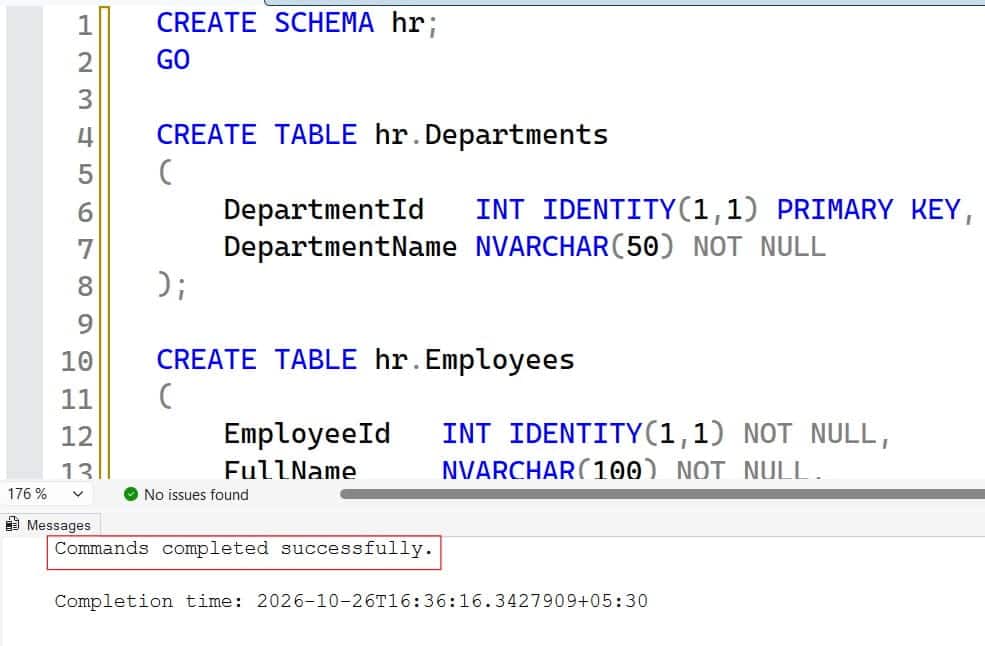
The PRIMARY KEY CLUSTERED constraint defines the physical row order, and each table can have only one clustered index. The foreign key keeps every employee tied to a real department. I use DECIMAL(12,2) for money because FLOAT can round payroll values. For more on keys, see this guide to creating a table with a primary key in SQL Server.
Now load data that includes a tie and a NULL:
INSERT INTO hr.Departments (DepartmentName)
VALUES (N'Engineering'), (N'Sales'), (N'Finance'), (N'Support');

INSERT INTO hr.Employees (FullName, DepartmentId, Salary, HireDate)
VALUES
 (N'Avery Johnson', 1, 185000, '2019-03-11'),
 (N'Maya Patel',    1, 185000, '2020-07-01'),
 (N'Chris Walker',  2, 142000, '2018-01-15'),
 (N'Dana Lopez',    3, 165000, '2017-09-23'),
 (N'Ethan Brooks',  2, 158000, '2021-02-10'),
 (N'Sam Rivera',    4,  98000, '2023-01-09'),
 (N'Jordan Lee',    4,   NULL, '2024-06-17');
GO
After running the above query, I got the expected output as shown in the screenshot below.
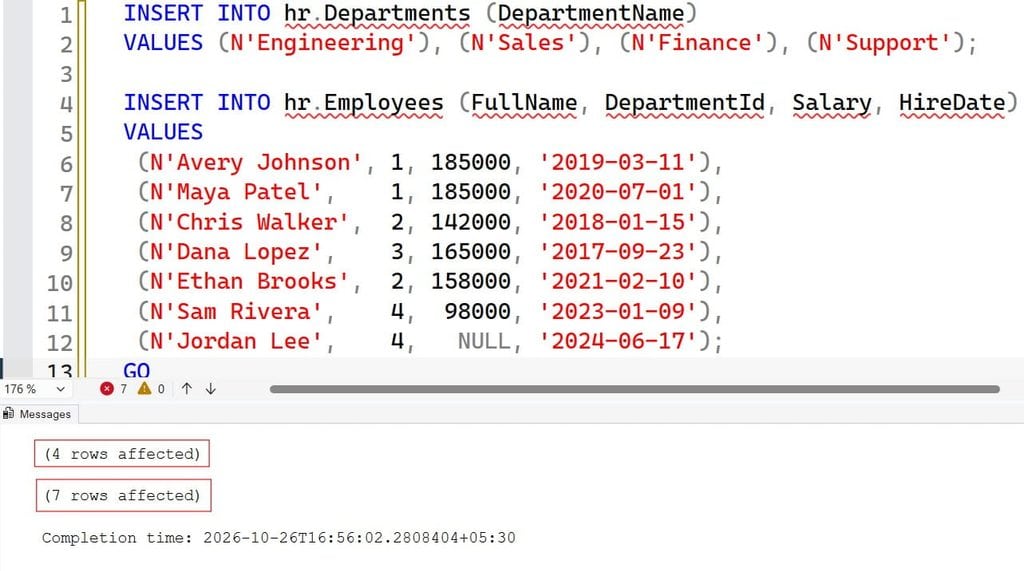
Two engineers tie at 185,000, and Jordan has no salary on file. NULL means “unknown,” not zero. This explainer on SQL NULL shows why that matters.
Pro Tip: In my experience, always seed test data with ties and NULLs. Most salary-report bugs I have seen passed testing only because the sample data was too clean.
How to Find Maximum Salary in SQL with MAX
The MAX function is an aggregate function. It reads many rows and returns one value, the largest. Here is the basic query:
SELECT MAX(Salary) AS MaxSalary
FROM hr.Employees;
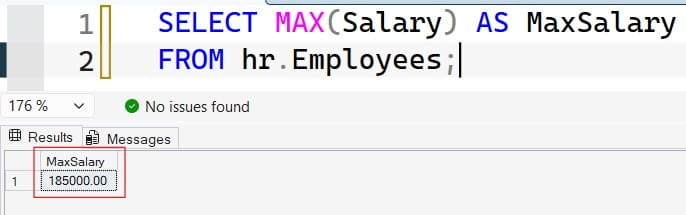
This returns 185000.00. MAX ignores NULL values, so Jordan’s missing salary does not affect the result. If every salary were NULL, MAX would return NULL, not zero. Learn more in this guide on how to use the MAX function in SQL Server. Check out the screenshot below for your reference.
Handle an Empty Result
Reports that print “NULL” confuse readers. Replace it with a default only when the business agrees that zero is meaningful:
SELECT COALESCE(MAX(Salary), 0) AS MaxSalary
FROM hr.Employees;
After executing the above query, I got the expected output as shown in the screenshot below.
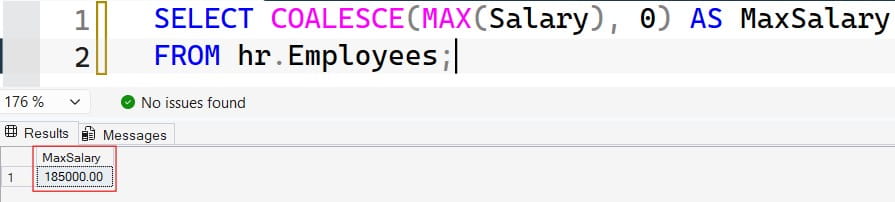
COALESCE returns the first non-NULL value in its list. The COALESCE function works across SQL Server versions, while ISNULL is a SQL Server-specific alternative with slightly different type rules. Warning: a fake zero can hide missing data, so I usually leave NULL visible in internal reports.
Format the Number for Display
Format at the report layer when you can. If you must format in T-SQL, see formatting numbers with commas in SQL Server. Keep the raw number for calculations.
Watch the Data Type
My opening story comes down to this. MAX on a text column compares characters, not values. Check the type before you trust the answer:
SELECT COLUMN_NAME, DATA_TYPE
FROM   INFORMATION_SCHEMA.COLUMNS
WHERE  TABLE_SCHEMA = 'hr'
  AND  TABLE_NAME   = 'Employees'
  AND  COLUMN_NAME  = 'Salary';
After executing the above query, I got the expected output as shown in the screenshot below.
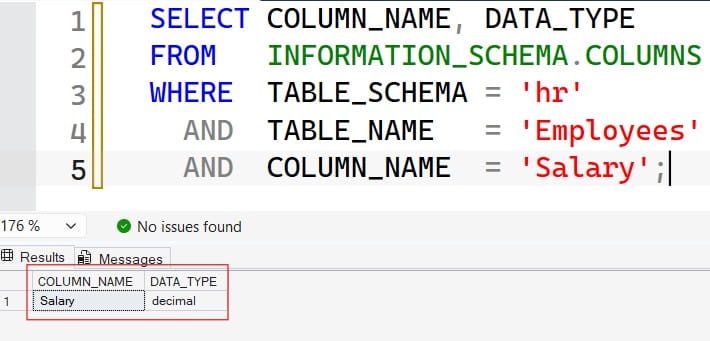
This query reads the system catalog and shows the declared type. If it says varchar, fix the column. If a conversion fails, read error converting data type varchar to numeric.
Pro Tip: I run the data type check first whenever a “highest” number looks suspicious. Text columns have embarrassed more dashboards than bad joins.
Find the Employee Who Earns the Maximum Salary
MAX gives you the number but not the person. You need the full row, and there are three reliable ways to get it. Each handles ties differently.
Method 1: Subquery Match
A subquery is a query nested inside another query. See this overview of SQL subqueries.
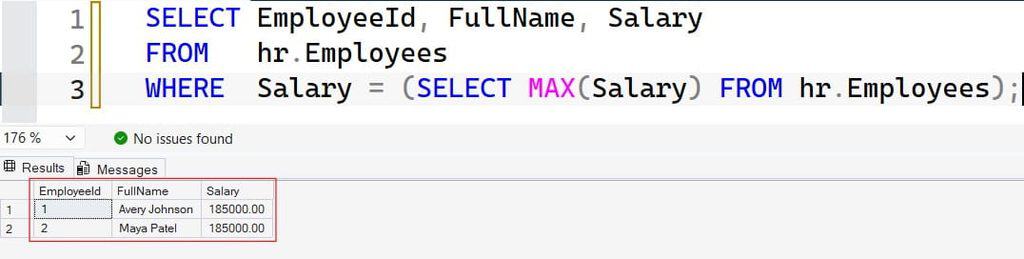
SELECT EmployeeId, FullName, Salary
FROM   hr.Employees
WHERE  Salary = (SELECT MAX(Salary) FROM hr.Employees);
The inner query finds 185000. The outer query returns every employee with that salary, so both engineers appear. This is usually what the business wants. Do not write WHERE Salary = MAX(Salary). SQL Server rejects aggregates in a WHERE clause (error 147). Check out the screenshot below for your reference.
Method 2: TOP with Ties
SELECT TOP (1) WITH TIES
       EmployeeId, FullName, Salary
FROM   hr.Employees
WHERE  Salary IS NOT NULL
ORDER BY Salary DESC;
After executing the above query, I got the expected output as shown in the screenshot below.
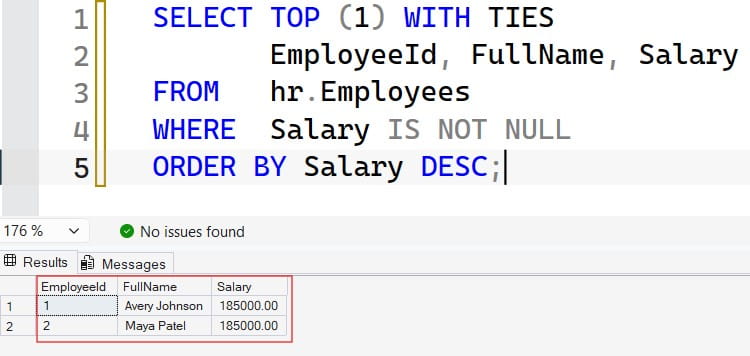
TOP (1) WITH TIES returns the first row plus any other rows that match its sort value. It requires an ORDER BY. Without WITH TIES, SQL Server would pick one of the two engineers arbitrarily. Read more about the SQL Server TOP clause.
Method 3: Window Function
A window function calculates a value across related rows without collapsing them. Start with this overview of window functions in SQL Server.
WITH Ranked AS
(
    SELECT EmployeeId, FullName, Salary,
           RANK() OVER (ORDER BY Salary DESC) AS SalaryRank
    FROM   hr.Employees
    WHERE  Salary IS NOT NULL
)
SELECT EmployeeId, FullName, Salary
FROM   Ranked
WHERE  SalaryRank = 1;
After executing the above query, I got the expected output as shown in the screenshot below.
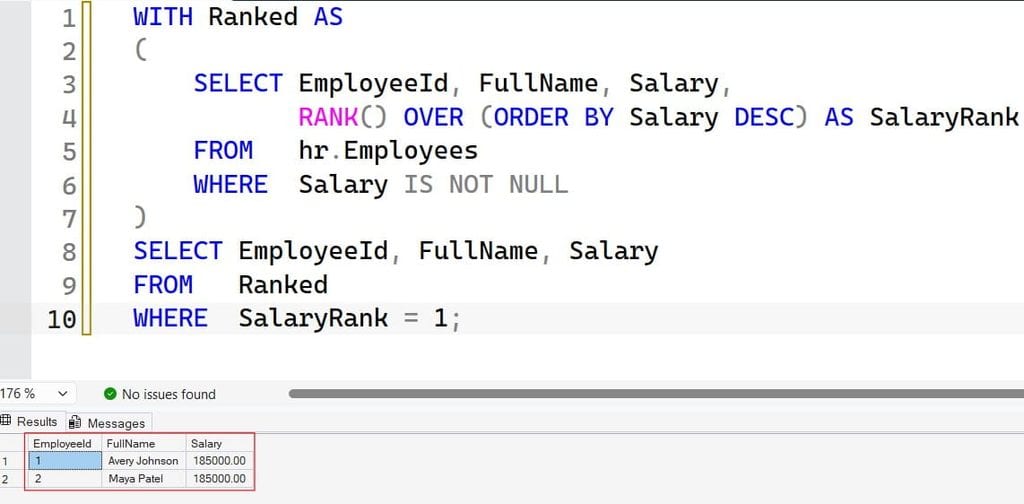
The CTE (common table expression) is a named, temporary result set. RANK() gives tied rows the same rank. The OVER clause defines the ordering, which is explained in this guide to the SQL OVER clause. I prefer this pattern when the requirement may grow from “highest” to “top three,” because you only change the filter. Compare ranking functions in RANK vs. DENSE_RANK and how to use the RANK function.
Which Method Should You Use?
| Method | Returns ties? | Best for | Trade-off |
|---|---|---|---|
| Subquery match | Yes | Simple “who earns the max” | Scans twice without an index |
| TOP 1 WITH TIES | Yes | Short, readable reports | Needs ORDER BY on the column |
| RANK window | Yes | Top N, per-group rankings | More code, but flexible |
Pro Tip: I ask one question before writing any of these: “If two people tie, should both appear?” A wrong assumption here produced the payroll audit I mentioned in the opening.
Find Maximum Salary per Department
Management rarely wants one company-wide number. They want the maximum per department. Use GROUP BY, which splits rows into groups before the aggregate runs. See how to use the GROUP BY clause in SQL Server.
SELECT d.DepartmentName,
       MAX(e.Salary) AS MaxSalary
FROM   hr.Employees   AS e
INNER JOIN hr.Departments AS d
       ON d.DepartmentId = e.DepartmentId
GROUP BY d.DepartmentName
ORDER BY MaxSalary DESC;
After executing the above query, I got the expected output as shown in the screenshot below.
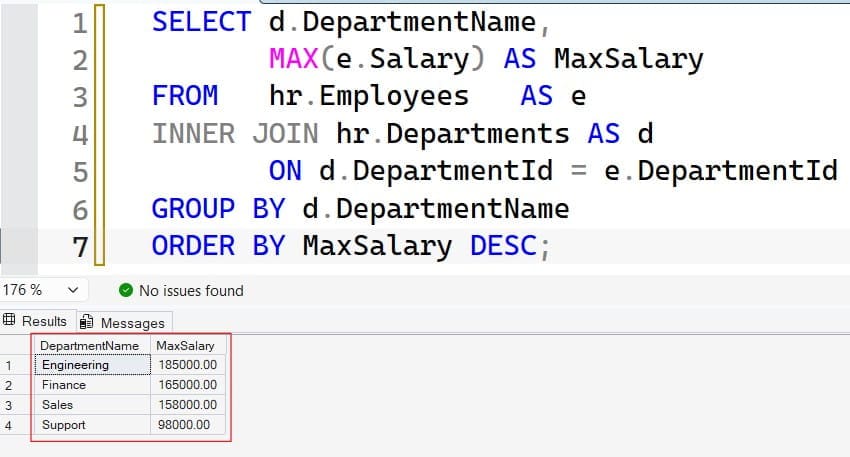
The join brings in the department name, and GROUP BY creates one row per department. For join basics, read this SQL INNER JOIN tutorial. Support shows 98000, because the NULL is ignored.
Filter Groups with HAVING
To show only departments whose highest salary exceeds 150,000:
SELECT d.DepartmentName, MAX(e.Salary) AS MaxSalary
FROM   hr.Employees e
INNER JOIN hr.Departments d ON d.DepartmentId = e.DepartmentId
GROUP BY d.DepartmentName
HAVING MAX(e.Salary) > 150000;
After executing the above query, I got the expected output as shown in the screenshot below.
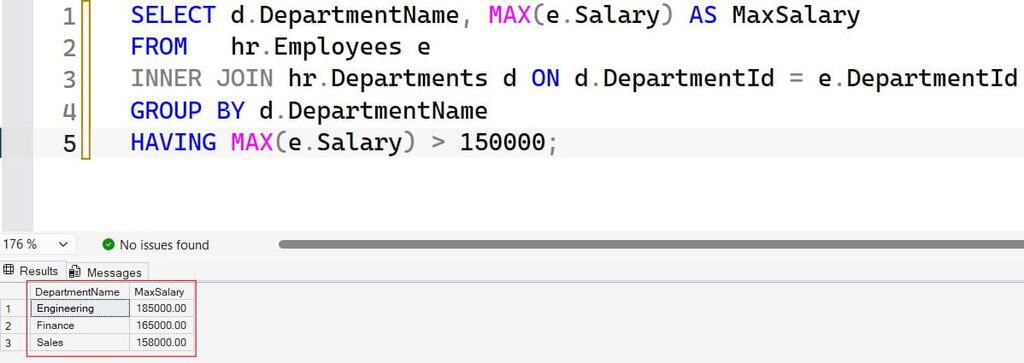
HAVING filters after grouping, while WHERE filters before. This comparison of HAVING vs. WHERE shows when to use each.
Show the Person with the Department Maximum
Aggregates return numbers, not names. To list each department’s top earner, use PARTITION BY:
WITH DeptRanked AS
(
    SELECT d.DepartmentName, e.FullName, e.Salary,
           RANK() OVER (
               PARTITION BY e.DepartmentId
               ORDER BY e.Salary DESC) AS DeptRank
    FROM   hr.Employees e
    INNER JOIN hr.Departments d ON d.DepartmentId = e.DepartmentId
    WHERE  e.Salary IS NOT NULL
)
SELECT DepartmentName, FullName, Salary
FROM   DeptRanked
WHERE  DeptRank = 1;
PARTITION BY restarts the ranking for each department, as covered in this SQL PARTITION BY guide. This is set-based code, meaning SQL Server handles all departments in one pass. I have seen developers loop through departments with WHILE and run one query each. That approach does not scale to hundreds of SaaS tenants.
For a multi-tenant app, add TenantId to the PARTITION BY and to your indexes. Otherwise one tenant’s report can read another tenant’s rows, which is both a performance problem and a data leak.
Pro Tip: I never put names and aggregates in one GROUP BY just to “make it work.” Doing so changes the grain of the report, and the numbers stop meaning what the title says.
Index the Salary Column for Speed
On seven rows, everything is instant. On 40 million rows, SQL Server might scan the whole table to find one maximum value. A nonclustered index is a separate sorted structure that points to table rows, and it lets SQL Server jump to the end of the list.
CREATE NONCLUSTERED INDEX IX_Employees_Salary
ON hr.Employees (Salary)
INCLUDE (FullName, DepartmentId);
The key column is Salary. INCLUDE stores extra columns at the leaf level so the query avoids lookups. With this index, SELECT MAX(Salary) can usually read a single index entry instead of scanning every row. Learn the syntax in this guide to creating an index in SQL Server.
There is a trade-off. Every index slows INSERT, UPDATE, and DELETE because SQL Server maintains it. Salary changes are rare, so the cost is small here. On a busy orders table, I would be far more selective. Review these SQL index best practices first.
Prove It with the Execution Plan
In SSMS, turn on the actual execution plan and run the query. If you need help, see how to run a query in SSMS. Look for an index seek or ordered scan feeding a small aggregate, with no big Sort operator.
SET STATISTICS IO ON;
SELECT MAX(Salary) FROM hr.Employees;
STATISTICS IO shows logical reads, the number of data pages touched. Compare the number before and after the index. Also keep statistics current. These are histograms the optimizer uses to estimate row counts, and you can refresh them with update stats on a table in SQL Server. More ideas are in these SQL query optimization tips.
Pro Tip: I check the actual plan before adding any index. In Azure SQL Database, an unused index costs storage and write throughput, and both show up on the bill.
Share Maximum Salary Safely
Salary is sensitive data. Never connect an app as sa or a sysadmin login. Wrap the query in a stored procedure and grant only EXECUTE. Here is how to create a stored procedure in SQL Server.
CREATE OR ALTER PROCEDURE hr.GetMaxSalaryByDepartment
AS
BEGIN
    SET NOCOUNT ON;

    SELECT d.DepartmentName, MAX(e.Salary) AS MaxSalary
    FROM   hr.Employees e
    INNER JOIN hr.Departments d ON d.DepartmentId = e.DepartmentId
    GROUP BY d.DepartmentName;
END;
GO
SET NOCOUNT ON suppresses extra “rows affected” messages. The procedure returns aggregates only, so the report user never sees individual pay. If you prefer a view, read how to create a view in SSMS and the overview of SQL Server views.
Use Entra ID and Least Privilege
On Azure SQL Database, create a contained database user from Microsoft Entra ID, so no SQL password exists:
CREATE USER [hr-reports-app] FROM EXTERNAL PROVIDER;
GRANT EXECUTE ON OBJECT::hr.GetMaxSalaryByDepartment TO [hr-reports-app];
The first statement maps an Entra identity, such as a managed identity, to the database. The second grants one permission. The app cannot read the Employees table directly. For VM-based servers, review how to give permission to execute a stored procedure, grant SELECT on a table, and SQL Server permissions. Always test with this low-privilege account, not your admin login.
Frequently Asked Questions
How do I find the maximum salary in SQL?
Use SELECT MAX(Salary) FROM hr.Employees;. MAX ignores NULL values and returns one number. To see who earns it, match the salary with a subquery or use a window function.
How do I find the employee with the maximum salary?
Use WHERE Salary = (SELECT MAX(Salary) FROM hr.Employees), or TOP (1) WITH TIES with ORDER BY. Both return every employee who ties at the top.
How do I find the maximum salary in each department?
Join employees to departments and use GROUP BY DepartmentName with MAX(Salary). To also show the person, use RANK() OVER (PARTITION BY DepartmentId ORDER BY Salary DESC) and keep rank 1.
Does MAX include NULL values?
No. MAX ignores NULLs. If all values are NULL, it returns NULL. Use COALESCE only when a default makes business sense.
Is it safe to expose salary data to a reporting app?
Only with controls. Use a managed identity, grant EXECUTE on a procedure that returns aggregates, require TLS, and turn on auditing. Prefer private access over public endpoints.
You learned how to find the maximum salary with MAX, return the employee behind it, calculate it per department, and index and secure the query. Decide how ties should behave before you ship, and give your app only the permissions it needs. I hope you found this article helpful.
You May Also Like
- SQL SELECT query examples for everyday work
- How to use the MIN function in SQL Server
- SQL MIN and MAX explained
- How to use the SUM function in SQL Server
- A handy SQL cheat sheet for developers

After working for more than 15 years in the Software field, especially in Microsoft technologies, I have decided to share my expert knowledge of SQL Server. Check out all the SQL Server and related database tutorials I have shared here. Most of the readers are from countries like the United States of America, the United Kingdom, New Zealand, Australia, Canada, etc. I am also a Microsoft MVP. Check out more here.