
A few years ago, an HR analyst at a logistics company asked me why her “top 3 earners” report showed three people one week and five the next. Nothing in the data had changed. Two employees shared the same salary, and the query she copied from a forum quietly cut off one of them. Leadership had already used the list in a pay-equity meeting.
The question of how to find the top 3 employees by salary in SQL Server looks easy, but it hides three decisions. Do you want the top 3 rows or the top 3 salary values? What should happen when salaries tie? And who is allowed to see this data at all? I have seen all three cause real problems in production reporting databases.
This guide walks through every reliable approach, including TOP, DENSE_RANK, OFFSET-FETCH, and per-department rankings. You will also learn how to index the query, lock it down with least-privilege access, and test it before it feeds a report.
Set Up the Employee Table
Before writing any query, you need a table that models salary correctly. In a SQL Server database, a schema is a named container for objects, and dbo is the default. Good table design makes ranking queries simpler and faster. Our guide on SQL database design best practices is not in this site’s library, so here are the choices I make in practice.
I store salary as decimal(10,2), not float. Floating-point types can introduce rounding errors, and a tie that should be exact may not compare as equal. I also give the table a primary key, a column that uniquely identifies each row. A stable key becomes useful later as a tie-breaker. If you want a refresher, see how to create a table with a primary key in SQL Server.
CREATE TABLE dbo.Employees
(
    EmployeeId  int IDENTITY(1,1) NOT NULL
        CONSTRAINT PK_Employees PRIMARY KEY,
    FullName    nvarchar(100) NOT NULL,
    Department  nvarchar(50)  NOT NULL,
    Salary      decimal(10,2) NOT NULL,
    HireDate    date          NOT NULL
);
After running the above query, I got the expected output as shown in the screenshot below.
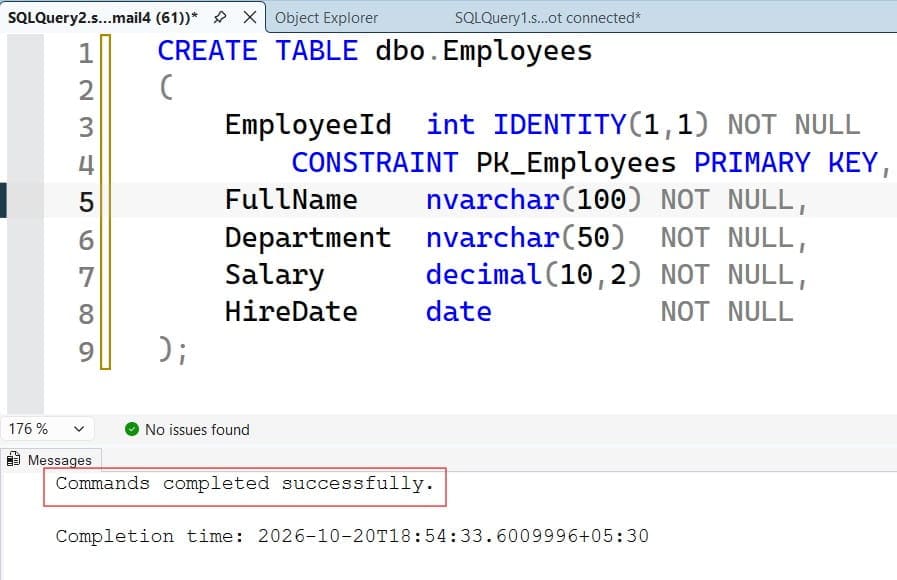
This statement creates the Employees table. The IDENTITY(1,1) property generates an incrementing ID automatically. The PK_Employees constraint creates a clustered index on EmployeeId, which physically orders the table by that key. The NOT NULL constraints stop missing salaries from sneaking in, which matters for ranking.
Now load sample data. Run this only in a development database. It inserts rows and would add duplicates if you run it twice.
INSERT INTO dbo.Employees (FullName, Department, Salary, HireDate)
VALUES
 (N'Ava Johnson',    N'Engineering', 145000, '2019-03-11'),
 (N'Liam Carter',    N'Engineering', 145000, '2021-07-19'),
 (N'Noah Smith',     N'Sales',        98000, '2020-01-06'),
 (N'Emma Davis',     N'Engineering', 132000, '2018-09-24'),
 (N'Olivia Brown',   N'Finance',     120000, '2017-05-15'),
 (N'Mason Lee',      N'Sales',       120000, '2022-02-28'),
 (N'Sophia Wilson',  N'Finance',      87000, '2023-04-03'),
 (N'James Taylor',   N'HR',           76000, '2016-11-14'),
 (N'Isabella Moore', N'Sales',       110000, '2020-08-17'),
 (N'Ethan Clark',    N'HR',           71000, '2024-01-22');
After running the above query, I got the expected output as shown in the screenshot below.
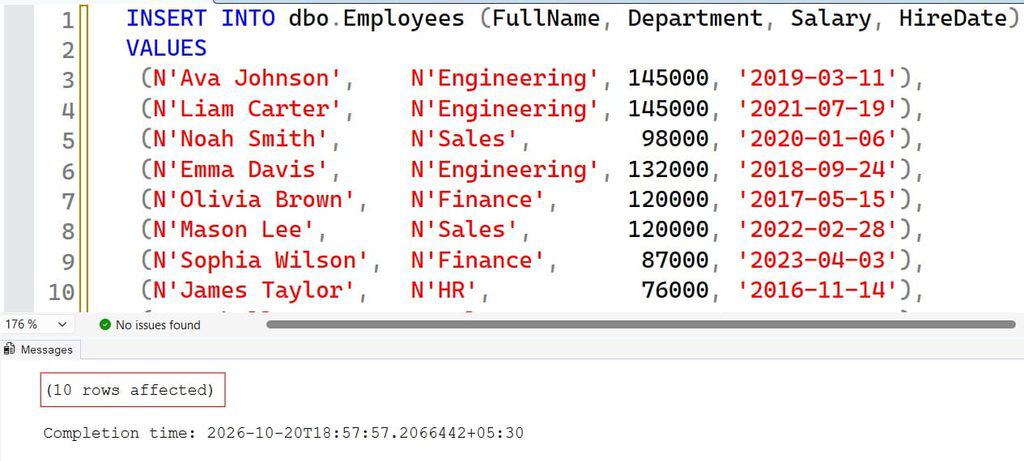
Notice the deliberate ties: Ava and Liam both earn $145,000, and Olivia and Mason both earn $120,000. Real payroll data always has ties, so your test data should too. You can run these in SSMS by following our walkthrough on how to run a query in SSMS.
Pro Tip: In my experience, test data without duplicates is useless for ranking queries. I always seed at least two tied values before I trust any “top N” logic.
Find the Top 3 Employees by Salary With TOP
The fastest answer uses the TOP clause, which limits how many rows a query returns. It needs an ORDER BY, because without one, SQL Server gives you three arbitrary rows.
SELECT TOP (3)
       EmployeeId, FullName, Department, Salary
FROM dbo.Employees
ORDER BY Salary DESC, EmployeeId ASC;
After running the above query, I got the expected output as shown in the screenshot below.
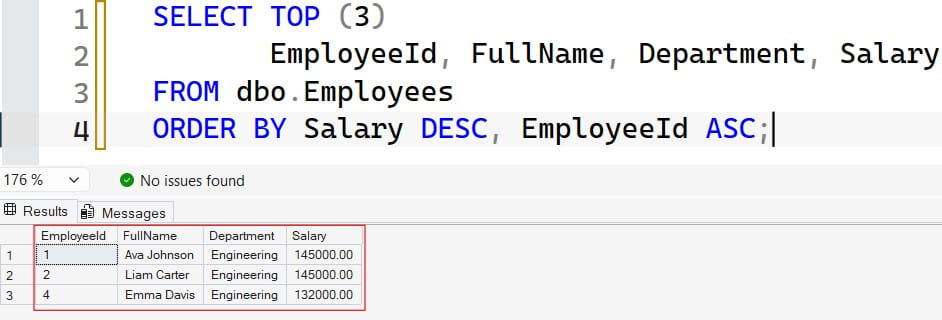
ORDER BY Salary DESC sorts the highest salary first. I add EmployeeId ASC as a tie-breaker, a second sort column that makes the result deterministic. Without it, Ava and Liam could swap places between runs, and so could any pair at the cutoff. You can read more in our guides to the TOP clause and the ORDER BY clause.
Include Ties With WITH TIES
If you want everyone who ties with the last row, add WITH TIES.
SELECT TOP (3) WITH TIES
       EmployeeId, FullName, Department, Salary
FROM dbo.Employees
ORDER BY Salary DESC;
After running the above query, I got the expected output as shown in the screenshot below.
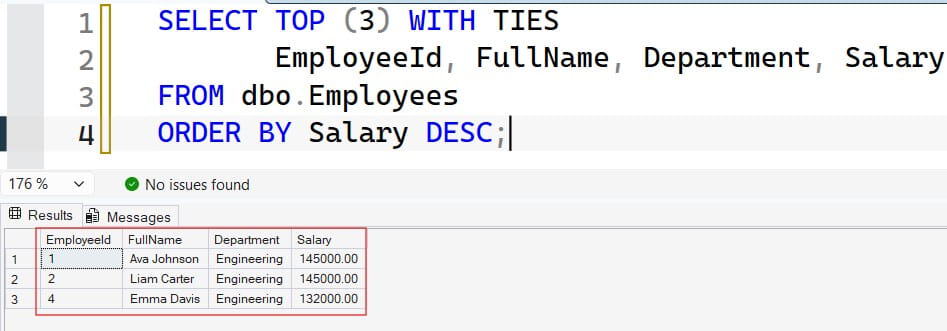
WITH TIES returns extra rows that match the salary of the third row. It requires ORDER BY, and it ignores the tie-breaker idea, since ties are the point. In our sample data it returns three rows, because Emma’s $132,000 has no match. If a fourth person also earned $132,000, you would see four rows. That is exactly the behavior that surprised my HR analyst, so document it for report consumers.
Pro Tip: I once saw a payroll export grow from 3 to 11 rows overnight because a bulk salary update created many ties at the cutoff. If a downstream system expects a fixed row count, do not use
WITH TIES.
Handle Ties With Window Functions
Sometimes the business question is not “the top 3 rows” but “everyone earning one of the top 3 salary amounts.” That is a different question, and window functions answer it. A window function calculates a value across a set of related rows without collapsing them. Our overview of window functions in SQL Server covers the full family.
Three ranking functions behave differently when values tie:
| Function | Ava (145k) | Liam (145k) | Emma (132k) | Olivia (120k) | Mason (120k) |
|---|---|---|---|---|---|
ROW_NUMBER() | 1 | 2 | 3 | 4 | 5 |
RANK() | 1 | 1 | 3 | 4 | 4 |
DENSE_RANK() | 1 | 1 | 2 | 3 | 3 |
ROW_NUMBER never repeats, so it behaves like TOP. RANK repeats on ties and then skips numbers. DENSE_RANK repeats on ties and never skips. For “top 3 salary levels,” DENSE_RANK is the right tool. See the guide to RANK vs DENSE_RANK and the notes on ROW_NUMBER for more examples.
WITH RankedSalaries AS
(
    SELECT EmployeeId, FullName, Department, Salary,
           DENSE_RANK() OVER (ORDER BY Salary DESC) AS SalaryRank
    FROM dbo.Employees
)
SELECT EmployeeId, FullName, Department, Salary, SalaryRank
FROM RankedSalaries
WHERE SalaryRank <= 3
ORDER BY SalaryRank, FullName;
After running the above query, I got the expected output as shown in the screenshot below.
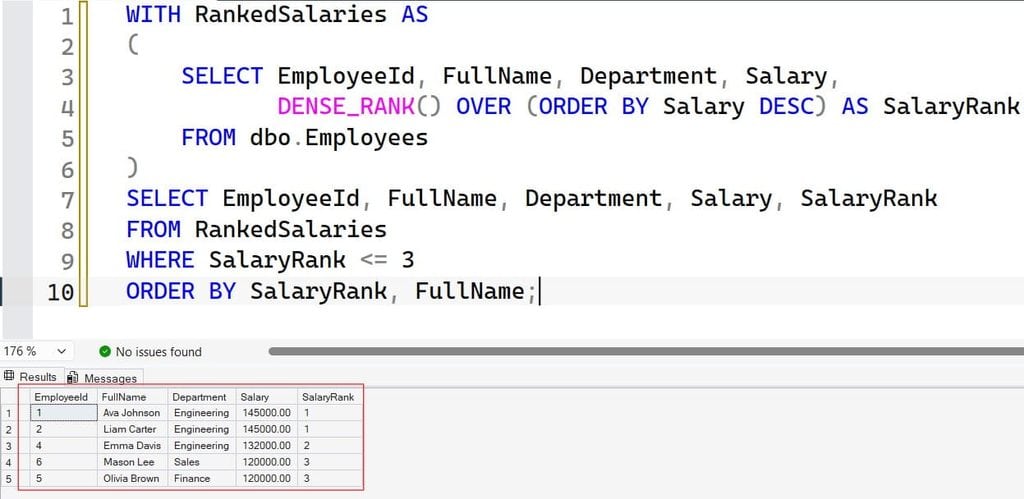
The CTE (common table expression) named RankedSalaries is a temporary named result set that exists only for this statement. Inside it, DENSE_RANK() OVER (ORDER BY Salary DESC) assigns a rank to each salary level.
You cannot filter on a window function directly in WHERE, which is why the ranking happens in the CTE and the filter happens outside it. This query returns five people: Ava, Liam, Emma, Olivia, and Mason. That is correct, because they hold the top three distinct salary amounts.
Pro Tip: I always write the business rule in a code comment above the query, such as “top 3 salary levels, ties included.” The next developer should never have to guess which definition you meant.
Find the Top 3 Salaries per Department
Real reports rarely want one company-wide list. They want the top earners inside each department. Add PARTITION BY, which restarts the ranking for each group. Our post on PARTITION BY in SQL Server explains how it differs from GROUP BY.
WITH DeptRanked AS
(
    SELECT FullName, Department, Salary,
           DENSE_RANK() OVER (
               PARTITION BY Department
               ORDER BY Salary DESC
           ) AS DeptRank
    FROM dbo.Employees
)
SELECT Department, FullName, Salary, DeptRank
FROM DeptRanked
WHERE DeptRank <= 3
ORDER BY Department, DeptRank, FullName;
After running the above query, I got the expected output as shown in the screenshot below.
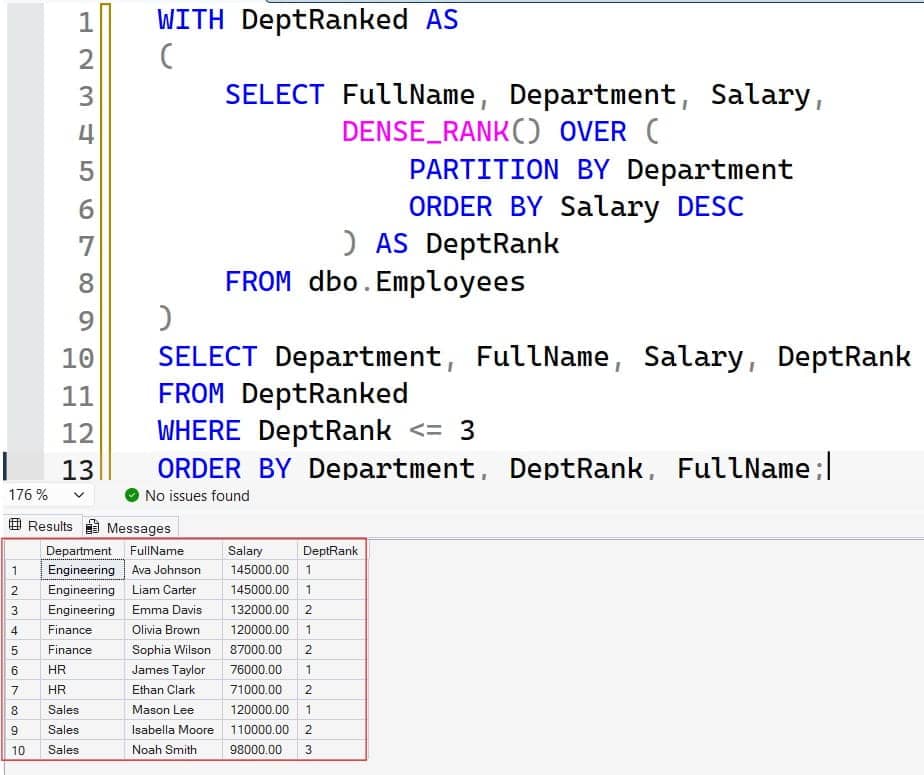
PARTITION BY Department creates a separate ranking window per department. Engineering returns Ava, Liam, and Emma. Sales returns Mason, Isabella, and Noah. Finance and HR return everyone, since each has fewer than three salary levels.
If you prefer a stored, reusable version, wrap it in a stored procedure with a parameter for the count. Our guide to creating a stored procedure in SQL Server shows the syntax. A parameterized procedure also helps security, because the application passes values instead of building SQL strings.
Pro Tip: In multi-tenant SaaS databases, I add the tenant ID to the
PARTITION BYclause and to every index. One missing tenant filter in a ranking query is a data leak, not just a bug.
Alternatives: OFFSET-FETCH and Subqueries
Two other patterns are worth knowing, mostly because you will meet them in old code.
OFFSET-FETCH
SELECT EmployeeId, FullName, Salary
FROM dbo.Employees
ORDER BY Salary DESC, EmployeeId ASC
OFFSET 0 ROWS FETCH NEXT 3 ROWS ONLY;
After running the above query, I got the expected output as shown in the screenshot below.
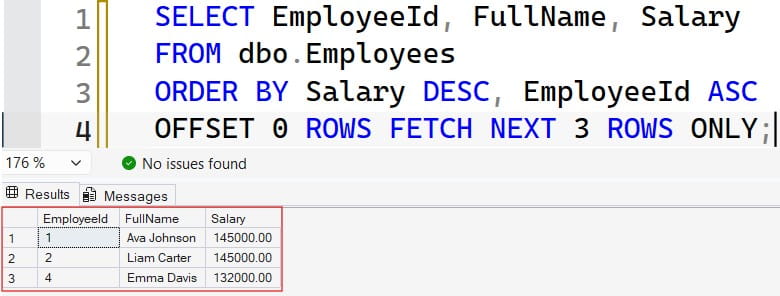
OFFSET 0 ROWS skips no rows, and FETCH NEXT 3 ROWS ONLY returns three. It behaves like TOP (3) but follows the ANSI standard and supports paging. For a “top 3” report, TOP is simpler. For paged grids, change the offset.
Subquery on Distinct Salaries
SELECT EmployeeId, FullName, Salary
FROM dbo.Employees
WHERE Salary IN (
    SELECT DISTINCT TOP (3) Salary
    FROM dbo.Employees
    ORDER BY Salary DESC
)
ORDER BY Salary DESC;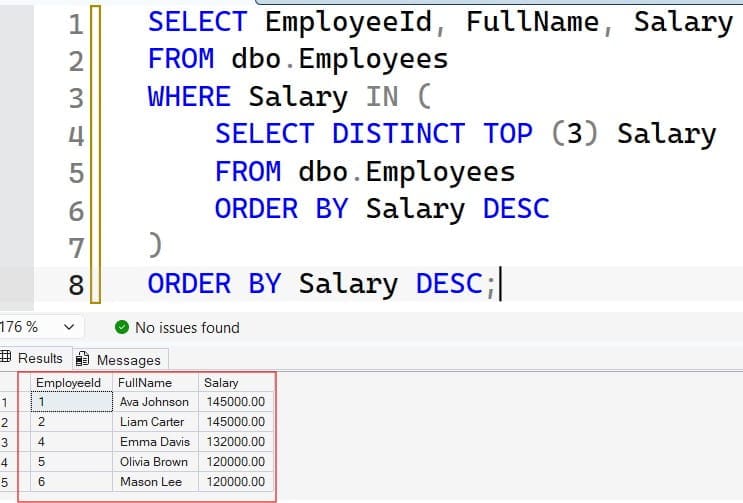
The inner query finds the three highest distinct salary values. The outer query returns every employee earning one of them. It gives the same five people as DENSE_RANK. It is readable, but window functions usually scale better and extend more easily to per-group rankings. Compare the trade-offs in our guide to SQL subqueries.
Pro Tip: I rewrite nested subquery versions as
DENSE_RANKwhen I tune them. The window version is easier to review, and the execution plan is usually simpler.
Index and Tune the Query
On ten rows, every approach is instant. On a 5-million-row HR or payroll history table, the plan matters. Without a helpful index, SQL Server must scan every row and sort them. A nonclustered index is a separate sorted structure that points back to the table rows, and it can remove that sort.
CREATE NONCLUSTERED INDEX IX_Employees_Salary
ON dbo.Employees (Salary DESC)
INCLUDE (FullName, Department);

CREATE NONCLUSTERED INDEX IX_Employees_Department_Salary
ON dbo.Employees (Department, Salary DESC)
INCLUDE (FullName);
The first index stores salaries in descending order, so TOP (3) can read just the first few entries. The INCLUDE columns let the index cover the query, which means SQL Server never has to look up the base table. The second index serves the per-department query, with Department first so each partition reads in order. Our walkthrough on creating an index in SQL Server and the index best practices cover the details.
Indexes have a cost. Every salary update must now also update both indexes, which slows writes slightly and uses storage. For a table that changes a few times a day, that trade is easy. For a high-write table, check the actual execution plan first. On tiny tables the optimizer may ignore the index and scan anyway, which is fine.
Keep statistics fresh too. Statistics are the data distribution summaries the optimizer uses to choose plans. If you have loaded lots of rows, review how to update statistics on a table. For wider tuning guidance, see these SQL query optimization tips.
On Azure SQL Database, you can also review slow queries with Query Store, a built-in feature that records query plans and runtime statistics. That helps you confirm the new index actually reduced reads before you pay for more compute.
Pro Tip: In my experience, I check logical reads in the actual execution plan before and after adding an index. If reads do not drop, I drop the index and save the write overhead.
Secure Salary Data
Salary is sensitive. A “top earners” query is exactly what an unauthorized user would want. The biggest risk I see is not SQL injection but over-broad access, such as a reporting app running under sa or a login with db_owner.
Apply least privilege, which means granting only the permissions a role needs. Give report users access to a view or stored procedure instead of the base table. A view is a saved query that behaves like a virtual table. Learn more in our SQL Server views guide.
CREATE VIEW dbo.vw_TopEarners
AS
SELECT TOP (3) WITH TIES FullName, Department, Salary
FROM dbo.Employees
ORDER BY Salary DESC;
GO

CREATE ROLE role_hr_reporting;
GRANT SELECT ON dbo.vw_TopEarners TO role_hr_reporting;
DENY SELECT ON dbo.Employees TO role_hr_reporting;
The view exposes only the columns and rows you choose. The GRANT gives the role access to the view, and the DENY blocks direct reads from the underlying table. DENY overrides GRANT, so use it carefully. Our guides on granting SELECT on a table and SQL Server permissions explain each option.
For Azure SQL Database, prefer Microsoft Entra ID authentication over SQL passwords, and use managed identities for applications so no password sits in a config file. You can test a query as an Entra user from the command line:
sqlcmd -S <sql-server-name>.database.windows.net \
  -d <database-name> \
  -G -N \
  -Q "SELECT TOP (3) FullName, Salary FROM dbo.vw_TopEarners;"
The -S flag sets the server and -d sets the database. The -G flag uses Microsoft Entra authentication instead of a SQL password. The -N flag requests an encrypted connection, which Azure SQL requires anyway. The -Q flag runs the query and exits. Keep the server on a private endpoint when possible, and never open a firewall rule to every IP address.
You can also add dynamic data masking to hide salary values from low-privilege users:
ALTER TABLE dbo.Employees
ALTER COLUMN Salary ADD MASKED WITH (FUNCTION = 'default()');
This masks the Salary column in query results for users without the UNMASK permission. Masking is a convenience layer, not a strong security boundary, because a determined user can still infer values through filters. Treat it as an extra guard on top of permissions, not a replacement.
Pro Tip: I always test new reporting access with a non-administrator database user. Twice I found that a “locked down” view still exposed salary because the user was in
db_datareader.
Frequently Asked Questions
How do I get the top 3 salaries in SQL Server?
Use SELECT TOP (3) with ORDER BY Salary DESC for the top three rows. If you need the top three distinct salary values, use DENSE_RANK() OVER (ORDER BY Salary DESC) and filter for ranks of 3 or less.
What is the difference between RANK and DENSE_RANK?
Both give tied rows the same rank. RANK skips numbers after a tie, so you can see 1, 1, 3. DENSE_RANK does not skip, so you see 1, 1, 2. Use DENSE_RANK for “top N levels” questions.
How do I find the top 3 employees in each department?
Use DENSE_RANK() or ROW_NUMBER() with PARTITION BY Department and ORDER BY Salary DESC. Put the ranking in a CTE and filter on the rank column in the outer query.
Does TOP 3 WITH TIES always return three rows?
No. It returns three rows plus any extra rows that tie with the third row’s salary. The result count can grow when many employees share a salary, so avoid it when downstream systems expect a fixed size.
How do I speed up a top N salary query?
Create a nonclustered index on Salary DESC with INCLUDE columns, or on (Department, Salary DESC) for per-group queries. Check the actual execution plan to confirm the sort disappears and logical reads drop.
You learned how to find the top 3 employees by salary with TOP, DENSE_RANK, OFFSET-FETCH, and per-department rankings, and how to index and secure the query. Decide how ties should behave before you write any SQL, and then protect salary data with least-privilege access. I hope you found this article helpful.
You May Also Like
- SQL SELECT query examples
- How to use the RANK function in SQL Server
- How to use the GROUP BY clause in SQL Server
- SQL OVER clause explained
- How to get the latest record by date in SQL Server

After working for more than 15 years in the Software field, especially in Microsoft technologies, I have decided to share my expert knowledge of SQL Server. Check out all the SQL Server and related database tutorials I have shared here. Most of the readers are from countries like the United States of America, the United Kingdom, New Zealand, Australia, Canada, etc. I am also a Microsoft MVP. Check out more here.