
A payroll dashboard skips second place after two employees share the highest salary. Another report forces those same employees into different positions. Both queries run without errors, but neither matches the business requirement: equal salaries should share a rank, with no gaps afterward.
The DENSE_RANK SQL function solves that problem. It assigns consecutive ranks to distinct ordering values while preserving every matching row.
The examples below show how to rank salaries, restart rankings within departments, filter the top distinct values, and tune the resulting queries without exposing unnecessary payroll data.
Understand DENSE_RANK SQL Syntax
DENSE_RANK() assigns ranks starting at 1. Rows with equal ordering values receive the same rank, and the next distinct value receives the next consecutive number. Its return type in SQL Server is bigint.learn.microsoft
The basic syntax is:
DENSE_RANK() OVER
(
    [PARTITION BY grouping_column]
    ORDER BY ranking_column ASC
)
The square brackets indicate optional syntax; do not include them around the entire PARTITION BY clause in your query.
Each component has a specific role:
DENSE_RANK()calculates the ranking.OVERdefines the rows and ordering used by the calculation.PARTITION BYoptionally restarts the ranking within groups.ORDER BYis required and determines which values rank first.ASCranks smaller values first;DESCranks larger values first.
A window function calculates values across related rows without collapsing them into a single summary row. Unlike GROUP BY, it lets a report retain individual employee details.
DENSE_RANK() works in SQL Server, Azure SQL Database, and Azure SQL Managed Instance. It requires no special Azure service tier.
For broader context, review window functions in SQL Server.
Pro Tip: I define what constitutes a tie before choosing the ordering columns. Ranking salary alone and ranking salary plus employee ID answer different questions.
Create Sample Data With Meaningful Duplicates
Use a development database for this setup. The script creates a table and inserts fictional employees; it does not modify existing payroll records.
If the table name already exists, choose another demonstration name and adjust the examples.
CREATE TABLE dbo.EmployeePayDemo
(
    EmployeeID   int NOT NULL
        CONSTRAINT PK_EmployeePayDemo PRIMARY KEY,
    EmployeeName nvarchar(100) NOT NULL,
    DepartmentID int NOT NULL,
    Salary       decimal(12, 2) NULL,
    IsActive     bit NOT NULL,
    CONSTRAINT CK_EmployeePayDemo_Salary
        CHECK (Salary >= 0)
);

INSERT INTO dbo.EmployeePayDemo
    (EmployeeID, EmployeeName, DepartmentID, Salary, IsActive)
VALUES
    (1, N'Emma Carter',    10, 120000.00, 1),
    (2, N'Noah Williams',  10, 120000.00, 1),
    (3, N'Olivia Davis',   10, 105000.00, 1),
    (4, N'Liam Johnson',   10,  95000.00, 1),
    (5, N'Ava Martinez',   20, 115000.00, 1),
    (6, N'James Wilson',   20, 100000.00, 1),
    (7, N'Sophia Brown',   20, 100000.00, 1),
    (8, N'Benjamin Lee',   20,      NULL, 1),
    (9, N'Mia Anderson',   20, 130000.00, 0);
After running the query above, I got the expected output shown in the screenshot below.
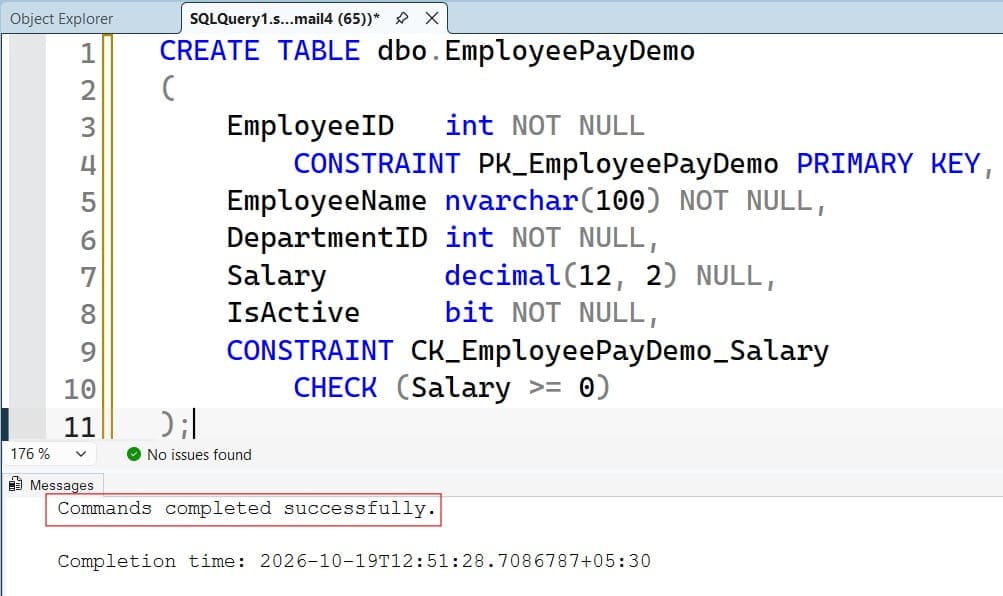
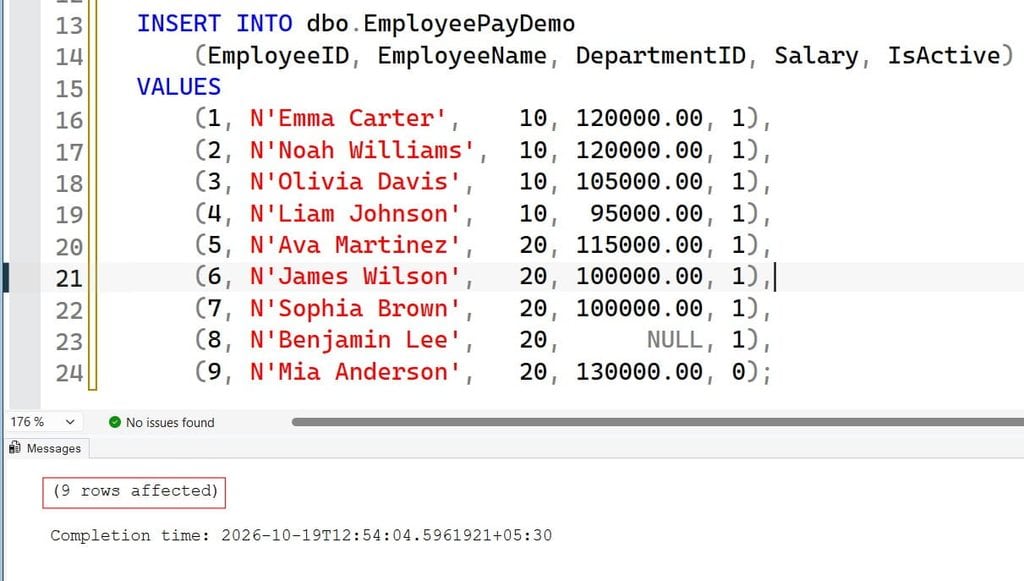
A schema is a namespace for database objects; this example uses dbo. The primary key uniquely identifies employees.
decimal(12, 2) stores exact amounts with two decimal places. Avoid approximate types such as float when equality determines compensation ties.
The check constraint rejects negative salaries but permits zero and NULL. Here, NULL means the salary is unknown.
A complete HR model would normally connect DepartmentID to a department table through a foreign key. Historical compensation also needs effective dates so the report does not compare current and previous salaries accidentally.
Pro Tip: I include duplicates, an inactive employee, and a missing salary in ranking tests. Unique values make several incorrect approaches look interchangeable.
Build Your First DENSE_RANK SQL Query
Rank active employees from highest to lowest salary:
SELECT
    EmployeeID,
    EmployeeName,
    Salary,
    DENSE_RANK() OVER (
        ORDER BY Salary DESC
    ) AS SalaryRank
FROM dbo.EmployeePayDemo
WHERE IsActive = 1
  AND Salary IS NOT NULL
ORDER BY Salary DESC, EmployeeID;
The result is: See the screenshot below for reference.
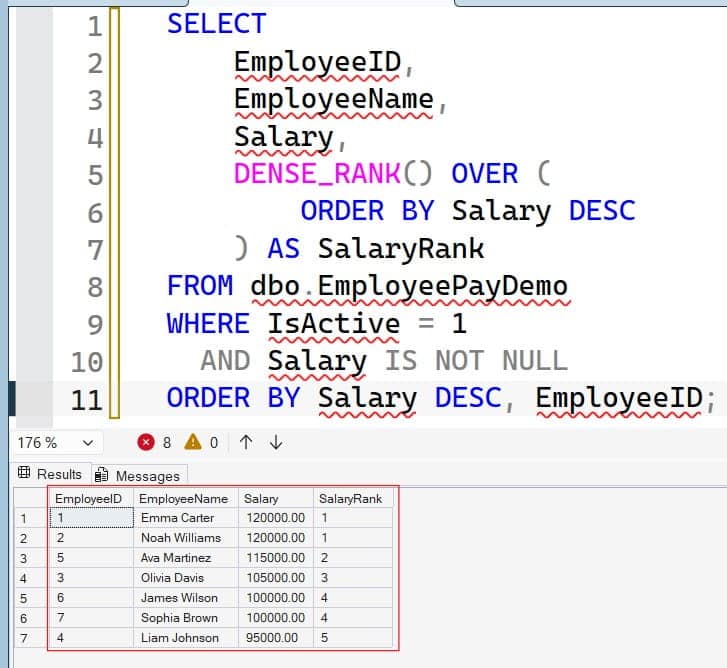
The WHERE clause defines the eligible population before ranking. Mia is inactive, and Benjamin has no known salary.
Two ordering clauses serve different purposes. The ordering inside OVER defines rank. The final ORDER BY defines presentation.
Do not assume the window ordering guarantees output order. Also, do not add EmployeeID inside OVER merely to stabilize the display. That would break salary ties because each salary-and-ID combination is unique.
Microsoft classifies DENSE_RANK() as nondeterministic. Treat it as a query-time calculation, not a permanent employee identifier. For unchanged input values, its tie rule remains defined; changing the population can change ranks.
Review the SQL OVER clause when separating calculation order from display order.
Pro Tip: I keep business ranking columns inside
OVERand display tie-breakers outside it. That separation makes code reviews much easier.
Compare DENSE_RANK, RANK, and ROW_NUMBER
These functions look similar but handle ties differently:
| Salary | DENSE_RANK | RANK | ROW_NUMBER |
|---|---|---|---|
| 120000 | 1 | 1 | 1 |
| 120000 | 1 | 1 | 2 |
| 115000 | 2 | 3 | 3 |
| 105000 | 3 | 4 | 4 |
The ROW_NUMBER positions shown assume employee ID breaks salary ties.
Use each function for its intended purpose:
DENSE_RANK(): consecutive distinct salary levels.RANK(): competition-style placement with gaps after ties.ROW_NUMBER(): individual row positions.
For exactly three employees, use ROW_NUMBER() with a unique tie-breaker. For every employee earning one of the three highest distinct salaries, use DENSE_RANK().
This distinction also affects deduplication. DENSE_RANK() does not remove duplicate records, and it does not reliably select one survivor from a duplicate group. Deduplication usually needs a separate, explicit row-selection rule.
The comparison of RANK versus DENSE_RANK explains these ranking differences in more detail.
Pro Tip: I ask whether “top three” means three rows or three distinct values. That small clarification prevents most ranking disputes.
Rank Within Departments and Filter Top Values
Add PARTITION BY when rankings must restart within departments:
WITH DepartmentRanks AS
(
    SELECT
        EmployeeID,
        EmployeeName,
        DepartmentID,
        Salary,
        DENSE_RANK() OVER (
            PARTITION BY DepartmentID
            ORDER BY Salary DESC
        ) AS SalaryRank
    FROM dbo.EmployeePayDemo
    WHERE IsActive = 1
      AND Salary IS NOT NULL
)
SELECT
    DepartmentID,
    EmployeeID,
    EmployeeName,
    Salary,
    SalaryRank
FROM DepartmentRanks
WHERE SalaryRank <= 2
ORDER BY DepartmentID, SalaryRank, EmployeeID;
After running the query above, I got the expected output shown in the screenshot below.
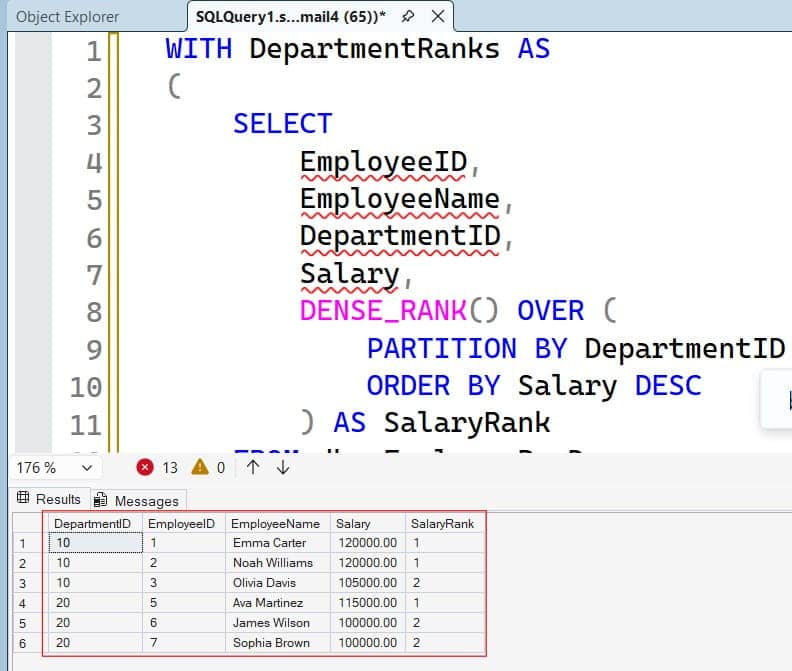
A partition is a group within which the calculation runs independently.
The common table expression, or CTE, names the intermediate query. Its leading semicolon safely terminates any preceding statement.
The result includes Emma, Noah, and Olivia from department 10, plus Ava, James, and Sophia from department 20. Two salary levels can therefore return more than two employees.
The outer query is necessary because SQL Server does not allow filtering a window function directly in the same query block’s WHERE clause.
For the second-highest distinct salary, change the outer condition to SalaryRank = 2. A department with only one known salary level returns no matching rows.
In multi-tenant applications, enforce authorized tenant scope before ranking. Partitioning organizes results; it does not authorize access.
Learn more about SQL PARTITION BY before extending this pattern to locations or business units.
Pro Tip: I verify whether filtering belongs before or after ranking. Ranking a department and filtering company-wide ranks afterward are not equivalent operations.
Aggregate First When Ranking Business Totals
Ranking individual orders does not identify the highest-value customers. Calculate customer totals first, then rank those totals.
This self-contained example uses fictional sales:
WITH Sales AS
(
    SELECT CustomerID, OrderAmount
    FROM
    (
        VALUES
            (101, CAST(600.00 AS decimal(12, 2))),
            (101, CAST(400.00 AS decimal(12, 2))),
            (102, CAST(1000.00 AS decimal(12, 2))),
            (103, CAST(750.00 AS decimal(12, 2)))
    ) AS v(CustomerID, OrderAmount)
),
CustomerTotals AS
(
    SELECT
        CustomerID,
        SUM(OrderAmount) AS TotalRevenue
    FROM Sales
    GROUP BY CustomerID
)
SELECT
    CustomerID,
    TotalRevenue,
    DENSE_RANK() OVER (
        ORDER BY TotalRevenue DESC
    ) AS RevenueRank
FROM CustomerTotals
ORDER BY RevenueRank, CustomerID;
After running the query above, I got the expected output shown in the screenshot below.
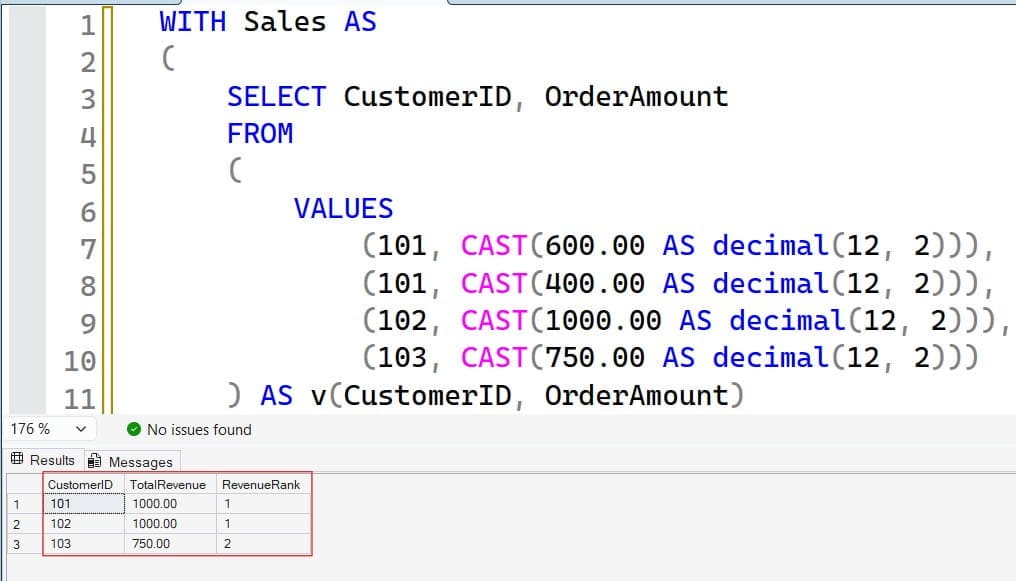
Customers 101 and 102 each total 1000.00, so both rank 1. Customer 103 ranks 2.
The first CTE supplies sample rows. The second calculates one total per customer. Ranking then operates at the correct business level.
In production, define reporting dates, currencies, refunds, and canceled orders before aggregation. Incorrect joins can multiply order rows and inflate totals before ranking.
Review GROUP BY in SQL Server when building ranked summaries.
Pro Tip: I validate aggregate totals independently before reviewing their ranks. Ranking cannot repair duplicated joins or an incorrect revenue definition.
Tune Ranking Queries With Execution Plans
Ranking often requires ordered input. Large sorts can consume CPU and memory, particularly when the query carries unnecessary wide columns.
Use an actual execution plan to inspect how SQL Server accesses, filters, and sorts rows. Measure representative executions:
SET STATISTICS IO ON;
SET STATISTICS TIME ON;

SELECT
    DepartmentID,
    EmployeeID,
    Salary,
    DENSE_RANK() OVER (
        PARTITION BY DepartmentID
        ORDER BY Salary DESC
    ) AS SalaryRank
FROM dbo.EmployeePayDemo
WHERE IsActive = 1
  AND Salary IS NOT NULL;

SET STATISTICS IO OFF;
SET STATISTICS TIME OFF;
After running the query above, I got the expected output shown in the screenshot below.
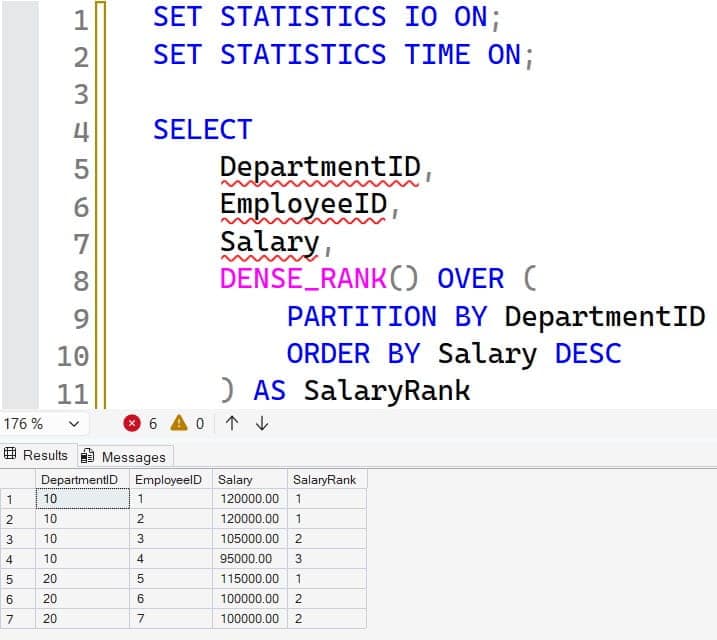
STATISTICS IO reports page reads. STATISTICS TIME reports CPU and elapsed time.
For frequent department rankings, test this candidate:
CREATE NONCLUSTERED INDEX IX_EmployeePayDemo_DepartmentSalary
ON dbo.EmployeePayDemo
    (DepartmentID, Salary DESC)
INCLUDE (EmployeeName)
WHERE IsActive = 1
  AND Salary IS NOT NULL;
A nonclustered index is a separate ordered access structure. Its key order aligns with the partition and ranking columns, which can reduce sorting. Included columns supply additional output without becoming ordering keys.
Warning: Index creation consumes storage and resources and can block other work. Review existing indexes and schedule production deployment appropriately.
Do not add this index automatically to a small table. Wider indexes increase storage and write overhead.
Statistics describe data distribution and help SQL Server estimate row counts. Compare estimated and actual rows when investigating poor plans.learn.microsoft
Query Store, when enabled, records query performance history and plans. Use it to detect regressions before increasing Azure SQL compute. Lower resource use does not automatically reduce a provisioned bill; savings depend on right-sizing and the purchasing model.
Pro Tip: I compare report performance and salary-import overhead before retaining an index. Optimizing reads should not quietly make every payroll write more expensive.
Handle NULLs, Permissions, and Reporting Consistency
Unlike MIN(), DENSE_RANK() does not ignore null values. SQL Server treats nulls as the lowest ordering values, so they appear first for ascending ranking and last for descending ranking.
Exclude them when unknown values should not participate. Avoid replacing them with zero unless zero genuinely represents the business value.
For concurrent salary changes, define reporting consistency requirements. An isolation level controls how a transaction observes other transactions’ changes. Avoid NOLOCK for compensation reports because uncommitted data can produce misleading results.
Apply least privilege. Expose an approved view or stored procedure rather than broad payroll-table access, and test with a non-administrator account.
Prefer Microsoft Entra authentication and managed identities for supported Azure applications. Store unavoidable secrets in Azure Key Vault, not source code, spreadsheets, shared files, or unprotected settings.
Require encrypted connections with certificate validation. An authorized administrator can check session encryption:
SELECT encrypt_option
FROM sys.dm_exec_connections
WHERE session_id = @@SPID;
TRUE indicates encryption, not proof that the client validated the server certificate. DMV permissions vary by platform and version.
Prefer private endpoints for Azure database access. Audit sensitive access and permission changes without placing salary values in general application logs.
The read-only ranking query needs no special backup operation. Supporting schema deployments still require reviewed scripts and established restore procedures.
Pro Tip: I test security using the reporting identity, not the deployment account. Administrator access hides permission mistakes that applications encounter immediately.
Frequently Asked Questions
What does DENSE_RANK do in SQL?
It assigns consecutive ranks to distinct ordering values. Equal values share a rank, and the next distinct value receives the next number without a gap.
Does DENSE_RANK remove duplicate rows?
No. It preserves rows and assigns equal ranks when their ordering values match. Removing duplicates requires a separate rule based on the intended data identity.
Can I use DENSE_RANK in a WHERE clause?
Not directly in the same SQL Server query block. Calculate the rank in a CTE or derived table, then filter it in an outer query.
Can DENSE_RANK use multiple ordering columns?
Yes. Ties then depend on the complete ordering combination. Adding a unique employee ID prevents salary-only ties, so use multiple columns only when that matches the requirement.
Does DENSE_RANK guarantee exactly three top results?
No. Filtering ranks 1 through 3 returns every row within the top three distinct ordering levels. Use ROW_NUMBER() with a suitable unique tie-breaker when the requirement is at most three rows.
You can now use DENSE_RANK() to preserve ties, rank within groups, and filter distinct business-value levels. Define the eligible population clearly, restrict sensitive data access, and measure execution plans before changing indexes or compute. I hope you found this article helpful.
You May Also Like
- Use ROW_NUMBER in SQL Server
- Compare CTEs and temporary tables
- Understand SQL NULL values
- Apply SQL Server indexing best practices
- Test SQL Server stored procedures

After working for more than 15 years in the Software field, especially in Microsoft technologies, I have decided to share my expert knowledge of SQL Server. Check out all the SQL Server and related database tutorials I have shared here. Most of the readers are from countries like the United States of America, the United Kingdom, New Zealand, Australia, Canada, etc. I am also a Microsoft MVP. Check out more here.