
A payroll report lists the lowest-paid employee twice because two people earn the same amount. A developer skips the first row to find the second-lowest salary, but the query returns that same minimum again. The statement runs successfully; the business answer is wrong.
Understanding how to find the second lowest salary in SQL Server starts with distinguishing the second distinct salary from the second employee in an ordered list. Most compensation reports need the second distinct amount, including every employee who earns it.
The following examples show how to calculate that amount, return matching employees, handle missing values, rank within departments, and validate performance and permissions.
Find the Second Lowest Salary in SQL Server With MIN()
For a salary-only result, select the smallest salary greater than the overall minimum:
SELECT
    MIN(Salary) AS SecondLowestSalary
FROM dbo.Employees
WHERE Salary >
(
    SELECT MIN(Salary)
    FROM dbo.Employees
);
The inner query finds the lowest salary. The outer query excludes that amount and finds the minimum among the remaining salaries.
For values 45000, 45000, 52000, and 68000, the result is 52000. Duplicate minimums do not affect the answer.
MIN() is an aggregate function: it calculates one summary value from qualifying rows. It ignores NULL, which represents an unknown or missing value. If fewer than two distinct non-null salaries exist, this query returns one row containing NULL.
This pattern works in SQL Server, Azure SQL Database, and Azure SQL Managed Instance. It requires no special service tier or additional infrastructure.
It is also a set-based operation: SQL describes the required result rather than looping through employees individually. A cursor or WHILE loop adds complexity without helping this calculation.
For aggregate fundamentals, review using MIN in SQL Server.
Pro Tip: I use the nested minimum pattern when the application needs one amount and a predictable single-row result, including when no second salary exists.
Create Sample Data That Exposes Ranking Mistakes
Run this setup in a development database. It creates a table and inserts fictional records; it does not overwrite existing employee data.
If dbo.Employees already exists, choose another demonstration table name and adjust the examples.
CREATE TABLE dbo.Employees
(
    EmployeeID   int NOT NULL
        CONSTRAINT PK_Employees PRIMARY KEY,
    EmployeeName nvarchar(100) NOT NULL,
    DepartmentID int NOT NULL,
    Salary       decimal(12, 2) NULL,
    IsActive     bit NOT NULL,
    CONSTRAINT CK_Employees_Salary
        CHECK (Salary >= 0)
);

INSERT INTO dbo.Employees
    (EmployeeID, EmployeeName, DepartmentID, Salary, IsActive)
VALUES
    (1, N'Emma Carter',    10, 45000.00, 1),
    (2, N'Noah Williams',  20, 45000.00, 1),
    (3, N'Olivia Davis',   10, 52000.00, 1),
    (4, N'Liam Johnson',   20, 52000.00, 1),
    (5, N'Ava Martinez',   10, 68000.00, 1),
    (6, N'James Wilson',   20, 72000.00, 1),
    (7, N'Sophia Brown',   10,     NULL, 1),
    (8, N'Benjamin Lee',   20, 40000.00, 0);
After running the query above, I got the expected output shown in the screenshot below.
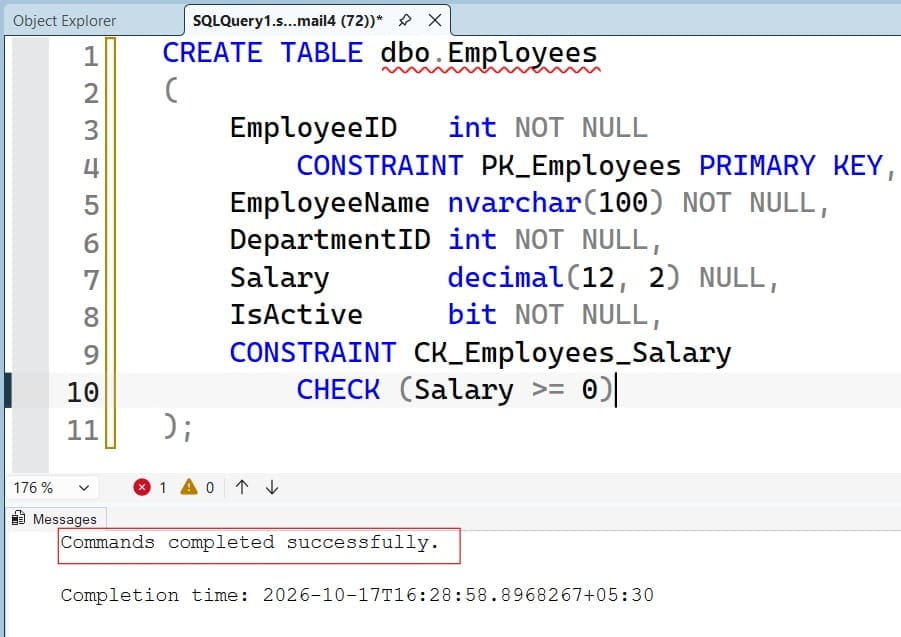
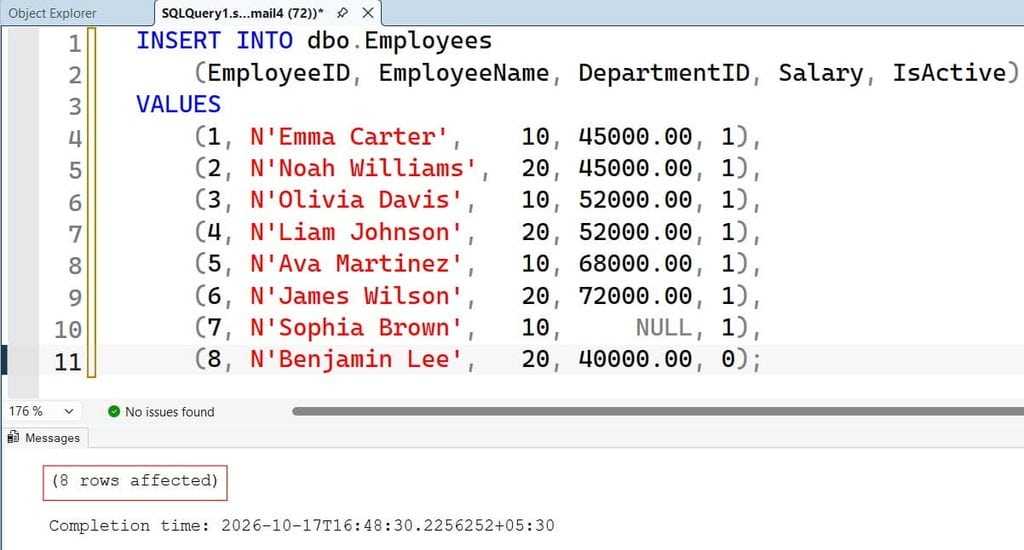
A schema is a namespace for database objects; this example uses dbo. The primary key uniquely identifies employees. In a complete HR model, DepartmentID would normally reference a department table through a foreign key.
decimal(12, 2) stores exact amounts with two decimal places. Avoid approximate numeric types such as float for salary values.
The check constraint rejects negative salaries but allows zero and NULL. It does not establish whether zero is valid for your business.
Across all employees, the second-lowest distinct salary is 45000.00. Among active employees, it is 52000.00. That difference makes eligibility filtering part of correctness, not an optional reporting detail.
Pro Tip: I include duplicate minimums, duplicate second-place salaries, and an inactive employee in test data. Clean, unique values hide the mistakes this query needs to prevent.
Apply Eligibility Rules Before Calculating the Minimum
If the report covers active employees, apply that condition inside both queries:
SELECT
    MIN(e.Salary) AS SecondLowestActiveSalary
FROM dbo.Employees AS e
WHERE e.IsActive = 1
  AND e.Salary >
  (
      SELECT MIN(e2.Salary)
      FROM dbo.Employees AS e2
      WHERE e2.IsActive = 1
  );
After running the query above, I got the expected output shown in the screenshot below.
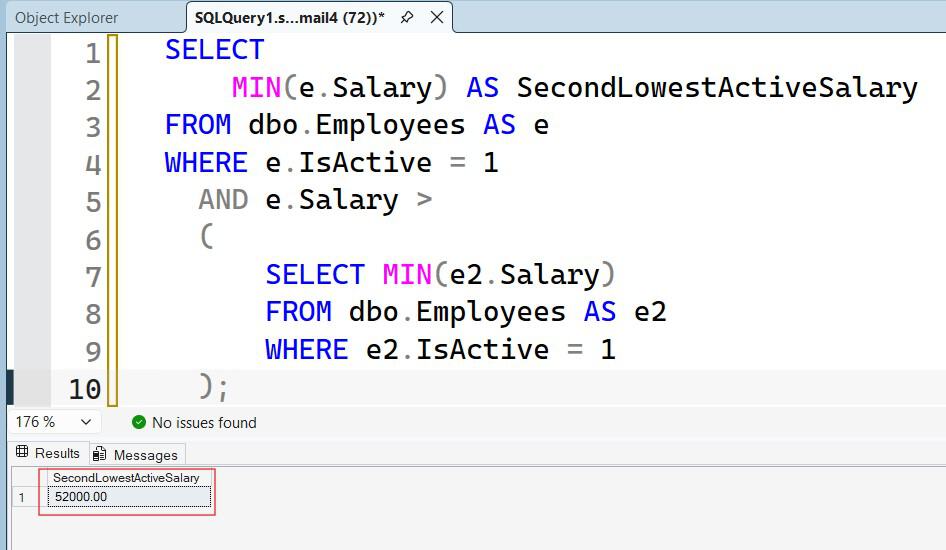
This returns 52000.00.
The inner query finds the minimum within the eligible population. The outer query searches for the next distinct salary within that same population.
Filtering only one level can produce an incorrect answer. For example, using the inactive employee’s 40000.00 as the baseline would incorrectly make 45000.00 the second active salary.
Define these rules before publishing the report:
- Whether inactive employees qualify.
- Whether zero means valid compensation or missing imported data.
- Which currency and pay period apply.
- Whether the report uses current or effective-dated salaries.
Do not compare hourly rates directly with annual salaries. Likewise, do not replace missing salaries with zero before calculating the minimum; that can introduce an artificial salary level.
The SQL WHERE clause tutorial explains how filters determine the rows available to each calculation.
Pro Tip: I keep the eligible employee population identical across inner and outer queries. A correct aggregate cannot compensate for inconsistent business filters.
Find the Second Lowest Salary in SQL Server With DENSE_RANK
Use DENSE_RANK() when the report needs employee details or when the ranking should be easy to extend:
WITH RankedEmployees AS
(
    SELECT
        EmployeeID,
        EmployeeName,
        DepartmentID,
        Salary,
        DENSE_RANK() OVER (
            ORDER BY Salary ASC
        ) AS SalaryRank
    FROM dbo.Employees
    WHERE IsActive = 1
      AND Salary IS NOT NULL
)
SELECT
    EmployeeID,
    EmployeeName,
    DepartmentID,
    Salary
FROM RankedEmployees
WHERE SalaryRank = 2
ORDER BY EmployeeID;
This returns Olivia and Liam, each earning 52000.00.Check out the screenshot below for your reference.
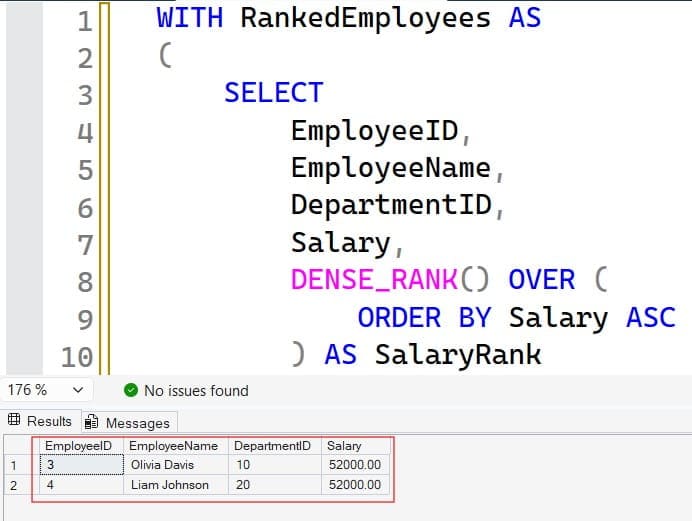
DENSE_RANK() is a window function: it calculates a value across related rows without collapsing them into one summary row. Equal salaries receive equal ranks, and the next distinct salary receives the next consecutive rank.learn.microsoft
The common table expression, or CTE, names the intermediate query RankedEmployees. The outer query filters its calculated rank. A CTE applies only to the immediately following statement.
Exclude NULL before ranking. Unlike MIN(), ranking does not automatically ignore unknown salaries.
Why not ROW_NUMBER or RANK?
For active salaries 45000, 45000, 52000, 52000:
| Function | Assigned values | Meaning |
|---|---|---|
DENSE_RANK() | 1, 1, 2, 2 | Consecutive distinct salary levels |
RANK() | 1, 1, 3, 3 | Ranking with gaps after ties |
ROW_NUMBER() | 1, 2, 3, 4 | Individual row positions |
ROW_NUMBER() answers a different question. RANK() can leave no row with rank 2.
Do not add EmployeeID inside the DENSE_RANK() ordering. That ranks salary-and-employee combinations rather than salary alone. Keep display tie-breakers in the final ORDER BY.
See RANK versus DENSE_RANK for a deeper comparison.
Pro Tip: I use salary alone to define salary rank, then employee ID to define display order. Mixing those responsibilities silently changes tie handling.
Use OFFSET FETCH for a Compact Salary-Only Query
When only the amount is needed, this alternative is concise:
SELECT DISTINCT
    Salary AS SecondLowestSalary
FROM dbo.Employees
WHERE IsActive = 1
  AND Salary IS NOT NULL
ORDER BY Salary ASC
OFFSET 1 ROWS
FETCH NEXT 1 ROWS ONLY;
After running the query above, I got the expected output shown in the screenshot below.
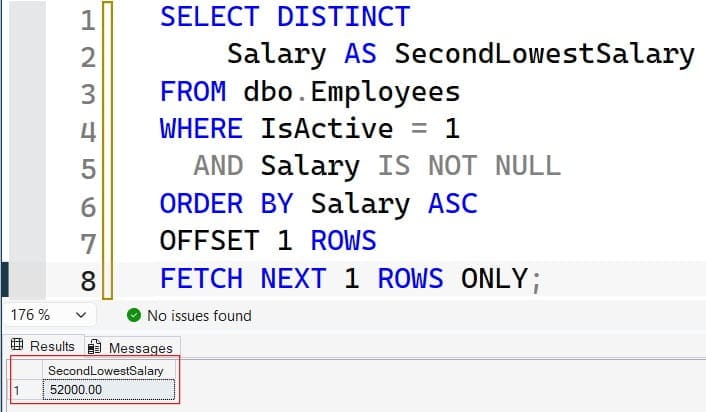
DISTINCT removes duplicate amounts. OFFSET 1 skips the lowest distinct salary, and FETCH NEXT 1 returns the next amount.
Without DISTINCT, two employees earning the minimum would make the result wrong. Without the null filter, ascending ordering can place an unknown salary before known amounts.
OFFSET ... FETCH requires SQL Server 2012 or later and is available in Azure SQL Database and Azure SQL Managed Instance.
Its missing-result behavior differs from the nested MIN() query: it returns no rows when a second distinct salary does not exist.
Choose deliberately:
- Nested
MIN(): one amount, or oneNULL. DENSE_RANK(): matching employee rows, including ties.OFFSET ... FETCH: a compact distinct salary result.
Query length does not establish performance. Test the alternatives against your actual workload.
Pro Tip: I document whether a missing salary level produces an empty result or a null value. Applications should not discover that difference after deployment.
Find the Second Lowest Salary in Each Department
For department-level reporting, restart the ranking within each department:
WITH DepartmentRanks AS
(
    SELECT
        EmployeeID,
        EmployeeName,
        DepartmentID,
        Salary,
        DENSE_RANK() OVER (
            PARTITION BY DepartmentID
            ORDER BY Salary ASC
        ) AS SalaryRank
    FROM dbo.Employees
    WHERE IsActive = 1
      AND Salary IS NOT NULL
)
SELECT
    DepartmentID,
    EmployeeID,
    EmployeeName,
    Salary
FROM DepartmentRanks
WHERE SalaryRank = 2
ORDER BY DepartmentID, EmployeeID;
After running the query above, I got the expected output shown in the screenshot below.
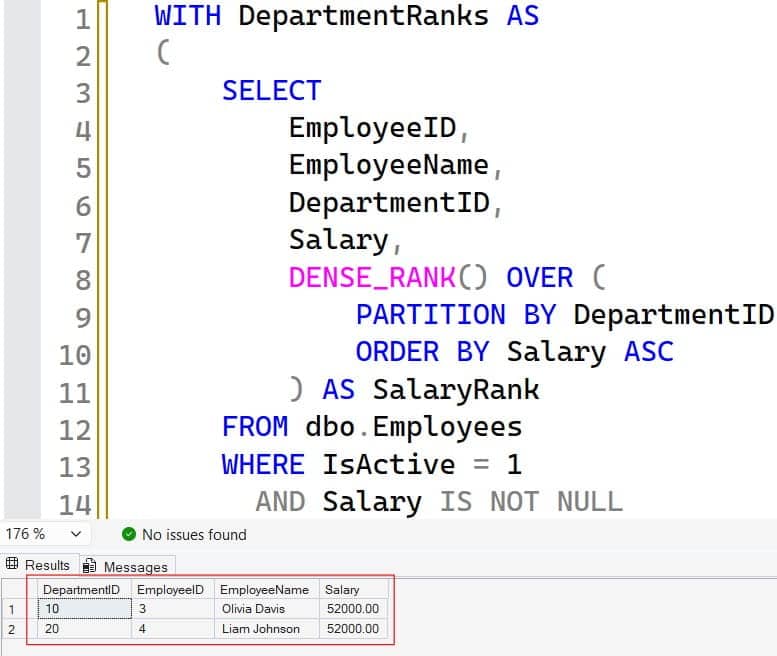
PARTITION BY divides the window calculation into independent groups. Department 10 returns Olivia, and department 20 returns Liam.
Departments with fewer than two distinct known salaries return no rows. If a dashboard must display every department, start from a department table and left join the ranked result.
For a multi-tenant application, enforce authorized tenant scope before ranking. Partitioning organizes calculations; it does not authorize access.
Learn more about SQL PARTITION BY before extending the query to locations or business units.
Pro Tip: I verify the grouping boundary with the report owner. Company-wide rank filtered afterward does not mean the same thing as rank calculated within a department.
Tune the Query Before Adding Compute
Use an actual execution plan, which shows how SQL Server accessed and processed the data. Measure a representative query:
SET STATISTICS IO ON;
SET STATISTICS TIME ON;

SELECT MIN(Salary) AS SecondLowestSalary
FROM dbo.Employees
WHERE IsActive = 1
  AND Salary >
  (
      SELECT MIN(Salary)
      FROM dbo.Employees
      WHERE IsActive = 1
  );

SET STATISTICS IO OFF;
SET STATISTICS TIME OFF;
STATISTICS IO reports page reads. STATISTICS TIME reports CPU and elapsed time. Compare repeated executions under similar conditions.
For frequent active-salary queries, test a candidate nonclustered index—a separate ordered access structure:
CREATE NONCLUSTERED INDEX IX_Employees_ActiveSalary
ON dbo.Employees (Salary)
WHERE IsActive = 1
  AND Salary IS NOT NULL;
Warning: Index creation consumes storage and resources and may block other work. Review existing indexes and schedule production changes appropriately.
The filtered index stores only known active salaries. It may support efficient minimum lookups, but the actual plan determines whether it helps.
Department-level reports may benefit from (DepartmentID, Salary) instead. Wider indexes that include employee details can reduce extra lookups but increase storage and salary-write overhead.
Follow SQL Server indexing best practices. Keep statistics—metadata describing data distribution—appropriate for the workload.
Query Store, when enabled, records query performance history and plans. Use it to identify regressions. In Azure SQL, lower resource use does not automatically lower a provisioned bill; savings depend on purchasing model and right-sizing.
Pro Tip: I measure report reads and payroll-write overhead before retaining an index. Faster reporting is not a win if every salary import becomes more expensive.
Protect Payroll Data and Test the Result Contract
Expose only the data the application needs. A stored procedure—a named database routine—can return an approved amount without exposing employee names.
After creating the procedure and an authorized reporting role:
GRANT EXECUTE
ON OBJECT::dbo.GetSecondLowestActiveSalary
TO PayrollReportingRole;
The procedure must already exist. Review stored procedure execution permissions and test with a non-administrator identity.
Prefer Microsoft Entra authentication and managed identities for supported Azure applications. Keep unavoidable secrets in Azure Key Vault, not source code, spreadsheets, shared files, or unprotected settings.
Require encrypted connections with certificate validation. An authorized administrator can verify session encryption:
SELECT encrypt_option
FROM sys.dm_exec_connections
WHERE session_id = @@SPID;
TRUE indicates encryption, not proof of client certificate validation. Permissions vary by platform and version; do not grant broad monitoring access just for this check.
Prefer private endpoints for Azure access. Audit sensitive payroll access and alert on permission changes without copying salaries into general application logs.
Test empty data, all-null salaries, one distinct salary, ties, and concurrent changes. Avoid NOLOCK, which permits uncommitted reads. The read-only query needs no special backup operation, but schema deployments still require change review and established restore procedures.
Pro Tip: I test the reporting identity separately from the deployment identity. Administrative execution can hide both missing permissions and excessive access.
Frequently Asked Questions
How do I find the second lowest salary without duplicates?
Use nested MIN() with a strict > comparison against the minimum. Alternatively, use DENSE_RANK() and select rank 2 after excluding null salaries.
Why does ROW_NUMBER return the lowest salary again?
It counts employee rows rather than distinct salary amounts. Two employees sharing the minimum occupy the first two positions.
What happens when only one distinct salary exists?
The nested MIN() query returns one row containing NULL. The ranking and OFFSET ... FETCH examples return no rows.
How do I exclude zero salaries?
Add Salary > 0 consistently to the eligible population. Do this only when business rules exclude zero; otherwise, you may hide valid records or loading errors.
Can I find the nth lowest salary using this approach?
Yes. Replace the ranking filter with a validated positive integer parameter such as @N. Keep the window ordering based on salary alone to preserve ties.
You can now retrieve the second-lowest distinct salary, preserve tied employees, and calculate department-level results. Keep eligibility rules consistent, restrict payroll access, and measure performance before adding indexes or compute. I hope you found this article helpful.
You May Also Like
- Explore SQL Server window functions
- Understand SQL NULL values
- Use ROW_NUMBER in SQL Server
- Review the SQL OVER clause
- Test SQL Server stored procedures

After working for more than 15 years in the Software field, especially in Microsoft technologies, I have decided to share my expert knowledge of SQL Server. Check out all the SQL Server and related database tutorials I have shared here. Most of the readers are from countries like the United States of America, the United Kingdom, New Zealand, Australia, Canada, etc. I am also a Microsoft MVP. Check out more here.