
A nightly order import fails because one row contains “pending” in an amount column. Meanwhile, a report displays dates differently between environments, and a customer lookup scans far more data than expected. Each problem involves conversion, but each needs a different fix.
The SQL Server CAST vs CONVERT decision is straightforward: use CAST for standard, readable type conversion and CONVERT when you need its style parameter, especially for date parsing or formatted output. Neither function automatically validates your business rules or guarantees better performance.
You’ll learn how to choose between them, handle invalid input, preserve numeric precision, and avoid conversions that interfere with efficient queries.
SQL Server CAST vs CONVERT: The Main Differences
Both functions perform explicit conversion: you tell SQL Server which data type the result should use. An implicit conversion happens automatically when SQL Server reconciles different types in an expression.
| Feature | CAST | CONVERT |
|---|---|---|
| Basic purpose | Convert an expression to another type | Convert an expression to another type |
| Syntax | CAST(expression AS type) | CONVERT(type, expression [, style]) |
| SQL portability | Uses standard SQL syntax | Uses T-SQL-specific syntax |
| Style parameter | Not available | Available for supported conversions |
| Invalid supported conversion | Usually raises an error | Usually raises an error |
| Error-tolerant counterpart | TRY_CAST | TRY_CONVERT |
T-SQL is Microsoft’s SQL dialect. These functions work in SQL Server, Azure SQL Database, and Azure SQL Managed Instance.
CAST improves portability, but identical behavior across database products is not guaranteed. Supported types, rounding, and date interpretation still vary.
CONVERT’s style parameter controls certain conversions involving dates, times, money, floating-point values, and binary data. It is not a universal formatting argument that applies identically to every type.
Pro Tip: I would make CAST the default in a coding standard and require a clear reason—usually a documented style—for choosing CONVERT.
Compare CAST and CONVERT Syntax With Simple Examples
Start with equivalent conversions:
SELECT
    CAST('125' AS int) AS UsingCast,
    CONVERT(int, '125') AS UsingConvert;
Both return the integer 125. Check out the screenshot below for your reference.
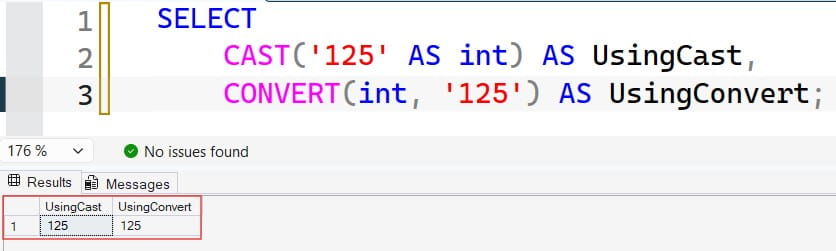
The target type determines what values the result can represent. Converting text to an integer requires valid integer text within the integer range.
Convert a number to text
DECLARE @OrderId int = 10425;

SELECT
    CAST(@OrderId AS varchar(20)) AS CastOrderId,
    CONVERT(varchar(20), @OrderId) AS ConvertOrderId;
Both return the text 10425. See the screenshot below for reference.
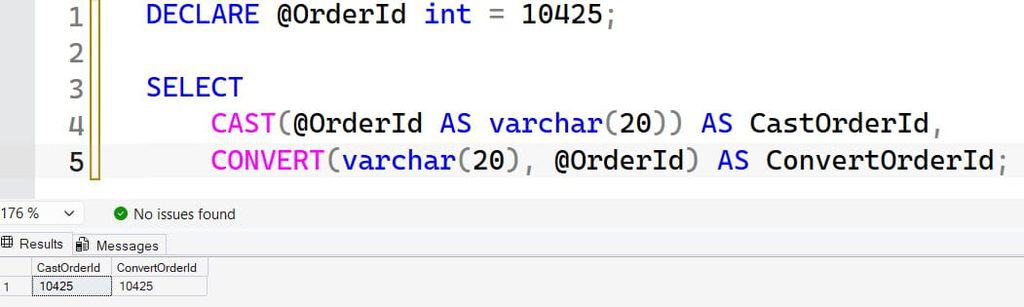
This is useful when building an export label. It does not change the original variable or a stored column.
Always specify string length. For CAST and CONVERT, an omitted character length defaults to 30; in variable declarations and data definitions, the default can instead be 1. Depending on the conversion, insufficient length can truncate text or cause an error.
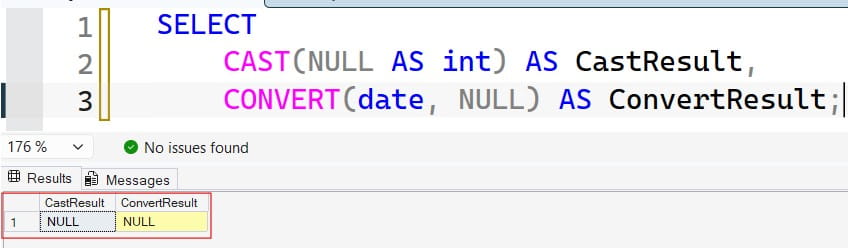
Understand NULL behavior
SELECT
    CAST(NULL AS int) AS CastResult,
    CONVERT(date, NULL) AS ConvertResult;
Both results are NULL. Conversion does not turn missing information into zero or an empty string. See the screenshot below for reference.
For additional examples, see using CAST in SQL Server and using the CONVERT function.
Pro Tip: I would specify string length even in diagnostic queries. Examples copied into production should not depend on context-sensitive defaults.
SQL Server CAST vs CONVERT for Dates and Times
CONVERT is especially useful when text dates arrive in a documented format.
The string 03/04/2026 is ambiguous. It can mean March 4 or April 3. Relying on session language or date-format settings can produce different results between environments.
Parse an explicit input format
SELECT
    CONVERT(date, '03/04/2026', 101) AS USDate,
    CONVERT(date, '03/04/2026', 103) AS BritishDate;
After executing the above query, I got the expected output. See the screenshot below for reference.
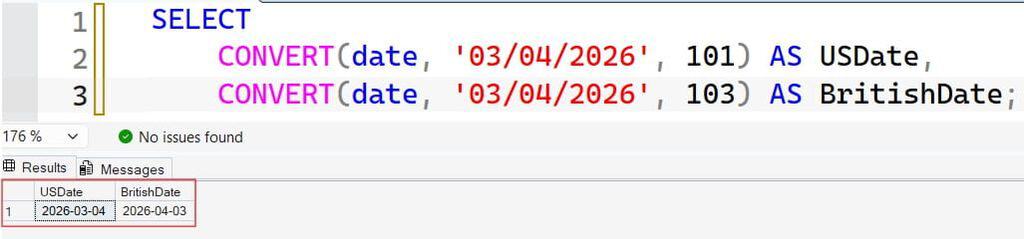
Style 101 interprets the text as month/day/year, producing March 4. Style 103 interprets it as day/month/year, producing April 3.
| Style | Typical format | Example |
|---|---|---|
| 101 | mm/dd/yyyy | 11/10/2026 |
| 103 | dd/mm/yyyy | 10/11/2026 |
| 112 | yyyymmdd | 20261110 |
| 23 | yyyy-mm-dd | 2026-11-10 |
| 126 | ISO-style date and time | 2026-11-10T14:35:27.123 |
Styles describe supported parsing or output behavior; they do not change a date column into stored formatted text.
Format a typed date for export
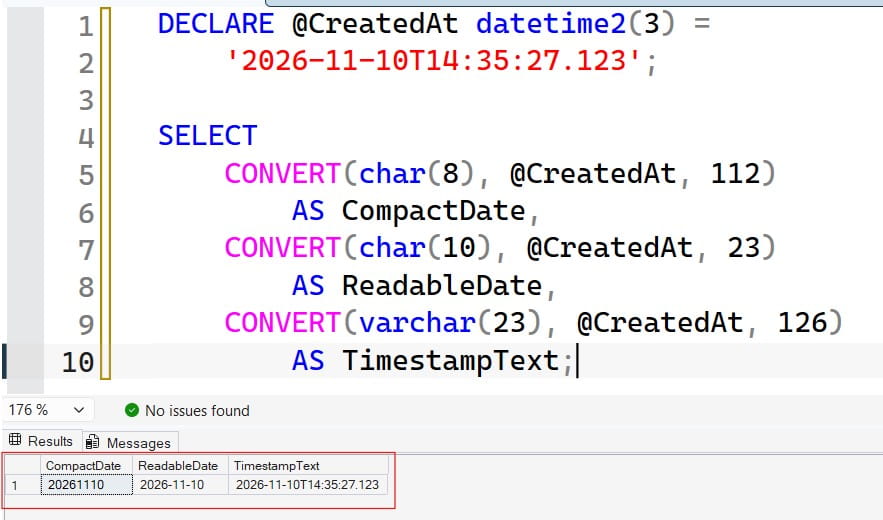
DECLARE @CreatedAt datetime2(3) =
    '2026-11-10T14:35:27.123';

SELECT
    CONVERT(char(8), @CreatedAt, 112)
        AS CompactDate,
    CONVERT(char(10), @CreatedAt, 23)
        AS ReadableDate,
    CONVERT(varchar(23), @CreatedAt, 126)
        AS TimestampText;
The results are 20261110, 2026-11-10, and 2026-11-10T14:35:27.123. Check out the screenshot below for your reference.
Store dates in date/time columns and format them at the output boundary. Text storage makes validation, sorting, and date arithmetic harder.
Also, datetime2 does not carry a time-zone offset. Adding a Z to formatted output does not make an unspecified local timestamp UTC.
See converting varchar values to dates for related parsing examples.
Pro Tip: I would document the source format beside every import conversion. A style number without its intended format is easy to misinterpret during maintenance.
Preserve Numeric Precision and Understand Rounding
CAST and CONVERT apply the same underlying rules for equivalent numeric conversions. The important decisions are the source type, target range, precision, and scale.
Precision is the total number of decimal digits. Scale is the number after the decimal point.
SELECT
    CAST(123.4567 AS decimal(10, 2)) AS CastAmount,
    CONVERT(decimal(10, 2), 123.4567) AS ConvertAmount;
Both return 123.46.
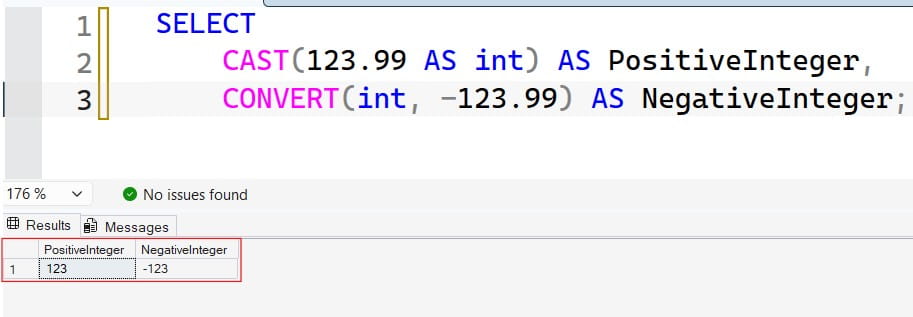
Reducing decimal scale normally rounds. Converting a decimal number to int instead truncates its fractional portion:
SELECT
    CAST(123.99 AS int) AS PositiveInteger,
    CONVERT(int, -123.99) AS NegativeInteger;
The results are 123 and -123. Check out the screenshot below for your reference.
Do not generalize this behavior to every source type. Conversion rules can differ for money, floating-point, and character values.
Convert before integer division
SELECT
    CAST(5 / 2 AS decimal(10, 2))
        AS ConvertedTooLate,
    CAST(5 AS decimal(10, 2)) / 2
        AS FractionPreserved;
The first expression returns 2.00. Integer division already discarded the fraction before CAST ran.
Test the target range
A decimal(5,2) supports three digits before the decimal point. It cannot hold 1234.56.
A value can also overflow after rounding: 999.995 cannot become 1000.00 in decimal(5,2).
Choose types from documented maximums rather than current sample values. Avoid using float for contractual monetary amounts that require exact decimal representation.
Pro Tip: I would test both the largest expected value and a value that rounds across a boundary. Those cases expose weaknesses that ordinary amounts miss.
Use TRY_CAST and TRY_CONVERT for Untrusted Input
CAST and CONVERT can stop a statement when a supported conversion fails. TRY_CAST and TRY_CONVERT return NULL for those failures instead.
TRY_CONVERT also accepts a style argument, making it useful for imported dates. Both are available in modern SQL Server versions, including SQL Server 2012 and later.learn.microsoft+1
Validate an import without writing data
This example uses inline rows and a common table expression, or CTE—a named result set for the following statement.
WITH SourceRows AS
(
    SELECT *
    FROM
    (
        VALUES
            (1, N'125.50', N'11/10/2026'),
            (2, N'pending', N'11/10/2026'),
            (3, N'', N'02/30/2026'),
            (4, NULL, NULL)
    ) AS v(SourceRowId, AmountText, OrderDateText)
),
Parsed AS
(
    SELECT
        SourceRowId,
        NULLIF(LTRIM(RTRIM(AmountText)), N'')
            AS CleanAmountText,
        TRY_CAST(
            NULLIF(LTRIM(RTRIM(AmountText)), N'')
            AS decimal(12, 2)
        ) AS ParsedAmount,
        TRY_CONVERT(
            date,
            NULLIF(LTRIM(RTRIM(OrderDateText)), N''),
            101
        ) AS ParsedOrderDate
    FROM SourceRows
)
SELECT
    SourceRowId,
    ParsedAmount,
    ParsedOrderDate,
    CASE
        WHEN CleanAmountText IS NULL THEN 'Missing amount'
        WHEN ParsedAmount IS NULL THEN 'Invalid amount'
        ELSE 'Valid amount'
    END AS AmountStatus
FROM Parsed;
Trimming and NULLIF normalize ordinary blank input before conversion. TRY_CAST handles the amount; TRY_CONVERT interprets dates using style 101.
The invalid February date becomes NULL. Add a separate date-status expression in a complete validation workflow.
Do not immediately replace every failed value with zero. That can conceal rejected revenue or inventory quantities.
Know the limits
TRY functions are not universal error suppression. An explicitly prohibited conversion, such as integer directly to XML, still raises an error. Successful conversion also does not guarantee validity: negative quantities or implausible dates may still violate business rules.learn.microsoft+1
Review TRY_CONVERT examples when building a staging process.
Pro Tip: I would preserve the source row identifier, raw value, and rejection reason so an import can be corrected and replayed without guesswork.
Avoid Conversion-Driven Performance Problems
There is no useful blanket rule that CAST is faster than CONVERT. Equivalent expressions often produce equivalent plans.
The larger concern is where conversion occurs.
Match parameter and column types
Suppose OrderNumber is a varchar column with an index:
-- Assumes dbo.Orders exists.
DECLARE @OrderNumber varchar(20) = '10425';

SELECT
    OrderId,
    OrderNumber
FROM dbo.Orders
WHERE OrderNumber = @OrderNumber;
Matching types avoids an unnecessary conversion.
By contrast, converting every OrderNumber to int can fail on alphanumeric values and interfere with efficient index access. An index seek navigates to matching entries; a scan reads a broader set.
Leading zeros also matter. The identifiers 0010425 and 10425 may be different business values even though their numeric conversions match.
Prefer clear timestamp ranges
-- Assumes OrderDate is datetime2(3).
DECLARE @Start datetime2(3) = '2026-11-10T00:00:00.000';
DECLARE @End datetime2(3) = '2026-11-11T00:00:00.000';

SELECT OrderId, OrderDate
FROM dbo.Orders
WHERE OrderDate >= @Start
  AND OrderDate < @End;
This half-open range includes the starting boundary and excludes the next day.
SQL Server can optimize some casts from datetime to date, so “any function prevents a seek” is too absolute. Nevertheless, a direct range makes intent explicit and is straightforward to test.
Inspect actual execution plans, conversion warnings, logical reads, and runtime. Query Store, when enabled, helps compare historical plans and performance.
See SQL query optimization tips before adding indexes or increasing Azure compute.
Pro Tip: I would investigate column-side conversions before debating CAST versus CONVERT syntax. Expression placement usually matters more than the function name.
Frequently Asked Questions
Which is better: CAST or CONVERT?
Use CAST for ordinary conversions and clearer standard SQL syntax. Use CONVERT when a supported style parameter provides necessary parsing or output control.
Is CONVERT faster than CAST in SQL Server?
Not inherently. Compare the actual plan and workload; source types, expression placement, and index access usually matter more than choosing between equivalent syntax.
Can CAST format a date as yyyy-mm-dd?
CAST has no style parameter. Use CONVERT(char(10), DateColumn, 23) when you specifically need that text output, while keeping stored dates in date/time types.
Why does TRY_CAST return NULL?
The source may be NULL, invalid for the target type, or outside its range. Preserve raw input and validation status so you can distinguish those situations.
Will TRY_CONVERT prevent every conversion error?
No. Explicitly prohibited conversions still raise errors. It also does not prevent truncation or rounding that counts as a successful conversion, so validate those separately.
You May Also Like
- Fixing varchar-to-numeric conversion errors
- Understanding SQL Server date formats
- Using CASE expressions for validation
- SQL database design best practices
- SQL Server index best practices
CAST handles standard type conversion, while CONVERT adds style-based control for supported formats. Preserve source meaning, validate failures explicitly, and test execution plans before deploying conversion changes. I hope you found this article helpful.

After working for more than 15 years in the Software field, especially in Microsoft technologies, I have decided to share my expert knowledge of SQL Server. Check out all the SQL Server and related database tutorials I have shared here. Most of the readers are from countries like the United States of America, the United Kingdom, New Zealand, Australia, Canada, etc. I am also a Microsoft MVP. Check out more here.