
A sales dashboard shows the wrong month-over-month change even though its totals look correct. The reporting query compares one customer’s revenue with another customer’s previous row. Meanwhile, a separate batch process uses a loop to calculate gaps between orders.
SQL Server LAG and LEAD Functions solve adjacent-row comparisons without requiring a self-join for every calculation. LAG retrieves a value from an earlier row, while LEAD retrieves one from a later row within a defined ordering.
You’ll learn how to build reliable comparisons, calculate changes and time gaps, handle missing values, and tune these queries for production reporting.
Understand SQL Server LAG and LEAD Functions
LAG and LEAD are window functions. A window function calculates a result across related rows while keeping the individual rows in the output.
Unlike GROUP BY, which combines rows into summary groups, these functions let an order remain visible beside its previous or next order value.
| Function | Direction | Typical use |
|---|---|---|
LAG | Earlier in the specified order | Compare current revenue with previous revenue |
LEAD | Later in the specified order | Find the next order date |
| Both | Within an optional partition | Keep customer or tenant sequences separate |
“Earlier” and “later” refer to the window ordering, not necessarily chronological time. With descending dates, LAG can retrieve a chronologically newer value.
Both functions have been available since SQL Server 2012 and are supported in Azure SQL Database and Azure SQL Managed Instance. Their basic syntax does not require a special Azure service tier.
SELECT
    SalesMonth,
    Revenue,
    LAG(Revenue, 1, NULL) OVER (
        ORDER BY SalesMonth
    ) AS PreviousRevenue,
    LEAD(Revenue, 1, NULL) OVER (
        ORDER BY SalesMonth
    ) AS NextRevenue
FROM (
    VALUES
        (CONVERT(date, '20260101'), CAST(1000 AS decimal(12,2))),
        (CONVERT(date, '20260201'), CAST(1200 AS decimal(12,2))),
        (CONVERT(date, '20260301'), CAST(900 AS decimal(12,2)))
) AS Sales(SalesMonth, Revenue)
ORDER BY SalesMonth;
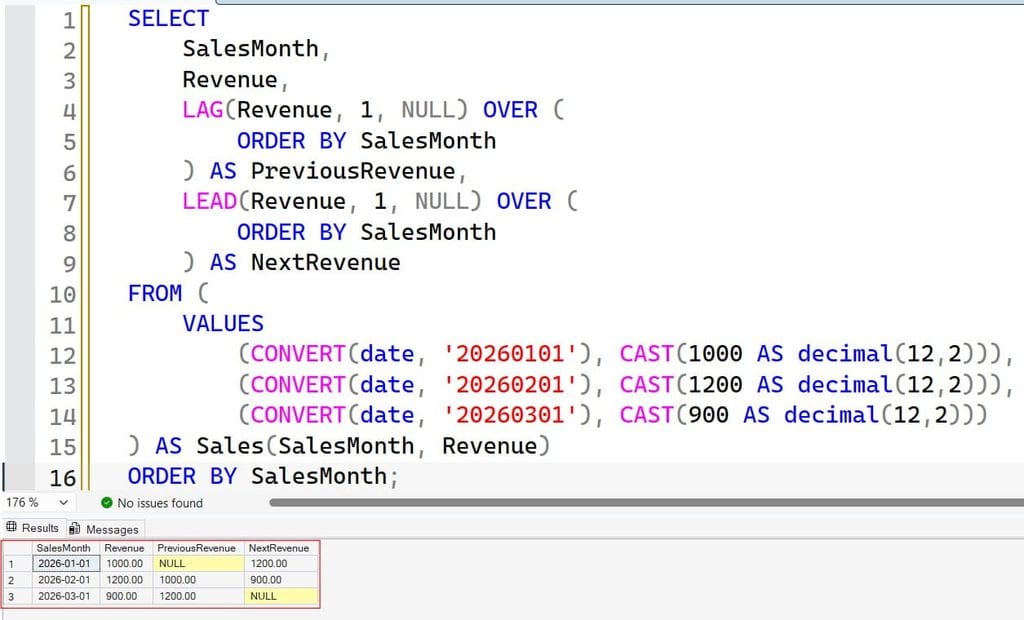
The derived table supplies three monthly records. February shows previous revenue of 1000.00 and next revenue of 900.00. See the screenshot below for reference.
For broader context, review these SQL Server window function examples.
Pro Tip: I start with three hand-checked rows before expanding a window query. That makes an incorrect direction or partition obvious.
Read the Syntax Before Building the Report
The basic expression is:
LAG(ValueExpression, Offset, DefaultValue)
    OVER (
        PARTITION BY GroupingColumn
        ORDER BY SequencingColumn
    )
Use LEAD with the same structure when looking forward.
Each component has a specific role:
ValueExpressionidentifies the value to retrieve.Offsetspecifies how many rows to move; its default is1.DefaultValueapplies when the requested row is outside the partition.PARTITION BYseparates independent sequences.ORDER BYdefines the sequence within each partition.
The default must be compatible with the value’s data type. For example, use a decimal-compatible default for revenue, not a label such as 'No previous sale'. The window ORDER BY is required.
An offset counts rows, not days or months. LAG(Revenue, 12) means twelve rows earlier; it means twelve months earlier only when the data contains exactly one row for every month.
The window ordering also does not guarantee the final display order. Add an outer ORDER BY for predictable report output.
See this OVER clause guide for how partitioning and ordering work together.
Pro Tip: I document the row grain before choosing an offset. “One row per customer per calendar month” is a useful contract; “monthly data” leaves too much room for mistakes.
Prepare a Reusable Customer Revenue Dataset
The following examples use a local temporary table. Its # prefix makes it session-local, and SQL Server stores it in tempdb, the system database used for temporary work.
Run the setup once in a development connection:
CREATE TABLE CustomerRevenue
(
    CustomerId int NOT NULL,
    SalesMonth date NOT NULL,
    Revenue decimal(12,2) NULL,
    PRIMARY KEY CLUSTERED (CustomerId, SalesMonth)
);

INSERT INTO CustomerRevenue
    (CustomerId, SalesMonth, Revenue)
VALUES
    (101, '20260101', 1000.00),
    (101, '20260201', 1200.00),
    (101, '20260301', NULL),
    (101, '20260401', 1500.00),
    (102, '20260101', 800.00),
    (102, '20260201', 1000.00),
    (102, '20260301', 900.00);
The primary key prevents duplicate customer-month combinations. Its clustered index organizes the rowstore table by customer and month, matching the sequence used below.
decimal(12,2) stores exact decimal amounts, avoiding approximate floating-point arithmetic for this revenue example. NULL revenue deliberately represents an unknown value, not zero sales.
This design establishes a clear grain: one row per customer per month. If the source contains individual orders, aggregate them to that grain before calculating monthly comparisons.
For setup variations, see this guide to creating temporary tables in SQL Server.
Pro Tip: I enforce the intended reporting grain with a key whenever possible. Duplicate periods can produce believable but incorrect comparisons.
Use SQL Server LAG and LEAD Functions by Customer
Without partitioning, the last row for customer 101 could become the previous row for customer 102. That is a calculation error, even when the query executes successfully.
SELECT
    CustomerId,
    SalesMonth,
    Revenue,
    LAG(Revenue) OVER (
        PARTITION BY CustomerId
        ORDER BY SalesMonth
    ) AS PreviousRevenue,
    LEAD(Revenue) OVER (
        PARTITION BY CustomerId
        ORDER BY SalesMonth
    ) AS NextRevenue
FROM CustomerRevenue
ORDER BY CustomerId, SalesMonth;
After executing the above query, I got the expected output as shown in the screenshot below.
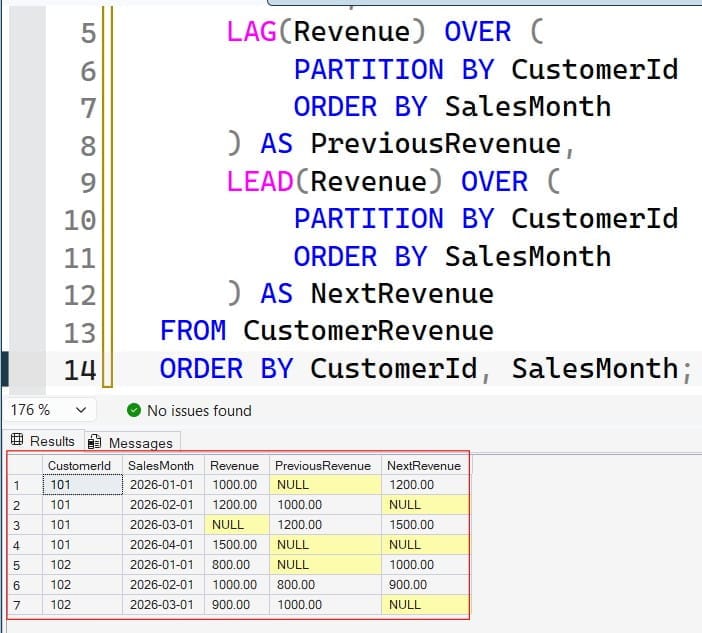
PARTITION BY CustomerId restarts the comparison for each customer. The first row in each partition has no previous row; the last has no next row.
Customer 101’s February row returns:
| Revenue | PreviousRevenue | NextRevenue |
|---|---|---|
| 1200.00 | 1000.00 | NULL |
Here, the next row exists, but its revenue is NULL. That differs from the final row, where no next row exists.
For event-level data, dates alone may not provide a unique sequence. Use a meaningful tie-breaker such as ORDER BY EventTime, EventId. A unique identifier makes ordering repeatable, but the application must still define what simultaneous events mean.
Window partitioning is logical query grouping, not physical table partitioning and not a security boundary. Learn more in this PARTITION BY tutorial.
Pro Tip: I test two customers together before approving a report. A single-customer test cannot expose a missing partition.
Calculate Revenue Changes and Filter Correctly
A common requirement is the amount and percentage change from the previous period.
Use a common table expression, or CTE, to name the intermediate query result:
WITH RevenueHistory AS
(
    SELECT
        CustomerId,
        SalesMonth,
        Revenue,
        LAG(Revenue) OVER (
            PARTITION BY CustomerId
            ORDER BY SalesMonth
        ) AS PreviousRevenue
    FROM CustomerRevenue
)
SELECT
    CustomerId,
    SalesMonth,
    Revenue,
    PreviousRevenue,
    Revenue - PreviousRevenue AS RevenueChange,
    CAST(
        100.0 * (Revenue - PreviousRevenue)
        / NULLIF(PreviousRevenue, 0)
        AS decimal(12,2)
    ) AS PercentageChange
FROM RevenueHistory
WHERE SalesMonth >= '20260201'
ORDER BY CustomerId, SalesMonth;
For customer 101 in February, the increase is 200.00, or 20.00%. See the screenshot below for reference.
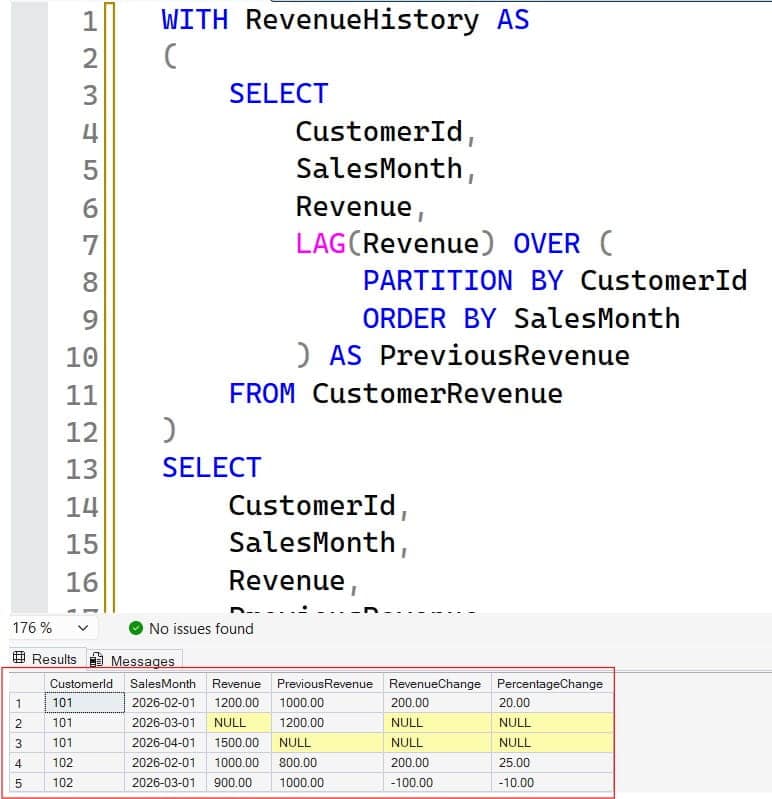
NULLIF(PreviousRevenue, 0) converts a zero denominator to NULL, preventing division by zero. This reports an undefined percentage as NULL rather than inventing a percentage.
The filter belongs outside the CTE because January is needed to calculate February’s previous value. Filtering January out before LAG runs removes that comparison row.
A CTE does not automatically materialize or cache results. Its purpose here is calculation structure. Review this CTE versus temporary table comparison when intermediate results need reuse.
For missing calendar periods, first join to a calendar table or otherwise generate the required periods. LAG cannot create a missing month.
Pro Tip: I check the first displayed reporting period against the preceding source period. Incorrect filter placement often shows up only at that boundary.
Handle Defaults and IGNORE NULLS Deliberately
The third argument is a boundary default, not a replacement for every NULL value.
SELECT
    CustomerId,
    SalesMonth,
    Revenue,
    LAG(Revenue, 1, 0.00) OVER (
        PARTITION BY CustomerId
        ORDER BY SalesMonth
    ) AS PreviousRevenue
FROM CustomerRevenue
WHERE CustomerId = 101
ORDER BY SalesMonth;
January returns 0.00 because no previous row exists. April still returns NULL because March exists and contains NULL revenue.
Replacing both cases with zero can distort growth rates. Preserve unknown values unless the business explicitly defines them as zero.
Skip missing observations when appropriate
SQL Server 2022 and supported Azure SQL platforms provide IGNORE NULLS. Run the following only on a supporting version:
SELECT
    CustomerId,
    SalesMonth,
    Revenue,
    LAG(Revenue) IGNORE NULLS OVER (
        PARTITION BY CustomerId
        ORDER BY SalesMonth
    ) AS PreviousKnownRevenue
FROM CustomerRevenue
WHERE CustomerId = 101
ORDER BY SalesMonth;
April returns February’s 1200.00, skipping March’s NULL. This is the previous known observation, not the previous calendar month.
Without the option, the default behavior respects NULLs. SQL Server 2022 CU4 included a fix involving IGNORE NULLS with LAG and LEAD; use an appropriately patched, supported build and regression-test the behavior.
Pro Tip: I name this output
PreviousKnownRevenue, notPreviousMonthRevenue. The name should reveal that the query can skip periods.
Use LEAD to Measure Time Between Events
LEAD also helps analyze order gaps, equipment readings, and workflow transitions.
WITH OrderEvents AS
(
    SELECT *
    FROM (
        VALUES
            (101, 1, CONVERT(datetime2(0), '2026-01-10T09:00:00')),
            (101, 2, CONVERT(datetime2(0), '2026-01-10T11:30:00')),
            (101, 3, CONVERT(datetime2(0), '2026-01-11T08:00:00'))
    ) AS Sample(CustomerId, OrderId, OrderTime)
),
OrderedEvents AS
(
    SELECT
        CustomerId,
        OrderId,
        OrderTime,
        LEAD(OrderTime) OVER (
            PARTITION BY CustomerId
            ORDER BY OrderTime, OrderId
        ) AS NextOrderTime
    FROM OrderEvents
)
SELECT
    CustomerId,
    OrderId,
    OrderTime,
    NextOrderTime,
    DATEDIFF_BIG(SECOND, OrderTime, NextOrderTime)
        AS SecondsUntilNextOrder
FROM OrderedEvents
ORDER BY CustomerId, OrderTime, OrderId;
The first gap is 9000 seconds. The final row returns NULL because no next order exists.
DATEDIFF_BIG counts date-part boundaries and returns bigint. The whole-second sample avoids implying fractional-second precision. For finer timing, choose the required date part and timestamp precision deliberately.
Store event times consistently, commonly in UTC, and handle local display conversion separately. For status histories, an interval between events measures time in a status only if the history captures every relevant transition.
See this DATEDIFF function guide for date-difference fundamentals.
Pro Tip: I retain the event timestamps beside calculated durations during testing. That makes timezone mistakes and unexpected sequencing much easier to diagnose.
Frequently Asked Questions
What is the difference between LAG and LEAD in SQL Server?
LAG retrieves a value from an earlier row in the window order. LEAD retrieves a value from a later row, and both operate within the specified partition.
Can I use LAG without ORDER BY?
No. Its window requires ORDER BY to define the sequence. Use an additional unique ordering column when dates or timestamps can tie.
Does LAG return the previous month?
Not automatically. It returns an earlier row, so missing months change the meaning. Generate a complete monthly sequence when the requirement is a calendar-period comparison.
Can I filter directly on a LAG result in WHERE?
Not in the same query level where the window result is calculated. Compute it in a CTE or derived table, then apply the filter outside.
Does the default value replace NULL revenue?
No. It applies when the requested offset is outside the partition. Use explicit NULL-handling logic or supported IGNORE NULLS behavior when the business requirement calls for it.
You May Also Like
- Use ROW_NUMBER to sequence SQL Server results
- Understand SQL Server LAST_VALUE
- Compare RANK and DENSE_RANK
- Improve SQL Server query performance
- Review SQL Server database permissions
LAG and LEAD let you compare neighboring rows, calculate changes, and measure event gaps without writing repetitive lookup logic. Reliable results depend on correct row grain, ordering, partition boundaries, and tested NULL handling—not just valid syntax. I hope you found this article helpful.

After working for more than 15 years in the Software field, especially in Microsoft technologies, I have decided to share my expert knowledge of SQL Server. Check out all the SQL Server and related database tutorials I have shared here. Most of the readers are from countries like the United States of America, the United Kingdom, New Zealand, Australia, Canada, etc. I am also a Microsoft MVP. Check out more here.