
Knowing how to find a table in SQL Server is a fundamental skill. In this article, I’m going to share the exact methods I use every day to navigate massive schemas and locate specific objects in seconds.
Find Table In SQL Server
Method 1: The Visual Approach (SQL Server Management Studio)
If you’re a fan of a graphical user interface (GUI), SQL Server Management Studio (SSMS) is your primary tool. This is the most common method used by beginners and those who prefer a “point-and-click” experience.
Using the Object Explorer Filter
The “Object Explorer” sidebar can be your best friend or your worst enemy. If you have thousands of tables, don’t scroll. Filter.
- Open SSMS and connect to your instance (e.g.,
NYC-PROD-SQL-01). - Expand your Databases node and navigate to your specific database.
- Right-click on the Tables folder.
- Select Filter > Filter Settings.
- In the “Value” field, type part of the table name (e.g.,
Customer). - Click OK. Check out the screenshot below for your reference.
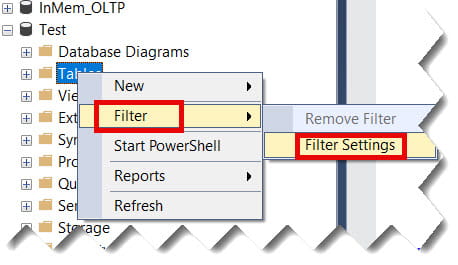
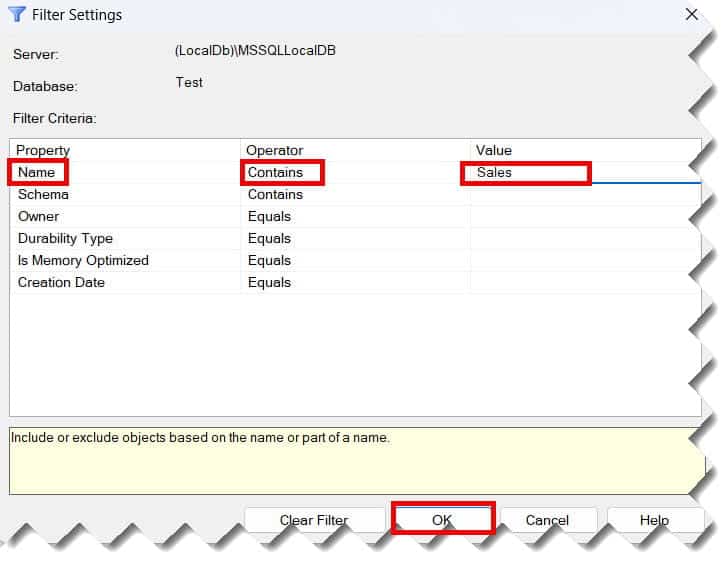
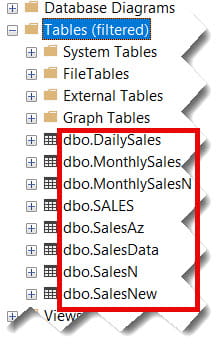
Now, the Object Explorer will only show tables containing that keyword. To see everything again, simply right-click the folder and select Remove Filter.
Method 2: The T-SQL Way (Using System Views)
I rarely use the GUI. It’s too slow for complex searches. Instead, I rely on T-SQL queries against system catalog views. These are built-in “maps” that SQL Server maintains for every object in the database.
1. Using sys.tables (The Pro Choice)
The sys.tables view is specific to SQL Server. It’s fast, reliable, and provides detailed metadata.
SQL
SELECT
    name AS TableName,
    create_date AS DateCreated,
    modify_date AS DateModified
FROM sys.tables
WHERE name LIKE '%sales%'
ORDER BY name;
After executing the above query, I got the expected output as shown in the screenshot below.

2. Using INFORMATION_SCHEMA.TABLES (The Standard Choice)
If you work across different platforms—say, migrating data from a firm that uses PostgreSQL to a branch using SQL Server—you might prefer INFORMATION_SCHEMA. It’s ISO-standard compliant, meaning the syntax is similar across various database engines.
SQL
SELECT
    TABLE_SCHEMA,
    TABLE_NAME,
    TABLE_TYPE
FROM INFORMATION_SCHEMA.TABLES
WHERE TABLE_NAME LIKE '%sales%'
AND TABLE_TYPE = 'BASE TABLE';
After executing the above query, I got the expected output as shown in the screenshot below.

Comparison: sys.tables vs. INFORMATION_SCHEMA.TABLES
| Feature | sys.tables | INFORMATION_SCHEMA.TABLES |
| Performance | High (Optimized for SQL Server) | Moderate (Standardized view) |
| Standard | Microsoft Specific | ISO/ANSI Standard |
| Detail | Extensive (Includes IDs, Dates, Flags) | Basic (Name, Schema, Type) |
| Visibility | Shows only user-defined tables | Shows tables and views (unless filtered) |
Method 3: Finding Tables by Column Name
This is a scenario I face often: “Find every table in the ‘Liberty Insurance’ database that contains a column named PolicyID.”
Manually checking every table is impossible. Instead, we join two system views: sys.columns and sys.tables.
The “Find-By-Column” Script
This query is a staple in my personal “DBA Toolkit.” It returns the schema, table name, and the specific column name.
SQL
SELECT
    s.name AS SchemaName,
    t.name AS TableName,
    c.name AS ColumnName
FROM sys.columns c
JOIN sys.tables t ON c.object_id = t.object_id
JOIN sys.schemas s ON t.schema_id = s.schema_id
WHERE c.name LIKE '%Account%'
ORDER BY TableName;
After executing the above query, I got the expected output as shown in the screenshot below.

Expert Tip: If you’re searching for sensitive data (like
CreditCardorSSN), useLIKE '%CC%'orLIKE '%SSN%'to catch variations in naming conventions.
Method 4: Searching Across the Entire Server
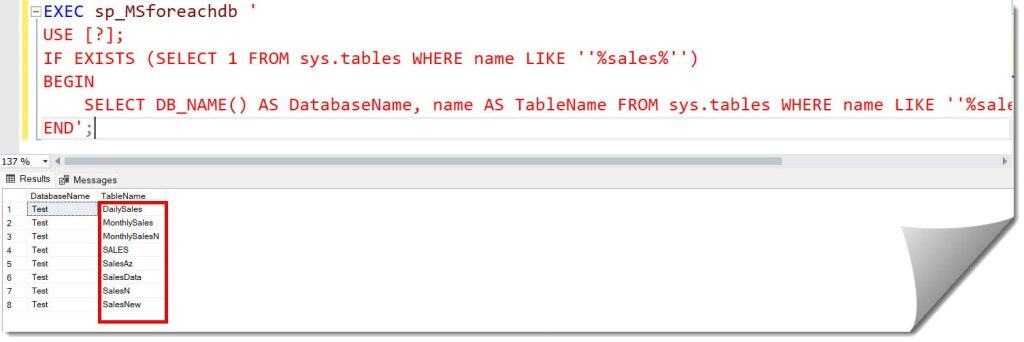
Sometimes, you don’t even know which database the table lives in. Perhaps a developer at “Pacific Northwest Tech” created a table in a random test environment. You can use the sp_MSforeachdb system stored procedure to search every database on your instance.
Note: Use this with caution on high-traffic production servers, as it iterates through every database and can cause a temporary spike in resources.
SQL
EXEC sp_MSforeachdb '
USE [?];
IF EXISTS (SELECT 1 FROM sys.tables WHERE name LIKE ''%TargetTable%'')
BEGIN
    SELECT DB_NAME() AS DatabaseName, name AS TableName FROM sys.tables WHERE name LIKE ''%TargetTable%''
END';
After executing the above query, I got the expected output as shown in the screenshot below.
Advanced Search: Using “SQL Search” Extensions
While T-SQL is powerful, sometimes you need a “Global Search” that hits everything—stored procedures, views, triggers, and tables—all at once. Many American DBAs use third-party tools like Redgate SQL Search (which is free).
These tools integrate directly into SSMS and allow you to search the entire database object tree as easily as a Google search. If you find yourself searching for tables multiple times a day.
Summary:
Locating a table in SQL Server is the first step toward masterly data manipulation. Whether you prefer the visual filtering of SSMS or the precision of T-SQL system views, having these scripts and techniques ensures you retrieve the table name faster.
You may also like the following articles:
- How to Recover a Deleted Table in SQL Server Without Backup
- SQL Server Find Table With Column Name
- SQL Server Grant Select On Table
- Drop All Constraints On A Table SQL Server
- SQL Server Rebuild All Indexes On A Table

After working for more than 15 years in the Software field, especially in Microsoft technologies, I have decided to share my expert knowledge of SQL Server. Check out all the SQL Server and related database tutorials I have shared here. Most of the readers are from countries like the United States of America, the United Kingdom, New Zealand, Australia, Canada, etc. I am also a Microsoft MVP. Check out more here.