
In this article, I’m going to walk you through how to recover a deleted table in SQL Server without a Backup to help you recover your data without a .bak file.
How to Recover a Deleted Table in SQL Server Without a Backup
Your Immediate Recovery Checklist:
- Set the Database to Read-Only: This prevents any new writes from overwriting the deallocated pages.
- Switch to Simple or Full Recovery Awareness: If you are in Full Recovery Model, your transaction log is your best friend. If you are in Simple, we have to move significantly faster.
- Detach the MDF/LDF (Optional but Recommended): In extreme cases, taking the files offline and working on a copy is the safest way to ensure zero data loss during the attempt.
Understanding the “Magic” of the Transaction Log
Most SQL Server instances are set to the Full Recovery Model. This means every single insert, update, and—crucially—delete is recorded in the .ldf file.
When a table is dropped, the transaction log records the DROPOBJECT operation. The data remains in the data file (.mdf) in a “ghosted” state until the background ghost cleanup process or a new write operation claims that space. Our goal is to read those logs before they are recycled or overwritten.
Method 1: Using Log Sequence Numbers (LSNs)
The most professional way to recover data without a standard backup is to perform a Point-in-Time Recovery using the transaction log, but if you truly have no backup, we have to look at the log directly using undocumented functions.
Step 1: Identify the Transaction ID
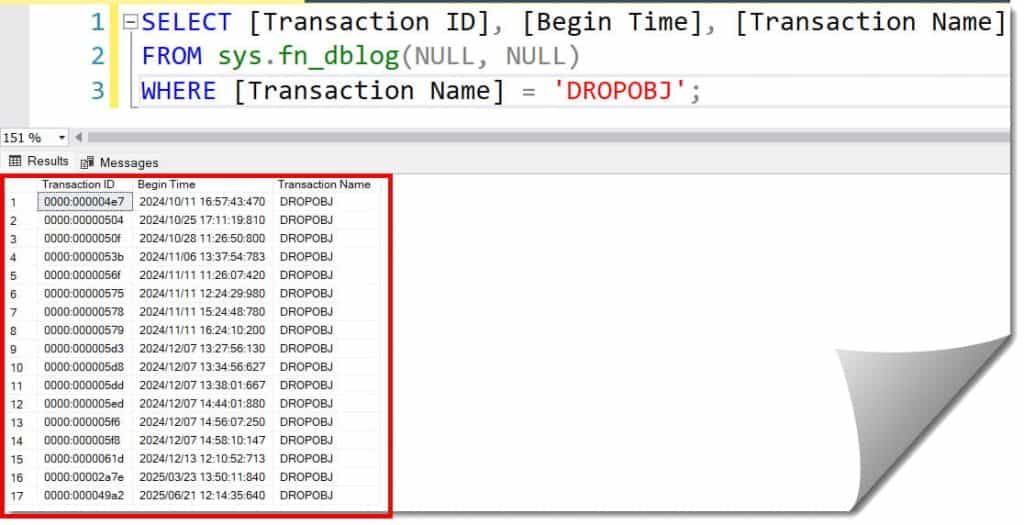
I use the fn_dblog function to Peer into the transaction log. This is a built-in, undocumented function that allows us to see exactly when the “Drop Table” occurred.
SQL
SELECT [Transaction ID], [Begin Time], [Transaction Name]
FROM sys.fn_dblog(NULL, NULL)
WHERE [Transaction Name] = 'DROPOBJ';
After executing the query above, I received the expected output, as shown in the screenshot below.
Step 2: Locate the Deallocated Pages
Once I have the Transaction ID, I can find the specific rows that were removed. This requires looking for LOP_DELETE_ROWS or LOP_BEGIN_XACT entries associated with your deleted table’s object ID.
Method 2: Transaction Log Reconstruction (The Technical Path)
If you don’t have a backup, but your database was in Full Recovery Mode, you might still have a “Tail-Log.” Even if you’ve never taken a full backup (which, as a Senior DBA, I have to tell you is a major “no-no” in the industry), the log file is still growing.
Comparison: Recovery Models and Recovery Chances
| Recovery Model | Ease of Recovery | Required Tooling |
| Full | High | Transaction Log Reader / LSN Point-in-Time |
| Bulk-Logged | Medium | Transaction Log + Data Page Header Analysis |
| Simple | Low | Direct Disk/MDF Hex Editing or Page Scraping |
Why Simple Recovery is a Nightmare
In “Simple” recovery, the log is truncated as soon as a checkpoint occurs. If you are in a high-traffic environment, your log might wrap around in minutes. If you’re in Simple mode, stop reading this and shut down the SQL Service now to preserve the MDF file.
Method 3: Using Third-Party Forensic Tools
Let’s be honest. Manually reconstructing a table from fn_dblog is like trying to rebuild a shredded document with Scotch tape while wearing oven mitts. It is technically possible, but it’s a nightmare.
How Page Scraping Works:
- Scanning the MDF: The tool scans the database file for headers that look like table data but aren’t linked to any current system object.
- Schema Reconstruction: It looks for the
sys.sysobjvaluesandsys.sysallocunitsto figure out what the columns were (e.g., Is this 4-byte chunk an Integer or a small DateTime?). - Data Export: It exports the found rows into a new SQL script that you can run to recreate the table.
Step-by-Step Tutorial
If you are stuck and can’t buy a tool, here is the workflow I followed.
1. Find the Object ID
Even if the table is gone, the transaction log often still references the internal Object ID. You need this to filter the log.
2. Extract Data to a Flat File
Using fn_dblog, you can see the hex values of the deleted rows.
- The Problem: The data is in Hexadecimal.
- The Solution: You have to convert the
[RowLog Contents 0]column back into your original data types. This involves understanding the SQL Server Storage Engine format (Fixed length vs. Variable length columns).
3. Rebuild the Schema
You cannot recover a table if you don’t know what it looked like. I always check:
- Cached Execution Plans: Sometimes the schema is still in the plan cache.
- Scripting Folders: Check if any developer in the North Carolina office has the original
CREATE TABLEscript in their Git history.
Preventing This in the Future
I would be doing you a disservice if I didn’t tell you how to ensure this never happens again. In the USA, data compliance (like HIPAA or SOC2) requires more than just “hoping” the log is there.
- Transaction Log Backups: If you are in Full Recovery, you must back up the log every 15 minutes.
- DDL Triggers: I highly recommend implementing a DDL Trigger that prevents
DROP TABLEon production databases without an explicit override.SQLCREATE TRIGGER SafetyNet ON DATABASE FOR DROP_TABLE AS PRINT 'Drop Table is disabled. Contact the Lead DBA.' ROLLBACK; - Delayed Secondary: Consider a secondary server with a “Delayed Redo” of 2 hours. If a table is dropped on Primary, you have 2 hours to go to the Secondary and grab the data before the “Drop” command is replicated.
Frequently Asked Questions (FAQ)
Can I recover a table if I ran TRUNCATE?
TRUNCATE is harder than DELETE. DELETE logs every row; TRUNCATE only logs the page deallocations. You can still recover, but you have to use page-level reconstruction rather than row-level log reading.
Does fn_dblog work after a server restart?
Yes, but only for the active portion of the log. If the server has a high volume of transactions, the information you need might be pushed out of the active log into the hidden portions of the file.
Is there a “Recycle Bin” in SQL Server 2022 or 2025?
No. While there are features like Temporal Tables (which keep a history of data changes), there is no native “undelete” for a dropped table object itself.
Final Thoughts
Recovering a table without a backup is a high-wire act. It’s stressful, it’s technical, and it’s not always 100% successful if the disk has been heavily used after the drop.
If you are currently staring at an empty SELECT statement where your data used to be, follow the steps above. Start with the log, look for the DROPOBJ signature, and whatever you do—don’t shrink your database files.
You may also like the following articles:

After working for more than 15 years in the Software field, especially in Microsoft technologies, I have decided to share my expert knowledge of SQL Server. Check out all the SQL Server and related database tutorials I have shared here. Most of the readers are from countries like the United States of America, the United Kingdom, New Zealand, Australia, Canada, etc. I am also a Microsoft MVP. Check out more here.