
Here, we will discuss the proven strategies for safely renaming tables while maintaining data integrity, application compatibility, and business continuity for critical enterprise systems.
Rename Table In SQL Server
Understanding SQL Server Table Rename Operations
What is Table Renaming in SQL Server?
Table renaming in SQL Server is a fundamental database administration operation that changes the identifier of an existing table while preserving all data, structure, indexes, and constraints.
Core Table Rename Characteristics for Operations:
- Schema preservation: All table structure, data, and constraints remain intact during rename operations
- Reference management: Dependent objects require manual updates to reflect new table names
- Application impact: Queries, stored procedures, and views referencing the table need modification
- Minimal downtime: Rename operations execute quickly with brief exclusive locks
- Reversibility: Operations can be rolled back if performed within transaction boundaries
Why Rename Tables in American Enterprise Environments?
Primary Business Drivers for Table Renaming:
| Rename Scenario | American Business Context | Implementation Priority | Operational Impact |
|---|---|---|---|
| Naming Standardization | Corporate merger and acquisition integration | High | Medium complexity |
| Business Rebranding | Company identity transformation | Medium | High visibility |
| Schema Optimization | Database modernization projects | High | Low immediate impact |
| Compliance Requirements | Regulatory naming standard adoption | Critical | High complexity |
| Legacy Migration | Application modernization initiatives | High | Extended timeline |
SQL Server Table Rename Methods
Method 1: Using sp_rename Stored Procedure
The sp_rename system stored procedure represents the primary method for renaming tables in SQL Server.
Basic sp_rename Syntax for Database Operations:
-- Standard Table Rename for Business Operations
EXEC sp_rename 'EmployeeReportN', 'EmployeeReportNew';
After executing the above query, I got the expected output as shown in the screenshot below.


-- Schema-qualified Table Rename for Enterprise Systems
EXEC sp_rename 'dbo.EmployeeReportNew', 'dbo.EmployeeReportN';
Method 2: SQL Server Management Studio (SSMS)
SSMS provides intuitive table rename capabilities:
SSMS Rename Process for Database Teams:
1. Connect to SQL Server instance.
2. Navigate to appropriate database containing target table.
3. Expand Tables folder to locate the table requiring rename.

4. Right click on the table name and select the Rename option as shown in the screenshot below.Table name becomes editable.
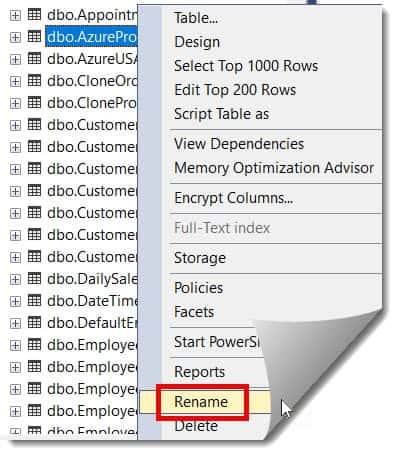
5. Enter new table name following naming conventions and Press Enter to confirm table rename operation.

6. Refresh Object Explorer to verify table rename success. You can see the below screenshot where it shows the table has been renamed successfully.

Best Practices for Database Teams
Naming Convention Standards
Enterprise Naming Guidelines for Organizations:
-- Table Naming Convention Framework
Business Table Naming Standards:

1. American Business Context Prefixes:
   • USA_ : American-specific business data
   • Corp_ : Corporate-wide American data
   • Reg_ : Regional American operations
   • Div_ : Divisional American business units

2. Functional Category Indicators:
   • Customer : Customer management data
   • Product : Product catalog and inventory
   • Order : Sales and order processing
   • Employee : Human resources and staffing
   • Financial : Accounting and financial data

3.Data Classification Suffixes:
   • _Master : Master data and reference tables
   • _Trans : Transactional and operational data
   • _Hist : Historical and archived data
   • _Temp : Temporary and processing tables
   • _Archive : Long-term retention data

4. American Naming Convention Examples:
   • USACustomer_Master : American customer master data
   • CorpEmployee_Trans : Corporate employee transaction data
   • RegSales_Hist : Regional sales historical data
   • DivProduct_Archive : Division product archive data
Conclusion:
Successful table renaming extends far beyond executing a simple sp_rename command—it requires comprehensive planning, systematic execution, thorough validation, and proactive risk management tailored to the unique requirements of business operations.
Essential Success Principles for Database Teams:
- Comprehensive Planning: Always conduct thorough dependency analysis and impact assessment before executing rename operations in production environments
- Risk Mitigation: Implement transaction-safe procedures with backup strategies and rollback capabilities for business continuity
- Stakeholder Coordination: Engage application teams, business users, and infrastructure administrators early in the planning process
- Validation Excellence: Execute multi-level validation procedures to ensure data integrity, application compatibility, and operational continuity for enterprises
- Documentation Standards: Maintain detailed change management records for compliance requirements and operational knowledge transfer
- Performance Optimization: Schedule rename operations during maintenance windows with minimal business impact consideration
You may also like the following articles:
- SQL Server Create Table With Primary Key
- How to Create Index on Temp Table in SQL Server
- How to Retrieve Data from Temp Table in SQL Server

After working for more than 15 years in the Software field, especially in Microsoft technologies, I have decided to share my expert knowledge of SQL Server. Check out all the SQL Server and related database tutorials I have shared here. Most of the readers are from countries like the United States of America, the United Kingdom, New Zealand, Australia, Canada, etc. I am also a Microsoft MVP. Check out more here.