
In this tutorial, I will show you the most efficient, professional ways to find a table by its column name in SQL Server. I’ll guide you through the system views and information schemas that make this task effortless.
SQL Server Find Table With Column Name
Why You Need to Find Tables via Column Names
In an ideal world, every database would have a perfect ERD (Entity Relationship Diagram). However, in the real world of business, databases grow organically. You might encounter:
- Legacy Systems: Older databases where documentation has been lost over time.
- Large ERPs: Systems like SAP or Microsoft Dynamics with thousands of tables.
- Security Audits: When you need to find all instances of PII (Personally Identifiable Information) to comply with state-specific privacy laws.
Method 1: Using INFORMATION_SCHEMA.COLUMNS
The INFORMATION_SCHEMA is a series of views that provide metadata about your objects. It is part of the SQL standard, making it highly portable and easy to remember.
The Query Structure
To find every table containing a specific column, you can run a simple SELECT statement:
SQL
SELECT
    TABLE_SCHEMA,
    TABLE_NAME,
    COLUMN_NAME,
    DATA_TYPE
FROM
    INFORMATION_SCHEMA.COLUMNS
WHERE
    COLUMN_NAME LIKE '%YourColumnName%';
Why This Works
- Scoping: It automatically filters out system tables, showing you only the user-defined tables you care about.
- Readability: The column names are intuitive (
TABLE_NAME,COLUMN_NAME). - Wildcards: By using the
LIKEoperator with%, you can find partial matches (e.g., searching forIDwill findCustomerID,OrderID, etc.).
Example:
SELECT
    TABLE_SCHEMA,
    TABLE_NAME,
    COLUMN_NAME,
    DATA_TYPE
FROM
    INFORMATION_SCHEMA.COLUMNS
WHERE
    COLUMN_NAME LIKE '%Salesid%';
After executing the query above, I received the expected output, as shown in the screenshot below.

Method 2: Using System Catalog Views
These are native to SQL Server and offer more granular detail than the INFORMATION_SCHEMA.
The Power of sys.columns and sys.tables
By joining these system views, you can extract a wealth of information about your schema architecture.
SQL
SELECT
    s.name AS SchemaName,
    t.name AS TableName,
    c.name AS ColumnName
FROM
    sys.columns c
JOIN
    sys.tables t ON c.object_id = t.object_id
JOIN
    sys.schemas s ON t.schema_id = s.schema_id
WHERE
    c.name LIKE '%YourColumnName%'
ORDER BY
    SchemaName, TableName;
Example:
SELECT
    s.name AS SchemaName,
    t.name AS TableName,
    c.name AS ColumnName
FROM
    sys.columns c
JOIN
    sys.tables t ON c.object_id = t.object_id
JOIN
    sys.schemas s ON t.schema_id = s.schema_id
WHERE
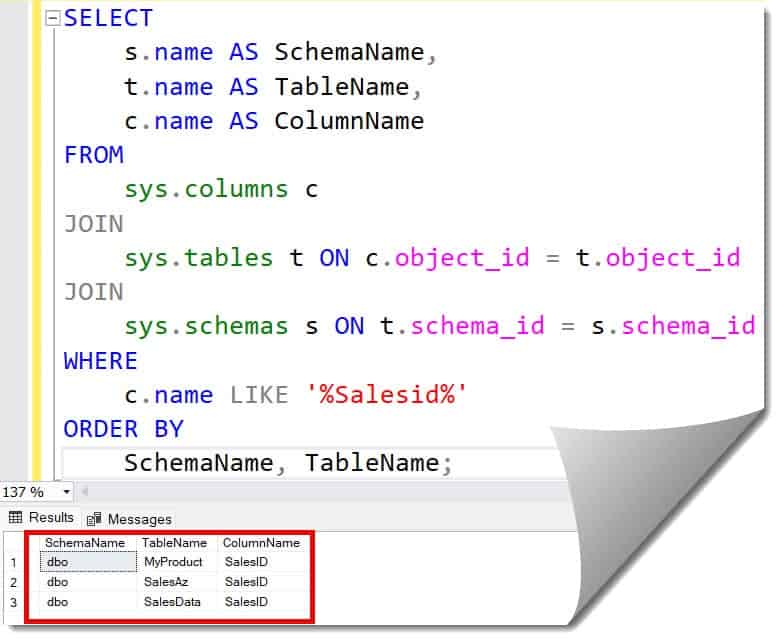
    c.name LIKE '%Salesid%'
ORDER BY
    SchemaName, TableName;
After executing the query above, I received the expected output, as shown in the screenshot below.
Key Differences Between Methods
| Feature | INFORMATION_SCHEMA | System Catalog Views |
| Portability | High (ANSI Standard) | Low (SQL Server Specific) |
| Performance | Standard | Slightly Faster |
| Detail Level | Basic Metadata | Deep Metadata (Indexes, Partitioning) |
| Ease of Use | Very Easy | Requires Joins |
Method 3: Searching Across Multiple Databases
If you are managing a server at a large logistics company, you might have dozens of separate databases (e.g., SalesDB, InventoryDB, HR_Production). Searching one by one is inefficient.
To search every database on the server, you can use the undocumented (but widely used) stored procedure sp_MSforeachdb.
Expert Note: While
sp_MSforeachdbis powerful, always test it in a development environment first, as it iterates through every database including system ones.
Example
DECLARE @ColumnName NVARCHAR(100) = 'salesid'; -- Replace with the column name you are searching for

DECLARE @Command NVARCHAR(MAX);
SET @Command = 'USE [?];
SELECT
    ''?'' AS DatabaseName,
    SCHEMA_NAME(t.schema_id) AS SchemaName,
    t.name AS TableName,
    c.name AS ColumnName
FROM
    sys.tables AS t
INNER JOIN
    sys.columns AS c ON t.object_id = c.object_id
WHERE
    c.name LIKE ''%' + @ColumnName + '%''
ORDER BY
    SchemaName,
    TableName;';

EXEC sp_MSforeachdb @Command;
After executing the query above, I received the expected output, as shown in the screenshot below.

Method 4: Filtering by Schema
In large American corporations, databases are often partitioned by department using Schemas. You might have Accounting.Payroll and HR.Payroll. If you only want to find columns within the Sales schema, your query should reflect that.
Tips for Schema Filtering:
- Always include
sys.schemasin your joins. - Filter using
s.name = 'Sales'. - This prevents “shadow data” from appearing in your results from other departments.
Best Practices
As a lead architect, I advise my teams to follow these rules when performing discovery:
- Use Wildcards Judiciously: Searching for
IDwill return thousands of rows. Be as specific as possible (e.g.,Customer_ID). - Check for Views: Sometimes the “table” you are looking for is actually a view. Use
sys.all_objectsorsys.viewsif your initial search yields nothing. - Account for Synonyms: In complex environments, tables might be aliased using Synonyms.
- Security First: Ensure your login has
VIEW DEFINITIONpermissions. Without this, these system queries will return empty results even if the column exists.
Summary Checklist
- [ ] Use
INFORMATION_SCHEMA.COLUMNSfor a quick, cross-platform search. - [ ] Use
sys.columnsjoined withsys.tablesfor deeper SQL Server-specific analysis. - [ ] Include
sys.typesif you need to verify the data format for application development. - [ ] Filter by
SchemaNameto narrow down results to specific business units.
Conclusion
By using the system views and schemas I’ve outlined, you turn your manual search into a two-second execution. Whether you’re cleaning up a database or building a new reporting suite, these queries are essential tools in your professional kit.
You may also like the following articles:
- Find Table In SQL Server
- SQL Query to Get Column Names from Table in SQL Server
- Alter table add column at specific position in SQL Server
- SQL Server Multi Statement Table Function
- SQL Server Check User Permissions On Table

After working for more than 15 years in the Software field, especially in Microsoft technologies, I have decided to share my expert knowledge of SQL Server. Check out all the SQL Server and related database tutorials I have shared here. Most of the readers are from countries like the United States of America, the United Kingdom, New Zealand, Australia, Canada, etc. I am also a Microsoft MVP. Check out more here.