
Whether you are building a transactional engine for an enterprise application or optimizing a massive data warehouse cluster, this deep dive will break down the structural, mathematical, and architectural differences between primary keys and foreign keys.
Primary Key vs Foreign Key
Core Mechanics: How Relational Constraints Guard Your Data Layer
Before writing a single line of Data Definition Language (DDL) syntax, we must step back and analyze what these constraints represent in relational algebra. A relational database is not merely a collection of isolated spreadsheets; it is a structured web of mathematical sets. Keys are the mechanisms that define and protect the boundaries of those sets.
The Identity Rule: What is a Primary Key?
A primary key is the ultimate source of truth for row identity within a table. Its structural mandate is absolute: it must uniquely identify every single record mapped inside the dataset.
Under the hood, when you declare a primary key, the database engine enforces two rigid constraints automatically:
- Uniqueness: No two rows can ever share the same primary key value.
- Non-Nullability: A primary key cell can never contain a
NULLvalue, because an unidentified or unknown entity cannot logically possess a unique identity.
The Relational Link: What is a Foreign Key?
A foreign key is a referential bridge. It is a column (or a collection of columns) in a target table that points directly to a primary key (or a unique key) in another table.
Its job is to enforce referential integrity. By establishing a foreign key constraint, you tell the database engine that it must prevent any action that would break the links between these two tables. The engine will actively block you from adding a child record if its foreign key value doesn’t already exist in the parent primary key column.
Structural Breakdown: Side-by-Side Comparison Matrix
Below highlights exactly how the database engine treats these keys differently:
| Architectural Metric | Primary Key (PK) | Foreign Key (FK) |
| Core Structural Purpose | Enforces entity integrity (Unique Row Identity) | Enforces referential integrity (Cross-Table Relationships) |
| Uniqueness Constraint | Strictly Mandatory (No duplicates allowed) | Entirely Optional (Supports 1:1, 1:Many, or Many:1 layouts) |
| Null Value Allowance | Completely Forbidden (NOT NULL is implicit) | Fully Allowed (Represents optional relationships) |
| Quantity Per Table | Maximum of One per table | Unlimited (A table can host dozens of foreign keys) |
| Default Index Configuration | Natively creates a Clustered Index in most engines | Does not automatically index (Must be created manually) |
| RDBMS Execution Type | Index Seek / Key Lookup target | Referential Integrity validation constraint check |
Deep Dive into Primary Keys: Architecture and Indexing Paths
To master primary key design, you must understand how the database engine physically structures data on storage disks based on your identity selections.
The Clustered Index Power
In most modern storage engines—such as MySQL’s InnoDB or Microsoft SQL Server—declaring a primary key automatically constructs a Clustered Index.
A clustered index doesn’t just point to data; it is the data page layout. The storage engine physically sorts and stores the table’s rows on disk in the exact sequential order dictated by the primary key. Because a table can only be physically sorted in one way, you can only have one primary key per table.
Natural Keys vs. Surrogate Keys
One of the most enduring debates in database modeling is whether to use a natural key or a surrogate key:
- Natural Keys: These are attributes that already exist in the real world and are inherently unique (e.g., a corporate Employer Identification Number (EIN) or an ISO currency code). While mathematically pure, natural keys can be risky. If the real-world standard changes, updating a natural primary key requires cascading that change across millions of rows in child tables.
- Surrogate Keys: These are system-generated identifiers created solely for data management (e.g., an auto-incrementing
BIGINTor a universally unique identifier like aUUID). They carry no business meaning, which means they never need to change, providing a stable, high-performance join target for the lifespan of the application.
Deep Dive into Foreign Keys: Relationships and Referential Cascades
While a primary key defines the baseline layout of a single table, the foreign key defines the network topology of your entire database schema.
Cardinality Configurations
Foreign keys allow you to model the exact business rules of your application through different cardinality types:
- One-to-Many ($1:M$): The most common pattern. A single parent record (e.g., a corporate account) maps to multiple child records (e.g., support tickets). The foreign key sits in the child table and allows duplicate entries.
- One-to-One ($1:1$): A specialized layout where a parent record maps to exactly one child record. To enforce this, place a foreign key in the child table and add a
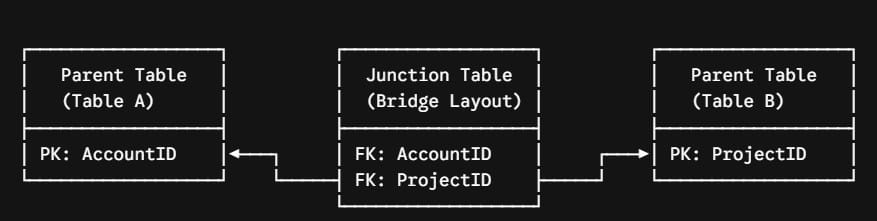
UNIQUEconstraint to that column. - Many-to-Many ($M:N$): Modeled by building a dedicated intermediary table (often called a junction, mapping, or bridge table). This table contains two foreign keys—one pointing to each parent table—effectively breaking the complex relationship down into two clean one-to-many structures.
Referential Actions: Managing the Delete Cascade
What happens when an operations manager deletes a parent account record that still has hundreds of child transactions attached to it? Without proper configuration, the database engine will throw a foreign key violation error and block the delete to prevent creating orphaned records.
You can control this behavior by defining explicit referential actions in your foreign key DDL script:
- ON DELETE RESTRICT / NO ACTION: The default behavior. The engine blocks the deletion of the parent row as long as dependent child rows exist.
- ON DELETE CASCADE: The engine automatically deletes all associated child rows when the parent row is deleted. Use this with caution; a single delete command can trigger a massive chain reaction across your database.
- ON DELETE SET NULL: The engine deletes the parent row but updates the foreign key columns in the child rows to
NULL. This breaks the relationship while preserving the historical data.
Performance Optimization and Architectural Pitfalls
The Missing Foreign Key Index Trap
A common misconception among developers is that defining a foreign key automatically creates an index on that column. It does not.
While primary keys automatically get a clustered index, foreign keys are left unindexed by default. Every time you delete a parent record or run a join query, the engine must perform a slow, full-table scan on the child table to validate the relationship.
💡Rule: Always create an explicit, non-clustered index on every foreign key column in your database schema.
Data Type Alignment
Ensure that your foreign key column uses the exact same data type, length, and unsigned settings as the primary key column it references.
If your parent table uses an UNSIGNED BIGINT for its primary key and your child table uses a standard signed BIGINT for its foreign key, the query optimizer will have to perform implicit type conversions on every single row during a join. This bypasses your indexes and slows down query performance.
Conclusion
By mastering the mechanics of primary and foreign keys and setting up clear indexing strategies early in your design phase, you eliminate technical debt and protect your data integrity. This approach ensures your data layers remain highly responsive, accurate, and capable of scaling efficiently under heavy enterprise workloads. Keep your constraints tight, your foreign keys indexed, and your database engines fully optimized!
You may also like the following articles:
- Primary Key vs Unique Key
- SQL Server Add Primary Key To Existing Table
- SQL Server Create Table With Primary Key

After working for more than 15 years in the Software field, especially in Microsoft technologies, I have decided to share my expert knowledge of SQL Server. Check out all the SQL Server and related database tutorials I have shared here. Most of the readers are from countries like the United States of America, the United Kingdom, New Zealand, Australia, Canada, etc. I am also a Microsoft MVP. Check out more here.