
A few years ago, an HR team at a mid-size U.S. retailer asked me why their “top 5 earners” report showed seven people on some days and four on others. The developer had used a simple TOP 5 query. Two employees shared the same salary at the cutoff, and the report silently dropped one of them. The payroll audit that followed was not fun.
Learning how to get the top 5 highest salary in SQL looks easy, but ties, NULL values, department grouping, and slow sorts on large tables cause real problems. I have fixed this exact issue on SQL Server VMs, Azure SQL Database, and Azure SQL Managed Instance. You will learn four reliable T-SQL patterns, when to use each, how to index them, and how to lock the data down safely.
Set Up the Employee Table First
Before writing queries, you need a realistic table. A schema is a named container that groups database objects, and I always put HR data in its own schema so I can grant permissions on it separately.
CREATE SCHEMA hr;
GO

CREATE TABLE hr.Employees
(
    EmployeeId   INT IDENTITY(1,1) NOT NULL,
    FullName     NVARCHAR(100)     NOT NULL,
    Department   NVARCHAR(50)      NOT NULL,
    Salary       DECIMAL(12,2)     NULL,
    HireDate     DATE              NOT NULL,
    CONSTRAINT PK_Employees PRIMARY KEY CLUSTERED (EmployeeId)
);
GO
After running the query above, I got the expected output shown in the screenshot below.
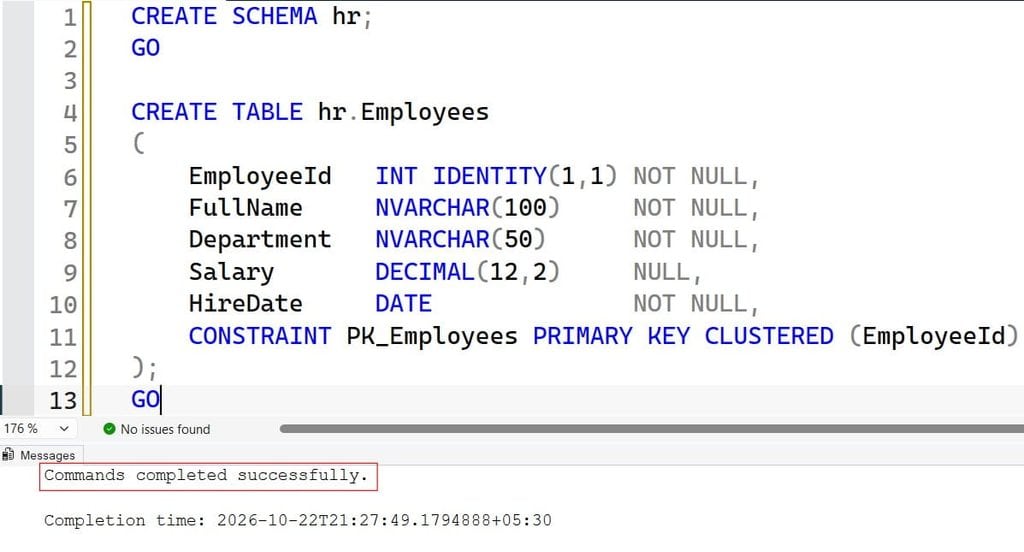
This creates the hr schema and a table with a clustered primary key. A clustered index defines the physical order of rows on disk, so each table can have only one. I use DECIMAL(12,2) for money because FLOAT can introduce rounding errors in payroll math. If you want a deeper walkthrough of keys, read this guide on creating a table with a primary key in SQL Server.
Now load sample data that includes ties and a NULL:
INSERT INTO hr.Employees (FullName, Department, Salary, HireDate)
VALUES
 (N'Avery Johnson',  N'Engineering', 185000, '2019-03-11'),
 (N'Maya Patel',     N'Engineering', 172000, '2020-07-01'),
 (N'Chris Walker',   N'Sales',       172000, '2018-01-15'),
 (N'Dana Lopez',     N'Finance',     165000, '2017-09-23'),
 (N'Ethan Brooks',   N'Sales',       158000, '2021-02-10'),
 (N'Priya Nair',     N'Finance',     158000, '2022-05-05'),
 (N'Sam Rivera',     N'Support',      98000, '2023-01-09'),
 (N'Jordan Lee',     N'Support',       NULL, '2024-06-17');
GO
After running the query above, I got the expected output shown in the screenshot below.
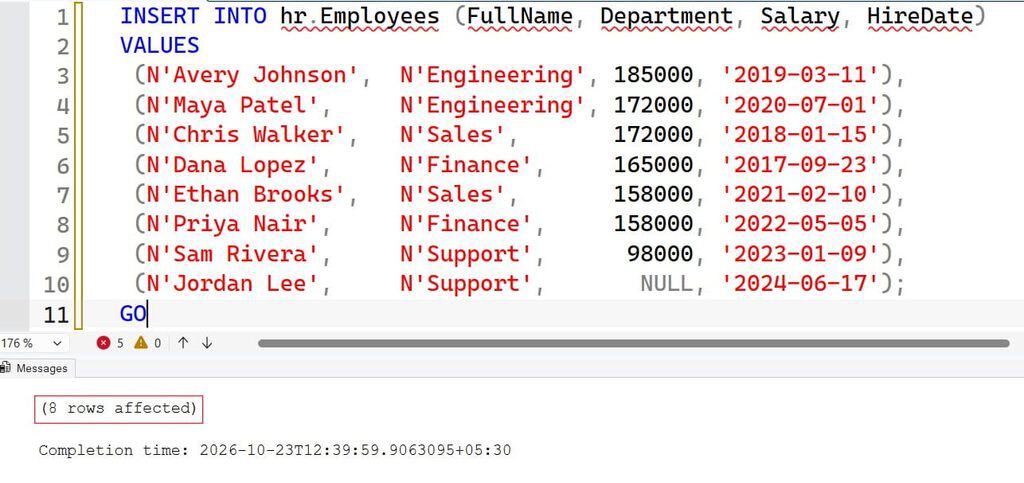
This data is deliberately messy. Two people earn 172,000, two earn 158,000, and one salary is NULL. NULL means “unknown,” and it behaves differently in sorting and comparisons, as covered in this explainer on SQL NULL.
Pro Tip: In my experience, always seed test tables with ties and NULLs. Almost every “top N” bug I have debugged in production passed testing only because the sample data was too clean.
Get Top 5 Highest Salary in SQL with TOP
The fastest method uses the TOP clause, which limits how many rows a query returns. You can see more variations in this tutorial on the SQL Server TOP clause.
SELECT TOP (5)
       EmployeeId, FullName, Department, Salary
FROM   hr.Employees
WHERE  Salary IS NOT NULL
ORDER BY Salary DESC;
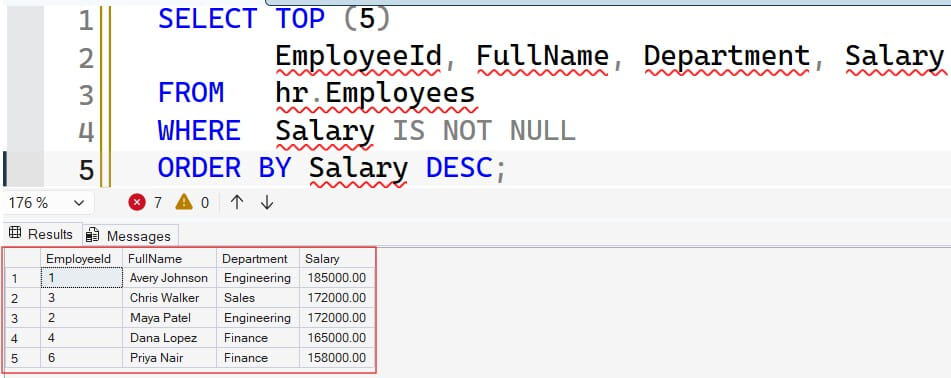
After running the query above, I got the expected output shown in the screenshot below.
Here is what each part does:
- TOP (5) returns at most five rows after sorting.
- WHERE Salary IS NOT NULL removes unknown salaries so they cannot distort the result.
- ORDER BY Salary DESC sorts from highest to lowest. Without ORDER BY, TOP returns an arbitrary five rows, which is a classic beginner bug.
This query returns exactly five rows, but it has a flaw. Salaries of 185000, 172000, 172000, 165000, and 158000 appear, yet Priya Nair also earns 158000 and is cut off at random. That is the bug my retail client hit.
Keep Ties with WITH TIES
If fairness matters, add WITH TIES. It returns extra rows that match the last value in the sort.
SELECT TOP (5) WITH TIES
       EmployeeId, FullName, Department, Salary
FROM   hr.Employees
WHERE  Salary IS NOT NULL
ORDER BY Salary DESC;
After running the query above, I got the expected output shown in the screenshot below.
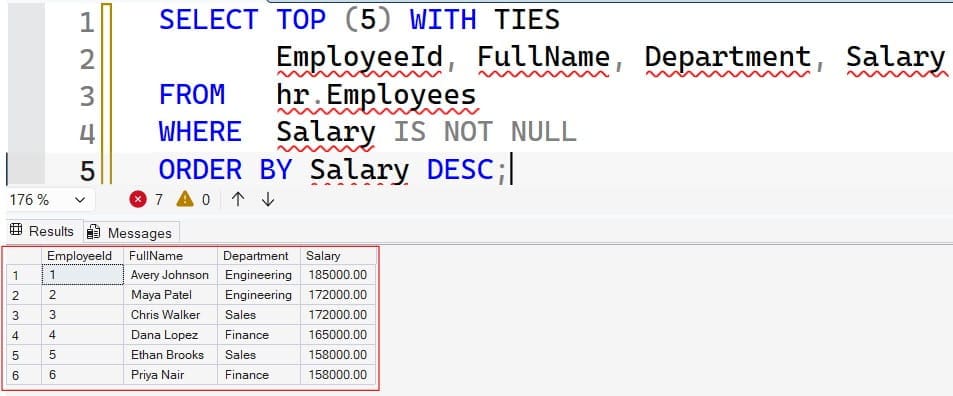
This returns six rows, because both 158000 earners are included. WITH TIES requires an ORDER BY clause. Use it when the business rule is “everyone at or above the fifth-highest pay.” Skip it when the report layout must show exactly five rows.
Pro Tip: I once shipped a dashboard that broke because WITH TIES returned 6 rows into a fixed 5-row grid. I now ask the business one question up front: “Do you want exactly five people, or the top five salary levels?”
Top 5 Distinct Salaries with DENSE_RANK
Sometimes “top 5 highest salaries” means five distinct pay levels, not five people. A window function calculates a value across a set of rows related to the current row without collapsing them. For background, see this overview of window functions in SQL Server.
WITH Ranked AS
(
    SELECT EmployeeId, FullName, Department, Salary,
           DENSE_RANK() OVER (ORDER BY Salary DESC) AS SalaryRank
    FROM   hr.Employees
    WHERE  Salary IS NOT NULL
)
SELECT EmployeeId, FullName, Department, Salary, SalaryRank
FROM   Ranked
WHERE  SalaryRank <= 5
ORDER BY SalaryRank, FullName;
After running the query above, I got the expected output shown in the screenshot below.
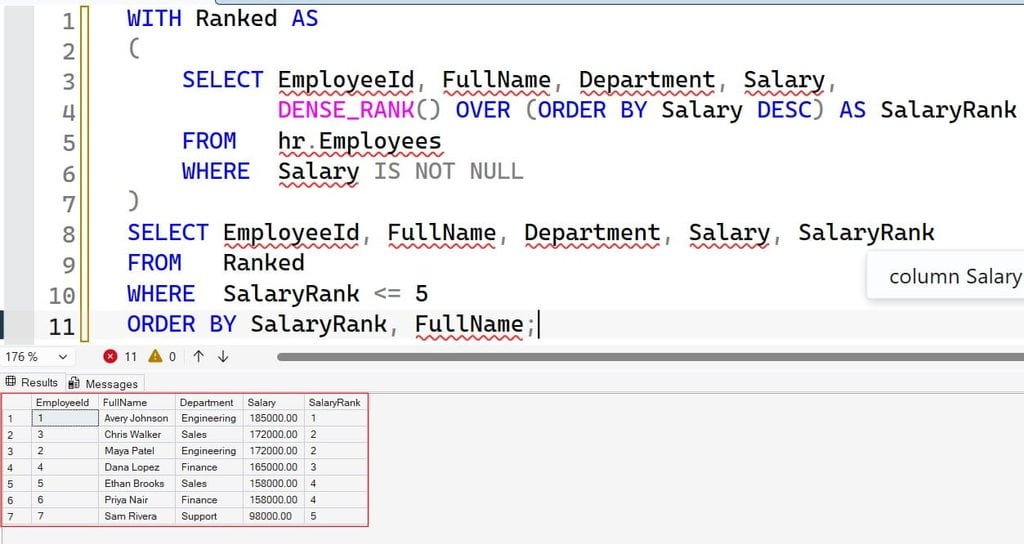
The CTE (common table expression) named Ranked is a temporary named result set that exists only for this statement. DENSE_RANK() gives tied rows the same rank and does not skip numbers afterward. The OVER clause defines the sort used for ranking, which is explained in this article on the SQL OVER clause.
Why wrap it in a CTE? SQL Server does not let you filter on a window function directly in the WHERE clause. The CTE computes the rank first, and the outer query filters it.
Top 5 Highest Salary per Department
Finance rarely wants one company-wide list. They want the top earners inside each department. This is where PARTITION BY helps. It restarts the ranking for each group, as shown in this tutorial on SQL PARTITION BY.
WITH DeptRanked AS
(
    SELECT FullName, Department, Salary,
           DENSE_RANK() OVER (
               PARTITION BY Department
               ORDER BY Salary DESC) AS DeptRank
    FROM   hr.Employees
    WHERE  Salary IS NOT NULL
)
SELECT Department, FullName, Salary, DeptRank
FROM   DeptRanked
WHERE  DeptRank <= 5
ORDER BY Department, DeptRank;
After running the query above, I got the expected output shown in the screenshot below.
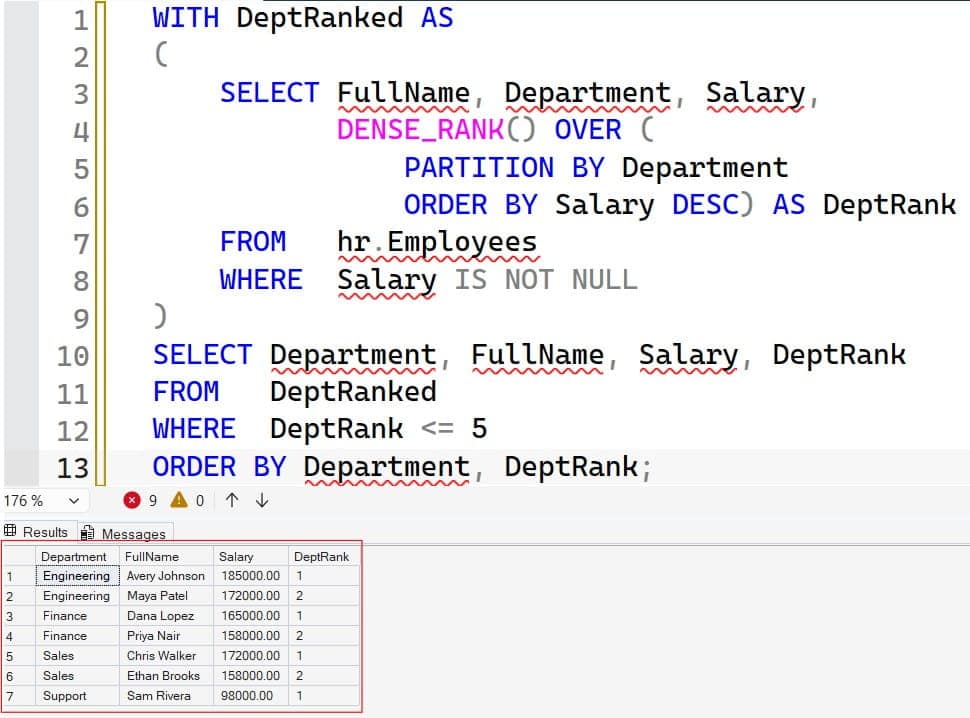
Each department gets its own ranking from 1 upward. This is a set-based approach, meaning SQL Server processes all rows in one operation. I have seen developers write a WHILE loop that visits each department and runs a separate query. That works for 5 departments and falls apart at 500 tenants in a SaaS app.
For a multi-tenant design, add TenantId to the PARTITION BY clause and to your indexes. Otherwise one customer’s heavy report can slow everyone else.
Pro Tip: On a SaaS project with 1,200 tenants, moving from a looping procedure to a single PARTITION BY query cut report time from minutes to a couple of seconds. Set-based code almost always wins here.
Pagination Style with OFFSET FETCH
Another option is OFFSET…FETCH, which skips a number of rows and then returns the next batch. It is useful for paged API results.
SELECT EmployeeId, FullName, Salary
FROM   hr.Employees
WHERE  Salary IS NOT NULL
ORDER BY Salary DESC, EmployeeId
OFFSET 0 ROWS FETCH NEXT 5 ROWS ONLY;
OFFSET 0 ROWS skips nothing, and FETCH NEXT 5 ROWS ONLY returns five rows. I add EmployeeId as a tiebreaker in ORDER BY. That makes the order deterministic, so page 2 never repeats or misses a row. OFFSET FETCH needs SQL Server 2012 or later, and it works in Azure SQL Database and Managed Instance.
Pro Tip: I add a unique tiebreaker column to every paged query. Without it, I have watched users see the same employee on page 1 and page 2.
Index the Salary Column for Fast Results
On eight rows, any method is instant. On 40 million rows, SQL Server may scan the whole table and sort it, which burns CPU and memory. A nonclustered index is a separate sorted structure that points back to the table rows. It lets SQL Server read the highest salaries directly.
CREATE NONCLUSTERED INDEX IX_Employees_Salary_Desc
ON hr.Employees (Salary DESC)
INCLUDE (FullName, Department);
The key column is Salary, sorted descending. INCLUDE adds non-key columns to the leaf level, so the query does not need extra lookups. This kind of index is called a covering index. Learn the syntax in this guide on creating an index in SQL Server.
There is a trade-off. Every index makes INSERT, UPDATE, and DELETE slower, because SQL Server must maintain it. Salary data changes rarely, so this index is cheap. On a high-write table like an order log, I would be far more selective. See these SQL index best practices before adding more.
Verify with the Execution Plan
Turn on the actual execution plan in SSMS and run the query. Look for an Index Seek or an ordered Index Scan with a Top operator, and no expensive Sort operator. If you need help running queries, check how to run a query in SSMS. Also keep statistics fresh. These are the histograms the optimizer uses to estimate row counts, and you can update them using update stats on a table in SQL Server.
SET STATISTICS IO ON;
SET STATISTICS TIME ON;

SELECT TOP (5) FullName, Salary
FROM   hr.Employees
WHERE  Salary IS NOT NULL
ORDER BY Salary DESC;
STATISTICS IO shows logical reads, which is the number of pages touched. Compare reads before and after the index. That number is a better proof of improvement than “it feels faster.”
Pro Tip: I check the actual plan before adding any index. On Azure SQL Database, an unused index also wastes storage and write capacity, and that shows up on your bill.
For more tuning ideas, see these SQL query optimization tips.
Wrap It in a Secure Stored Procedure
Salary data is sensitive. Never let an application connect as sa or any sysadmin account to run a report. Instead, wrap the query in a stored procedure, which is a saved, reusable T-SQL routine. Here is a walkthrough on creating a stored procedure in SQL Server.
CREATE OR ALTER PROCEDURE hr.GetTopSalaries
    @TopN INT = 5
AS
BEGIN
    SET NOCOUNT ON;

    IF @TopN < 1 OR @TopN > 100
        THROW 50001, 'TopN must be between 1 and 100.', 1;

    SELECT TOP (@TopN) WITH TIES
           FullName, Department, Salary
    FROM   hr.Employees
    WHERE  Salary IS NOT NULL
    ORDER BY Salary DESC;
END;
GO
SET NOCOUNT ON stops extra “rows affected” messages. The THROW statement rejects bad input early, which protects the server from someone requesting millions of rows. Because the procedure takes a typed parameter, it is also resistant to SQL injection, an attack where malicious text is run as code.
Grant Least-Privilege Access
Create a user who can only run this procedure. On Azure SQL Database, I prefer a contained database user tied to Microsoft Entra ID, so no SQL password exists at all.
CREATE USER [hr-reports-app] FROM EXTERNAL PROVIDER;
GRANT EXECUTE ON OBJECT::hr.GetTopSalaries TO [hr-reports-app];
The first statement maps an Entra identity, such as a managed identity, to the database. The second grants only EXECUTE on one procedure. The app cannot read the Employees table directly, which keeps access narrow. For on-premises or VM setups, review how to give permission to execute a stored procedure and grant SELECT on a table. For the bigger picture, read about SQL Server permissions.
Pro Tip: I always test with the low-privilege account, not my admin login. Twice I have found a report “working” only because I was testing as db_owner.
Salary is also a good candidate for dynamic data masking, which hides column values from non-privileged users, or Always Encrypted for stronger protection. If a view fits your design better, see how to create a view in SSMS.
Frequently Asked Questions
How do I get the top 5 highest salary in SQL without TOP?
Use ORDER BY Salary DESC OFFSET 0 ROWS FETCH NEXT 5 ROWS ONLY, or rank rows with DENSE_RANK and filter <= 5. Both are standard patterns on SQL Server 2012 and later.
What is the difference between TOP 5 and TOP 5 WITH TIES?
TOP 5 returns exactly five rows and cuts tied values at random. TOP 5 WITH TIES also returns every extra row that matches the fifth salary, so you may get more than five rows.
How do I find the 5th highest salary only?
Use DENSE_RANK() OVER (ORDER BY Salary DESC) in a CTE and filter where the rank equals 5. This returns every employee at that salary level, even when ties exist above it.
Does an index make top N salary queries faster?
Yes, on large tables. A nonclustered index on Salary descending lets SQL Server read the first rows in order instead of sorting the whole table. Confirm the benefit in the execution plan, because indexes also slow down writes.
Is it safe to expose salary data to a reporting app?
Only with controls in place. Use a managed identity, grant EXECUTE on a procedure, enforce TLS, and consider dynamic data masking. Turn on auditing so you can see who ran salary queries.
You now know how to return top salaries with TOP, WITH TIES, DENSE_RANK, PARTITION BY, and OFFSET FETCH, and how to index and secure them. Always decide how ties should behave before you ship, and give your app only the permissions it needs. I hope you found this article helpful.
You May Also Like
- SQL SELECT query examples for everyday work
- How to use the MAX function in SQL Server
- How to get the latest record by date in SQL Server
- How to find duplicate records in SQL
- A handy SQL cheat sheet for developers

After working for more than 15 years in the Software field, especially in Microsoft technologies, I have decided to share my expert knowledge of SQL Server. Check out all the SQL Server and related database tutorials I have shared here. Most of the readers are from countries like the United States of America, the United Kingdom, New Zealand, Australia, Canada, etc. I am also a Microsoft MVP. Check out more here.