
SQL Server NULLIF compares two expressions and returns NULL when they are equal. Otherwise, it returns the first expression. That makes it useful for protecting division, normalizing placeholder values, and excluding specific values from calculations.
You’ll learn how to use NULLIF correctly, control data types, combine it with other expressions, and test reporting logic without changing production data.
How SQL Server NULLIF Works
NULLIF is a built-in T-SQL function. T-SQL is Microsoft’s SQL dialect, used by SQL Server, Azure SQL Database, and Azure SQL Managed Instance.
Its syntax takes exactly two arguments:
NULLIF(expression1, expression2)Each argument is a scalar expression: a value such as a column, variable, literal, or calculation.
The behavior is straightforward:
SELECT
    NULLIF(10, 10) AS EqualValues,
    NULLIF(10, 20) AS DifferentValues,
    NULLIF(0, 0) AS ZeroValue;
After running the query above, I got the expected output shown in the screenshot below.
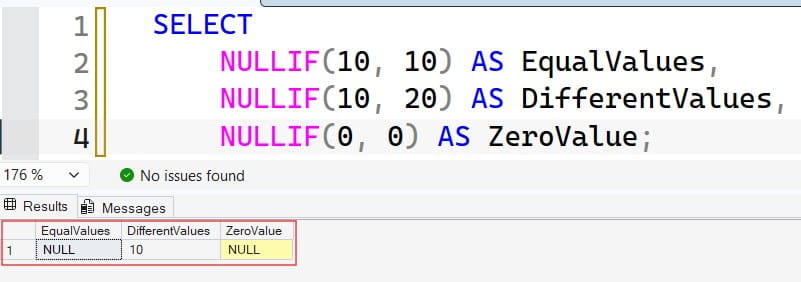
Expected results:
| EqualValues | DifferentValues | ZeroValue |
|---|---|---|
| NULL | 10 | NULL |
The function returns the first expression when the comparison is not true. It does not return a Boolean value or the second expression. Its result has the data type of the first expression.
NULL represents missing, unknown, or inapplicable information. It is not the same as zero or an empty string. For background, see how SQL NULL values work.
The equivalent CASE expression
You can express the same basic logic with CASE:
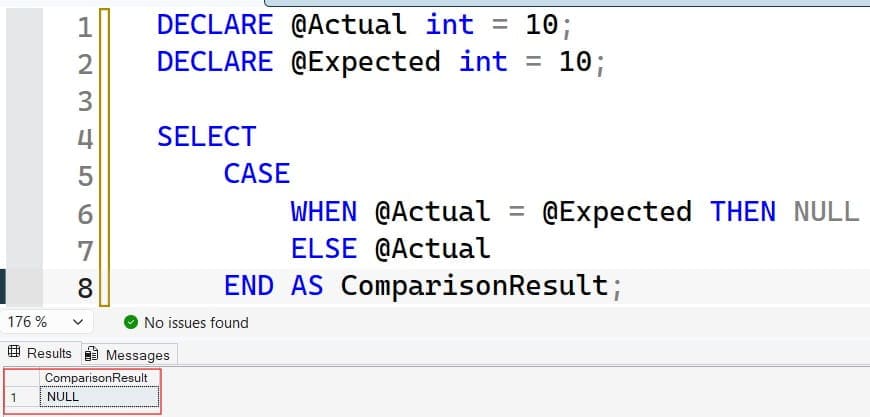
DECLARE @Actual int = 10;
DECLARE @Expected int = 10;

SELECT
    CASE
        WHEN @Actual = @Expected THEN NULL
        ELSE @Actual
    END AS ComparisonResult;
This returns NULL because the values match. NULLIF is the concise choice for one equality comparison; CASE is clearer when several conditions require different results. After running the query above, I got the expected output shown in the screenshot below.
Pro Tip: I would use NULLIF for a single “turn this matching value into NULL” rule and switch to CASE when the business rule needs explanation.
Prevent Divide-by-Zero Errors With SQL Server NULLIF
The common safe-division pattern is:
numerator / NULLIF(denominator, 0)When the denominator is zero, NULLIF returns NULL. Division by NULL produces NULL instead of attempting division by zero.
Run a self-contained sales example
This query uses inline sample rows, so it does not create or modify a permanent table:
SELECT
    s.ProductId,
    s.Revenue,
    s.UnitsSold,
    CAST(
        s.Revenue / NULLIF(s.UnitsSold, 0)
        AS decimal(19, 2)
    ) AS RevenuePerUnit
FROM
(
    VALUES
        (101, CAST(1200.00 AS decimal(19, 2)), 12),
        (102, CAST(450.00 AS decimal(19, 2)), 0),
        (103, CAST(0.00 AS decimal(19, 2)), 5),
        (104, CAST(300.00 AS decimal(19, 2)), NULL)
) AS s(ProductId, Revenue, UnitsSold);
The calculation returns:
| ProductId | RevenuePerUnit |
|---|---|
| 101 | 100.00 |
| 102 | NULL |
| 103 | 0.00 |
| 104 | NULL |
After running the query above, I got the expected output shown in the screenshot below.
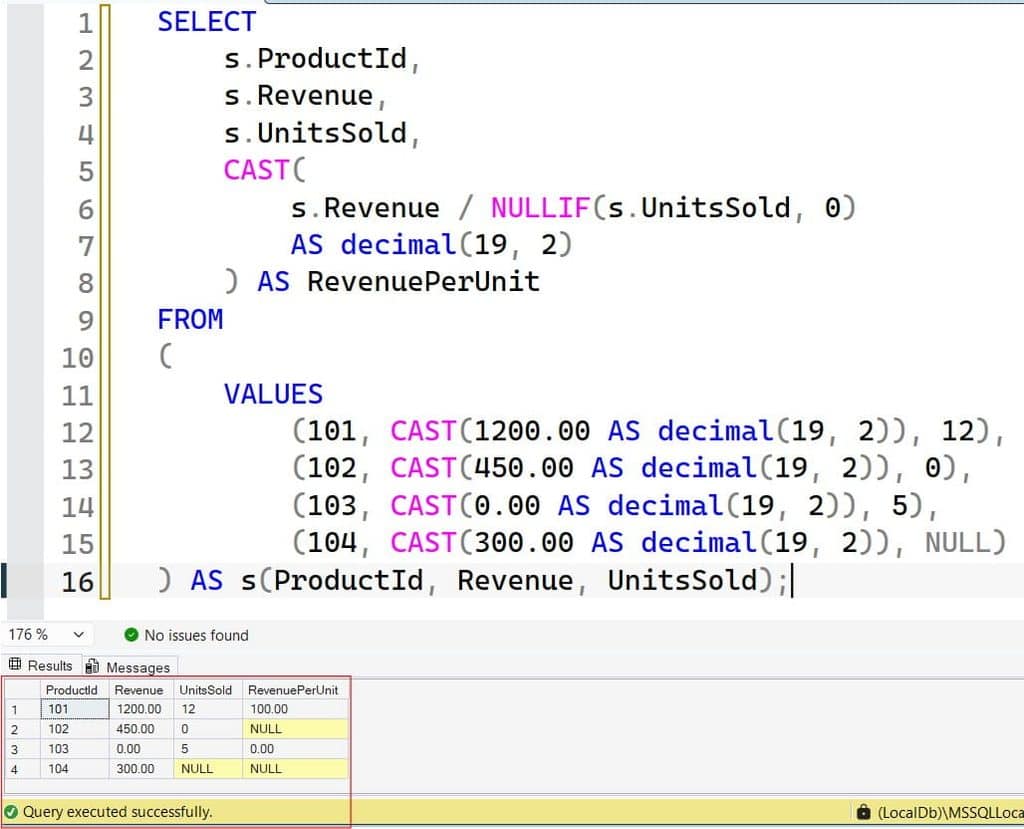
The distinction matters. Product 103 has a valid zero revenue-per-unit result. Products 102 and 104 do not have a usable denominator.
NULLIF protects the calculation but does not explain why units are zero or missing. Investigate those rows separately if they indicate a failed import or incomplete transaction.
Protect the denominator directly
Do not rely exclusively on a WHERE condition such as UnitsSold <> 0 to protect an otherwise unsafe calculation. SQL Server can choose an execution order different from the order in which query clauses appear. Protect the expression itself.
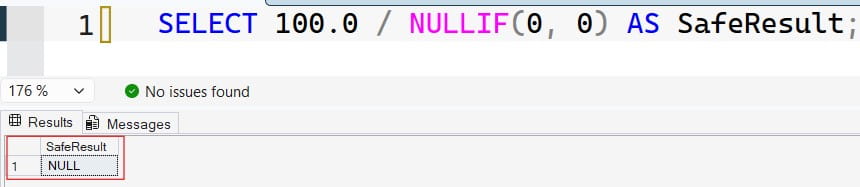
Similarly, placing NULLIF around an entire division is too late:
-- Protect the denominator, not the completed division.
SELECT 100.0 / NULLIF(0, 0) AS SafeResult;
After running the query above, I got the expected output shown in the screenshot below.
Pro Tip: I would keep a zero-denominator test case beside every ratio calculation. A query that works only with normal data is not adequately tested.
Control Data Types Before Dividing
NULLIF does not automatically convert integer arithmetic into decimal arithmetic.
SELECT
    5 / NULLIF(2, 0) AS IntegerResult,
    CAST(5 AS decimal(19, 4))
        / NULLIF(2, 0) AS DecimalResult;
After running the query above, I got the expected output shown in the screenshot below.
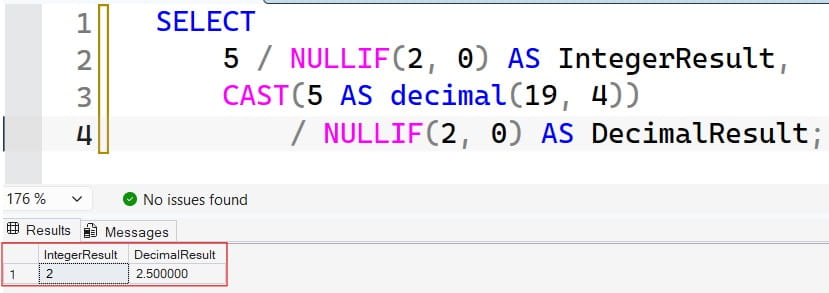
The first expression returns 2. The second represents 2.5, with its displayed scale determined by SQL Server’s decimal rules.
Integer division discards the fractional portion. Casting the result afterward cannot recover it:
SELECT
    CAST(5 / NULLIF(2, 0) AS decimal(19, 2))
        AS TooLate,
    CAST(
        CAST(5 AS decimal(19, 4)) / NULLIF(2, 0)
        AS decimal(19, 2)
    ) AS CorrectResult;
After running the query above, I got the expected output shown in the screenshot below.
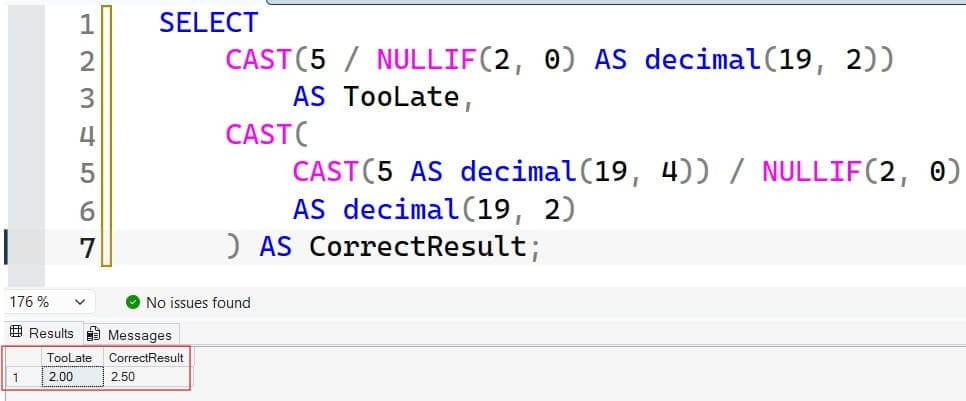
This returns 2.00 and 2.50. Cast an operand before division, then cast the final value if your output requires a specific scale.
For more examples, see using CAST in SQL Server.
Avoid implicit conversion surprises
An implicit conversion happens when SQL Server changes a data type automatically.
Although NULLIF returns the first argument’s type, comparing its arguments can require conversion:
SELECT NULLIF('10', 10) AS ConvertedComparison;The numeric comparison succeeds and returns NULL. Replacing '10' with 'unknown' can cause a conversion error.
Use compatible types deliberately. For text imported from external systems, validate and convert it before using it in numeric calculations.
Pro Tip: I would specify decimal precision and scale explicitly for financial ratios rather than let a chain of implicit conversions define the output contract.
Clean Blank Strings and Placeholder Values
NULLIF can normalize a known placeholder into NULL without updating stored data.
SELECT
    c.CustomerId,
    NULLIF(LTRIM(RTRIM(c.Phone)), '') AS CleanPhone
FROM
(
    VALUES
        (1, CAST(' 555-0101 ' AS varchar(30))),
        (2, CAST('' AS varchar(30))),
        (3, CAST('   ' AS varchar(30))),
        (4, CAST(NULL AS varchar(30)))
) AS c(CustomerId, Phone);
LTRIM and RTRIM remove ordinary leading and trailing spaces. NULLIF then converts the remaining empty string to NULL.
The first row returns 555-0101; the others return NULL.
On SQL Server 2017 and later, basic TRIM can replace the nested trimming functions. Review SQL Server TRIM examples before using version-specific syntax.
Normalize placeholders carefully
A source system might use 'N/A' for missing information:
DECLARE @Reference varchar(30) = 'N/A';

SELECT NULLIF(@Reference, 'N/A') AS CleanReference;
This returns NULL, but the comparison follows SQL Server’s string-comparison rules. Collation controls characteristics such as case sensitivity; ordinary equality comparisons also commonly ignore trailing spaces.
Trimming ordinary spaces does not remove every whitespace character. Tabs, line breaks, and nonbreaking spaces may require separate handling.
Preview normalization with SELECT before considering stored-data changes. A legitimate identifier containing a placeholder-like value should not disappear because a cleanup rule was too broad.
Pro Tip: I would normalize a value only after confirming what the source system means by it. “Looks empty” and “means missing” are different requirements.
Combine NULLIF With COALESCE or ISNULL
NULLIF creates NULL when values match. COALESCE and ISNULL supply replacements when an expression is already NULL.
| Expression | Purpose |
|---|---|
NULLIF(a, b) | Return NULL when a = b; otherwise return a |
COALESCE(a, b, c) | Return the first non-NULL expression |
ISNULL(a, b) | Replace NULL in a with b |
CASE | Apply conditional rules with separate branches |
Supply a reporting fallback
DECLARE @Revenue decimal(19, 2) = 450.00;
DECLARE @Units int = 0;

SELECT
    COALESCE(
        CAST(
            @Revenue / NULLIF(@Units, 0)
            AS decimal(19, 2)
        ),
        CAST(0 AS decimal(19, 2))
    ) AS DisplayRevenuePerUnit;
NULLIF protects the denominator. COALESCE then replaces the undefined result with zero.
That fallback is a business decision, not a technical requirement. If zero means “valid result of zero,” using it for undefined ratios makes the report ambiguous.
Often, keeping NULL and adding a separate status column is clearer.
Learn more about SQL Server COALESCE and ISNULL replacement behavior.
ISNULL generally uses the first argument’s data type, while COALESCE resolves its result type using data-type precedence. Explicit casts help avoid unexpected conversion or truncation.
Pro Tip: I would preserve NULL in the calculation layer and apply presentation defaults only where the reporting requirement explicitly calls for them.
Use NULLIF in Averages and Aggregated Ratios
Aggregate functions summarize multiple rows. AVG ignores NULL inputs, so replacing selected values with NULL changes which rows contribute.
Exclude zeros only when the business rule allows it
SELECT
    AVG(v.Amount) AS AverageIncludingZero,
    AVG(NULLIF(v.Amount, 0)) AS AverageExcludingZero
FROM
(
    VALUES
        (CAST(100.00 AS decimal(19, 2))),
        (CAST(0.00 AS decimal(19, 2))),
        (CAST(200.00 AS decimal(19, 2))),
        (CAST(NULL AS decimal(19, 2)))
) AS v(Amount);
The averages are 100 and 150, respectively.
The second calculation excludes zero. That is appropriate only if zero is a documented placeholder, not a genuine observation. Microsoft’s NULLIF examples demonstrate this pattern with budget data.
See how AVG works in SQL Server for related aggregate behavior.
Distinguish overall ratios from average row ratios
SELECT
    SUM(v.Revenue) / NULLIF(SUM(v.Units), 0)
        AS OverallRevenuePerUnit,
    AVG(v.Revenue / NULLIF(v.Units, 0))
        AS AverageRowRevenuePerUnit
FROM
(
    VALUES
        (CAST(100.00 AS decimal(19, 2)), 1),
        (CAST(900.00 AS decimal(19, 2)), 90)
) AS v(Revenue, Units);
The overall ratio is approximately 10.99; the average row ratio is 55.
Neither is automatically wrong. They answer different questions: total revenue per total unit versus the average of row-level rates.
Also decide how rows with missing or zero units contribute to the numerator. Protecting a denominator does not resolve mismatched populations.
Pro Tip: I would confirm the metric definition with a two-row example before implementing it across millions of transactions.
Frequently Asked Questions
What does NULLIF return in SQL Server?
It returns NULL when its two expressions compare equal. Otherwise, it returns the first expression, using that expression’s data type.
What happens when NULLIF receives NULL?
NULLIF(CAST(NULL AS int), 0) returns NULL. NULLIF(5, CAST(NULL AS int)) returns 5, because comparison with NULL is not true. Use IS NULL to test explicitly for missing values.
Does NULLIF prevent every divide-by-zero error?
It protects a division by wrapping the denominator and converting 0 to NULL. Nested calculations may contain other unprotected denominators, so inspect each division separately.
Is NULLIF the same as ISNULL?
No. NULLIF turns a matching value into NULL; ISNULL replaces an existing NULL with another value. They solve opposite parts of a missing-data workflow.
Can NULLIF change stored table data?
Not by itself. In a SELECT query, it changes the returned expression, not the stored column. An INSERT or UPDATE using NULLIF can persist its result, so review write operations separately.
You May Also Like
- NULLIF vs. COALESCE in SQL Server
- Writing CASE expressions in SQL Server
- Using TRY_CONVERT for safer conversions
- SQL Server index best practices
- SQL database design best practices
- SQL Server CEILING
SQL Server NULLIF helps you protect division, normalize known placeholders, and control which values enter aggregate calculations. Preserve the difference between zero and unknown, then verify both numerical results and query behavior before deployment. I hope you found this article helpful.

After working for more than 15 years in the Software field, especially in Microsoft technologies, I have decided to share my expert knowledge of SQL Server. Check out all the SQL Server and related database tutorials I have shared here. Most of the readers are from countries like the United States of America, the United Kingdom, New Zealand, Australia, Canada, etc. I am also a Microsoft MVP. Check out more here.