
A sales dashboard shows 40,000 customers, but the customer table contains only 12,000 accounts. The report joined customers to orders and counted the resulting rows. Repeat buyers appeared several times, turning an order count into an inflated customer count.
The SQL COUNT vs COUNT DISTINCT difference comes down to what you count: COUNT(*) counts rows, COUNT(column) counts non-NULL values, and COUNT(DISTINCT column) counts unique non-NULL values. These expressions answer different business questions.
You’ll learn how to choose the correct expression, handle joins and missing values, and tune exact counts without changing what the report means.
SQL COUNT vs COUNT DISTINCT: The Main Difference
COUNT is an aggregate function: it summarizes a set of rows into a single result. Adding DISTINCT changes the calculation by eliminating duplicate expression values before counting.
| Expression | Counts duplicates? | Counts NULL? | Typical purpose |
|---|---|---|---|
COUNT(*) | Yes, as separate rows | Includes rows containing NULL | Total matching rows |
COUNT(CustomerId) | Yes | No | Rows with a known customer |
COUNT(DISTINCT CustomerId) | No | No | Unique known customers |
All three operate on the rows produced by the query’s filters and joins. They do not necessarily count an entire base table.
For example, filtering an orders query to November means the count applies only to qualifying November rows. Adding a join may multiply those rows before aggregation.
These behaviors apply to SQL Server, Azure SQL Database, and Azure SQL Managed Instance. COUNT returns an int; COUNT_BIG provides equivalent counting behavior with a bigint result for larger totals.
Pro Tip: I would name the metric before writing the query: “order rows,” “identified orders,” and “unique buyers” require different expressions.
Run a SQL COUNT vs COUNT DISTINCT Example
This self-contained example uses a common table expression, or CTE, to name an inline result set. It creates no permanent objects.
WITH Orders AS
(
    SELECT *
    FROM
    (
        VALUES
            (1001, 101, 'East'),
            (1002, 101, 'East'),
            (1003, 102, 'West'),
            (1004, NULL, 'West'),
            (1005, 103, 'East'),
            (1006, 103, 'East')
    ) AS v(OrderId, CustomerId, Region)
)
SELECT
    COUNT(*) AS TotalOrders,
    COUNT(CustomerId) AS OrdersWithCustomerId,
    COUNT(DISTINCT CustomerId) AS UniqueCustomers
FROM Orders;
The results are as shown in the screenshot below:
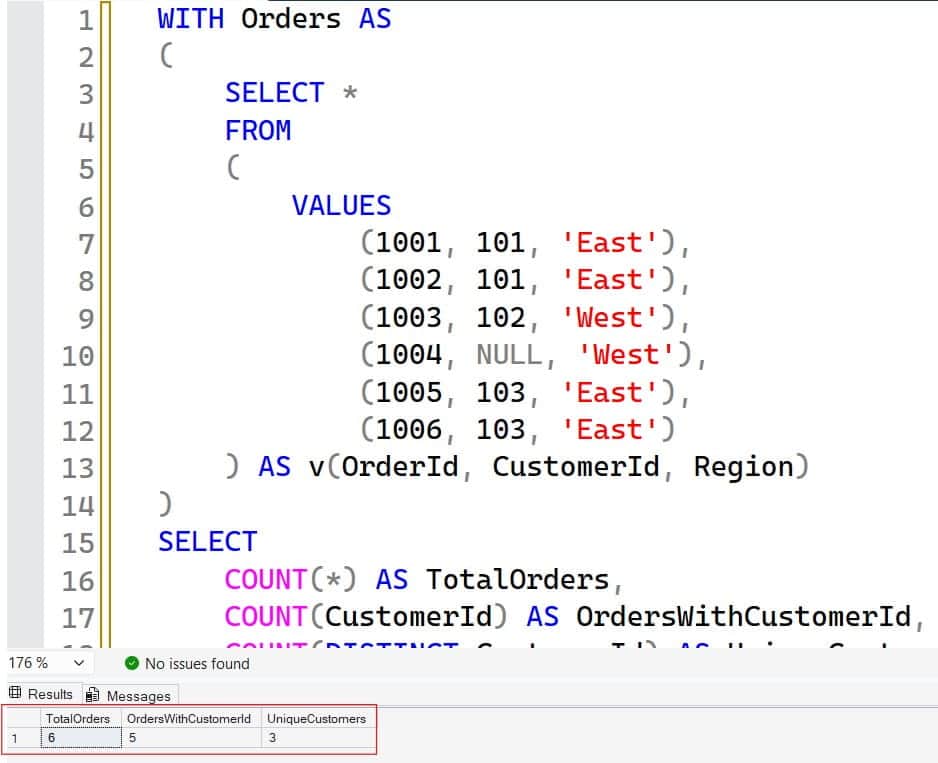
There are six orders. Five contain a customer identifier. Those five references represent three customers: 101, 102, and 103.
The NULL customer could represent guest checkout or incomplete source data. Its meaning belongs in the data specification; the count cannot determine it.
A CTE exists only for the statement immediately following it. Repeat the CTE when running another independent example.
For additional syntax, see using COUNT in SQL Server.
Pro Tip: I would validate a count against six understandable rows before running it against six million. Small examples expose definition mistakes quickly.
Understand NULL, Empty Strings, and Empty Results
NULL means missing, unknown, or inapplicable information. It is not a blank string or zero.
SELECT
    COUNT(*) AS TotalRows,
    COUNT(v.Code) AS NonNullCodes,
    COUNT(DISTINCT v.Code) AS UniqueCodes
FROM
(
    VALUES
        (CAST('A' AS varchar(10))),
        ('A'),
        (''),
        (NULL)
) AS v(Code);
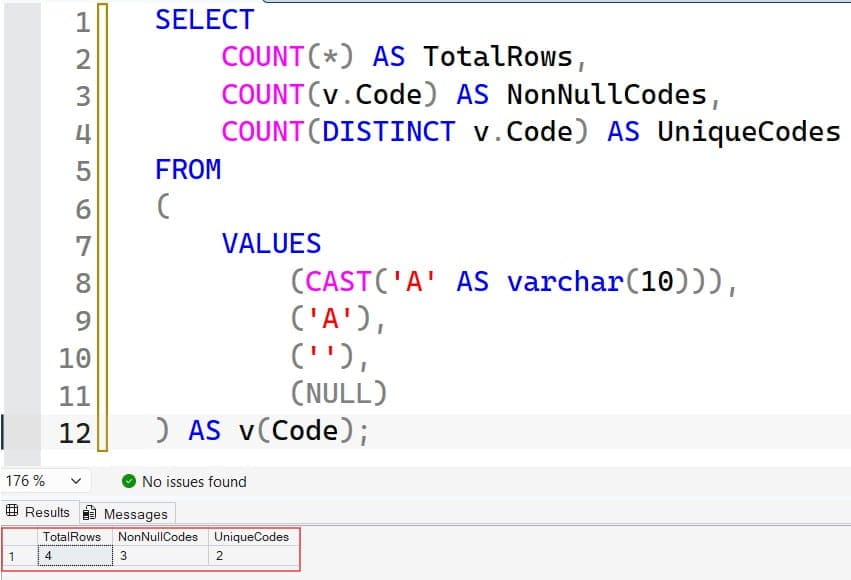
This returns four rows, three non-NULL codes, and two distinct codes. The empty string contributes a value. See the screenshot below for reference.
String uniqueness follows the expression’s collation—the comparison rules governing characteristics such as case and accent sensitivity. Under a case-insensitive collation, ABC and abc may count as one value.
Do not substitute a placeholder merely to include NULL in a distinct count. A placeholder that appears in real data can merge unrelated categories.
Include NULL as one category
SELECT COUNT(*) AS DistinctCategoriesIncludingNull
FROM
(
    SELECT DISTINCT v.CustomerId
    FROM
    (
        VALUES (101), (101), (102), (NULL), (NULL)
    ) AS v(CustomerId)
) AS d;
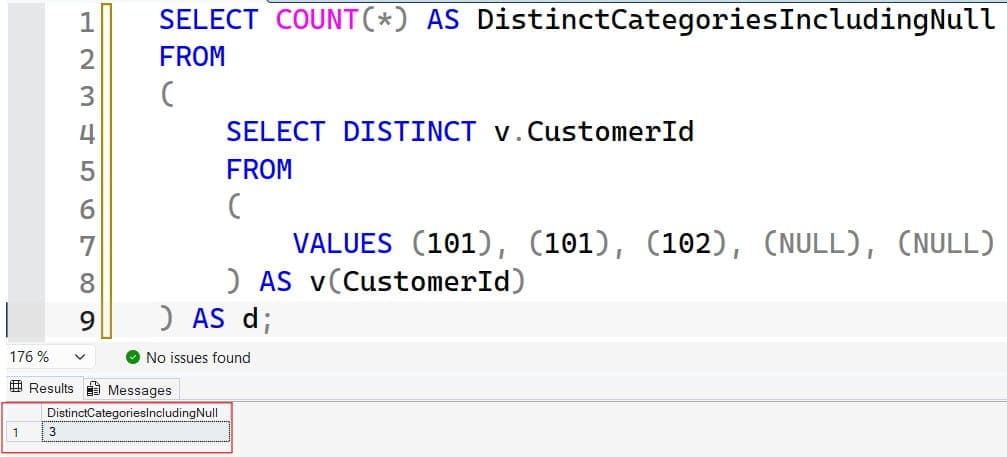
This returns 3. SELECT DISTINCT retains one NULL category; the outer COUNT(*) counts that row. In contrast, COUNT(DISTINCT CustomerId) excludes it.
Count an empty result
Without GROUP BY, a COUNT aggregate returns one row containing zero when nothing matches. With GROUP BY, an empty input produces no groups and therefore no result rows.
Review SQL NULL behavior when missing values affect reporting.
Pro Tip: I would decide explicitly whether “unknown” is excluded, counted as one category, or reported separately. Each approach produces a different metric.
Count Within Groups Without Double-Counting Totals
GROUP BY divides qualifying rows into groups before calculating aggregates.
SELECT
    v.Region,
    COUNT(*) AS OrderCount,
    COUNT(DISTINCT v.CustomerId) AS UniqueCustomers
FROM
(
    VALUES
        ('East', 101),
        ('East', 101),
        ('East', 102),
        ('West', 101),
        ('West', 103)
) AS v(Region, CustomerId)
GROUP BY v.Region;
East has three orders and two unique customers. West has two orders and two unique customers.
However, the overall unique-customer count is three, not four. Customer 101 appears in both groups.
Distinct counts are generally not additive. Summing daily unique visitors does not necessarily produce monthly unique visitors; summing tenant-level users may not produce organization-wide users.
Filter groups with HAVING
SELECT
    v.CustomerId,
    COUNT(*) AS OrderCount
FROM
(
    VALUES
        (101, 1001),
        (101, 1002),
        (102, 1003)
) AS v(CustomerId, OrderId)
GROUP BY v.CustomerId
HAVING COUNT(*) > 1;
This returns customer 101 with two orders. WHERE filters input rows; HAVING filters aggregated groups.
See GROUP BY examples for more grouping patterns.
Pro Tip: I would calculate an overall distinct total independently rather than sum grouped distinct counts unless the groups are provably disjoint.
Fix Inflated Counts After Joins
A one-to-many join produces multiple result rows for one parent. That behavior is correct, but counting those rows may answer the wrong question.
The next example models customers and their orders:
WITH Customers AS
(
    SELECT CustomerId
    FROM (VALUES (101), (102), (103)) AS v(CustomerId)
),
Orders AS
(
    SELECT *
    FROM
    (
        VALUES
            (1001, 101),
            (1002, 101),
            (1003, 102)
    ) AS v(OrderId, CustomerId)
)
SELECT
    COUNT(*) AS JoinedRows,
    COUNT(o.OrderId) AS MatchedOrders,
    COUNT(DISTINCT c.CustomerId) AS AllCustomers,
    COUNT(DISTINCT o.CustomerId) AS BuyingCustomers
FROM Customers AS c
LEFT JOIN Orders AS o
    ON o.CustomerId = c.CustomerId;
The results are four joined rows, three orders, three customers, and two buying customers.
LEFT JOIN preserves customer 103 with NULL order columns. Consequently, COUNT(*) includes that unmatched row, while COUNT(o.OrderId) does not.
Count children per parent
When grouping by customer, use the nonnullable child key:
-- Assumes these application tables already exist.
SELECT
    c.CustomerId,
    COUNT(o.OrderId) AS OrderCount
FROM dbo.Customers AS c
LEFT JOIN dbo.Orders AS o
    ON o.CustomerId = c.CustomerId
GROUP BY c.CustomerId;
Assuming OrderId is a nonnullable order identifier, customers without orders receive zero rather than one.
If another join introduces order lines, even COUNT(o.OrderId) can multiply. Aggregate orders first, use an appropriate distinct key, or use EXISTS when the question is simply whether a match exists.
See SQL Server LEFT JOIN examples.
Pro Tip: I would inspect the joined rows before adding DISTINCT. Deduplication can hide an incorrect join condition instead of fixing it.
Count Unique Combinations and Conditional Values
SQL Server’s COUNT(DISTINCT expression) accepts one expression, not a comma-separated list of columns. To count combinations, deduplicate the columns in a derived table.
SELECT COUNT(*) AS UniqueTenantCustomers
FROM
(
    SELECT DISTINCT
        v.TenantId,
        v.CustomerId
    FROM
    (
        VALUES
            (1, 101),
            (1, 101),
            (2, 101),
            (2, 102)
    ) AS v(TenantId, CustomerId)
) AS d;
This returns three unique tenant/customer pairs.
That distinction matters in a multi-tenant application where CustomerId is unique only within a tenant.
Avoid joining values into a string to simulate a composite key. Different pairs can produce the same concatenated value, and NULL handling introduces additional complications.
The derived-table approach includes distinct combinations containing NULL. Add explicit non-NULL filters if those combinations should be excluded.
Count only qualifying customers
SELECT
    COUNT(
        CASE WHEN v.Status = 'Paid' THEN 1 END
    ) AS PaidOrders,
    COUNT(
        DISTINCT CASE
            WHEN v.Status = 'Paid' THEN v.CustomerId
        END
    ) AS UniquePayingCustomers
FROM
(
    VALUES
        (101, 'Paid'),
        (101, 'Paid'),
        (102, 'Pending'),
        (103, 'Paid')
) AS v(CustomerId, Status);
The results are three paid orders and two unique paying customers.
CASE returns NULL for nonmatching rows, which COUNT ignores. Do not add ELSE 0 to the first expression: zero is non-NULL and would count.
Explore CASE expressions in SQL Server for related conditional aggregates.
Pro Tip: I would keep composite business keys as separate columns throughout deduplication rather than invent a string encoding for them.
Performance, Large Counts, and Production Accuracy
COUNT DISTINCT often requires more work than counting rows because SQL Server must identify unique values. Execution plans may use sorting, hashing, or already ordered index data.
A memory grant is workspace memory allocated to a query. If a sort or hash operation needs more than available, it may spill intermediate work to tempdb, SQL Server’s temporary workspace database.
Tune the workload, not the spelling
Use this sequence:
- Confirm the business metric and filtering scope.
- Inspect the actual execution plan.
- Measure logical reads and elapsed time.
- Check row estimates and statistics.
- Evaluate supporting indexes.
- Recheck performance under representative concurrency.
An index matching filters and counted keys can help, but its maintenance adds write and storage costs. COUNT(*) does not imply SQL Server must retrieve every column, and COUNT(1) is not a reliable performance improvement.
Review SQL query optimization guidance before increasing Azure compute capacity.
Avoid integer overflow
-- Assumes the application table exists.
SELECT
    COUNT_BIG(*) AS OrderRows,
    COUNT_BIG(DISTINCT CustomerId) AS UniqueCustomers
FROM dbo.Orders;
COUNT_BIG returns bigint. COUNT uses int, whose maximum is 2,147,483,647; casting COUNT’s output afterward does not prevent overflow inside the aggregate.learn.microsoft
Consider approximate counts selectively
SQL Server 2019 and later, Azure SQL Database, and Managed Instance support APPROX_COUNT_DISTINCT. It uses less memory for large distinct-count workloads, with documented error of up to 2% within 97% probability. It is unsuitable when billing, reconciliation, or contractual reports require exact totals.learn.microsoft
Frequently Asked Questions
Does COUNT(column) remove duplicates?
No. It counts every non-NULL occurrence, including repeated values. Add DISTINCT when you need unique non-NULL values.
Is COUNT(*) different from COUNT(1)?
Both count qualifying rows because the constant 1 is never NULL. Use COUNT(*) to communicate row-counting intent; changing it to COUNT(1) is not a general tuning technique.
Can SQL Server count distinct values across multiple columns?
Yes, by selecting distinct column combinations in a subquery and applying COUNT(*) outside it. SQL Server does not accept COUNT(DISTINCT ColumnA, ColumnB).
Can I use COUNT DISTINCT with OVER?
SQL Server does not support DISTINCT in COUNT’s window-function syntax. Aggregate distinct counts by the required grouping keys, then join those results back when row-level output is needed.
Why is COUNT DISTINCT smaller than COUNT(*)?
Repeated values count once, and NULL values are excluded. Joins can also multiply rows without creating additional distinct entities, making the difference larger.
You May Also Like
- COUNT_BIG examples in SQL Server
- SQL DISTINCT and duplicate elimination
- Finding duplicate records in SQL
- SQL Server index best practices
- Primary keys vs. foreign keys
COUNT(*) measures rows, COUNT(column) measures non-NULL occurrences, and COUNT(DISTINCT column) measures unique non-NULL values. Define the metric and verify join behavior before tuning the query. I hope you found this article helpful.

After working for more than 15 years in the Software field, especially in Microsoft technologies, I have decided to share my expert knowledge of SQL Server. Check out all the SQL Server and related database tutorials I have shared here. Most of the readers are from countries like the United States of America, the United Kingdom, New Zealand, Australia, Canada, etc. I am also a Microsoft MVP. Check out more here.