
Knowing exactly which SSMS Version you are running is the first step toward a stable environment. In this guide, I will show you how to check your SSMS version using multiple professional methods.
How To Check SSMS Version
Method 1: The “Help > About” Menu (The Golden Standard)
This is the most direct and authoritative way to find your version details. Whether you are using a legacy install or the latest 2026 release, this method never fails.
Step-by-Step Instructions:
- Launch SSMS: Open the application on your Windows machine.
- Navigate to the Top Ribbon: Look at the horizontal menu at the very top of the screen.
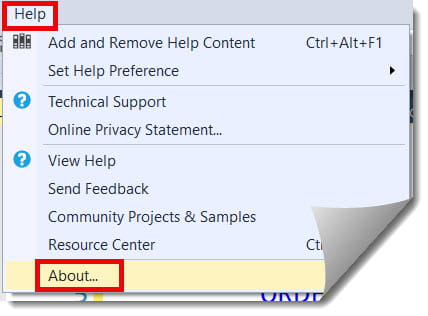
- Click on “Help”: This is usually located to the right of the “Window” menu.
- Select “About”: Click the option labeled “About…” at the bottom of the dropdown.
A dialog box will pop up. This window contains a wealth of information. The primary line you are looking for is SQL Server Management Studio, followed by a version number (e.g., 22.1.15.0). Check out the screenshot below for your reference.

Understanding the “About” Dialog Components
As shown in the above screenshot, when that box opens, you’ll see several different version numbers. It can be confusing for beginners, so let’s break down what each one means for a professional environment.
| Component | Description | Why It Matters |
| SSMS Version | The overall release version (e.g., 21.0). | This is what you tell your manager or include in a ticket. |
| Component Version | The specific build of the shell (e.g., 17.x). | Useful for technical troubleshooting with Microsoft. |
| Operating System | Your Windows version (e.g., Windows 11 Pro). | Confirms if your OS supports the latest SSMS features. |
| .NET Framework | The runtime version. | Critical for ensuring custom plugins or extensions work. |
Method 2: Using the Visual Studio Installer (The Modern Way)
Starting with the more recent versions of SSMS (v21 and v22), Microsoft has moved the installation logic into the Visual Studio Installer architecture.
- Press the Windows Key on your keyboard.
- Search for “Visual Studio Installer” and open it.
- Under the “Installed” tab, locate SQL Server Management Studio.
- The version number will be displayed directly beneath the title.
Pro Tip: This method is excellent because it also tells you if an Update is available. If you see a green notification, it means you’re behind on patches.
Method 3: Checking via Command Line
You might need to check versions across 50 different servers without opening the GUI. You can do this using a simple command in PowerShell or the Command Prompt.
PowerShell Command:
PowerShell
(Get-Item "C:\Program Files (x86)\Microsoft SQL Server Management Studio 22\Common7\IDE\ssms.exe").VersionInfo.ProductVersionWhy Use the CLI?
- Inventory Management: You can script this to run against every machine in your domain.
- Speed: It’s faster than waiting for the SSMS splash screen to load.
- Accuracy: It pulls the metadata directly from the executable file.
Common Issues When Checking Versions
- Multiple Versions Installed: It is possible to have SSMS 19 and SSMS 22 installed side-by-side. Ensure you are checking the version for the shortcut you actually use daily.
- The “Preview” Version: If you see “Preview” or “RC” (Release Candidate) in the version string, you are running a pre-release build. These are great for testing but should never be used on a production server for a bank or healthcare provider.
- Incomplete Updates: Sometimes an update fails halfway through. If the version number looks strange (all zeros or a very old date), try running a “Repair” via the Visual Studio Installer.
Summary and Final Thoughts
Knowing how to check your SSMS version is a fundamental skill, but knowing what to do with that information is what makes you an expert. Whether you use the Help Menu, the VS Installer, or a PowerShell script, always ensure your version aligns with your project’s security and performance requirements.
You may also like the following articles:

After working for more than 15 years in the Software field, especially in Microsoft technologies, I have decided to share my expert knowledge of SQL Server. Check out all the SQL Server and related database tutorials I have shared here. Most of the readers are from countries like the United States of America, the United Kingdom, New Zealand, Australia, Canada, etc. I am also a Microsoft MVP. Check out more here.