
If you struggle with missing records in your reports, or if you don’t know why an appended table suddenly filters out your primary data, this comprehensive tutorial is for you. Let’s walk through the core mechanics, syntactic variations, and optimization strategies required to deploy SQL LEFT JOIN effectively at enterprise scale.
SQL LEFT JOIN
Defining the Core Engine Mechanics: What is left join in SQL
To write high-performance queries, we must look past basic text syntax and look at relational algebra. In standard relational theory, a LEFT JOIN (historically termed a LEFT OUTER JOIN) is an asymmetric set operation.
Unlike an INNER JOIN, which requires a matching predicate to return records from either side, a LEFT JOIN establishes a clear hierarchical dependency between two datasets.
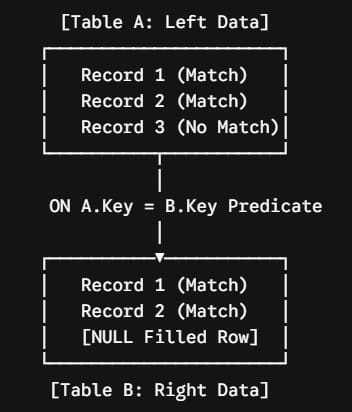
When the query planner encounters a left join, it designates the first table declared in the FROM clause as the Left Table (driving table) and the second table as the Right Table.
The engine processes the datasets row by row:
- It reads a record from the Left Table.
- It evaluates the relational condition declared in the
ONclause against the rows of the Right Table. - If the predicate evaluates to
TRUE, the engine pairs the columns of both tables together in the output stream. - If the predicate evaluates to
FALSEorUNKNOWNfor every single row in the Right Table, the engine still returns the Left Table record, but populates every single column belonging to the Right Table with a nativeNULLvalue identifier.
Structural Breakdown: Left Join vs. Inner Join
| Architectural Metric | LEFT OUTER JOIN | INNER JOIN |
| Primary Set Behavior | Preserves all rows from the driving dataset | Restricts output strictly to matching records |
| Right Table Mismatches | Appends structured NULL cells | Completely drops the unmatched record |
| Output Cardinality Risk | Output row count is at least equal to Left Table | Output row count can contract to zero |
| Predicate Sensitivity | Highly sensitive to ON vs. WHERE filter placement | Highly flexible with filtering placement |
| Optimizer Scan Type | Typically forces an outer index scan/nested loop | Highly optimizable via inner hash matches |
| Primary Structural Purpose | Auditing, missing data tracking, optional attributes | Transactional lookup stitching |
Check out SQL INNER JOIN vs LEFT JOIN for more details
Syntax Architecture
In modern ANSI-SQL, readability and intent preservation are key to maintaining long-term code bases. The explicit standard ensures that your data relationships remain transparent to future maintainers.
The Explicit Left Join Standard
The correct, professional execution format relies on explicit join declarations coupled directly with a bounding relational predicate:
SQL
SELECT
    Parent.AccountIdentifier,
    Parent.CorporateName,
    Child.TransactionAmount
FROM EnterpriseAccounts AS Parent
LEFT OUTER JOIN FinancialLedgers AS Child
    ON Parent.AccountKey = Child.AccountKeyField;
After executing the query above, I obtained the expected output shown in the screenshot below.
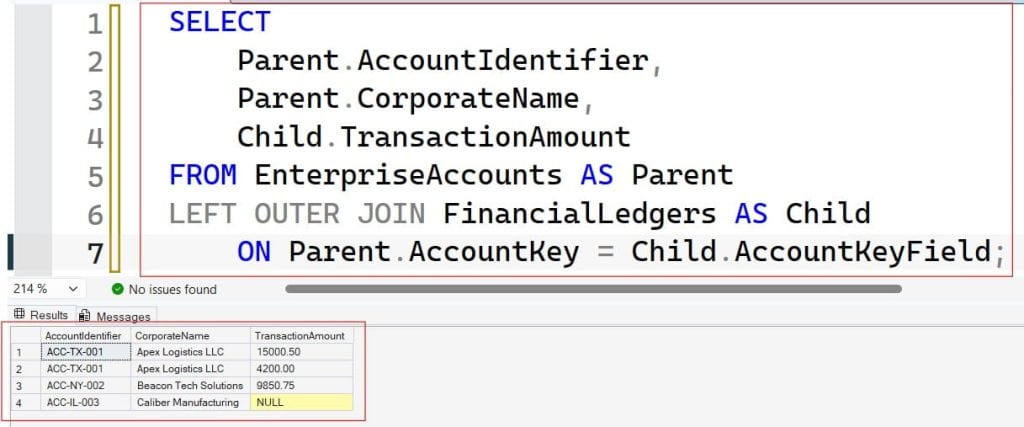
💡 Note: The
OUTERkeyword is entirely optional. WritingLEFT JOINandLEFT OUTER JOINtells the query optimizer to execute the exact same operation. In enterprise codebases, I recommend using the shorthandLEFT JOINfor conciseness, provided your team applies it consistently.
The Legacy Implicit Syntax (Banned Practice)
Decades ago, database engines like Oracle and Microsoft SQL Server utilized non-standard, implicit join syntax within the WHERE clause using symbols like *= or (+).
SQL
/* DEPRECATED AND BANNED ANTI-PATTERN */
SELECT Parent.CorporateName, Child.TransactionAmount
FROM EnterpriseAccounts Parent, FinancialLedgers Child
WHERE Parent.AccountKey *= Child.AccountKeyField;
These implicit styles are completely deprecated in modern database architectures. They introduce severe ambiguity, break query parsing engines during server upgrades, and degrade performance. Always use explicit ANSI-SQL syntax.
The Critical Gotcha: ON vs. WHERE Clause Filtering
The single biggest bug I find during performance code reviews involves developers misunderstanding how the query engine applies filters to an asymmetric outer join. Misplacing a filter can accidentally convert your LEFT JOIN straight back into an unyielding INNER JOIN.
Scenario A: Filtering the Right Table in the WHERE Clause
Consider this highly problematic pattern:
SQL
/* WARNING: Architectural Flaw */
SELECT A.ClientName, B.PolicyType
FROM CustomerProfiles AS A
LEFT JOIN InsurancePolicies AS B
    ON A.ClientKey = B.ClientKey
WHERE B.IsActive = 1;
Why it breaks: The SQL engine processes the FROM and JOIN clauses before it processes the WHERE clause.
When the engine processes the LEFT JOIN, it preserves a customer row from CustomerProfiles even if they have no policies, filling B.PolicyType and B.IsActive with NULL.
Next, the engine evaluates the WHERE clause: WHERE B.IsActive = 1. Because a NULL value can never equal $1$ (any comparison against a NULL evaluates to UNKNOWN), the engine discards that row.
As a result, you lose all your unmatched customer records, turning your left outer join into an inner join.
Scenario B: Moving the Filter to the ON Clause
To fix this structural flaw and preserve the integrity of your left driving table, shift the conditional constraint directly into the ON clause:
SQL
/* CORRECT: Relational Integrity Preserved */
SELECT A.ClientName, B.PolicyType
FROM CustomerProfiles AS A
LEFT JOIN InsurancePolicies AS B
    ON A.ClientKey = B.ClientKey
    AND B.IsActive = 1;
By placing the filter inside the ON clause, you change the join condition itself. Now, the engine looks for active policies. If it finds one, it links the data. If it doesn’t find an active policy, it preserves the customer row and cleanly appends NULL values, maintaining your reporting framework.
Enterprise Design Patterns: When to Deploy a LEFT JOIN
Understanding when to choose a left outer join over other set operations is a key skill for senior data engineers. Let’s look at the primary use cases for this operator:
Pattern 1: Identifying Missing Records (The Orphan Audit)
A primary operational task in data management is auditing systems to find missing entries, processing gaps, or incomplete workflows. You can easily pinpoint these gaps by combining a LEFT JOIN with an IS NULL check:
SQL
SELECT Drivers.StaffName
FROM LogisticsDrivers AS Drivers
LEFT JOIN ActiveVehicles AS Fleet
    ON Drivers.DriverID = Fleet.AssignedDriverID
WHERE Fleet.AssignedDriverID IS NULL;
Because the query filters for rows where the right table’s key failed to link, it isolates only the drivers who have no vehicle assignments. This design pattern is highly effective for generating exception reports and validation checks.
Pattern 2: Building Asymmetric Aggregations
When building executive dashboards, managers often need a clean summary of activity across all assets—such as seeing total sales per retail branch, even for newly opened locations that haven’t processed a transaction yet.
Using a left join ensures that every retail location remains visible on the dashboard, displaying a clean $0$ or NULL total rather than vanishing from the chart entirely.
Advanced Query Performance Tuning and Optimization
Left joins can impact query performance if your indexing strategy does not align with your join predicates. Because the database engine must scan the driving table and probe the secondary table, unindexed targets will cause slow table scans.
Index Optimization Protocols
To optimize your query execution paths, implement these indexing practices:
- Foreign Key Indexes: Ensure that the columns used in your
ONclause are covered by non-clustered indexes on the target table. - Data Type Alignment: Confirm that the matching columns share identical data types and collations. If the engine has to implicitly convert data types at runtime to evaluate the join, it will bypass indexes and slow down performance.
- Bypassing Nested Loops: For large datasets, keep your statistics updated so the query planner can accurately choose fast merge or hash execution paths rather than defaulting to slow nested loop operations.
Conclusion
By establishing these solid design patterns and understanding the underlying mechanics of the LEFT JOIN, you protect your datasets from accidental truncation and keep your reporting pipelines accurate. Keep your models normalized, your predicates explicit, and your database engines highly optimized!
You may also like the following articles:

After working for more than 15 years in the Software field, especially in Microsoft technologies, I have decided to share my expert knowledge of SQL Server. Check out all the SQL Server and related database tutorials I have shared here. Most of the readers are from countries like the United States of America, the United Kingdom, New Zealand, Australia, Canada, etc. I am also a Microsoft MVP. Check out more here.