
In this tutorial, I will walk you through the precise mechanics of executing every type of SQL Server function using parameters. You will learn how to supply literal values, pass dynamic session variables, feed table columns as inputs via CROSS APPLY, and avoid the common pitfalls that cause runtime errors and query degradation.
How to Execute Function in SQL Server with Parameters
Types of Parameterized Functions in SQL Server
Before executing a function, you must identify its architectural type. SQL Server categorizes user-defined functions into three distinct varieties, each requiring a specific execution pattern:
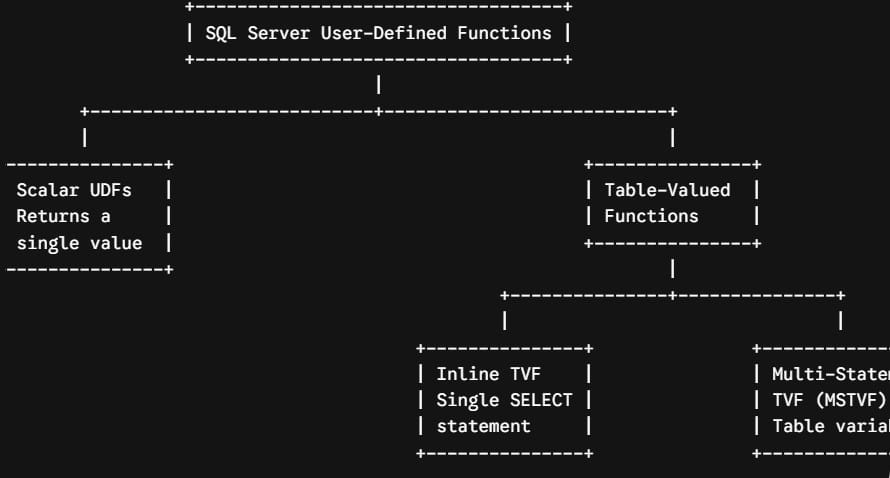
- Scalar User-Defined Functions: Accept zero or more parameters and return a single, discrete data value (such as an
INT,VARCHAR,DECIMAL, orDATETIME). - Inline Table-Valued Functions (iTVFs): Accept parameters and return the result of a single
SELECTstatement formatted as a relational table structure. They contain no proceduralBEGIN...ENDblock. - Multi-Statement Table-Valued Functions (MSTVFs): Accept parameters, populate an explicitly declared table variable using procedural code, and return that tabular result set.
The Two-Part Naming Rule: Why Schema Matters
The single most common error developers face when executing scalar functions in SQL Server is omitting the schema qualifier.
When calling built-in system functions (like GETDATE(), LEN(), or DATEADD()), SQL Server resolves the function name globally without a schema prefix. However, when executing a user-defined scalar function, SQL Server strictly requires a two-part name (schema_name.function_name).
SQL
-- Fails with: 'Cannot find either column "CalculateAnnualTax" or the user-defined function...'
SELECT CalculateAnnualTax(85000.00, 0.07);

-- Executes Successfully
SELECT dbo.CalculateAnnualTax(85000.00, 0.07);
Rule of Thumb: Always qualify your user-defined scalar functions with their associated schema (most commonly
dbo., or custom schemas such asfinance.orhr.). While Table-Valued Functions can sometimes resolve without the schema prefix, applying the two-part naming convention uniformly across all functions is an industry best practice.
Executing Scalar Functions with Parameters
Let’s assume we have created a scalar function named dbo.CalculateOvertimePay that accepts two parameters: @HourlyRate (DECIMAL(10,2)) and @HoursWorked (DECIMAL(5,2)), returning the total overtime payout as a DECIMAL(10,2).
SQL
CREATE FUNCTION dbo.CalculateOvertimePay
(
    @HourlyRate DECIMAL(10,2),
    @HoursWorked DECIMAL(5,2)
)
RETURNS DECIMAL(10,2)
AS
BEGIN
    DECLARE @OvertimeHours DECIMAL(5,2);
    DECLARE @OvertimePay DECIMAL(10,2) = 0.00;

    IF @HoursWorked > 40.00
    BEGIN
        SET @OvertimeHours = @HoursWorked - 40.00;
        SET @OvertimePay = @OvertimeHours * (@HourlyRate * 1.5);
    END

    RETURN @OvertimePay;
END;
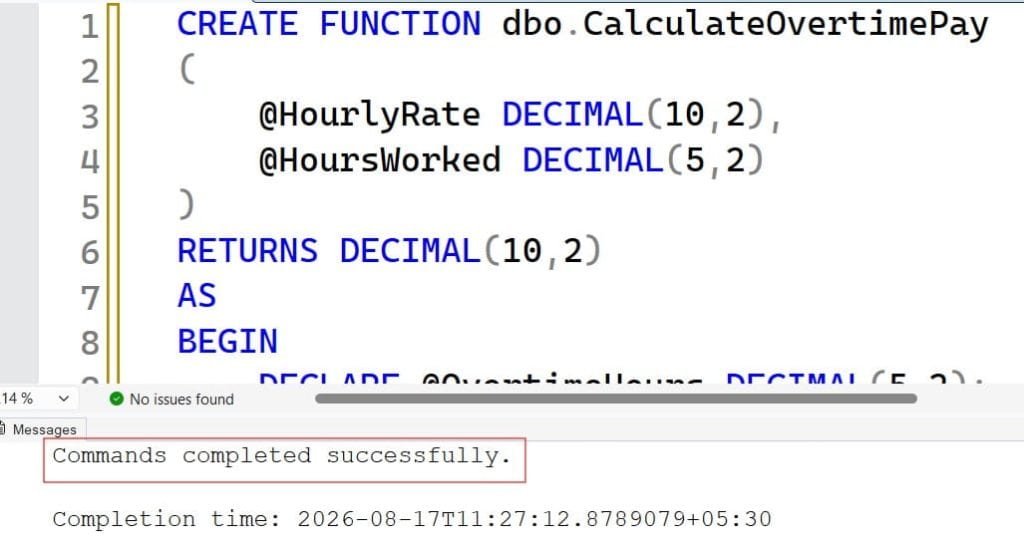
After executing the above query, the function has been created successfully as shown in the screenshot below.
Here are the standard ways to execute this parameterized function:
Method 1: Direct SELECT Statement with Literal Parameters
The simplest way to call a scalar function is by passing hardcoded literal values inside a SELECT statement:
SQL
SELECT dbo.CalculateOvertimePay(35.50, 48.00) AS OvertimeCompensation;Result: After executing the above query, I got the expected output as shown in the below screenshot.

Method 2: Passing Declared T-SQL Variables
In production scripts, stored procedures, or automation routines, you frequently pass local T-SQL variables into the function parameters:
SQL
DECLARE @EmployeeRate DECIMAL(10,2) = 42.00;
DECLARE @TotalHours DECIMAL(5,2) = 52.50;
DECLARE @CalculatedPayout DECIMAL(10,2);

-- Execute and assign to a local variable
SET @CalculatedPayout = dbo.CalculateOvertimePay(@EmployeeRate, @TotalHours);

-- Display the result
SELECT @CalculatedPayout AS TotalPayout;
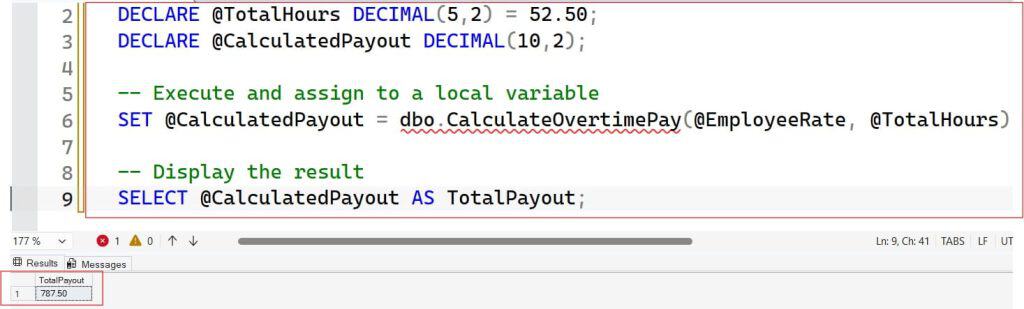
After executing the above query, I got the expected output as shown in the below screenshot.
Method 3: Passing Column Values in Query Projections
You can execute a parameterized scalar function on a per-row basis by passing table column names as the arguments:
SQL
SELECT
    EmployeeID,
    FirstName,
    LastName,
    BaseHourlyRate,
    WeeklyHoursWorked,
    dbo.CalculateOvertimePay(BaseHourlyRate, WeeklyHoursWorked) AS OvertimePay
FROM HumanResources.PayrollRoster
WHERE DepartmentID = 104;
During execution, SQL Server evaluates dbo.CalculateOvertimePay for each row returned by the FROM and WHERE clauses, injecting the values of BaseHourlyRate and WeeklyHoursWorked dynamically.
Method 4: Capturing Return Values Using the EXECUTE Keyword
While scalar functions are typically invoked inside expressions, you can also execute them using the EXEC or EXECUTE command combined with a return variable:
SQL
DECLARE @Result DECIMAL(10,2);

EXEC @Result = dbo.CalculateOvertimePay
    @HourlyRate = 50.00,
    @HoursWorked = 45.00;

SELECT @Result AS ExecutionResult;
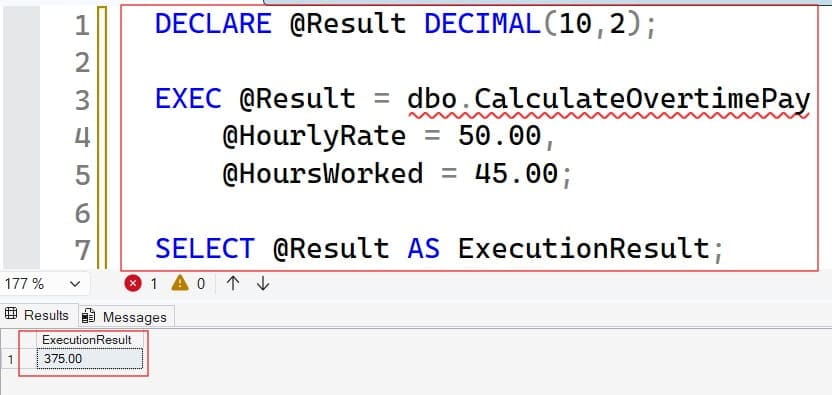
After executing the above query, I got the expected output as shown in the below screenshot.
Executing Inline Table-Valued Functions (iTVFs) with Parameters
Inline Table-Valued Functions do not return a single scalar value; they return an entire relational rowset. Because they behave like parameterized views, you execute them inside the FROM clause of a SELECT statement just like a standard table.
Let’s look at an iTVF that retrieves active customer orders based on state and minimum order total:
SQL
CREATE FUNCTION Sales.GetCustomerOrdersByState
(
    @StateCode CHAR(2),
    @MinOrderAmount DECIMAL(10,2)
)
RETURNS TABLE
AS
RETURN
(
    SELECT
        OrderID,
        CustomerID,
        OrderDate,
        TotalDue,
        ShipState
    FROM Sales.OrdersHeader
    WHERE ShipState = @StateCode
      AND TotalDue >= @MinOrderAmount
);
Executing the iTVF with Parameter Values
To execute this function, call it directly in the FROM clause, passing the required arguments inside parentheses:
SQL
SELECT
    OrderID,
    CustomerID,
    OrderDate,
    TotalDue
FROM Sales.GetCustomerOrdersByState('TX', 500.00)
ORDER BY TotalDue DESC;
Joining an iTVF with Other Physical Tables
Because an iTVF returns a valid table structure, you can join its output to other database tables, apply aliases, and include additional filtering predicates:
SQL
SELECT
    ord.OrderID,
    cust.CustomerName,
    cust.AccountTier,
    ord.TotalDue
FROM Sales.GetCustomerOrdersByState('CA', 1000.00) AS ord
INNER JOIN Sales.CustomerProfiles AS cust
    ON ord.CustomerID = cust.CustomerID
WHERE cust.AccountTier = 'Enterprise';
Executing Functions Dynamically Using CROSS APPLY and OUTER APPLY
What if you have a table of records and need to execute a Table-Valued Function for every row in that table, passing a column from the outer table into the function’s parameters?
Standard SQL INNER JOIN syntax cannot pass values dynamically into a table function parameter. To accomplish this, SQL Server provides the APPLY operator.
1. CROSS APPLY (Equivalent to an INNER JOIN)
CROSS APPLY invokes the table-valued function for each row of the outer table. If the function returns an empty result set for a given row, that outer row is excluded from the final output.
SQL
SELECT
    cust.CustomerID,
    cust.CustomerName,
    cust.StateCode,
    ord.OrderID,
    ord.TotalDue
FROM Sales.CustomerProfiles AS cust
CROSS APPLY Sales.GetCustomerOrdersByState(cust.StateCode, 250.00) AS ord;
2. OUTER APPLY (Equivalent to a LEFT OUTER JOIN)
OUTER APPLY invokes the function for every outer row, but if the function returns no records, the outer row is still preserved with NULL values in the function’s columns:
SQL
SELECT
    cust.CustomerID,
    cust.CustomerName,
    cust.StateCode,
    ord.OrderID,
    ord.TotalDue
FROM Sales.CustomerProfiles AS cust
OUTER APPLY Sales.GetCustomerOrdersByState(cust.StateCode, 250.00) AS ord;
Executing Multi-Statement Table-Valued Functions (MSTVFs)
Multi-Statement Table-Valued Functions define an explicit table variable layout within their signature and use procedural logic (IF...ELSE, loops, cursor operations) to populate that table before returning it.
SQL
CREATE FUNCTION HumanResources.GetDepartmentSalarySummary
(
    @DepartmentID INT
)
RETURNS @DepartmentSummary TABLE
(
    SummaryID INT IDENTITY(1,1) PRIMARY KEY,
    DepartmentID INT,
    Headcount INT,
    AverageSalary DECIMAL(12,2),
    TotalPayroll DECIMAL(14,2)
)
AS
BEGIN
    INSERT INTO @DepartmentSummary (DepartmentID, Headcount, AverageSalary, TotalPayroll)
    SELECT
        DepartmentID,
        COUNT(EmployeeID),
        AVG(AnnualSalary),
        SUM(AnnualSalary)
    FROM HumanResources.EmployeeSalaries
    WHERE DepartmentID = @DepartmentID
    GROUP BY DepartmentID;

    RETURN;
END;
Executing the MSTVF
Just like an inline TVF, you execute an MSTVF within the FROM clause:
SQL
SELECT
    DepartmentID,
    Headcount,
    AverageSalary,
    TotalPayroll
FROM HumanResources.GetDepartmentSalarySummary(102);
Working with Default and Optional Parameters
SQL Server functions support default parameters, but their execution mechanics differ significantly from stored procedures.
When executing a Stored Procedure, you can simply omit an argument if it has a defined default. However, when executing a User-Defined Function, you cannot omit the parameter. You must explicitly pass the DEFAULT keyword in the parameter’s position.
Function Definition with Defaults:
SQL
CREATE FUNCTION dbo.CalculateProductDiscount
(
    @ListPrice DECIMAL(10,2),
    @DiscountPercent DECIMAL(4,2) = 0.05 -- Default 5%
)
RETURNS DECIMAL(10,2)
AS
BEGIN
    RETURN @ListPrice - (@ListPrice * @DiscountPercent);
END;
Correct vs. Incorrect Execution Syntax:
SQL
-- INCORRECT: Throws an error (An invalid parameter was passed)
SELECT dbo.CalculateProductDiscount(100.00);

-- CORRECT: Using explicit DEFAULT keyword
SELECT dbo.CalculateProductDiscount(100.00, DEFAULT) AS DiscountedPrice;

-- CORRECT: Overriding the default value
SELECT dbo.CalculateProductDiscount(100.00, 0.15) AS DiscountedPrice;
Troubleshooting Common Errors
Error 1: “Cannot find either column or user-defined function…”
- Cause: The scalar function was called without the schema prefix (e.g., calling
CalculateTax(100)instead ofdbo.CalculateTax(100)). - Fix: Prefix the function call with its schema name:
dbo.CalculateTax(...).
Error 2: “The formal parameter ‘@ParamName’ was not supplied…”
- Cause: A parameter was completely omitted during the function invocation.
- Fix: Provide all parameters defined in the signature. If the parameter has a default value assigned, pass the literal keyword
DEFAULT.
Error 3: “Invalid use of a side-effecting operator within a function…”
- Cause: Attempting to call non-deterministic system functions like
NEWID()orRAND()or executing data modification statements (INSERT,UPDATE,DELETEto physical tables) inside the function. - Fix: Remove side-effecting operations. For GUID generation or randomized data, pass those generated values into the function as parameters rather than generating them inside the function body.
Performance Best Practices for Parameterized Functions
- Favor Inline TVFs Over Scalar Functions:Prior to SQL Server 2019, scalar UDFs forced queries into iterative, row-by-row execution (RBAR – Row By Agonizing Row), disabling parallel execution plans. Whenever possible, rewrite complex scalar functions as single-statement Inline Table-Valued Functions and join them with
CROSS APPLY. - Leverage Scalar UDF Inlining (SQL Server 2019+):If you are running SQL Server 2019 (15.x) or higher with database compatibility level 150+, the query optimizer automatically inlines many scalar functions into the calling query execution plan, substantially reducing CPU overhead.
- Ensure Parameter Data Types Match Exactly:Passing an
NVARCHARstring into a function expecting aVARCHARparameter forces implicit data type conversion during execution. This causes unnecessary CPU cycles and can prevent the query optimizer from leveraging existing column indexes on underlying tables.
Mastering the execution of parameterized functions in SQL Server is essential for writing clean, modular, and high-performing database routines.
You may also like the following articles:

After working for more than 15 years in the Software field, especially in Microsoft technologies, I have decided to share my expert knowledge of SQL Server. Check out all the SQL Server and related database tutorials I have shared here. Most of the readers are from countries like the United States of America, the United Kingdom, New Zealand, Australia, Canada, etc. I am also a Microsoft MVP. Check out more here.