
A payroll analyst at a mid-size staffing company once sent me a screenshot of a report. It showed the “third highest salary” in a department, and the number was wrong. Two people shared the top salary, and the query counted them as separate ranks. The report fed a compensation review, so a small logic bug could have changed real paychecks.
That is the catch with a question that looks simple. If you want to find nth highest salary in SQL Server, the right query depends on how you treat ties, NULL values, and large tables. A wrong choice also slows the report as data grows.
I will walk through four working T-SQL methods and show when each one fits. You will also learn how to wrap the logic in a secure stored procedure, speed it up with an index, and run it safely on Azure SQL Database.
How to Find Nth Highest Salary in SQL Server
Set Up a Safe Test Table
Start with a small table so you can check every result by hand. A schema is a named container for database objects, and dbo is the default one. A primary key is a column that uniquely identifies each row. This guide on creating a table with a primary key covers the basics.
CREATE TABLE dbo.Employees
(
    EmployeeId  INT           NOT NULL CONSTRAINT PK_Employees PRIMARY KEY,
    FullName    NVARCHAR(100) NOT NULL,
    Department  NVARCHAR(50)  NOT NULL,
    Salary      DECIMAL(12,2) NULL
);

INSERT INTO dbo.Employees (EmployeeId, FullName, Department, Salary)
VALUES
(1, N'Ava Carter',  N'Engineering', 120000),
(2, N'Ben Ortiz',   N'Engineering', 110000),
(3, N'Cara Nguyen', N'Engineering', 110000),
(4, N'Dan Brooks',  N'Sales',        95000),
(5, N'Eli Foster',  N'Sales',        90000),
(6, N'Fay Morgan',  N'HR',           90000),
(7, N'Gus Patel',   N'HR',           70000),
(8, N'Hana Lee',    N'HR',           NULL);
After running the query above, I got the expected output shown in the screenshot below.
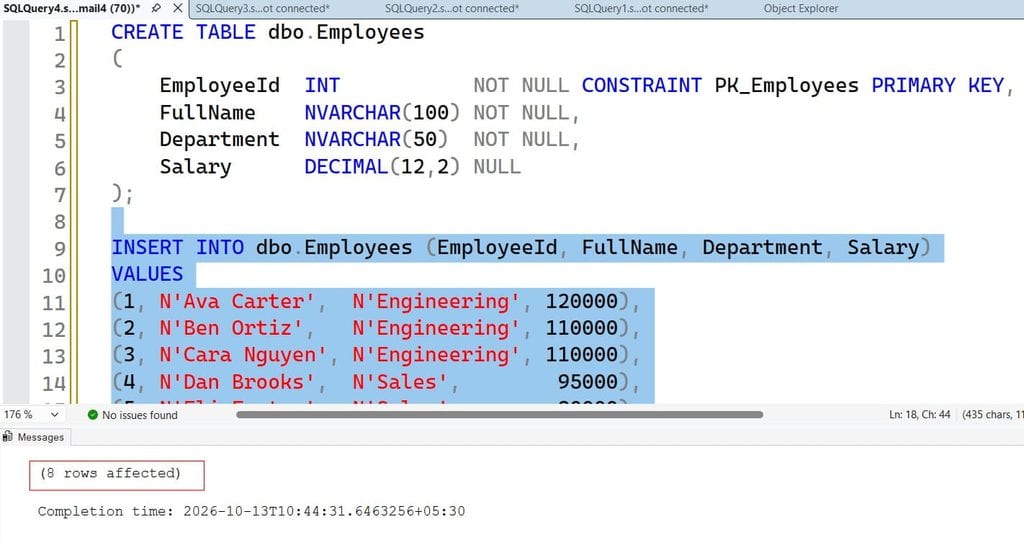
This creates an Employees table with a primary key and a nullable Salary column. I use DECIMAL(12,2) for money, because floating-point types can introduce rounding errors. The data holds two deliberate traps: Ben and Cara tie at 110,000, and Hana has no salary. To see why that matters, read how SQL NULL values behave in comparisons and sorting.
The distinct salaries in descending order are 120,000, 110,000, 95,000, 90,000, and 70,000. So the 2nd highest is 110,000, the 3rd is 95,000, and the 4th is 90,000. Keep these answers handy to verify each method.
Pro Tip: In my experience, I always put deliberate ties and NULLs in test data. Most “nth highest” bugs I have fixed passed testing only because the sample data had unique values.
Decide What “Nth Highest” Means
Before writing code, settle one business rule. There are two valid meanings.
- Distinct salary rank: If two people earn 110,000, that value is rank 2, and 95,000 is rank 3. This is what most people mean.
- Row position: Each employee takes one position, so the second tied person is rank 3.
For a salary report, I almost always use distinct rank. Ask the stakeholder before you code. It takes one minute and prevents a bad report.
Pro Tip: I write the tie rule in a code comment and in the ticket. Six months later, someone always asks why rank 3 shows a lower number than they expected.
Method 1: DENSE_RANK Window Function (Recommended)
A window function calculates a value across a set of related rows without collapsing them. If they are new to you, start with window functions in SQL Server. DENSE_RANK gives tied rows the same rank and does not skip numbers afterward.
DECLARE @N INT = 3;

WITH RankedSalaries AS
(
    SELECT
        Salary,
        DENSE_RANK() OVER (ORDER BY Salary DESC) AS SalaryRank
    FROM dbo.Employees
    WHERE Salary IS NOT NULL
)
SELECT DISTINCT Salary
FROM RankedSalaries
WHERE SalaryRank = @N;
After running the query above, I got the expected output shown in the screenshot below.
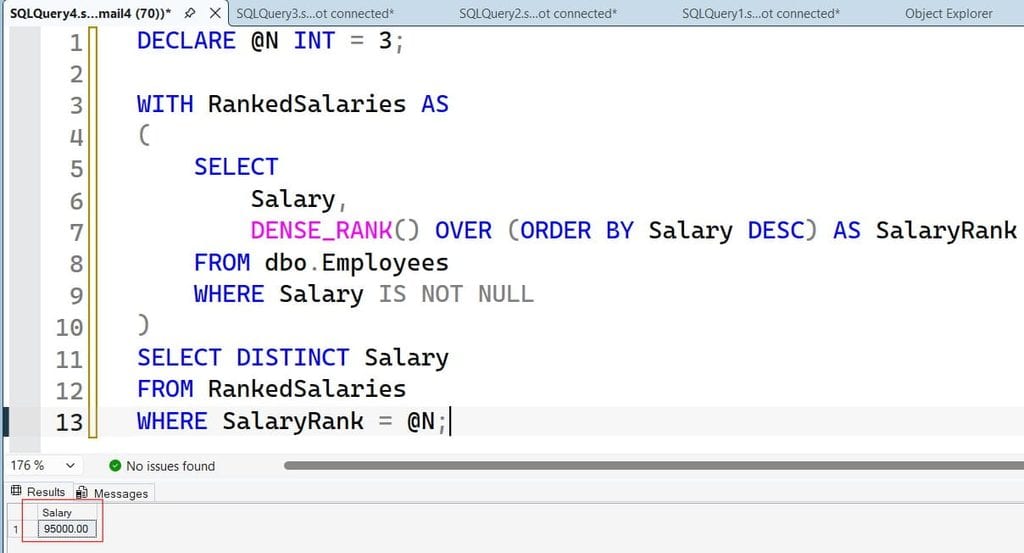
The CTE (common table expression) named RankedSalaries is a temporary named result set. See CTE vs temp table for when each fits. DENSE_RANK() OVER (ORDER BY Salary DESC) ranks salaries from highest to lowest. The WHERE Salary IS NOT NULL filter keeps NULLs out of the ranking. DISTINCT returns one row, even when several employees share the rank.
With @N = 3, this returns 95,000. It returns an empty result if @N is larger than the number of distinct salaries. That is useful, because “no such rank” is a real answer.
Why not ROW_NUMBER()? It gives every row a unique number, even for ties. With our data, rank 3 would return 110,000, which is wrong. The ROW_NUMBER function is great for deduplication and paging, but not for tied ranks. The article on RANK vs DENSE_RANK explains why RANK() also fails here: it leaves gaps after ties.
This method also returns full employee rows easily. Select FullName and Department instead of only Salary, and you get everyone who earns the nth highest value.
Pro Tip: I default to DENSE_RANK for reports. It is readable, handles ties correctly, and the next developer understands it without a comment.
Method 2: OFFSET FETCH for Modern SQL Server
OFFSET FETCH skips a number of rows and then returns the next batch. It works in SQL Server 2012 and later, and in Azure SQL Database. It builds on the ORDER BY clause, which it requires.
DECLARE @N INT = 3;

SELECT DISTINCT Salary
FROM dbo.Employees
WHERE Salary IS NOT NULL
ORDER BY Salary DESC
OFFSET @N - 1 ROWS
FETCH NEXT 1 ROWS ONLY;
After running the query above, I got the expected output shown in the screenshot below.
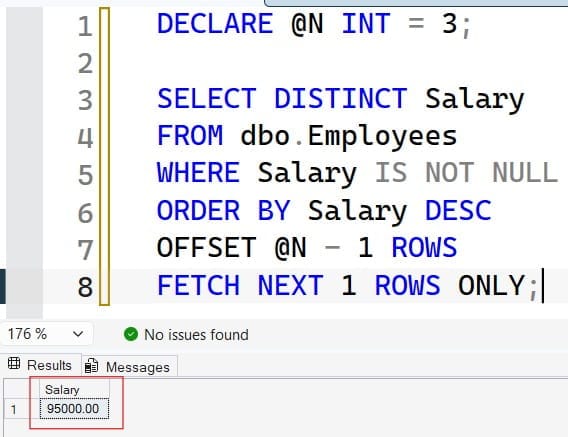
DISTINCT first collapses duplicates, so each remaining row is one unique salary. ORDER BY Salary DESC puts the highest first. OFFSET @N - 1 ROWS skips the top ranks, and FETCH NEXT 1 ROWS ONLY returns the next one. For @N = 3, it skips two salaries and returns 95,000.
I like this method for APIs and paging screens. It is short, and its intent is clear. The trade-off is that it returns only the salary value. If you need employee details, join the result back to the table or use DENSE_RANK.
The ORDER BY clause is required with OFFSET. Without it, SQL Server raises a syntax error.
Pro Tip: I use OFFSET FETCH when a developer wants a single value for an API. It is hard to misread, and it avoids a nested subquery.
Method 3: TOP With a Nested Query
This is the classic approach and the only one that works on very old versions. The TOP clause limits how many rows a query returns.
DECLARE @N INT = 3;

SELECT TOP (1) Salary
FROM
(
    SELECT DISTINCT TOP (@N) Salary
    FROM dbo.Employees
    WHERE Salary IS NOT NULL
    ORDER BY Salary DESC
) AS TopSalaries
ORDER BY Salary ASC;
After running the query above, I got the expected output shown in the screenshot below.
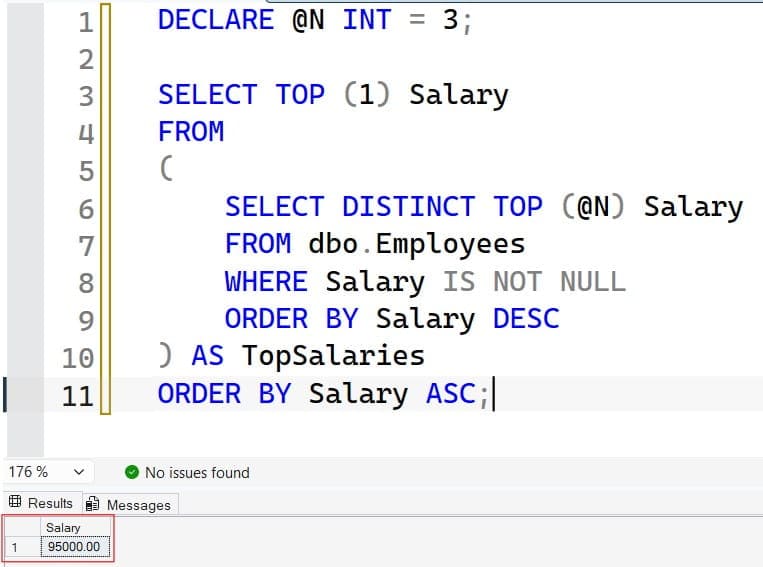
The inner query takes the top @N distinct salaries, which are 120,000, 110,000, and 95,000 for @N = 3. The outer query then sorts that small set ascending and returns the first row, 95,000. The lowest of the top three is the third highest.
Use this method when you must support legacy servers. One caution: if @N exceeds the number of distinct salaries, this query returns the lowest salary instead of nothing. That is a silent wrong answer, so add a check if you cannot guarantee valid input.
Pro Tip: I have inherited TOP-based code on SQL Server 2008 systems more than once. When the server is upgraded, I replace it with DENSE_RANK and add a test for the out-of-range case.
Method 4: Correlated Subquery (Learn It, Avoid It)
A correlated subquery runs once per outer row. It is a good teaching tool, but a poor choice for large tables. If you need a refresher, read about the SQL subquery first.
DECLARE @N INT = 3;

SELECT DISTINCT e1.Salary
FROM dbo.Employees AS e1
WHERE @N - 1 =
(
    SELECT COUNT(DISTINCT e2.Salary)
    FROM dbo.Employees AS e2
    WHERE e2.Salary > e1.Salary
);
After running the query above, I got the expected output shown in the screenshot below.
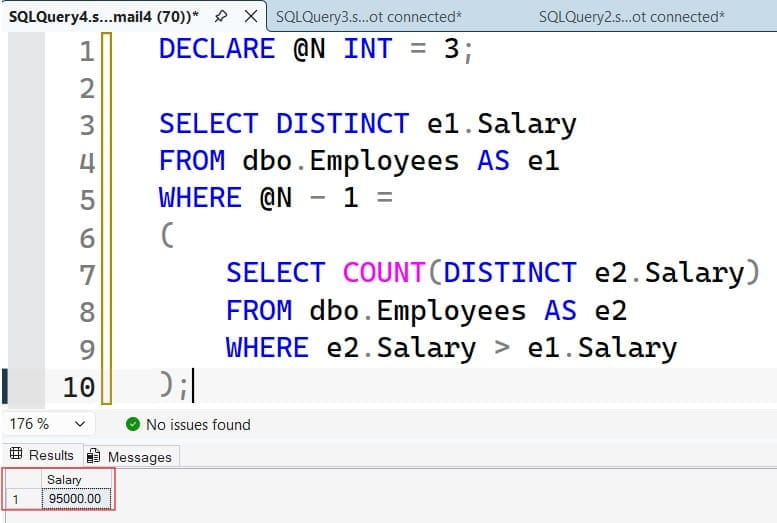
For each salary, the inner query counts how many distinct salaries are higher. If exactly @N - 1 are higher, that salary is the nth highest. The logic is correct, and COUNT DISTINCT handles ties.
The cost is the problem. The engine may scan the table repeatedly. On a few hundred rows you will not notice, but on millions of rows it can run far slower than the window function. I show this in training so people recognize it in old code, then I rewrite it.
| Method | Handles ties | Min version | Best for | Watch out for |
|---|---|---|---|---|
| DENSE_RANK | Yes | 2005 | Reports, full rows | Needs a window-capable version |
| OFFSET FETCH | Yes (with DISTINCT) | 2012 | APIs, single value | Returns salary only |
| TOP nested | Yes (with DISTINCT) | Any | Legacy servers | Wrong result if N is too large |
| Correlated subquery | Yes | Any | Learning | Slow on large tables |
Pro Tip: I never ship the correlated version. The first time I tested it on a 5-million-row table, the query ran many times longer than DENSE_RANK on the same data.
Find the Nth Highest Salary Per Department
Real requests are usually grouped. A manager wants the second highest salary in each department. Add PARTITION BY, which restarts the ranking for each group.
DECLARE @N INT = 2;

WITH DeptRanks AS
(
    SELECT
        Department,
        FullName,
        Salary,
        DENSE_RANK() OVER
            (PARTITION BY Department ORDER BY Salary DESC) AS SalaryRank
    FROM dbo.Employees
    WHERE Salary IS NOT NULL
)
SELECT Department, FullName, Salary
FROM DeptRanks
WHERE SalaryRank = @N
ORDER BY Department;
After running the query above, I got the expected output shown in the screenshot below.
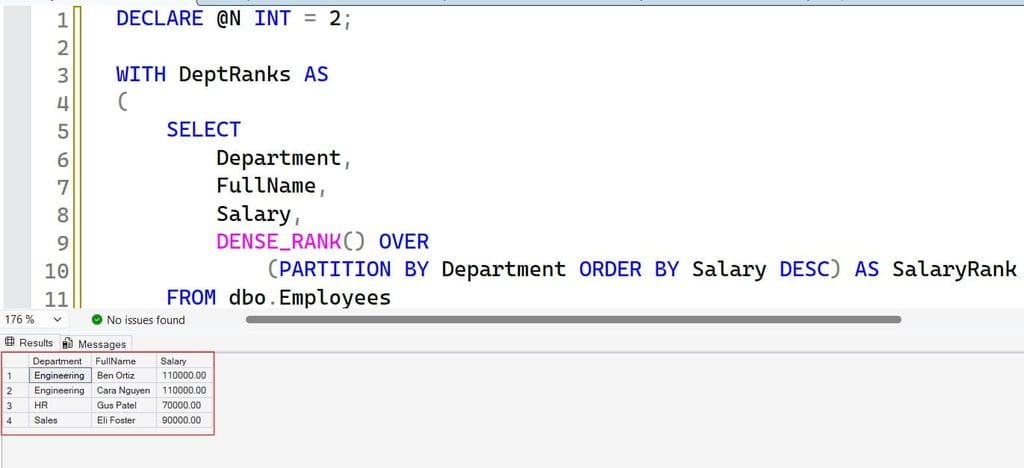
PARTITION BY Department ranks employees only within their own department. This returns Ben and Cara for Engineering at 110,000, and Eli for Sales at 90,000. HR returns Gus at 70,000, because Hana’s NULL is excluded and Fay’s 90,000 is rank 1. Notice that departments with fewer than N distinct salaries return no row, which is correct.
Pro Tip: I once gave a finance team a per-department report that silently skipped small departments. Now I add a note to the output explaining that missing rows mean “fewer than N distinct salaries.”
Wrap the Logic in a Secure Stored Procedure
A stored procedure is a saved, named block of T-SQL. It keeps the logic in one place, so every app gets the same answer. It also lets you grant access to the procedure instead of the whole table. Salary data is sensitive, so this matters. For syntax details, see how to create a stored procedure in SQL Server.
CREATE OR ALTER PROCEDURE dbo.usp_GetNthHighestSalary
    @N INT
AS
BEGIN
    SET NOCOUNT ON;

    IF @N IS NULL OR @N < 1
        THROW 50001, 'Parameter @N must be 1 or greater.', 1;

    SELECT
    (
        SELECT DISTINCT Salary
        FROM dbo.Employees
        WHERE Salary IS NOT NULL
        ORDER BY Salary DESC
        OFFSET @N - 1 ROWS
        FETCH NEXT 1 ROWS ONLY
    ) AS NthHighestSalary;
END;
After running the query above, I got the expected output shown in the screenshot below.
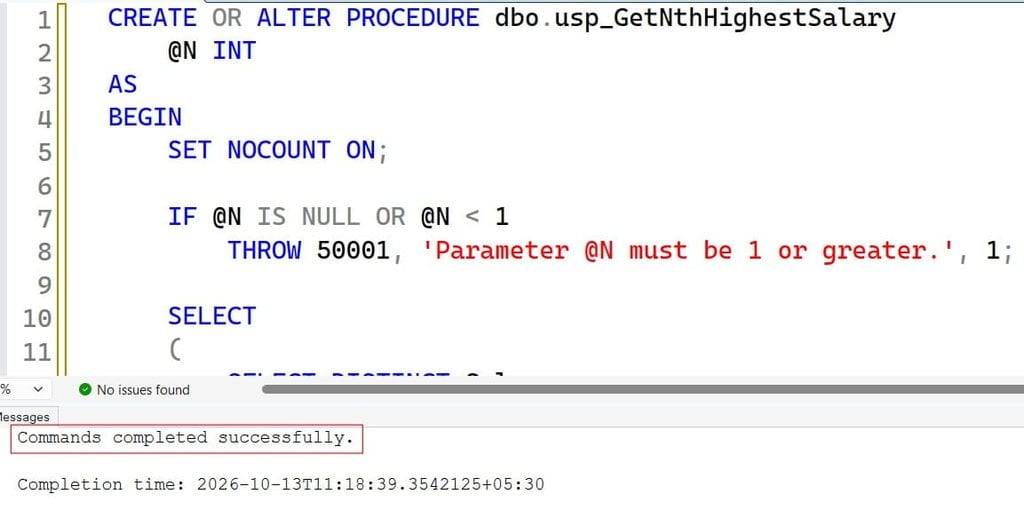
SET NOCOUNT ON stops extra “rows affected” messages. The THROW statement rejects invalid input early. Wrapping the query in a scalar subquery means the result is NULL, not an empty set, when N is too large. Many API callers prefer one predictable row.
Now give a reporting identity the least access it needs. In Azure SQL Database, a contained database user exists inside the database and does not need a server login. Learn the basics in this guide to creating users in Azure SQL Database.
CREATE USER [<entra-user-or-group-name>] FROM EXTERNAL PROVIDER;

CREATE ROLE role_salary_report;
GRANT EXECUTE ON OBJECT::dbo.usp_GetNthHighestSalary TO role_salary_report;
ALTER ROLE role_salary_report ADD MEMBER [<entra-user-or-group-name>];
FROM EXTERNAL PROVIDER creates a user backed by Microsoft Entra ID, so there is no SQL password to store. The custom role receives only EXECUTE on this one procedure. Because the procedure and table share the same owner, ownership chaining lets the procedure read the table without giving the caller direct SELECT rights. For more on this pattern, read how to give permission to execute a stored procedure and the overview of SQL Server permissions.
Test with that non-administrator identity. Confirm it can run the procedure and gets a permission error on SELECT * FROM dbo.Employees. Never use sa or a sysadmin account for an application.
Pro Tip: In my experience, granting EXECUTE on one procedure catches mistakes early. I once found an analyst with db_owner “just for a report,” and a procedure grant fixed that in ten minutes.
Speed It Up With the Right Index
Correct results come first, then speed. Every method above must sort salaries. On a large table, a nonclustered index can supply the salaries already sorted. It is a separate structure that stores chosen columns in sorted order with pointers to the rows. Learn the syntax in how to create an index in SQL Server.
CREATE NONCLUSTERED INDEX IX_Employees_Salary
ON dbo.Employees (Salary DESC)
INCLUDE (Department, FullName);
After running the query above, I got the expected output shown in the screenshot below.
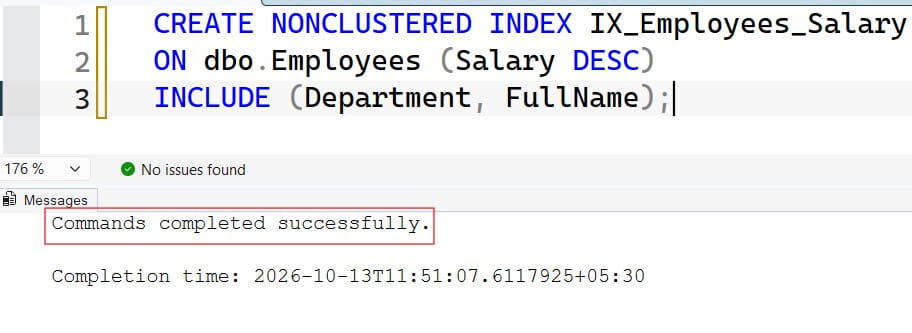
The key column Salary DESC matches the sort order, so the engine can read from the top and stop early. INCLUDE adds extra columns to the index, which lets queries return names and departments without extra lookups. Creating an index uses CPU, I/O, and storage, and can block writes on some editions, so build it during a quiet window.
There is a trade-off. Every index makes inserts and updates a bit slower, because SQL Server maintains it. For a payroll table that is read often and changed rarely, that cost is fine. For a heavy write table, measure first.
Check the real execution plan, which shows how SQL Server ran your query. Look for a sort operator and a scan. After adding the index, you should see an ordered scan or seek and a cheaper sort. Turn on Query Store, the built-in feature that tracks query performance over time, to compare before and after. Also keep statistics fresh, as shown in updating stats on a table, so the optimizer picks good plans.
If the query is still slow after tuning, scaling up compute is the last option, not the first. Bigger compute hides a bad query but does not fix it, and you pay for it every hour.
Pro Tip: I once saw a team double their Azure SQL tier to fix a slow ranking report. One index cut the runtime and let them stay on the smaller tier.
Run It Safely on Azure SQL Database
Many readers practice on Azure SQL Database. Here is a secure, low-cost dev setup.
az group create \
  --name rg-salary-dev \
  --location eastus

az sql server create \
  --name <sql-server-name> \
  --resource-group rg-salary-dev \
  --location eastus \
  --enable-ad-only-auth \
  --external-admin-principal-type Group \
  --external-admin-name <entra-admin-group-name> \
  --external-admin-sid <entra-admin-group-object-id>
The first command creates a resource group, a container for related resources, in the East US region. The second creates a logical SQL server. --enable-ad-only-auth turns off SQL passwords so only Entra ID sign-ins work. The admin is an Entra group, which is easier to manage than one person.
az sql db create \
  --resource-group rg-salary-dev \
  --server <sql-server-name> \
  --name sqldb-salary-dev \
  --edition GeneralPurpose \
  --compute-model Serverless \
  --family Gen5 \
  --capacity 1 \
  --min-capacity 0.5 \
  --auto-pause-delay 60 \
  --backup-storage-redundancy Local
This creates a serverless database, which bills compute per second while active and can auto-pause. --auto-pause-delay 60 pauses after 60 idle minutes, which suits dev work. --backup-storage-redundancy Local keeps backups cheaper in dev. Production usually needs zone or geo redundancy instead. Storage still costs money while the database is paused.
Now lock down the network. For real environments, disable public access and use a private endpoint, which gives private network access to a supported service. Never add a firewall rule that opens the whole internet. For temporary laptop access, allow only your own IP and remove it afterward.
Connect with a client tool such as SSMS. This guide to connecting to Azure SQL from SSMS covers it. Require encryption by keeping Encrypt set to true in your connection settings. Verify it with this query:
SELECT session_id, encrypt_option, auth_scheme
FROM sys.dm_exec_connections
WHERE session_id = @@SPID;
This dynamic management view (DMV) shows details for your current connection. encrypt_option should read TRUE. If it does not, fix the client setting before you query real data.
Because salaries are sensitive, add controls on top. Dynamic data masking hides column values from low-privilege users. Auditing records who ran what, and alerts help you catch unusual access.
Pro Tip: I set a budget on every dev resource group on day one. A forgotten database once ran for three weeks, and a budget alert would have caught it on day two.
Common Errors and Troubleshooting
You get no rows. N is larger than the count of distinct salaries, or every salary in the group is NULL. This is normal behavior, so decide how your app should handle it.
Rank 3 returns a wrong number. You probably used ROW_NUMBER() or RANK(). RANK() leaves gaps after ties, so rank 3 can disappear. Use DENSE_RANK() for distinct rank.
“Invalid usage of the option NEXT in the FETCH statement.” OFFSET FETCH needs an ORDER BY clause, and it is not available before SQL Server 2012.
The query is slow. Check the execution plan for a full scan and a sort. Add the index above, update statistics if they are stale, and compare runs in Query Store.
You cannot sign in. Check the firewall, private endpoint DNS, and the identity you used. For SQL password logins, SQL Server error 18456 explains the common causes.
Pro Tip: When a result looks wrong, I run the ranking CTE alone with every column visible. Seeing ranks next to salaries explains most bugs in a minute.
Frequently Asked Questions
What is the easiest way to find the nth highest salary in SQL Server?
Use DENSE_RANK() OVER (ORDER BY Salary DESC) in a CTE and filter for your rank. It handles ties correctly and is easy to read. It works in SQL Server 2005 and later, and in Azure SQL Database.
What is the difference between RANK, DENSE_RANK, and ROW_NUMBER?
ROW_NUMBER gives each row a unique number. RANK gives ties the same number but skips the next numbers. DENSE_RANK gives ties the same number and skips nothing, which makes it the right choice for nth highest salary.
How do I find the second highest salary without a window function?
Use SELECT MAX(Salary) FROM dbo.Employees WHERE Salary < (SELECT MAX(Salary) FROM dbo.Employees). This works on any version. For other ranks, use the nested TOP or OFFSET FETCH method.
How do I handle NULL salaries?
Add WHERE Salary IS NOT NULL to every method. NULLs can sort into the result and cause wrong answers, especially when N is larger than the data. Decide with the business whether missing salaries should count at all.
How do I make the nth highest salary query faster?
Create a nonclustered index on Salary DESC with included columns, then review the execution plan. Use Query Store to confirm the improvement. Add compute only after the query itself is tuned.
You learned four ways to find the nth highest salary in SQL Server, why DENSE_RANK is the safest default, and how to secure and tune the query on Azure SQL Database. Always decide your tie and NULL rules first, and give applications access only through least-privilege procedures. I hope you found this article helpful.
You May Also Like
- Read how to use the RANK function in SQL Server for leaderboard-style queries.
- Compare a SQL subquery vs. JOIN to pick the right pattern.
- Learn how to use GROUP BY in SQL Server for salary summaries by department.
- Follow these SQL query optimization tips to speed up reports.
- Review SQL index best practices before adding more indexes.

After working for more than 15 years in the Software field, especially in Microsoft technologies, I have decided to share my expert knowledge of SQL Server. Check out all the SQL Server and related database tutorials I have shared here. Most of the readers are from countries like the United States of America, the United Kingdom, New Zealand, Australia, Canada, etc. I am also a Microsoft MVP. Check out more here.