
A payroll analyst at a mid-sized staffing company once sent me a spreadsheet and a worried email. Their HR dashboard showed the “second highest salary” per department, but two departments returned the same number as the top salary. The query had used TOP 1 with a sort, and it counted tied employees as separate ranks. Nobody caught it until a compensation review put the wrong figure in front of leadership.
This is why how to find second highest salary in SQL Server is more than an interview question. The right answer depends on how you treat ties, empty results, and NULL values. It also depends on table size, because some patterns scan the whole table twice. I have fixed this exact bug in HR, sales-commission, and billing reports.
By the end, you will know five reliable T-SQL methods, when to use each one, how to extend them to the Nth highest salary and to per-department results, and how to secure and tune the query in Azure SQL Database.
How to Find Second Highest Salary in SQL Server
Set Up a Realistic Salary Table
Start with a clean test table. A schema is a named container that groups database objects, and it helps you control permissions. I keep HR data in its own hr schema so I can lock it down separately from application tables.
CREATE SCHEMA hr;
GO

CREATE TABLE hr.Employees
(
    EmployeeId   INT IDENTITY(1,1) PRIMARY KEY,
    FullName     NVARCHAR(100) NOT NULL,
    Department   NVARCHAR(50)  NOT NULL,
    Salary       DECIMAL(12,2) NULL
);
GO

INSERT INTO hr.Employees (FullName, Department, Salary)
VALUES
('Ava Collins',  'Engineering', 145000),
('Noah Rivera',  'Engineering', 145000),
('Liam Patel',   'Engineering', 128000),
('Mia Johnson',  'Sales',       118000),
('Ethan Brooks', 'Sales',        99000),
('Zoe Carter',   'Sales',        99000),
('Owen Reed',    'Support',      72000),
('Ivy Morgan',   'Support',      NULL);
GO
After running the query above, I got the expected output shown in the screenshot below.
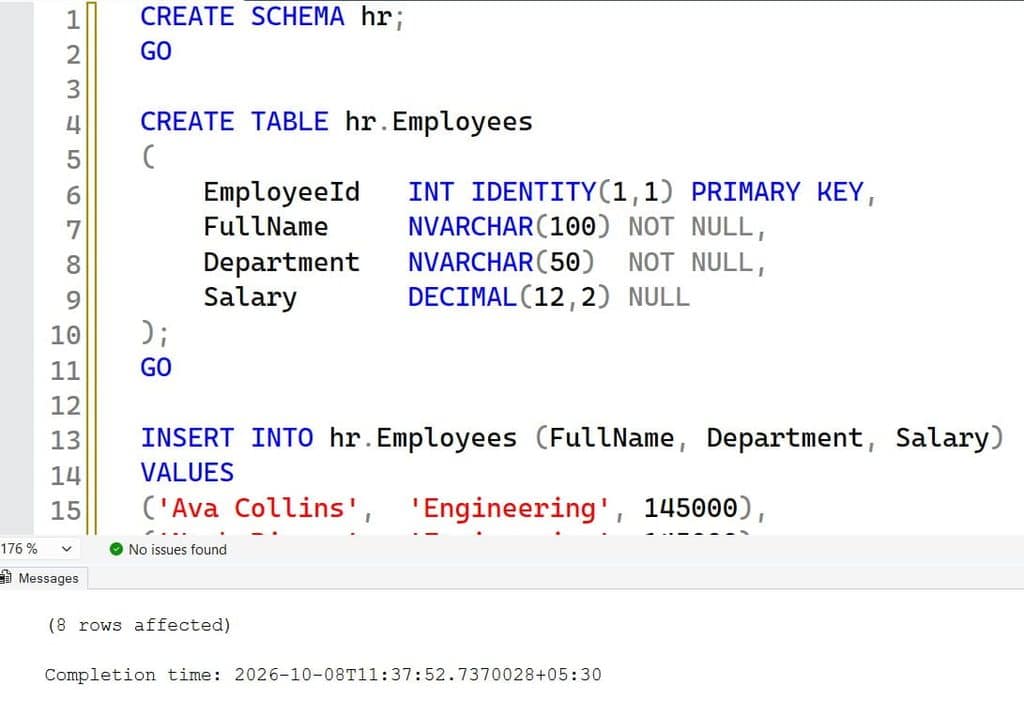
This creates the hr schema and an Employees table. EmployeeId is a primary key, which uniquely identifies each row and creates a clustered index by default. The Salary column allows NULL on purpose, because real HR data often has missing values. The sample rows include ties in Engineering and Sales, which is where most queries fail.
Before you run anything, decide what “second highest” means. If two people earn 145,000, is the second highest 145,000 or 128,000? In almost every business report, you want the second highest distinct salary, which is 128,000. Write that rule down in the ticket.
Pro Tip: In my experience, I ask the report owner one question before writing any query: “If two people tie for first, who is second?” That answer decides which method I use.
Method Overview: Which Query Fits
Several patterns solve this problem. They differ in readability, tie handling, and performance. Here is how I compare them.
| Method | Handles ties as distinct values | Returns NULL if none exists | Easy to extend to Nth |
|---|---|---|---|
| Subquery with MAX | Yes | Yes | No |
| TOP with ORDER BY twice | Needs DISTINCT | No | Moderate |
| OFFSET FETCH | Needs DISTINCT | No | Yes |
| DENSE_RANK window function | Yes | No | Yes |
| Correlated subquery count | Yes | No | Yes |
Use the first method for a fast one-off check. Use the window function method for production reports, since it groups by department cleanly.
Find the Second Highest Salary With a Subquery
A subquery is a query nested inside another query. This approach finds the maximum salary that is lower than the overall maximum. See this overview of SQL subqueries if you need a refresher.
SELECT MAX(Salary) AS SecondHighestSalary
FROM   hr.Employees
WHERE  Salary < (SELECT MAX(Salary) FROM hr.Employees);
After running the query above, I got the expected output as the second-highest salary as shown in the screenshot below.
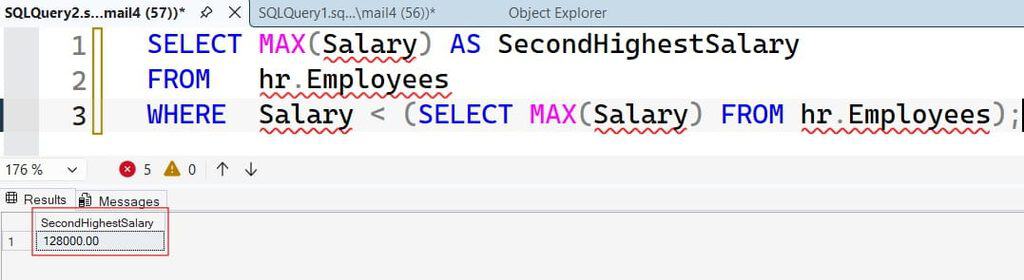
The inner query returns the top salary, 145,000. The outer query then takes the MAX value from every salary below it, which is 128,000. Because < skips all rows equal to the top salary, ties do not cause trouble.
This method has a useful side effect. If the table has only one distinct salary, MAX over zero rows returns NULL instead of an error or an empty set. That is exactly what a dashboard needs, because the application gets a clear “no second value” signal. NULL salaries are ignored by MAX, so the NULL for Ivy Morgan does not break anything.
The downside is that the query reads the table twice. On a small HR table, nobody notices. On a table with 50 million billing rows, the second pass matters, and you need an index on the column. I cover that later.
Pro Tip: I use this subquery for quick data checks during incident calls. It is short, safe with ties, and nobody has to remember window function syntax at 2 a.m.
Find the Second Highest Salary With TOP and ORDER BY
The classic pattern uses TOP twice with opposite sorts. The TOP clause limits the number of rows returned, and the ORDER BY clause controls their order.
SELECT TOP 1 Salary AS SecondHighestSalary
FROM (
    SELECT DISTINCT TOP 2 Salary
    FROM   hr.Employees
    WHERE  Salary IS NOT NULL
    ORDER BY Salary DESC
) AS t
ORDER BY Salary ASC;
After running the query above, I got the expected output as the second-highest salary as shown in the screenshot below.
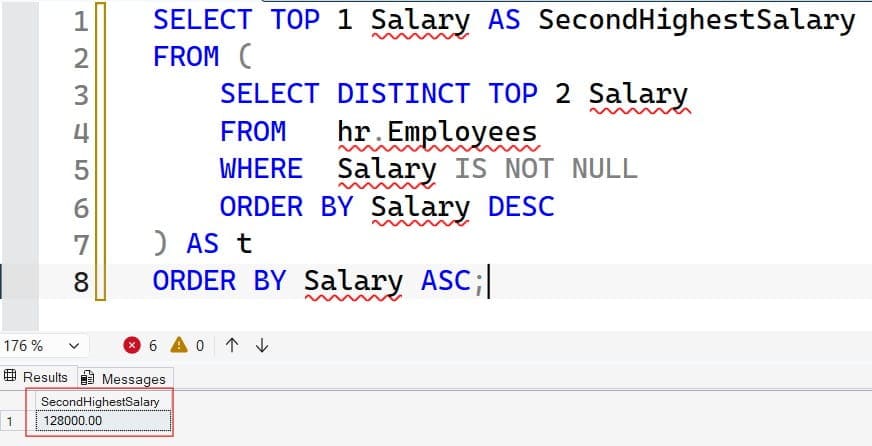
The inner query uses DISTINCT to remove duplicate salaries, takes the two highest values, and sorts them from high to low. The outer query then sorts those two values from low to high and returns the first one, which is the second highest. The IS NOT NULL filter keeps NULLs out. See SQL DISTINCT for how duplicates are removed.
Without DISTINCT, this query returns 145,000, the same bug that hit my client. This is the most common mistake I see in code reviews.
There is one more catch. If the table holds a single distinct salary, the outer query returns that one salary, not NULL, because the inner query returns only one row. The result is wrong, and it looks valid. Always test with a one-row table.
Pro Tip: I keep a tiny test table with three cases: ties at the top, one distinct value, and all NULLs. If a query passes all three, I trust it.
Find the Second Highest Salary With OFFSET FETCH
OFFSET ... FETCH skips a number of rows and returns the next group. It is available in SQL Server 2012 and later, and in Azure SQL Database. It is part of the ORDER BY clause, so it requires one.
SELECT DISTINCT Salary AS SecondHighestSalary
FROM   hr.Employees
WHERE  Salary IS NOT NULL
ORDER BY Salary DESC
OFFSET 1 ROWS FETCH NEXT 1 ROWS ONLY;
After running the query above, I got the expected output as the second-highest salary as shown in the screenshot below.
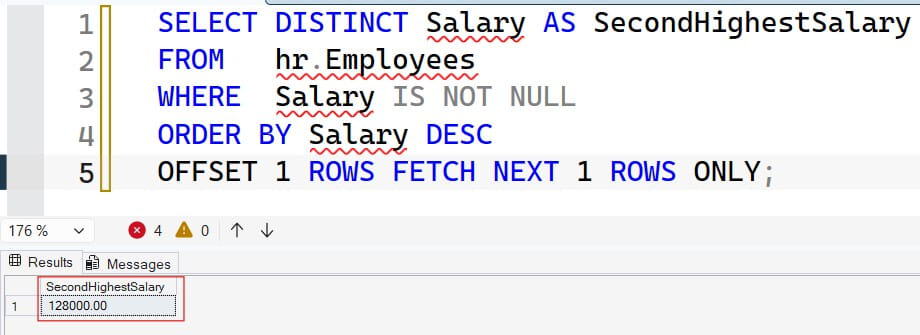
Here, DISTINCT collapses the salaries to unique values. ORDER BY Salary DESC puts the largest first. OFFSET 1 ROWS skips the first value, and FETCH NEXT 1 ROWS ONLY returns the next one. The pattern is easy to read, and changing the offset gives you the third or fourth highest.
The trade-off is that an empty result returns zero rows, not NULL. If your application expects a single value, wrap the query in a subquery with SELECT (...), which converts an empty result to NULL. Handle that case in code, because a missing row can crash a report that expects one.
Pro Tip: I once saw a payroll API throw a null reference error because the query returned no row for a new department. I now wrap Nth-value queries so the app always gets exactly one row.
Find the Second Highest Salary With DENSE_RANK
A window function performs a calculation across a set of rows related to the current row, without collapsing them. This is the method I recommend for production reports. Read more on window functions in SQL Server before you start.
WITH RankedSalaries AS
(
    SELECT Salary,
           DENSE_RANK() OVER (ORDER BY Salary DESC) AS SalaryRank
    FROM   hr.Employees
    WHERE  Salary IS NOT NULL
)
SELECT DISTINCT Salary AS SecondHighestSalary
FROM   RankedSalaries
WHERE  SalaryRank = 2;
After running the query above, I got the expected output as the second-highest salary as shown in the screenshot below.
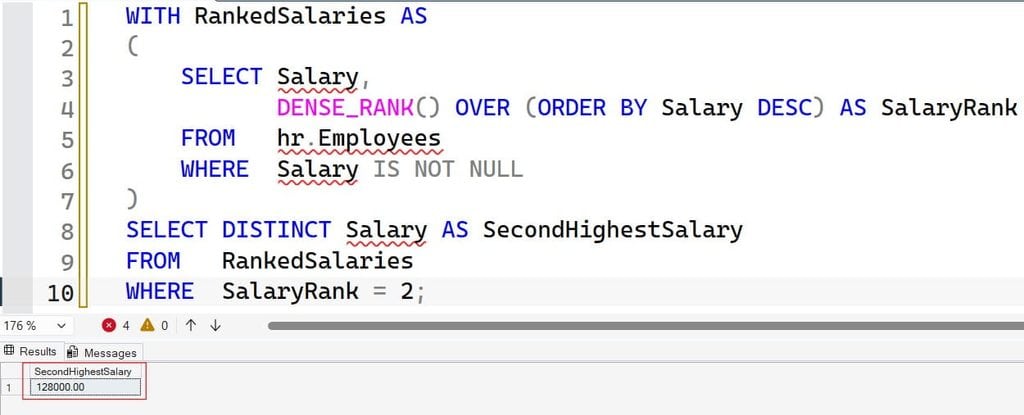
The CTE (common table expression) named RankedSalaries is a temporary named result set that exists for one statement. For when to pick a CTE over a temp table, see this comparison of CTEs vs. temp tables. DENSE_RANK() assigns rank 1 to 145,000, rank 2 to 128,000, and so on, with no gaps after ties.
DENSE_RANK vs. RANK vs. ROW_NUMBER
These three ranking functions give different answers on tied data, and picking the wrong one is the root of many bugs.
- ROW_NUMBER gives every row a unique number, so tied salaries get different numbers. Read about ROW_NUMBER in SQL Server.
- RANK gives tied rows the same rank but skips the next number. Two people at rank 1 means the next rank is 3, so rank 2 never appears.
- DENSE_RANK gives tied rows the same rank and does not skip numbers.
The full difference is explained in RANK vs. DENSE_RANK, and you can learn the basics of the RANK function. For “second highest distinct salary,” use DENSE_RANK. If you used RANK on my sample data, rank 2 would not exist for Engineering, and the query would return nothing.
Pro Tip: I never use RANK for “Nth highest” reports. A gap in rank numbers causes empty results that look like missing data, and users file bugs against the wrong team.
Second Highest Salary Per Department
Most real requests ask for the second highest salary in each department, not just one overall number. Add PARTITION BY, which splits the ranking into separate groups.
WITH DeptRanks AS
(
    SELECT Department,
           Salary,
           DENSE_RANK() OVER (PARTITION BY Department
                              ORDER BY Salary DESC) AS SalaryRank
    FROM   hr.Employees
    WHERE  Salary IS NOT NULL
)
SELECT Department, Salary AS SecondHighestSalary
FROM   DeptRanks
WHERE  SalaryRank = 2
GROUP BY Department, Salary;
After running the query above, I got the expected output as the second-highest salary as shown in the screenshot below.
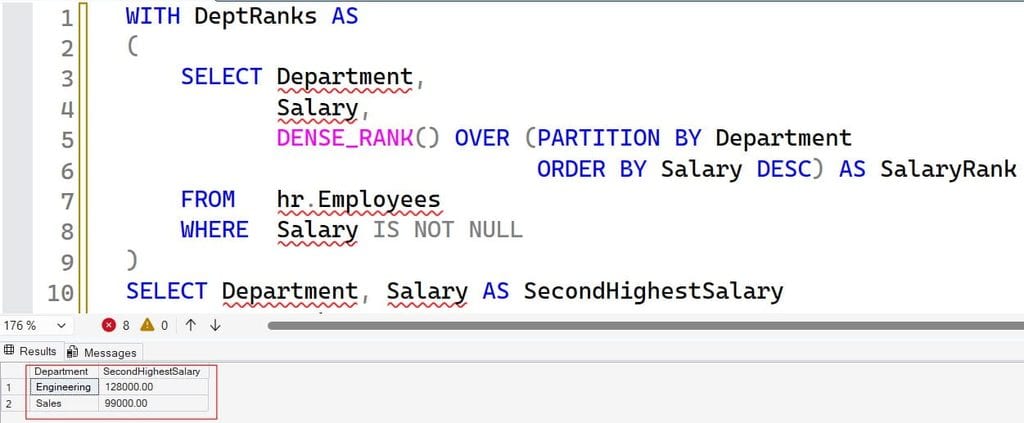
PARTITION BY Department restarts the ranking for each department. Engineering returns 128,000, Sales returns 99,000, and Support returns nothing, because Support has only one non-NULL salary. The final GROUP BY removes repeated rows when several employees share the same second-place salary. If you need a refresher, read how to use GROUP BY in SQL Server.
To include departments with no second value, add a LEFT JOIN from a department list. This is a business decision, so confirm with the report owner whether blank rows should appear.
Generalize to the Nth Highest Salary
Hardcoding rank 2 works once. A reusable version takes the rank as a parameter. A stored procedure is a saved, parameterized T-SQL routine that applications can call.
CREATE OR ALTER PROCEDURE hr.GetNthHighestSalary
    @N INT
AS
BEGIN
    SET NOCOUNT ON;

    IF @N < 1
    BEGIN
        THROW 50001, 'N must be 1 or greater.', 1;
    END;

    WITH Ranked AS
    (
        SELECT Salary,
               DENSE_RANK() OVER (ORDER BY Salary DESC) AS SalaryRank
        FROM   hr.Employees
        WHERE  Salary IS NOT NULL
    )
    SELECT (SELECT TOP 1 Salary FROM Ranked WHERE SalaryRank = @N) AS NthHighestSalary;
END;
GO
After running the query above, I got the expected output as shown in the screenshot below.
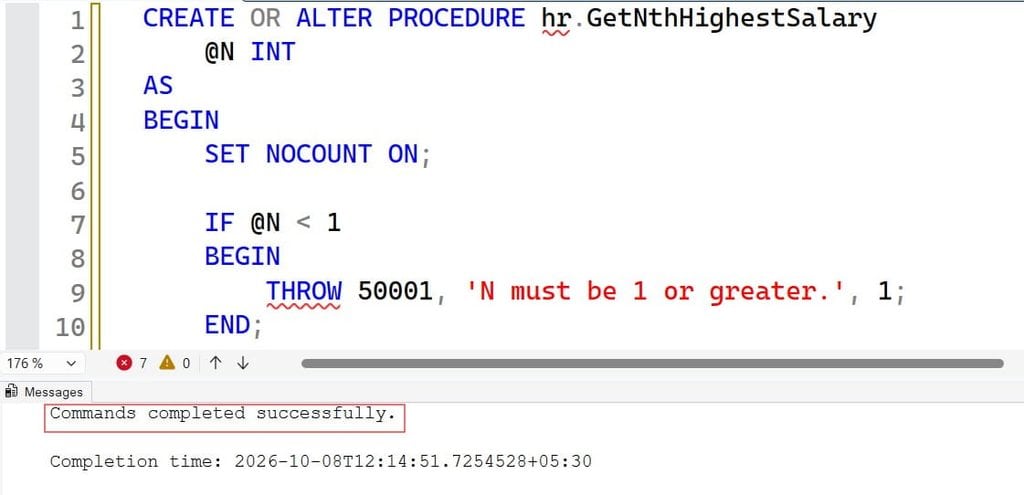
SET NOCOUNT ON stops SQL Server from sending row-count messages, which trims network chatter. The IF block validates the input and throws an error for bad values. The final SELECT (subquery) guarantees exactly one row, with NULL when the Nth value does not exist.
Test it with EXEC hr.GetNthHighestSalary @N = 2;. Use parameters, never string concatenation, so the query stays safe from SQL injection. For more on structure, see how to give permission to execute a stored procedure.
Pro Tip: I validate parameters inside the procedure even when the app validates them too. Another team will call your procedure someday, and they will not read your front-end code.
Secure Salary Data
Salary is sensitive data. A report query is only as safe as the access around it. Apply least privilege, which means each account gets only the permissions it needs. Do not let an app run as sa, sysadmin, or db_owner.
In Azure SQL Database, prefer Microsoft Entra ID authentication and a managed identity over SQL passwords. A managed identity is an Azure-managed account that lets an app authenticate without a stored secret. This reduces the risk of a leaked connection string.
CREATE USER [app-hr-reports] FROM EXTERNAL PROVIDER;

GRANT EXECUTE ON OBJECT::hr.GetNthHighestSalary TO [app-hr-reports];
DENY  SELECT  ON SCHEMA::hr TO [app-hr-reports];
CREATE USER ... FROM EXTERNAL PROVIDER maps an Entra ID identity to a database user. GRANT EXECUTE lets it run only the procedure. DENY SELECT blocks direct reads of the hr tables, so the report account sees the answer but never the whole payroll. To audit these rights later, use SQL Server permissions and check user permissions on a table.
Next, think about the network and the data. Enforce TLS encrypted connections, which is the default on Azure SQL Database, and verify it by querying sys.dm_exec_connections and checking that encrypt_option is TRUE. Use a private endpoint instead of a public firewall rule, and never open 0.0.0.0 to 255.255.255.255.
Consider dynamic data masking on the Salary column for support staff, and turn on auditing plus Microsoft Defender for SQL to flag unusual reads of HR tables. Test everything by logging in as the non-administrator report user.
Pro Tip: I log in as the report account before every release and try a direct
SELECT * FROM hr.Employees. If that works, my permissions are wrong, and I want to find out before an auditor does.
Speed Up the Query With Indexing
On a small table, any method works. On a large table, indexing decides everything. An index is a sorted structure that lets SQL Server find rows without scanning the whole table. The basic steps are covered in how to create an index in SQL Server.
CREATE NONCLUSTERED INDEX IX_Employees_Department_Salary
ON hr.Employees (Department, Salary DESC);
This nonclustered index stores department and salary in sorted order, with salary descending. A ranking query partitioned by department can then read rows in the required order instead of sorting them in memory. Without it, the plan includes an expensive Sort operator.
There is a trade-off. Each index adds work to every INSERT and UPDATE, plus storage. Salary tables change rarely, so the cost is low. A high-write table, like order lines, needs more caution. Follow these SQL index best practices and confirm the benefit in the actual execution plan before you keep an index.
Then compare methods. Run each query with SET STATISTICS IO ON and SET STATISTICS TIME ON, and read logical reads and CPU time. In Azure SQL Database, Query Store records plans and runtime stats over time, so you can prove a change helped. Wasted CPU can push you to a bigger vCore or DTU tier, which raises cost, so fixing one slow report is cheaper than scaling the database.
Pro Tip: I compare at least two methods on production-sized data. The “clever” query is not always the fastest, and the plan tells me the truth in about 30 seconds.
Common Errors and Troubleshooting
These are the problems I see most.
The query returns the highest salary instead of the second. You skipped DISTINCT, or you used ROW_NUMBER. Switch to DENSE_RANK or add DISTINCT before ranking.
The query returns no rows. You used RANK, or there is no second distinct value. Return NULL with a wrapped subquery so the caller always gets one row.
NULL salaries change the result. In sort order, NULL values appear first in ascending order and last in descending order, and they may confuse ranking. Add WHERE Salary IS NOT NULL, and read about handling NULL values for details.
“Incorrect syntax near OFFSET.” OFFSET needs ORDER BY, and it needs SQL Server 2012 or later. Check your version and your database compatibility level.
Slow performance on large tables. Check the plan for scans and Sort operators. Add a supporting index, and update statistics if the estimates look wrong.
Production Readiness Checklist
- Define tie rules: Document whether “second highest” means distinct salary or second row, and add test cases for ties, single values, and NULLs.
- Use least privilege: Give the report account EXECUTE on one procedure through a Microsoft Entra ID identity, not direct table access or sysadmin rights.
- Require encryption: Keep TLS on, use a private endpoint, and verify encrypted sessions with a DMV check.
- Test recovery: Confirm PITR or backup restores work before you ship schema or index changes.
- Monitor cost and speed: Track CPU in Query Store, set Azure budgets and alerts, and tag databases by environment.
- Right-size by environment: Use smaller, pausable compute in development and zone-redundant settings only where production needs them.
Frequently Asked Questions
What is the easiest way to find the second highest salary in SQL Server?
The subquery with MAX is the shortest: select the maximum salary that is less than the overall maximum. It handles ties and returns NULL when no second value exists. For per-department reports, use DENSE_RANK instead.
What is the difference between RANK and DENSE_RANK for salary queries?
RANK leaves gaps after ties, so a rank of 2 may not exist. DENSE_RANK has no gaps, so rank 2 always means the second distinct salary. Use DENSE_RANK for Nth highest queries.
How do I find the Nth highest salary in SQL Server?
Use DENSE_RANK in a CTE and filter on the rank you want, or use OFFSET with FETCH on distinct salaries. Wrap it in a stored procedure with a parameter and validate that the value is at least 1.
How do I handle NULL salaries?
Filter them out with WHERE Salary IS NOT NULL before ranking or sorting. MAX ignores NULLs on its own, but ORDER BY does not.
How do I speed up slow SQL Server queries like this one?
Read the actual execution plan, add an index that matches your partition and sort columns, and check Query Store for regressions. Measure logical reads before and after each change.
You learned five ways to find the second highest salary in SQL Server, why DENSE_RANK is the safest choice for ties, and how to secure and index the query. Always define tie and NULL rules first, then test with a restricted account on production-sized data before you trust the result. I hope you found this article helpful.
You May Also Like
- How to Find Nth Highest Salary in SQL Server
- How to find duplicate records in SQL
- How to Find the Second Lowest Salary in SQL Server
- SQL MIN and MAX functions
- SQL WHERE clause tutorial
- Top 10 SQL Server commands you must know
- How to Find the Lowest Salary in SQL Server
- How to Find 3rd Highest Salary in SQL Server

After working for more than 15 years in the Software field, especially in Microsoft technologies, I have decided to share my expert knowledge of SQL Server. Check out all the SQL Server and related database tutorials I have shared here. Most of the readers are from countries like the United States of America, the United Kingdom, New Zealand, Australia, Canada, etc. I am also a Microsoft MVP. Check out more here.